
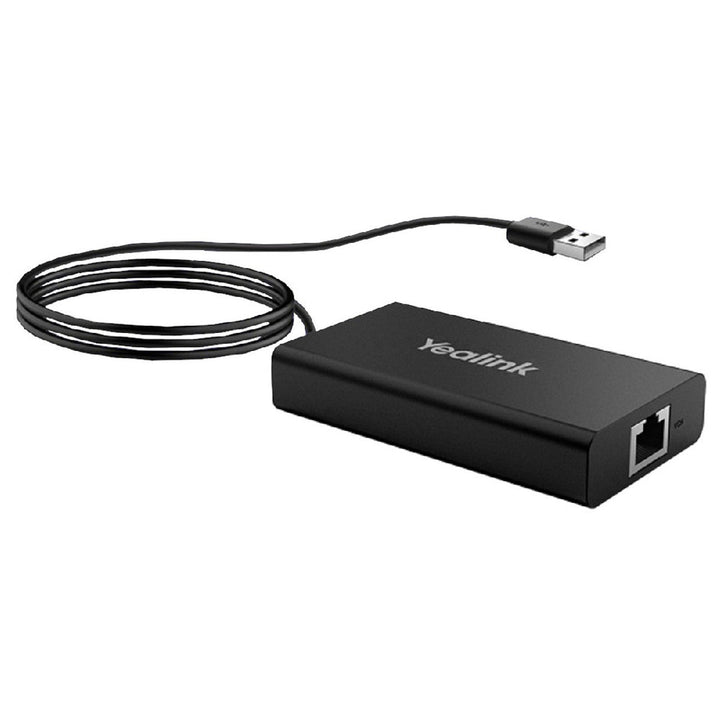

Yealink MVC-BYOD-Extender
PRODUCT DESCRIPTION
Yealink MVC-BYOD-Extender (1303113) - 2 Years Local Warranty
Turn Your Microsoft Teams Room into a BYOD Room in Seconds
The Yealink MVC-BYOD-Extender transforms meeting rooms equipped with Yealink MVC systems into multi-functional BYOD rooms. Plug the extender's USB cable into your laptop and start a video meeting on whatever platform you need — while the room keeps its native Microsoft Teams Rooms experience for everyday scheduled meetings. Perfect for Singapore organisations hosting clients and partners who join from different platforms.
Use the Room's Professional Camera and Audio from Your Laptop
In BYOD mode, your laptop connects over USB to the room's MVC system, so you can run the meeting from your own device while everyone benefits from the room-grade camera, microphones and speakers already installed — far better than huddling around a laptop webcam in a large meeting room.
Flexible Deployment up to 100 Metres
The extender links back to the MVC host over standard network cabling, supporting deployments of up to 100 metres. A 7.5 m CAT5e cable and 1.5 m USB 2.0 Type-A cable are included, so the table-top connection point can sit exactly where presenters need it, even in large boardrooms and training rooms.
5-Minute Installation, Compact Footprint
Yealink quotes just 5 minutes to complete installation and deployment. The compact extender box measures only 89 x 48 x 17 mm, keeping meeting tables tidy with a clean, professional cable setup.
Yealink MVC-BYOD-Extender Datasheet — Technical Specifications
General
| Model | Yealink MVC-BYOD-Extender |
| Part Number | 1303113 |
| Product Type | BYOD extender for Yealink MVC room systems |
| Function | Transforms MTR conference rooms deployed with MVC devices into multi-functional BYOD rooms |
| Warranty | 2 Years Local Warranty (Singapore) |
Ports & Connectivity
| Network | 1 x RJ45 port |
| Laptop Connection | USB 2.0 Type-A cable (1.5 m, included) |
| Deployment Range | Up to 100 m over network cabling (7.5 m CAT5e cable included) |
Design
| Dimensions (W x D x H) | 89 x 48 x 17 mm |
| Operating Temperature | 0 - 40°C |
| Operating Humidity | 10 - 95% |
| Installation | Approximately 5 minutes to install and deploy |
Compatibility & Software Support
Yealink lists the following MVC Microsoft Teams Rooms bundles as supported:
| MVC Systems | MVC400, MVC640-Wireless, MVC840, MVC860, MVC940 (with AVHub), MVC960 |
| Room Platform | Microsoft Teams Rooms (MTR) on the MVC host; BYOD mode lets your laptop run other UC platforms using the room's devices |
Yealink notes that more supported bundles are to be announced — check the official compatibility list on the Yealink product page before ordering for a specific MVC kit. For one-cable USB-C BYOD with 4K/60fps sharing on the newer MVC/ZVC S-Series kits, see the VCH51 Pro.
Package Contents & MVC-BYOD-Extender Ordering Information
In the box (PN 1303113):
- Yealink BYOD-Extender box
- 7.5 m CAT5e cable
- 1.5 m USB 2.0 Type-A cable
- Quick Start Guide
Yealink wired sharing and BYOD family at SourceIT:
| Yealink MVC-BYOD-Extender (this product) | PN 1303113 — switches Yealink MVC Teams Rooms into BYOD mode over USB |
| Yealink VCH51 Pro Content Sharing & BYOD Hub | PN 1303229 — one-cable USB-C hub with 4K/60fps sharing and 65 W PD charging for current MeetingBar/MeetingBoard Pro/MVC/ZVC S-Series rooms |
| Yealink VCH51 Sharing Box | PN 1303106 — wired HDMI/USB-C sharing and BYOD for MeetingBar A20/A30 and MeetingEye 400/600 |
| Yealink WPP30 Wireless Presentation Pod | Wireless 4K presentation alternative for cable-free sharing |
Datasheet & Downloads
Frequently Asked Questions — Yealink MVC-BYOD-Extender
What does the Yealink MVC-BYOD-Extender do?
It converts a Yealink MVC Microsoft Teams Room into a BYOD-capable room. Plug the extender's USB cable into your laptop and the room's MVC system becomes available to your own device, so you can host a meeting on the platform you choose using the room's camera and audio.
What is the difference between the MVC-BYOD-Extender, VCH51, VCH51 Pro and WPP30?
The MVC-BYOD-Extender (this product) adds BYOD switching over USB to existing MVC Teams Rooms. The VCH51 Sharing Box provides wired HDMI/USB-C sharing and BYOD for MeetingBar A20/A30 and MeetingEye 400/600. The VCH51 Pro is the one-cable USB-C hub with 4K/60fps sharing and 65 W laptop charging for the latest MeetingBar, MeetingBoard Pro and MVC/ZVC S-Series rooms. The WPP30 handles wireless presentation instead of cabled connections.
Which Yealink systems is the MVC-BYOD-Extender compatible with?
Yealink lists MVC400, MVC640-Wireless, MVC840, MVC860, MVC940 (with AVHub) and MVC960 bundles, with more supported bundles to be announced. Check the current compatibility list on the Yealink product page for your exact kit.
How is it cabled and how far can it reach?
The extender connects to the MVC host over network cabling with support for deployments up to 100 m; a 7.5 m CAT5e cable is included. Your laptop connects with the included 1.5 m USB 2.0 Type-A cable.
Is installation difficult?
No. Yealink quotes about 5 minutes to complete installation and deployment, and no software installation is needed on the room system beyond plugging in the extender.
Does the MVC-BYOD-Extender come with a local warranty in Singapore?
Yes. Every MVC-BYOD-Extender sold by SourceIT comes with 2 years local Singapore warranty and a GST invoice.


