
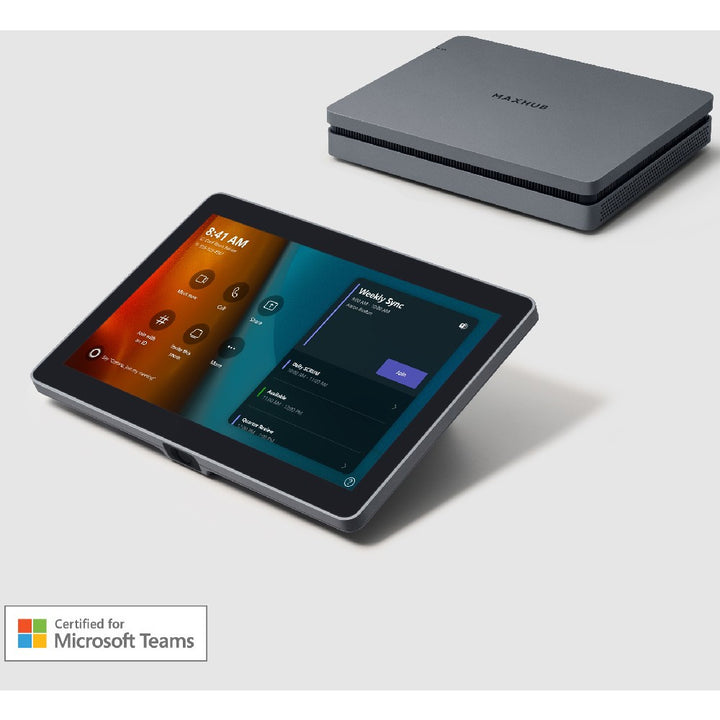


MAXHUB XCore Kit Microsoft Teams Rooms Compute Kit
Email sales@sourceit.com.sg or use Request for Quotation below and our team will confirm the latest price, availability and lead time.
PRODUCT DESCRIPTION
MAXHUB XCore Kit Microsoft Teams Rooms on Windows Compute Kit with XC13T Mini-PC and TCP20T 10.1" Touch Control Panel (XCore Kit) - 3 Years Local Warranty
Teams Rooms on Windows, Ready to Deploy
The MAXHUB XCore Kit pairs the XC13T mini-PC with the TCP20T touch control panel to turn a meeting room into a Microsoft Teams Rooms on Windows space. Add your choice of USB camera and audio device and the room is ready to meet.
XC13T Mini-PC
A 12th Gen Intel i3 processor with Intel UHD Graphics, 8 GB DDR4-3200 SO-DIMM x 2 and a 128 GB M.2 SATA SSD run Windows 11 IoT Enterprise SAC. Four USB-A 3.0 ports, HDMI out, LAN and audio out connect the room's peripherals.
TCP20T 10.1-inch Touch Panel
The 10.1-inch capacitive touch panel (1920 x 1200) gives users touch control of Teams Rooms meetings, with an HDMI input for content sharing plus USB-A and USB-C ports. It connects to the mini-PC's Teams Rooms console port with the included 5 m USB-C cable.
Tidy Installation
The kit ships with a PC bracket, wall bracket and cable cover for a tidy installation.
Need help choosing? Email sales@sourceit.com.sg with your room size, platform and quantity and we will recommend the right configuration.
MAXHUB XCore Kit Datasheet — Technical Specifications
General
| Product Name | MAXHUB XCore Room Kit for Microsoft Teams Rooms |
| Part Number | XCore Kit |
| Kit Contents | XC13T Mini-PC x 1, TCP20T Touch Control Panel x 1 |
| Local Warranty (Singapore) | 3 years, supplied by SourceIT with a GST invoice |
XC13T Mini-PC
| Processor | 12th Gen Intel i3 |
| Graphics | Intel UHD Graphics for 12th Gen Intel Processors |
| Memory | 8 GB DDR4 3200 MHz SO-DIMM x 2 |
| Storage | 128 GB SATA SSD (M.2-2280 SATA3, up to 6 Gb/s) |
| Operating System | Windows 11 IoT Enterprise SAC |
| Ports | 4 x USB-A 3.0, 1 x LAN, 1 x USB-C (for Teams Rooms console), 1 x HDMI out, 1 x audio out, 1 x AC power, Kensington lock slot |
| Dimensions | 230 x 185 x 41.5 mm |
| Weight | 1.36 kg |
TCP20T Touch Control Panel
| Display | 10.1-inch |
| Resolution | 1920 x 1200 |
| Touch | Capacitive |
| Ports | 1 x HDMI in (content sharing), 1 x USB-A 2.0, 1 x USB-C 3.1, 1 x audio out |
Power & Physical
| Power Input | 100–240 V AC, 50/60 Hz |
| Power Consumption | 90 W max |
| Package Dimensions | 890 x 270 x 265 mm |
| Package Weight | 8.611 kg |
| Operating Temperature | 0–40 °C |
Compatibility & Software Support
Conferencing Platform
Microsoft Teams Rooms on Windows, running Windows 11 IoT Enterprise SAC on the XC13T mini-PC.
Cameras & Audio
Connect USB conferencing peripherals such as the MAXHUB XBar U50 videobar, or a UC P30 camera with a UC BM45 speakerphone.
Content Sharing
Wired content sharing through the HDMI input on the TCP20T touch panel.
Package Contents & XCore Kit Ordering Information
In the Box
XC13T mini-PC and TCP20T touch panel, plus HDMI cable (1.8 m), USB Type-C to Type-C cable (5 m), quick start guide, PC bracket, wall bracket, cable cover and power cord (1.8 m), per MAXHUB's XCore Kit datasheet.
MAXHUB XCore Kits
| Model | Mini-PC | Touch console |
| XCore Kit (this listing) | XC13T, 12th Gen Intel i3 | TCP20T 10.1" |
| XCore Kit Pro | XC25T, Intel Core i5-1240P | TCP30T 11.6" |
Pair with a MAXHUB camera and audio device: XBar U50 USB videobar, UC P30 PTZ camera or UC BM45 speakerphone.
Datasheet & Downloads
| MAXHUB XCore Kit datasheet | XCore Kit Datasheet V2.1 (PDF) |
| MAXHUB product page | XCore Kit on maxhub.com |
Need a PDF sent directly? Email sales@sourceit.com.sg quoting XCore Kit.
Frequently Asked Questions — MAXHUB XCore Kit
Does the kit include a camera or speakerphone?
No. The XCore Kit is the compute and control part of the room: the XC13T mini-PC and TCP20T touch panel. Add a USB camera and audio device, such as the XBar U50.
Which processor and OS does it use?
A 12th Gen Intel i3 with Windows 11 IoT Enterprise SAC, per MAXHUB's datasheet.
How far can the touch panel be from the PC?
The kit includes a 5 m USB Type-C cable between the mini-PC and the touch panel.
What mounting hardware is included?
A PC bracket, a wall bracket and a cable cover.
What warranty do I get?
3 years local warranty in Singapore, supplied by SourceIT with a GST invoice.


