
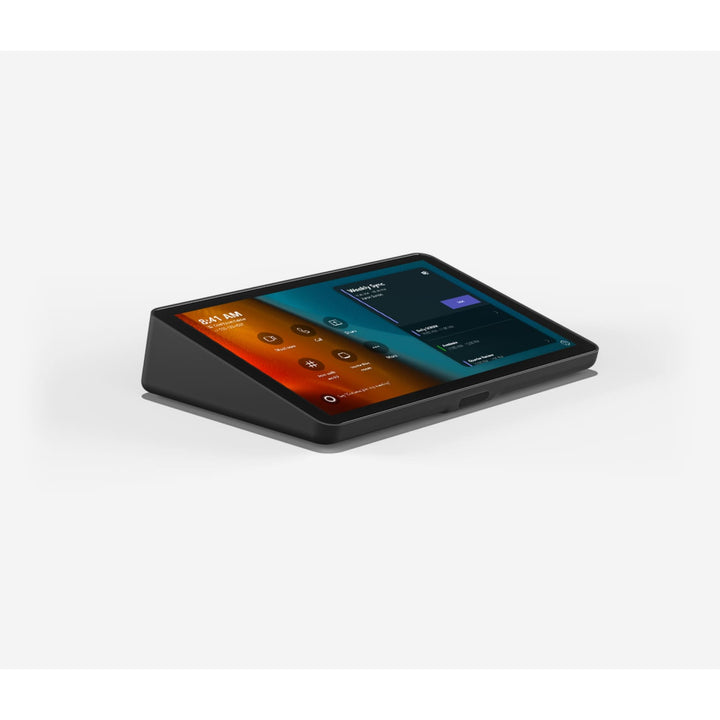

Logitech Tap with USB Kit Touch Controller
PRODUCT DESCRIPTION
Logitech Tap with USB Kit (939-002214) - 2 Years Local Warranty
Logitech Tap with USB Kit — Touch Controller for Entry-Level Microsoft Teams Rooms on Windows
Logitech Tap with USB Kit (939-002214) is the touch controller of Logitech's entry-level small room solution for Microsoft Teams Rooms on Windows. Its 10.1-inch touchscreen delivers one-touch join, meeting room control and HDMI ingest for wired content sharing, giving small huddle and BYOD spaces the same familiar Teams Rooms console as larger rooms.
One USB-C Cable for Connectivity and Power
A single 5 m USB-C connection to the meeting room PC carries both connectivity and power, using USB Type-C with DisplayPort Alternate Mode and Power Delivery. There is no separate network drop or power point needed at the table, which keeps small-room installs quick and tidy.
HDMI Content Sharing, Motion Sensor and Familiar Tap Design
An HDMI input on the controller accepts a presenter's laptop at up to 1920 x 1080 at 60 Hz, and a 3.5 mm headset jack is built in. An integrated PIR motion sensor and ultrasonic speaker, oleophobic anti-glare coating, internal cable management and two Kensington lock slots complete a controller built for everyday shared use.
Logitech Tap with USB Kit Datasheet — Technical Specifications
General
| Part Number | 939-002214 |
| Colour | Graphite |
| Product series | Logitech Tap touch controller family |
| Compatibility | Logitech entry-level small room solution for Microsoft Teams Rooms on Windows (Windows 11) |
| Warranty | 2 Years Local Warranty (Singapore) |
Display
| Screen size | 10.1 in diagonal |
| Resolution | 1280 x 800 |
| Display angle | 14° |
| Coating | Oleophobic anti-fingerprint and anti-glare |
Connectivity
| Host connection | USB Type-C with DisplayPort Alt Mode and Power Delivery |
| HDMI input | Up to 1920 x 1080 (Full HD) at 60 Hz |
| Audio | 3.5 mm 4-pole headset jack |
| Included cables | 5 m USB cable (controller to PC); 1.5 m USB-C to HDMI cable |
Design
| Dimensions (H x W x D) | 58 x 244 x 179 mm (2.28 x 9.61 x 7.05 in) |
| Weight | 1 kg (2.2 lb) |
| Sensors | Integrated ultrasonic speaker and PIR motion sensor |
| Mounting | 100 x 100 mm VESA FDMI |
| Security | Two Kensington lock slots |
Compatibility & System Requirements
Designed for one solution. Logitech offers Tap with USB Kit only as part of its entry-level small room solution for Microsoft Teams Rooms on Windows, alongside the Logitech MeetUp 2 conference camera and a Lenovo ThinkSmart Tiny compute. Logitech states it works only with the bundle it is included in, and there are no plans to offer it with other video bars.
Not interchangeable with the Cat5e Kit. Tap with USB Kit uses DisplayPort Alternate Mode over USB-C, so the Cat5e Kit for Logitech Tap does not work with it. Logitech does not recommend the solution if the included 5 m cable is too short or too long for the planned layout.
Mounting. The 100 x 100 mm VESA interface accepts the Logitech Table Mount, Riser Mount (952-000080) and Wall Mount. For rooms on other platforms or network-paired appliances, see Logitech Tap and Logitech Tap IP.
Package Contents & Tap Family Ordering Information
Included cables: 5 m USB cable for the controller-to-PC connection and 1.5 m USB-C to HDMI cable for content sharing.
Logitech Tap family at SourceIT:
| Model | Part Number |
| Logitech Tap (USB, with Cat5e connectivity) | 939-001950 |
| Logitech Tap IP — Graphite | 952-000085 |
| Logitech Tap IP — White | 952-000088 |
| Logitech Tap Table Mount | 939-001811 |
| Logitech Tap Riser Mount | 952-000080 |
| Logitech Tap Wall Mount | 939-001817 |
| Cat5e Kit for Logitech Tap | 952-000019 |
| Logitech PoE Injector with Plug Set | 952-000074 |
Datasheet & Downloads
Frequently Asked Questions — Logitech Tap with USB Kit
Which room system does it work with?
Tap with USB Kit is the controller of Logitech's entry-level small room solution for Microsoft Teams Rooms on Windows, with MeetUp 2 and a Lenovo ThinkSmart Tiny compute. Logitech states it works only within that solution.
How is it different from the standard Logitech Tap?
It connects to the room PC with a single 5 m USB-C cable using DisplayPort Alt Mode and Power Delivery, whereas the standard Logitech Tap uses the Cat5e connection. The Cat5e Kit is not compatible with Tap with USB Kit.
Can presenters share content from a laptop?
Yes. The HDMI input on the controller accepts a laptop at up to 1920 x 1080 at 60 Hz, and a 1.5 m USB-C to HDMI cable is included.
Can I use a longer cable?
Logitech supplies a 5 m cable and does not recommend the solution where that length does not suit the room layout.
Does it come with a local warranty?
Yes. Every Logitech Tap with USB Kit sold by SourceIT comes with 2 years local Singapore warranty and a GST invoice.


