
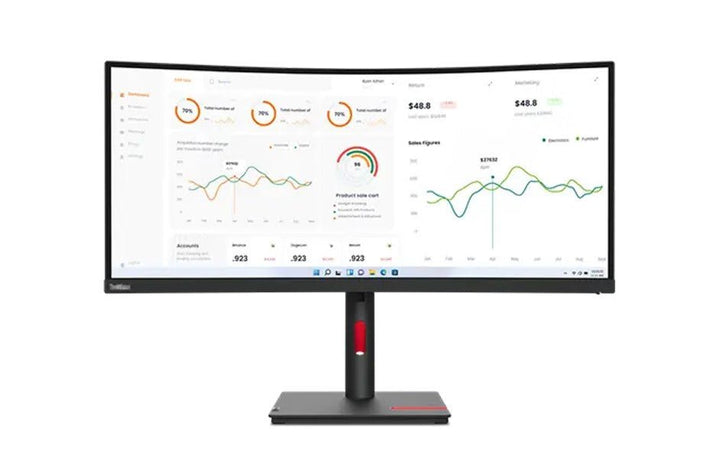


Lenovo ThinkVision T34w-30 34-inch Monitor
PRODUCT DESCRIPTION
Lenovo ThinkVision T34w-30 (63D4GAR1WW) - 3 Years Local Warranty
A 34-Inch 21:9 Curved Ultrawide With a 75 W Dock and Gigabit Ethernet
The ThinkVision T34w-30 is a 34-inch 3440 x 1440 curved VA display at a 1500R curvature, with a USB-C port carrying DisplayPort 1.4 Alt Mode video, up to 75 W of charging and gigabit Ethernet on one cable. In 21:9 it replaces a dual-monitor setup without the bezel down the middle.
3000:1 Contrast — Three Times the Rest of This Family
The VA panel here publishes 3000:1 typical contrast against 1000:1 on the IPS models beside it. Blacks are deeper and dark-background applications hold up better. The trade is colour depth: this is an 8-bit, 16.7-million-colour panel where the 32-inch models are 10-bit, so it is the productivity choice rather than the colour choice.
1500R Curvature Is the Point of the Shape
At 34 inches wide, a flat panel puts its edges measurably further from your eye than its centre. The 1500R curve keeps the whole width at a more consistent distance, which is what makes an ultrawide comfortable rather than merely large. Note that this model does not pivot — a curved ultrawide in portrait would make no sense, and Lenovo does not offer it.
A Rebuilt Listing
The previous version of this page listed no brightness, no contrast, no refresh rate, no response time, no curvature radius, no USB-C wattage and no dimensions, and described the display as "WQHD" where 3440 x 1440 is properly UWQHD. It also claimed built-in speakers; Lenovo publishes none for this model. Everything below comes from Lenovo's PSREF specification sheet.
Lenovo ThinkVision T34w-30 Datasheet — Technical Specifications
General
| Product | Lenovo ThinkVision T34w-30 |
| Part Number | 63D4GAR1WW |
| Machine Type | 63D4 |
| Type | 34-inch curved ultrawide USB-C docking monitor |
| Warranty | 3-Year Limited Warranty (Lenovo, per PSREF) |
| Local Warranty (Singapore) | Included with every SourceIT purchase, with GST invoice |
Panel & Image
| Screen Size | 34" |
| Panel Type | 3-side NearEdgeless Vertical Alignment (VA), WLED backlight |
| Resolution | 3440 x 1440 (UWQHD), 110 dpi |
| Aspect Ratio | 21:9 |
| Curvature | 1500R |
| Pixel Pitch | 0.232 x 0.232 mm |
| Refresh Rate | 60 Hz |
| Response Time | 4 ms Extreme mode / 6 ms Normal mode |
| Brightness | 350 cd/m² |
| Contrast Ratio | 3000:1 typical; 3,000,000:1 dynamic |
| Colour Gamut | 99% sRGB. Lenovo publishes no DCI-P3 figure, no coverage-versus-area split and no CIE standard for this model |
| Colour Depth | 8-bit, 16.7 million colours — note this is lower than the 10-bit of the 32-inch models in this family |
| Viewing Angles | 178° horizontal / 178° vertical |
| Surface | Anti-glare |
| Bezel | 2.1 mm sides, 2.1 mm top, 22.8 mm bottom |
Connectivity
| USB-C (docking) | 1 x USB-C 3.2 Gen 1 upstream — DisplayPort 1.4 Alt Mode, data, gigabit Ethernet and up to 75 W power delivery on one cable. Note this is 75 W, not the 90 W of the 32-inch models |
| Video Inputs | 1 x HDMI 2.1 TMDS (supports 3440 x 1440 at 60 Hz), 1 x DisplayPort 1.4 (HBR2), plus video over USB-C |
| DisplayPort Out | None |
| USB Hub | 4 x USB 3.2 Gen 1 downstream, one with BC 1.2. Upstream is the USB-C port only — there is no USB-B upstream |
| Network | 1 x RJ45 gigabit Ethernet (10/100/1000 Mbps) |
| Audio Out | 1 x 3.5 mm |
| Speakers | None. Lenovo publishes no built-in speakers for this model. Our previous listing said otherwise and was wrong. The MS30 Monitor Soundbar is available as a separately-sold clip-on accessory |
| Camera | None built in. Lenovo publishes optional ThinkVision VoIP Stack MC60 camera support, sold separately |
| KVM Switch | Not published by Lenovo for this model |
| Picture-in-Picture / Picture-by-Picture | Not published by Lenovo for this model |
| ThinkCentre Support | Lenovo publishes ThinkCentre M Series support; Tiny models require a separate bracket |
Stand & Ergonomics
| Tilt | -5° to +23.5° |
| Swivel | 45° left and right |
| Pivot | None. Lenovo publishes no pivot for this model, which is consistent with a curved ultrawide |
| Height Adjustment | Up to 155 mm |
| VESA | 100 x 100 mm |
Features
| Software | Lenovo ThinkColour (Lenovo Accessories and Display Manager) |
| Eye Care | Natural Low Blue Light |
| Power Management | Smart Power |
| Operating System Support | Windows 10 and Windows 11 |
Power & Certifications
| Power Consumption | 31 W typical / 130 W maximum |
| ENERGY STAR Power-On | 30 W; TEC 93 kWh |
| Sleep / Off Mode | < 0.5 W |
| Switch-off Mode | < 0.3 W |
| Power Supply | Internal, AC 100–240 V, 50–60 Hz |
| Certifications | ENERGY STAR certified; EPEAT Gold registered; TCO Certified 9.0; TCO edge 2.0; RoHS; Volatile Organic Compound certification; Eyesafe Certified 2.0; TÜV Rheinland Eye Comfort; TÜV Rheinland Low Blue Light |
Physical
| Dimensions with Stand | 808.4 x 231.6 x 414.3 mm at lowest; 569.3 mm high at highest |
| Head Only | 808.4 x 110.1 x 367.5 mm |
| Weight | 9.5 kg with stand; 7.0 kg head only |
| Packaged | 1070 x 525 x 187 mm; 14.8 kg |
Compatibility & Fit
An ultrawide instead of two monitors. 3440 x 1440 gives roughly the horizontal space of two 24-inch screens with no bezel down the middle, one power cable, one video cable and one stand. For anyone working across a document and a reference, a codebase and a terminal, or several trading or monitoring windows, it is the single change that makes the desk feel bigger.
The panel trade-off, stated plainly. This is a VA panel, not IPS. You gain contrast — 3000:1 against 1000:1 on the IPS models in this family — and you give up colour depth, at 8-bit against their 10-bit. Lenovo publishes 178° viewing angles for both technologies, but VA and IPS behave differently off-axis. For productivity, the contrast is the better deal. For colour work, it is not.
75 W, not 90 W. Worth catching before you order: the USB-C port here delivers up to 75 W, where the 32-inch T32h-30 and T32p-30 deliver 90 W. For a standard ultrabook that is ample. For a 15- or 16-inch machine with a 100 W-class adapter, expect it to charge slowly under load.
It does not pivot, and there is no KVM. Lenovo publishes tilt, swivel and 155 mm of lift, but no pivot — which is the right call for a curved 21:9 panel. There is also no USB-B upstream port and no published KVM function, so this monitor cannot switch a keyboard and mouse between two computers. The T32p-30 in this family is the KVM model.
Your DisplayPort cable is probably not in the box. Lenovo restricts the supplied DisplayPort cable to one specific regional configuration. Assume a Singapore order arrives with the USB-C and power cables only, and tell us if you need anything else.
Package Contents & ThinkVision Ordering Information
In the box, per Lenovo PSREF:
- Monitor with stand
- 1 x USB-C to USB-C cable (1.8 m)
- 1 x power cable (1.8 m)
- 1 x DisplayPort cable (1.8 m) — restricted by Lenovo to one regional configuration
- Quick setup guide and warranty booklet
Do not count on the DisplayPort cable for a Singapore order. Lenovo flags it as region-restricted. Tell us how you intend to connect and we will make sure the right cable ships with the monitor.
ThinkVision T-Series Ordering Information
| 63B0MAR6MY | ThinkVision T22i-30 — 21.5" FHD IPS, 4-port USB hub, full ergonomic stand |
| 63CFMARXMY | ThinkVision T24i-30 — 23.8" FHD IPS, 4-port USB hub, full ergonomic stand |
| 63FFMAR1MY | ThinkVision T24d-30 — 24" WUXGA 16:10, 1500:1, speakers, 100 Hz |
| 63A4MAR1WW | ThinkVision T27i-30 — 27" FHD IPS, 300 nits, 4-port USB hub |
| 61F1GAR2WW | ThinkVision T32h-20 — 31.5" QHD, USB-C 75 W, previous generation |
| 63D3GAR1WW | ThinkVision T32h-30 — 31.5" QHD, USB-C 90 W dock, gigabit Ethernet |
| 63D2GAR1WW | ThinkVision T32p-30 — 31.5" 4K, USB-C 90 W dock, GbE, KVM |
| 63D4GAR1WW (this listing) | ThinkVision T34w-30 — 34" 21:9 curved 1500R VA, USB-C 75 W dock, GbE |
Datasheet & Downloads
- Lenovo PSREF specification sheet — ThinkVision T34w-30 (PDF)
- Lenovo ThinkVision T34w-30 product datasheet (PDF)
PSREF is Lenovo's own Product Specifications Reference and is the source for every figure on this page unless the table says otherwise. PSREF publishes its spec sheets per model rather than per part number, so this SKU does not appear inside the PDF itself; a per-part-number detail page also exists at psref.lenovo.com and will render in a normal browser if you need this exact configuration confirmed before ordering. Ask us and we will pull it for you.
Frequently Asked Questions — Lenovo ThinkVision T34w-30
Does it have built-in speakers?
No. Lenovo publishes no speakers for the T34w-30. Our previous version of this page said it had them, which was wrong and is corrected here. There is a 3.5 mm audio-out, and Lenovo's MS30 Monitor Soundbar clips onto this chassis as a separate purchase — ask us to quote one.
How much power does the USB-C port deliver?
Up to 75 W. Our previous listing claimed "power delivery" with no figure at all. 75 W runs a typical business ultrabook comfortably; a larger laptop with a 100 W-class adapter will charge, but slowly under load.
Is 3440 x 1440 the same as WQHD?
Not quite, and the distinction is worth getting right. WQHD normally means 2560 x 1440. 3440 x 1440 is UWQHD — the same height, considerably more width. Our previous listing called it WQHD; this one does not.
Can I rotate it to portrait?
No. Lenovo publishes tilt, swivel and 155 mm of height adjustment for this model but no pivot. On a 1500R curved 21:9 panel, portrait would not be usable anyway.
Does it have a KVM switch?
No. Lenovo publishes no KVM for this model, and there is no USB-B upstream port for a second computer to connect to. The T32p-30 in this family is the model with KVM.
Should I buy this or two separate monitors?
The ultrawide wins on desk tidiness, on having no bezel through the middle of your working area, and on being one device to dock, power and mount. Two separate monitors win if you genuinely want two full-screen applications on independent screens, or if you want to run one in portrait. For most people who have tried both, the ultrawide is the one they keep.
What warranty applies in Singapore?
Lenovo PSREF states a 3-year limited warranty as the base warranty for this model, and every unit SourceIT sells comes with local Singapore warranty support and a GST invoice.


