
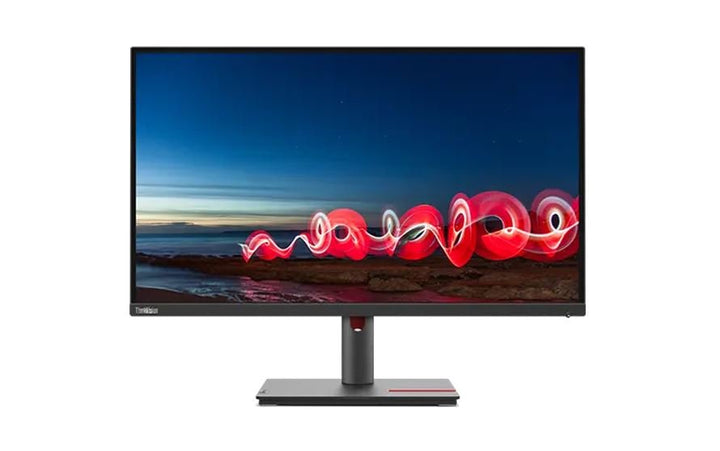


Lenovo ThinkVision T27i-30 27 inch FHD Monitor
PRODUCT DESCRIPTION
Lenovo ThinkVision T27i-30 (63A4MAR1WW) - 3 Years Local Warranty
27 Inches, 300 Nits and a Fast-Charge USB Port
The ThinkVision T27i-30 is the 27-inch member of this family: Full HD IPS at 300 cd/m² — brighter than its 21.5-inch and 23.8-inch siblings — with a four-port USB 3.2 Gen 1 hub that includes a BC 1.2 fast-charging port, and the same 155 mm-lift ergonomic stand.
Read the Pixel Density Before You Order
This is a 1920 x 1080 panel on a 27-inch screen, which works out to 82 dpi against 93 dpi on the 23.8-inch and 102 dpi on the 21.5-inch. Physically bigger, visibly coarser. If you want a better 27-inch rather than a larger one, the QHD and 4K models further down the T-series are the answer, and they are linked in the ordering table below.
Up to 75 Hz, and Three Response-Time Modes
Lenovo publishes 60 Hz typical with a 75 Hz maximum, and three response-time settings: 4 ms Extreme, 6 ms Normal and 14 ms with overdrive off. It is a business monitor rather than a gaming one, but the headroom is there and Lenovo documents it honestly.
EPEAT Gold, TCO 9.0, Eyesafe and Two Cables in the Box
The full procurement certification set — EPEAT Gold, ENERGY STAR, TCO Certified 9.0 with TCO edge, Eyesafe and TÜV Rheinland Eye Comfort and Low Blue Light. Unlike the smaller models in this family, the T27i-30 ships with both a DisplayPort and an HDMI cable in the box.
Lenovo ThinkVision T27i-30 Datasheet — Technical Specifications
General
| Product | Lenovo ThinkVision T27i-30 |
| Part Number | 63A4MAR1WW |
| Machine Type | 63A4 |
| Type | 27-inch business monitor |
| Warranty | 3-Year Limited Warranty (Lenovo, per PSREF) |
| Local Warranty (Singapore) | Included with every SourceIT purchase, with GST invoice |
Panel & Image
| Screen Size | 27" |
| Panel Type | 3-side NearEdgeless In-Plane Switching (IPS), WLED backlight |
| Resolution | 1920 x 1080 (Full HD), 82 dpi |
| Aspect Ratio | 16:9 |
| Refresh Rate | 60 Hz typical, 75 Hz maximum |
| Response Time | 4 ms Extreme mode / 6 ms Normal mode / 14 ms with overdrive off |
| Brightness | 300 cd/m² |
| Contrast Ratio | 1000:1; 3,000,000:1 dynamic typical |
| Colour Gamut | 99% sRGB. Lenovo publishes no colour-area-ratio figure for this model |
| Colour Depth | 8-bit (6-bit + FRC), 16.7 million colours |
| Viewing Angles | 178° horizontal / 178° vertical |
| Surface | Anti-glare |
| Bezel | 2.0 mm sides, 2 mm top, 17.6 mm bottom |
Connectivity
| Video Inputs | 1 x HDMI 2.1 TMDS, 1 x DisplayPort 1.2, 1 x VGA |
| A Note on That HDMI Version | Lenovo labels the port HDMI 2.1 TMDS. On a Full HD panel this is a labelling convention rather than a bandwidth upgrade — do not expect HDMI 2.1 features such as 4K high-refresh from it |
| DisplayPort Out | None |
| USB Hub | 1 x USB-B 3.2 Gen 1 upstream; 4 x USB 3.2 Gen 1 downstream, one of which supports BC 1.2 fast charging |
| USB-C | None |
| Network | None |
| Audio Out | 1 x 3.5 mm |
| Speakers | None built in. Lenovo offers the MS30 Monitor Soundbar as a separately-sold modular accessory that clips to the display; a 3.5 mm audio-out is provided for powered speakers or headphones |
| Security | Kensington Security Slot (2.5 x 6 mm and 3 x 7 mm) |
Stand & Ergonomics
| Tilt | -5° to +23.5° |
| Swivel | 45° left and right |
| Pivot | -90° to +90° |
| Height Adjustment | Up to 155 mm |
| VESA | 100 x 100 mm |
Power & Certifications
| Power Consumption | 24 W typical / 65 W maximum |
| ENERGY STAR Power-On | 15 W; TEC 50 kWh |
| Sleep / Off Mode | < 0.5 W |
| Switch-off Mode | < 0.3 W |
| Power Supply | Internal — no external brick |
| Certifications | ENERGY STAR certified; EPEAT Gold registered; RoHS; TCO Certified 9.0; TCO edge; Eyesafe certified; TÜV Rheinland Eye Comfort; TÜV Rheinland Low Blue Light (hardware solution) |
| Operating Temperature | 0°C to 40°C |
Physical
| Dimensions with Stand | 611.9 x 204.5 x 389.3 mm at lowest; 544.3 mm high at highest |
| Head Only | 611.9 x 50.0 x 362.5 mm |
| Weight | 6.9 kg with stand; 4.9 kg head only |
| Packaged | 690 x 148 x 525 mm; 10.1 kg. Note that Lenovo's own sheet prints an inch conversion of 21.17 in for the 690 mm figure, which is arithmetically wrong — 690 mm is 27.17 in. Use the millimetres |
Compatibility & Fit
The honest case for and against a 27-inch Full HD monitor. Against: 82 dpi means visibly larger pixels than a 24-inch of the same resolution, and text edges are softer. For: at a normal desk viewing distance the extra physical size makes interface elements easier to read for anyone who finds a 24-inch cramped, and it costs a fraction of a 27-inch QHD. If your users work in large spreadsheets or line-of-business applications at arm's length, this is a sensible buy. If they read a lot of small text, spend the difference on QHD.
The fast-charge port. One of the four downstream USB ports supports BC 1.2, so a phone or headset charges at a useful rate rather than trickling. The T22i-30 and T24i-30 do not have this.
The stand. 155 mm of height adjustment, 45° of swivel each way, 90° pivot to portrait, VESA 100 x 100 mm. On a 27-inch panel the height adjustment matters more than on a small one — a large screen set too high is a genuine neck problem.
What it does not do. No USB-C, no Ethernet, no DisplayPort out and no built-in speakers. Lenovo offers the MS30 Monitor Soundbar as a clip-on modular accessory if the desk needs audio; it is a separate purchase and we can quote it with the monitor.
Package Contents & ThinkVision Ordering Information
In the box, per Lenovo PSREF:
- Monitor with stand
- 1 x DisplayPort cable (1.8 m)
- 1 x HDMI cable (1.8 m)
- 1 x USB-A to USB-B cable (1.8 m)
- 1 x power cable (1.8 m)
- Quick setup guide
Unlike the 21.5-inch and 23.8-inch models in this family, the T27i-30 includes both a DisplayPort and an HDMI cable.
ThinkVision T-Series Ordering Information
| 63B0MAR6MY | ThinkVision T22i-30 — 21.5" FHD IPS, 4-port USB hub, full ergonomic stand |
| 63CFMARXMY | ThinkVision T24i-30 — 23.8" FHD IPS, 4-port USB hub, full ergonomic stand |
| 63FFMAR1MY | ThinkVision T24d-30 — 24" WUXGA 16:10, 1500:1, speakers, 100 Hz |
| 63A4MAR1WW (this listing) | ThinkVision T27i-30 — 27" FHD IPS, 300 nits, 4-port USB hub |
| 61F1GAR2WW | ThinkVision T32h-20 — 31.5" QHD, USB-C 75 W, previous generation |
| 63D3GAR1WW | ThinkVision T32h-30 — 31.5" QHD, USB-C 90 W dock, gigabit Ethernet |
| 63D2GAR1WW | ThinkVision T32p-30 — 31.5" 4K, USB-C 90 W dock, GbE, KVM |
| 63D4GAR1WW | ThinkVision T34w-30 — 34" 21:9 curved 1500R VA, USB-C 75 W dock, GbE |
Datasheet & Downloads
PSREF is Lenovo's own Product Specifications Reference and is the source for every figure on this page unless the table says otherwise. PSREF publishes its spec sheets per model rather than per part number, so this SKU does not appear inside the PDF itself; a per-part-number detail page also exists at psref.lenovo.com and will render in a normal browser if you need this exact configuration confirmed before ordering. Ask us and we will pull it for you.
Frequently Asked Questions — Lenovo ThinkVision T27i-30
Is a 27-inch Full HD monitor sharp enough?
It depends on the work. At 82 dpi this panel has visibly larger pixels than a 23.8-inch of the same resolution (93 dpi). For spreadsheets, line-of-business applications and anything read at arm's length it is perfectly comfortable, and the extra physical size helps. For long-form reading, design or dense code, a 27-inch QHD is the better investment — ask us and we will quote one.
Is the HDMI 2.1 port a real HDMI 2.1?
It is labelled HDMI 2.1 TMDS by Lenovo, but the panel is 1920 x 1080 at up to 75 Hz. The HDMI 2.1 designation here is a naming convention rather than a capability upgrade — there is no 4K, no high-refresh gaming and no HDMI 2.1 feature set to be had from it. We would rather say so than let the version number do work it cannot do.
Does it have built-in speakers?
No. Lenovo publishes no speakers for this model. There is a 3.5 mm audio-out for powered speakers or headphones. If the desk needs sound from the monitor itself, ask us about the MS30 Monitor Soundbar, which clips onto the ThinkVision T-series chassis and is a separate purchase.
Which USB port charges fastest?
One of the four downstream ports supports BC 1.2 fast charging — it is marked on the monitor. The other three supply standard USB power.
What warranty applies in Singapore?
Lenovo PSREF states a 3-year limited warranty as the base warranty for this model, and every unit SourceIT sells comes with local Singapore warranty support and a GST invoice.


