
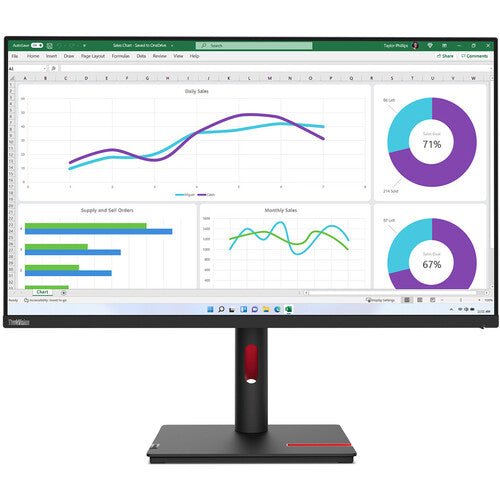


Lenovo ThinkVision T32h-30 31.5-inch IPS Monitor
PRODUCT DESCRIPTION
Lenovo ThinkVision T32h-30 (63D3GAR1WW) - 3 Years Local Warranty
31.5 Inches of QHD, With a 90 W Dock and Gigabit Ethernet in the Monitor
The ThinkVision T32h-30 puts a full docking station inside a 31.5-inch 2560 x 1440 IPS display. One USB-C cable carries DisplayPort 1.4 Alt Mode video, up to 90 W of charging, gigabit Ethernet and a four-port USB hub. Plug the laptop in and it has screen, power, network and peripherals.
10-Bit Colour and a 130% sRGB Colour Area Ratio
Lenovo publishes 10-bit (8-bit + FRC) colour with 99% sRGB coverage and a 130% sRGB colour area ratio at 350 cd/m². That is a genuinely capable panel for a productivity monitor — not a colour-critical grading display, but well past what an office spreadsheet needs.
QHD at 31.5 Inches Is the Size-to-Sharpness Sweet Spot
At 2560 x 1440 across 31.5 inches the pixel pitch is 0.273 mm. Windows and applications are legible at 100% scaling without the squinting a 4K panel at this size can cause, while giving substantially more workspace than a Full HD screen. For a desk that runs several windows side by side, this is the practical resolution.
This Listing Has Been Rebuilt
The previous version of this page was heavily contaminated with editing-tool markup — dozens of stray attributes and a leftover styling span — and stated the warranty three different ways in three places. Everything here has been rebuilt from Lenovo's PSREF specification sheet, and the warranty is stated once: 3-year limited warranty.
Lenovo ThinkVision T32h-30 Datasheet — Technical Specifications
General
| Product | Lenovo ThinkVision T32h-30 |
| Part Number | 63D3GAR1WW |
| Machine Type | 63D3 |
| Type | 31.5-inch QHD USB-C docking monitor |
| Warranty | 3-Year Limited Warranty (Lenovo, per PSREF) |
| Local Warranty (Singapore) | Included with every SourceIT purchase, with GST invoice |
Panel & Image
| Screen Size | 31.5" |
| Panel Type | 3-side NearEdgeless In-Plane Switching (IPS), WLED backlight |
| Resolution | 2560 x 1440 (QHD) |
| Aspect Ratio | 16:9 |
| Pixel Pitch | 0.273 x 0.273 mm |
| Refresh Rate | 60 Hz |
| Response Time | 4 ms Extreme mode / 6 ms Normal mode |
| Brightness | 350 cd/m² |
| Contrast Ratio | 1000:1 typical; 3,000,000:1 dynamic |
| Colour Gamut | 99% sRGB coverage ratio; 130% sRGB colour area ratio. Lenovo publishes no DCI-P3 figure and no CIE standard for this model |
| Colour Depth | 10-bit (8-bit + FRC) |
| Viewing Angles | 178° horizontal / 178° vertical |
| Surface | Anti-glare |
| Bezel | 2.0 mm sides, 2 mm top, 18.6 mm bottom |
Connectivity
| USB-C (docking) | 1 x USB-C 3.2 Gen 1 upstream — DisplayPort 1.4 Alt Mode, data, gigabit Ethernet and up to 90 W power delivery on a single cable |
| Video Inputs | 1 x HDMI, 1 x DisplayPort 1.4 (HBR2), plus video over USB-C |
| A Note on the HDMI Version | Lenovo's PSREF sheet calls this port HDMI 2.1 TMDS supporting 2560 x 1440 at 60 Hz; Lenovo's own datasheet calls it HDMI 2.0. The two documents disagree, so we describe it by what it does: HDMI carrying 2560 x 1440 at 60 Hz |
| DisplayPort Out | None — this model cannot daisy-chain a second display |
| USB Hub | 4 x USB 3.2 Gen 1 Type-A downstream, one with BC 1.2 fast charging. There is no USB-B upstream port — the hub is fed by the USB-C connection only |
| Network | 1 x RJ45 gigabit Ethernet (10/100/1000 Mbps), passed to the laptop over USB-C |
| Audio Out | 1 x 3.5 mm |
| Speakers | None built in. Lenovo offers the MS30 Monitor Soundbar as a separately-sold modular accessory that clips to the display; a 3.5 mm audio-out is provided for powered speakers or headphones |
| Camera | None built in. Lenovo publishes optional ThinkVision VoIP camera support, sold separately |
| KVM Switch | Not published by Lenovo for this model. The T32p-30 in this family does have one; this display physically lacks the USB-B upstream port a KVM needs |
| Security | Kensington Security Slot |
Stand & Ergonomics
| Tilt | -5° to +23.5° |
| Swivel | 45° left and right |
| Pivot | -90° to +90° |
| Height Adjustment | Up to 155 mm |
| VESA | 100 x 100 mm |
Features
| Software | Lenovo ThinkColour (Lenovo Accessories and Display Manager) |
| Eye Care | Natural Low Blue Light |
| Power Management | Smart Power |
| Picture-in-Picture / Picture-by-Picture | Not published by Lenovo for this model |
Power & Certifications
| Power Consumption | 32 W typical / 153 W maximum |
| ENERGY STAR Power-On | 26 W; TEC 82.6 kWh |
| Sleep / Off Mode | < 0.5 W |
| Switch-off Mode | < 0.3 W |
| Power Supply | Internal, AC 100–240 V, 50–60 Hz |
| Certifications | ENERGY STAR certified; EPEAT Gold registered; TCO Certified 9.0; TCO edge 2.0; RoHS (2011/65/EU); Eyesafe Certified 2.0; TÜV Rheinland Eye Comfort; TÜV Rheinland Low Blue Light (hardware solution) |
| EU Energy Label | Not published by Lenovo for this model |
Physical
| Dimensions with Stand | 714.2 x 234.9 x 444.5 mm at lowest; 599.5 mm high at highest |
| Head Only | 714.2 x 59.5 x 420.9 mm |
| Weight | 9.9 kg with stand; 7.2 kg head only |
| Packaged | 950 x 525 x 148 mm; 14.0 kg |
Compatibility & Fit
The single-cable setup, and its one limit. USB-C carries video, data, gigabit Ethernet and up to 90 W of charging. For most business laptops that is genuinely one cable for everything. Check your machine's own power requirement first — 90 W covers the great majority of ultrabooks and many 15-inch machines, but a mobile workstation rated at 135 W or 170 W will charge slowly or not at all under load and should keep its own adapter.
There is no USB-B upstream port, and that has a consequence. The four-port USB hub is fed entirely by the USB-C connection. That keeps the cabling clean, but it also means this monitor cannot act as a KVM switch between two computers — and Lenovo publishes no KVM feature for it. If you need one screen shared between a desktop and a laptop with one keyboard and mouse, the T32p-30 in this family is the model with KVM, and it is linked below.
What comes in the box — and what does not. Lenovo supplies a USB-C to USB-C cable and a power cable. There is no DisplayPort cable and no HDMI cable. If any machine on the desk will connect over DisplayPort or HDMI rather than USB-C, ask us to add a cable to the order.
Audio. There are no built-in speakers, only a 3.5 mm audio-out. Lenovo's MS30 Monitor Soundbar clips onto this chassis and is a separate purchase — we can quote it alongside the monitor.
Package Contents & ThinkVision Ordering Information
In the box, per Lenovo PSREF:
- Monitor with stand
- 1 x USB-C to USB-C cable (1.8 m)
- 1 x power cable (1.8 m)
- Quick setup guide and warranty booklet
No DisplayPort cable, no HDMI cable and no USB-A cable are supplied. Lenovo's box is built around the single USB-C connection. Tell us how the desk will connect and we will include the right cables.
ThinkVision T-Series Ordering Information
| 63B0MAR6MY | ThinkVision T22i-30 — 21.5" FHD IPS, 4-port USB hub, full ergonomic stand |
| 63CFMARXMY | ThinkVision T24i-30 — 23.8" FHD IPS, 4-port USB hub, full ergonomic stand |
| 63FFMAR1MY | ThinkVision T24d-30 — 24" WUXGA 16:10, 1500:1, speakers, 100 Hz |
| 63A4MAR1WW | ThinkVision T27i-30 — 27" FHD IPS, 300 nits, 4-port USB hub |
| 61F1GAR2WW | ThinkVision T32h-20 — 31.5" QHD, USB-C 75 W, previous generation |
| 63D3GAR1WW (this listing) | ThinkVision T32h-30 — 31.5" QHD, USB-C 90 W dock, gigabit Ethernet |
| 63D2GAR1WW | ThinkVision T32p-30 — 31.5" 4K, USB-C 90 W dock, GbE, KVM |
| 63D4GAR1WW | ThinkVision T34w-30 — 34" 21:9 curved 1500R VA, USB-C 75 W dock, GbE |
Datasheet & Downloads
- Lenovo PSREF specification sheet — ThinkVision T32h-30 (PDF)
- Lenovo ThinkVision T32h-30 product datasheet (PDF)
PSREF is Lenovo's own Product Specifications Reference and is the source for every figure on this page unless the table says otherwise. PSREF publishes its spec sheets per model rather than per part number, so this SKU does not appear inside the PDF itself; a per-part-number detail page also exists at psref.lenovo.com and will render in a normal browser if you need this exact configuration confirmed before ordering. Ask us and we will pull it for you.
Frequently Asked Questions — Lenovo ThinkVision T32h-30
Can one USB-C cable really do everything?
For a standard business laptop, yes: video at 2560 x 1440, up to 90 W of charging, gigabit Ethernet and four USB ports, all over one cable. The exception is a high-draw mobile workstation — if your machine ships with a 135 W or 170 W adapter, keep using it and treat the USB-C connection as video, network and data.
Does it have a KVM switch?
No. Lenovo publishes no KVM for the T32h-30, and the monitor has no USB-B upstream port, which is what a KVM needs in order to switch the hub between two computers. The T32p-30 is the model in this family that has one.
Is the HDMI port 2.0 or 2.1?
Lenovo's two documents disagree — the PSREF specification sheet says HDMI 2.1 TMDS, the product datasheet says HDMI 2.0. What is not in dispute is what it does: 2560 x 1440 at 60 Hz. We publish the disagreement rather than picking the more impressive number.
Does a DisplayPort or HDMI cable come in the box?
No. Lenovo supplies a USB-C to USB-C cable and a power cable, and nothing else. If you plan to connect a desktop over DisplayPort or HDMI, ask us to add a cable.
Does it have built-in speakers?
No. Lenovo publishes no speakers for this model. There is a 3.5 mm audio-out for powered speakers or headphones. If the desk needs sound from the monitor itself, ask us about the MS30 Monitor Soundbar, which clips onto the ThinkVision T-series chassis and is a separate purchase.
Why QHD rather than 4K at this size?
At 31.5 inches, 2560 x 1440 gives a 0.273 mm pixel pitch — readable at 100% scaling with no fiddling. A 4K panel at the same size needs display scaling to be comfortable, which some line-of-business applications still handle badly. If you specifically want 4K at this size, the T32p-30 is in the table above.
What warranty applies in Singapore?
Lenovo PSREF states a 3-year limited warranty as the base warranty for this model, and every unit SourceIT sells comes with local Singapore warranty support and a GST invoice.


