
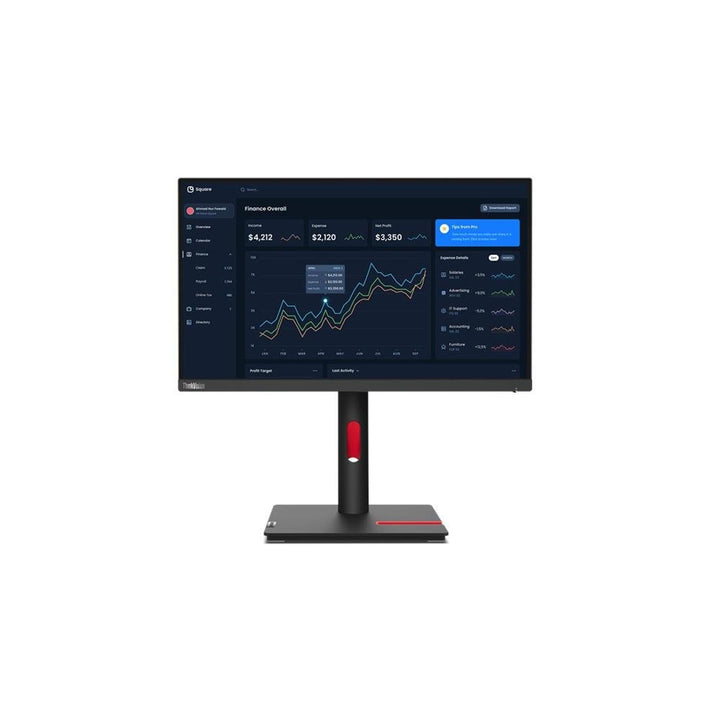


Lenovo ThinkVision T22i-30 21.5-inch FHD Monitor
PRODUCT DESCRIPTION
Lenovo ThinkVision T22i-30 (63B0MAR6MY) - 3 Years Local Warranty
A 21.5-Inch Business Monitor With a Full Ergonomic Stand and a Four-Port USB Hub
The ThinkVision T22i-30 is a 21.5-inch Full HD IPS business display with the specification office buyers actually use daily: a four-port USB 3.2 Gen 1 hub, a stand with 155 mm of height adjustment, 45° swivel each way and full 90° pivot, and three video inputs including VGA for legacy docks and thin clients.
99% sRGB, and Genuinely Frugal at 15 W
Lenovo publishes 99% sRGB coverage and a 108% sRGB colour area ratio on this panel — unusually good for the size and price — alongside 15 W typical consumption and an ENERGY STAR power-on figure of 11 W. Across a floor of thirty desks, that difference shows up on the bill.
Certified Against the Standards Procurement Actually Asks For
EPEAT Gold, ENERGY STAR, TCO Certified 9.0 with TCO edge 2.0, Eyesafe Certified 2.0 and TÜV Rheinland Eye Comfort, Flicker Free and Low Blue Light. When a tender requires environmental and eye-comfort credentials on every line item rather than only the laptops, this monitor clears them.
A Correction to This Listing
This page previously carried an unfinished internal editing note in place of a proper warranty line, and stated the term as one year. Lenovo publishes a 3-year limited warranty for this model. The note is gone and the term is corrected here.
Lenovo ThinkVision T22i-30 Datasheet — Technical Specifications
General
| Product | Lenovo ThinkVision T22i-30 |
| Part Number | 63B0MAR6MY |
| Machine Type | 63B0 |
| Type | 21.5-inch business monitor |
| Warranty | 3-Year Limited Warranty (Lenovo, per PSREF) |
| Local Warranty (Singapore) | Included with every SourceIT purchase, with GST invoice |
Panel & Image
| Screen Size | 21.5" |
| Panel Type | 3-side NearEdgeless In-Plane Switching (IPS), WLED backlight |
| Resolution | 1920 x 1080 (Full HD), 102 dpi |
| Aspect Ratio | 16:9 |
| Refresh Rate | 60 Hz |
| Response Time | 4 ms Extreme mode / 6 ms Normal mode |
| Brightness | 250 cd/m² |
| Contrast Ratio | 1000:1 typical; 3,000,000:1 dynamic |
| Colour Gamut | 99% sRGB coverage ratio; 108% sRGB colour area ratio |
| Colour Depth | 8-bit (6-bit + FRC), 16.7 million colours |
| Viewing Angles | 178° horizontal / 178° vertical |
| Surface | Anti-glare. Lenovo publishes no haze percentage |
| Bezel | 2.0 mm sides, 2 mm top, 17.3 mm bottom |
Connectivity
| Video Inputs | 1 x HDMI 1.4, 1 x DisplayPort 1.2, 1 x VGA |
| DisplayPort Out | None — this model cannot daisy-chain a second display |
| USB Hub | 1 x USB-B 3.2 Gen 1 upstream; 4 x USB 3.2 Gen 1 (5 Gbps) downstream. Lenovo publishes no BC 1.2 fast-charge port on this model |
| USB-C | None |
| Network | None |
| Audio Out | 1 x 3.5 mm |
| Speakers | None. Lenovo publishes no built-in speakers for this model — there is a 3.5 mm audio-out for powered speakers or headphones |
| Security | Kensington Security Slot |
Stand & Ergonomics
| Tilt | -5° to +23.5° |
| Swivel | 45° left and right |
| Pivot | -90° to +90° |
| Height Adjustment | Up to 155 mm |
| VESA | 100 x 100 mm |
Power & Certifications
| Power Consumption | 15 W typical / 48 W maximum |
| ENERGY STAR Power-On | 11 W; TEC 34.41 kWh |
| Sleep / Off Mode | < 0.5 W |
| Switch-off Mode | < 0.3 W |
| Power Supply | Internal — no external brick |
| Certifications | ENERGY STAR certified; EPEAT Gold registered; RoHS; TCO Certified 9.0; TCO edge 2.0; Eyesafe Certified 2.0; TÜV Rheinland Eye Comfort, Flicker Free and Low Blue Light |
| EU Energy Label | Not published by Lenovo for this model |
Physical
| Dimensions with Stand | 498.3 x 194.7 x 332.4 mm at lowest; 487.4 mm high at highest |
| Head Only | 489.3 x 46.4 x 294.7 mm |
| Weight | 4.9 kg with stand; 3.0 kg head only |
| Packaged | 563 x 144 x 414 mm; 6.8 kg |
Compatibility & Fit
What the USB hub is for. A single USB-B cable from the PC lights up four USB 3.2 Gen 1 ports on the monitor at 5 Gbps — keyboard, mouse, headset and a flash drive plugged into the screen instead of scrabbling behind a tower. Note that Lenovo publishes no BC 1.2 fast-charging port on this model, so treat the ports as data ports rather than as a place to charge a phone quickly.
VGA is still here, and that is deliberate. Alongside HDMI 1.4 and DisplayPort 1.2 there is a VGA input. In a fleet that still runs older thin clients, KVM switches or docks, that port is often the reason a monitor gets specified at all.
The stand is the real upgrade over a value monitor. 155 mm of height adjustment, 45° of swivel each way and a full 90° pivot to portrait. Getting the top of the screen to eye level is the single change that most reduces neck strain over an eight-hour day, and a tilt-only stand cannot do it. VESA 100 x 100 mm if you would rather use an arm.
What it does not do. No USB-C, so no single-cable laptop docking and no charging over the video cable. No Ethernet. No DisplayPort out, so no daisy-chaining. If you need any of those, the T32h-30, T32p-30 or T34w-30 in the table below are the docking models in this family.
Package Contents & ThinkVision Ordering Information
In the box, per Lenovo PSREF:
- Monitor with stand
- 1 x HDMI cable (1.8 m)
- 1 x USB-A to USB-B cable (1.8 m)
- 1 x power cable (1.8 m)
- Quick setup guide and warranty booklet
Note: no DisplayPort cable is supplied. If you intend to connect over DisplayPort, ask us to add a cable to the order.
ThinkVision T-Series Ordering Information
| 63B0MAR6MY (this listing) | ThinkVision T22i-30 — 21.5" FHD IPS, 4-port USB hub, full ergonomic stand |
| 63CFMARXMY | ThinkVision T24i-30 — 23.8" FHD IPS, 4-port USB hub, full ergonomic stand |
| 63FFMAR1MY | ThinkVision T24d-30 — 24" WUXGA 16:10, 1500:1, speakers, 100 Hz |
| 63A4MAR1WW | ThinkVision T27i-30 — 27" FHD IPS, 300 nits, 4-port USB hub |
| 61F1GAR2WW | ThinkVision T32h-20 — 31.5" QHD, USB-C 75 W, previous generation |
| 63D3GAR1WW | ThinkVision T32h-30 — 31.5" QHD, USB-C 90 W dock, gigabit Ethernet |
| 63D2GAR1WW | ThinkVision T32p-30 — 31.5" 4K, USB-C 90 W dock, GbE, KVM |
| 63D4GAR1WW | ThinkVision T34w-30 — 34" 21:9 curved 1500R VA, USB-C 75 W dock, GbE |
Datasheet & Downloads
PSREF is Lenovo's own Product Specifications Reference and is the source for every figure on this page unless the table says otherwise. PSREF publishes its spec sheets per model rather than per part number, so this SKU does not appear inside the PDF itself; a per-part-number detail page also exists at psref.lenovo.com and will render in a normal browser if you need this exact configuration confirmed before ordering. Ask us and we will pull it for you.
Frequently Asked Questions — Lenovo ThinkVision T22i-30
Is the warranty one year or three?
Three. Lenovo PSREF states a 3-year limited warranty for this model. Our earlier version of this page said one year, and left an unfinished internal editing note in the warranty line where a proper answer should have been. Neither should have been visible to a customer. Both are corrected here.
Does it have built-in speakers?
No. Lenovo publishes no speakers for this model. There is a 3.5 mm audio-out for powered speakers or headphones. If the desk needs sound from the monitor itself, ask us about the MS30 Monitor Soundbar, which clips onto the ThinkVision T-series chassis and is a separate purchase.
Can I charge a phone from the USB ports?
Slowly. Lenovo publishes no BC 1.2 fast-charging port for the T22i-30 — the T27i-30 and T24d-30 in this family do have one, but this model does not, so the ports supply standard USB power only.
Can I connect my laptop with one USB-C cable?
No. The T22i-30 has no USB-C port. Video comes in over HDMI, DisplayPort or VGA, and the USB hub needs its own USB-B cable to the PC. For single-cable USB-C docking, look at the T32h-30, T32p-30 or T34w-30.
Does it rotate to portrait?
Yes — a full 90° pivot, plus 155 mm of height adjustment and 45° of swivel each way. Portrait is genuinely useful for long documents, code and log files.
What warranty applies in Singapore?
Lenovo PSREF states a 3-year limited warranty as the base warranty for this model, and every unit SourceIT sells comes with local Singapore warranty support and a GST invoice.


