
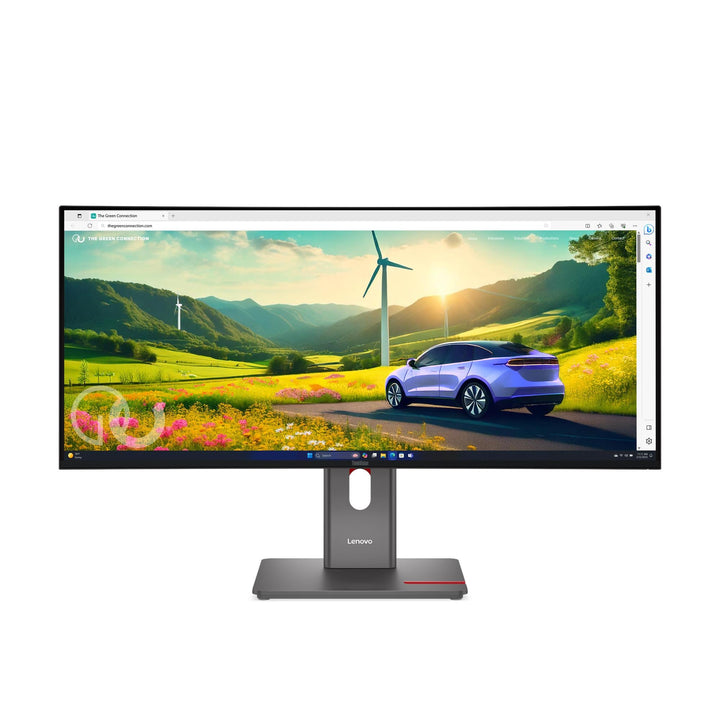


Lenovo ThinkVision P34WD-40 34-inch WQHD Ultrawide Monitor
PRODUCT DESCRIPTION
Lenovo ThinkVision P34WD-40 (64ADGAR1MY) - 3 Years Local Warranty
A 34-Inch Curved IPS Black Ultrawide With 140 W USB-C Docking
The ThinkVision P34WD-40 is 3440 x 1440 at 21:9 on a gently curved 3800R panel carrying TÜV Rheinland IPS Black certification — 2000:1 contrast, twice what a conventional IPS panel manages, without giving up IPS viewing angles. It docks at 140 W with 2.5-gigabit Ethernet and an eKVM switch.
IPS Black Is the Specification That Makes This Panel Different
Conventional IPS trades contrast for viewing angles; VA does the reverse. IPS Black narrows that gap: Lenovo publishes 2000:1 here against 1000–1500:1 on standard IPS, at 178° in both axes. On a large ultrawide used for long sessions, deeper blacks are what stop the screen looking washed out in a dim room.
98% DCI-P3, Calibrated in Two Spaces, With Speakers and Five USB-A Ports
99% sRGB and 98% DCI-P3 (CIE 1976) at 10-bit, calibrated to Delta E under 2 in both DCI-P3 and sRGB. Add 3 W x 2 built-in speakers, five downstream USB-A ports, two downstream USB-C ports and a Smart Sensor that adjusts brightness to the room.
A Gentle 3800R Curve, and No Pivot
At 3800R this is a far gentler curve than the 1500R used on the T-series ultrawides — closer to flat, which suits colour work where a strong curve distorts straight lines. Lenovo publishes tilt, swivel and 155 mm of lift, and no pivot, which is correct for a 21:9 panel.
Lenovo ThinkVision P34WD-40 Datasheet — Technical Specifications
General
| Product | Lenovo ThinkVision P34WD-40 |
| Part Number | 64ADGAR1MY |
| Machine Type | 64AD |
| Type | 34-inch curved ultrawide USB-C docking monitor with eKVM |
| Colour | Eclipse black |
| Warranty | 3-Year Limited Warranty (Lenovo, per PSREF) |
| Local Warranty (Singapore) | Included with every SourceIT purchase, with GST invoice |
Panel & Image
| Screen Size | 34" |
| Panel Type | 4-side Ultra Thin Bezel In-Plane Switching (IPS), WLED backlight, with TÜV Rheinland IPS Black certification |
| Resolution | 3440 x 1440 (UWQHD), 110 dpi |
| Aspect Ratio | 21:9 |
| Curvature | 3800R — a gentle curve, far flatter than the 1500R used on the T-series ultrawides |
| Active Area | 799.8 x 334.8 mm; pixel pitch 0.2325 mm |
| Refresh Rate | 24 Hz to 120 Hz |
| Response Time | 4 ms GtG Extreme mode / 6 ms GtG Normal mode |
| Brightness | 350 cd/m². No separate peak or HDR brightness figure is published |
| Contrast Ratio | 2000:1 typical; 3,000,000:1 dynamic |
| Colour Gamut | 99% sRGB (CIE 1931); 98% DCI-P3 (CIE 1976); Lenovo's datasheet adds 99% BT.709 (CIE 1931). Adobe RGB not published |
| Colour Depth | 10-bit (8-bit + FRC), 1.07 billion colours |
| Factory Calibration | Average Delta E under 2 for DCI-P3 and sRGB, with a printed calibration report in the box |
| Hardware Calibration | Not published by Lenovo for any monitor in this range. What Lenovo publishes is factory calibration — the panel is calibrated on the line and a printed report ships in the box. That is not the same as being able to recalibrate it yourself with a colorimeter |
| HDR | HDR10 compliance. No DisplayHDR tier and no local-dimming zone count is published |
| Viewing Angles | 178° horizontal / 178° vertical |
| Surface | Anti-glare |
| Bezel | 2.0 mm sides, 2.0 mm top, 12.7 mm bottom |
Connectivity
| USB-C (docking) | 1 x USB-C upstream, USB 10 Gbps (3.2 Gen 2) — USB Power Delivery 3.1 up to 140 W and DisplayPort 1.4 Alt Mode at HBR3, plus data and Ethernet |
| Thunderbolt | None. Despite its position in the range, this model is USB-C only — the word Thunderbolt does not appear in Lenovo's specification for it, and no Thunderbolt cable ships with it |
| Video Inputs | 1 x HDMI 2.1 TMDS (supports 3440 x 1440 at 120 Hz), 1 x DisplayPort 1.4 (HBR3, 32.4 Gbps), plus video over USB-C |
| DisplayPort Out | 1 x DisplayPort 1.4 out |
| Daisy Chain | Not published by Lenovo for this model, despite the DisplayPort 1.4 output being present. Ask us and we will get it confirmed for your layout |
| USB Hub | 1 x USB-B upstream (5 Gbps); 5 x USB-A downstream (5 Gbps); 2 x USB-C downstream (5 Gbps, 15 W, data only). Lenovo does not publish a BC 1.2 port for this model |
| Network | 2.5-gigabit Ethernet, 1 x RJ45 (2.5 Gb / 1000M / 100M / 10M) |
| KVM Switch | Yes — KVM switch with eKVM |
| Picture-in-Picture / Picture-by-Picture | Both supported, plus Lenovo's True Split |
| Audio Out | Not published by Lenovo. No 3.5 mm jack appears in this model's connector list — audio comes from the PC |
| Speakers | Integrated, 3 W x 2. The MS30 Monitor Soundbar is also supported, sold separately |
| Camera | None with this part number. Lenovo bundles the ThinkVision VoIP Stack MC60 webcam only on separate model codes. It is available as an accessory — ask us to quote one |
| Security | Kensington Nano Security Slot (2.5 x 6 mm) |
Stand & Ergonomics
| Tilt | -5° to +23.5° |
| Swivel | 45° left and right |
| Pivot | None published by Lenovo for this model |
| Height Adjustment | Up to 155 mm |
| VESA | 100 x 100 mm |
Features
| Smart Sensor | Automatic ambient-brightness adjustment |
| Software | Lenovo ThinkColour; Lenovo Display Fleet Manager (LDFM) |
| AI Power Saving Mode | Supported |
| Multi-sync | Supported |
| Mirrored Power Button | Yes |
Power & Certifications
| Power Consumption | 28 W typical / 250 W maximum |
| ENERGY STAR Power-On | 24.5 W; TEC 100.9 kWh |
| Sleep / Off Mode | < 0.5 W |
| Switch-off Mode | < 0.3 W |
| Power Supply | Internal — no external brick |
| Certifications | ENERGY STAR certified; EPEAT Gold registered; RoHS (2011/65/EU); TCO Certified generation 10; TCO Edge 2.1; Volatile Organic Compound certification; TÜV Rheinland IPS Black; Eyesafe Certified 2.0; TÜV Rheinland Eye Comfort (5-star); TÜV Rheinland Low Blue Light (hardware solution); China Energy Efficiency Tier 1 (Lenovo datasheet) |
| EU Energy Label | Not published in Lenovo's PSREF specification sheet; Lenovo's product datasheet states Level E |
Physical
| Dimensions with Stand | 817.1 x 220.0 x 393.8 mm at lowest; 548.8 mm high at highest |
| Head Only | 817.1 x 82.2 x 358.6 mm |
| Weight | 10.0 kg (22.0 lb) with stand; 7.2 kg head only |
| Packaged | 905.0 x 174.0 x 470.0 mm; 14.7 kg |
Compatibility & Fit
What actually separates the P-series from the T-series. Lenovo's own marketing puts the P-series under "Best-in-Class Performance for Leading Professionals" and the T-series under "Enhanced Productivity for Modern Taskers", but it never states in prose that colour accuracy is the dividing line. The evidence is in the specification sheets instead: most P-series models publish a factory calibration figure of Delta E under 2 and ship a printed calibration report in the box, and T-series models do not. That is the difference we are willing to stand behind, and it is why this page cites the per-model figure rather than a slogan.
What IPS Black actually changes. Standard IPS gives excellent viewing angles and mediocre contrast, typically 1000:1 to 1500:1. VA gives strong contrast and weaker off-axis behaviour. IPS Black is a panel refinement that raises IPS contrast without the VA trade-off — Lenovo publishes 2000:1 here, with 178° viewing angles in both axes and a TÜV Rheinland IPS Black certification. On a large screen used for eight hours in a normally-lit office, that is the difference between blacks that look black and blacks that look grey.
3800R, and why a gentle curve suits this monitor. The T-series ultrawides use 1500R, a pronounced curve that wraps the image around the viewer. This panel uses 3800R, much closer to flat. On a colour-work display that is deliberate: a strong curve makes straight lines look bent at the edges, which matters when you are laying out a page or judging a composition. If you want the wrap-around feel for monitoring or trading, the T34WD-40 at 1500R is the other choice.
Note that this is USB-C, not Thunderbolt. Despite sitting alongside the Thunderbolt-equipped P32UD-40 and P40WD-40, this model is USB-C only — 10 Gbps with DisplayPort 1.4 Alt Mode at HBR3 and 140 W. That is more than enough for a single 3440 x 1440 panel, and it means the monitor works identically with any USB-C laptop rather than favouring Thunderbolt hosts. No Thunderbolt cable ships with it because there is nothing to plug it into.
Seven downstream ports and speakers. Five USB-A and two USB-C downstream ports, plus 3 W x 2 built-in speakers — more of both than almost anything else in this range. There is no 3.5 mm jack, so headphones connect to the laptop.
Package Contents & ThinkVision Ordering Information
In the box, per Lenovo PSREF:
- 1 x DisplayPort 1.4 cable (1.8 m)
- 1 x USB-C to USB-C Gen 1 cable (1.8 m)
- 1 x USB-B to USB-A Gen 1 cable (1.8 m)
- 1 x power cable (1.8 m)
- Factory calibration report
- Quick setup guide
No Thunderbolt cable is supplied, and none is needed — this model has no Thunderbolt port. No HDMI cable and no webcam are included.
ThinkVision P-Series Ordering Information
| 62B2GAR1WW | ThinkVision P24h-2L — 23.8" QHD dock, 75 W USB-C, GbE, 1 W speakers |
| 63B4GAR6WW | ThinkVision P24q-30 — 23.8" QHD, Delta E<2, no USB-C |
| 64B2GAR1MY | ThinkVision P24Q-40 — 23.8" QHD, Delta E<2, USB hub — not a dock |
| 64B1GAR1MY | ThinkVision P24QD-40 — 23.8" QHD dock — 140 W USB-C, 2.5GbE, eKVM |
| 63F4MAR1WW | ThinkVision P25i-30 (WW) — 24.5" FHD, 100 Hz, DP out, VGA |
| 63F4MAR1MY | ThinkVision P25i-30 (MY) — 24.5" FHD, 100 Hz, DP out, VGA |
| 63A1GAR1WW | ThinkVision P27h-30 — 27" QHD dock, 100 W USB-C, 95% DCI-P3, KVM |
| 64B3GAR2MY | ThinkVision P27QD-40 — 27" QHD dock — 140 W, 2.5GbE, eKVM, 98% DCI-P3 |
| 63D1RAR1WW | ThinkVision P32p-30 — 31.5" 4K Thunderbolt 4 dock, 100 W, KVM |
| 64A8XAR2MY | ThinkVision P32UD-40 — 31.5" 4K Thunderbolt 4, 140 W, 2.5GbE, eKVM |
| 64ADGAR1MY (this listing) | ThinkVision P34WD-40 — 34" curved IPS Black, 140 W USB-C, eKVM, speakers |
| 64B4XAR1MY | ThinkVision P40WD-40 — 39.7" 5K2K IPS Black, Thunderbolt 4, 140 W, eKVM |
| 63DBRAR1MY | ThinkVision P49w-30 — 49" DQHD 32:9 curved, Thunderbolt 4, KVM |
Datasheet & Downloads
- Lenovo PSREF specification sheet — ThinkVision P34WD-40 (PDF)
- Lenovo ThinkVision P34WD-40 product datasheet (PDF)
PSREF is Lenovo's own Product Specifications Reference and is the source for every figure on this page unless the table says otherwise. PSREF publishes its spec sheets per model rather than per part number, so this SKU does not appear inside the PDF itself; a per-part-number detail page also exists at psref.lenovo.com and will render in a normal browser if you need this exact configuration confirmed before ordering. Ask us and we will pull it for you.
Frequently Asked Questions — Lenovo ThinkVision P34WD-40
What is IPS Black and does it matter?
It is a panel refinement that raises IPS contrast without sacrificing viewing angles. Lenovo publishes 2000:1 here where standard IPS in this range manages 1000:1 to 1500:1, and the monitor carries a TÜV Rheinland IPS Black certification. On a large screen in a normally-lit room it is the difference between blacks that read as black and blacks that read as dark grey. It is one of the few panel-technology claims that is visible without a test pattern.
Does it have Thunderbolt?
No. This model is USB-C only — 10 Gbps, DisplayPort 1.4 Alt Mode at HBR3, 140 W power delivery. The word Thunderbolt does not appear in Lenovo's specification for it. That is not a shortcoming for a single 3440 x 1440 panel, and it means the monitor behaves the same with any USB-C laptop. The Thunderbolt models in this range are the P32p-30, P32UD-40, P40WD-40 and P49w-30.
Why is the curve so much gentler than the T34WD-40's?
Because this is a colour-work display. At 3800R it is much closer to flat than the T-series' 1500R, so straight lines stay straight at the edges — which matters when you are judging a layout or a composition. The 1500R curve wraps the image around you more, which suits monitoring and trading desks better than design work.
Can I chain a second display from it?
There is a DisplayPort 1.4 output, but Lenovo publishes no daisy-chain capability or chain limit for this model. We will not claim what Lenovo has not stated. Ask us and we will get it confirmed in writing for your layout.
Does it rotate to portrait?
No. Lenovo publishes tilt, swivel and 155 mm of height adjustment for this model, and no pivot — which is correct for a curved 21:9 panel.
What does "factory calibrated" actually mean here?
It means Lenovo calibrated this panel on the production line, measured the result and put a printed report in the box — so the monitor is accurate out of the carton without you buying a colorimeter. What it does not mean is hardware calibration: Lenovo publishes no hardware-calibration support for any ThinkVision P-series model, so you cannot write a new calibration into the monitor's own lookup table later. For most design, marketing and video-review work the factory calibration is what matters; for a print house that recalibrates monthly, it is worth a conversation before you order.
What warranty applies in Singapore?
Lenovo PSREF states a 3-year limited warranty as the base warranty for this model, and every unit SourceIT sells comes with local Singapore warranty support and a GST invoice.


