
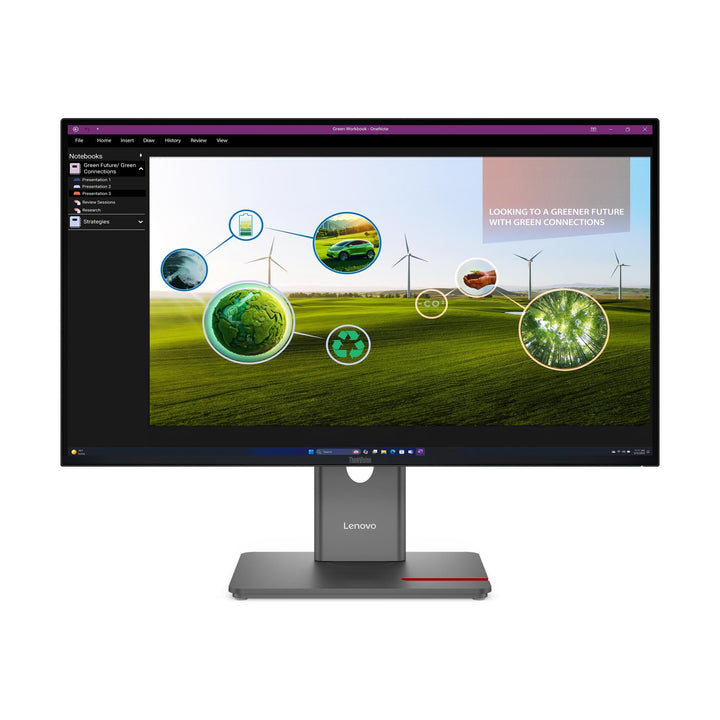


Lenovo ThinkVision P27Q-40 27-inch QHD Monitor
PRODUCT DESCRIPTION
Lenovo ThinkVision P27Q-40 (64A7GAR6MY) - 3 Years Local Warranty
A 10-bit, 98% DCI-P3 Panel, Calibrated at the Factory
The ThinkVision P27Q-40 is the only monitor in this group with a genuine colour claim. It is a 10-bit panel covering 99% sRGB, 98% DCI-P3 and 99% BT.709, factory calibrated to an average Delta E under 2 for both DCI-P3 and sRGB — and Lenovo ships the calibration report in the box. Every other model here is 8-bit with no calibration claim.
24–120 Hz Variable Refresh on a 4-Side Ultra Thin Panel
The panel runs a 24 Hz to 120 Hz variable refresh rate and is HDR10 compliant, in a 4-side Ultra Thin chassis whose bottom bezel is just 11.5 mm — the slimmest here. At 350 cd/m² and 1500:1, it is bright enough for any office and clean enough for multi-monitor walls.
Read the USB-C Specification Carefully — It Is Not a Docking Port
This is the single most important thing to know before ordering. The P27Q-40's USB-C is a downstream data port with 15 W power delivery only. It has no DisplayPort Alt Mode and will not charge a laptop. If you want single-cable docking, the P24h-30 is the model that does it, with 100 W and ethernet. We would rather you knew that now than after delivery.
Built for Managed Fleets
Lenovo supports this model with Display Fleet Manager for asset management and firmware control, and ThinkColour for colour adjustment. With DisplayPort 1.4 out for daisy chaining, TCO Certified generation 10 with TCO Edge 2.1, Eyesafe 2.0 and a five-star TÜV Rheinland Eye Comfort rating, it is specified for estates rather than individual desks.
Lenovo ThinkVision P27Q-40 Datasheet — Technical Specifications
General
| Product | Lenovo ThinkVision P27Q-40 |
| Part Number | 64A7GAR6MY |
| Machine Type | 64A7 |
| Colour | Eclipse black |
| Warranty | 3-Year Limited Warranty (Lenovo, per PSREF) |
| Local Warranty (Singapore) | Included with every SourceIT purchase, with GST invoice |
Panel & Image
| Screen Size | 27" |
| Panel Type | 4-side Ultra Thin In-Plane Switching (IPS), WLED backlight |
| Resolution | 2560 x 1440 (QHD) |
| Aspect Ratio | 16:9 |
| Refresh Rate | 24 Hz – 120 Hz variable (HDMI 2.1 carries 2560x1440 @ 120 Hz) |
| Response Time | 4 ms (Extreme) / 6 ms (Normal) |
| Brightness | 350 cd/m² |
| Contrast Ratio | 1500:1 typical; 3,000,000:1 dynamic |
| Colour Gamut | 99% sRGB; 98% DCI-P3; 99% BT.709 |
| Colour Depth | 10-bit |
| Factory Calibration | Average Delta E < 2 for DCI-P3 and sRGB; calibration report included in the box |
| HDR | HDR10 compliant |
| Viewing Angles | 178° / 178° |
| Surface | Anti-glare |
Connectivity
| Video Inputs | 1x HDMI 2.1 TMDS (2560x1440 @ 120 Hz); 1x DisplayPort 1.4 HBR2, max 21.6 Gbps |
| Video Output | 1x DisplayPort 1.4 out — daisy chain a second ThinkVision monitor |
| USB-C | 1x USB-C (USB 5Gbps / 3.2 Gen 1), data only, 15 W PD, downstream — no DisplayPort Alt Mode, does not charge a laptop |
| USB Hub | 3x USB-A (USB 5Gbps / 3.2 Gen 1), one with BC 1.2; 1x USB-B upstream feeds the hub |
| Ethernet | None |
| Audio Out | Not published by Lenovo for this model |
| Speakers | None — optional MS30 Monitor Soundbar sold separately |
| KVM | Not published by Lenovo for this model |
| Cables Supplied | 1x DisplayPort 1.4 cable (1.8 m); 1x HDMI 2.0 cable (1.8 m); 1x USB-B to USB-A cable (1.8 m); 1x power cable (1.8 m); factory calibration report |
Stand & Ergonomics
| Tilt | -5° to +23.5° |
| Swivel | 45° left and right |
| Pivot | -90° to +90° |
| Height Adjustment | Up to 155 mm |
| VESA Mount | 100 x 100 mm |
Power & Certifications
| Power Consumption | 15 W typical / 75 W maximum |
| Sleep / Off | <0.5 W; switch-off <0.3 W |
| ENERGY STAR | Power on 13.8 W; TEC 43.5 kWh |
| Power Supply | Internal, AC 100–240 V 50/60 Hz |
| Certifications | ENERGY STAR certified; EPEAT Gold; TCO Certified generation 10; TCO Edge 2.1; RoHS; Windows 10 and 11 certified; Eyesafe Certified 2.0; TÜV Rheinland Eye Comfort 5-star; Low Blue Light (Hardware Solution) |
Physical
| Dimensions with Stand | 613.6 x 195.0 x 384.2 mm (lowest) to 613.6 x 195.0 x 539.2 mm (highest) |
| Dimensions, Head Only | 613.6 x 46.0 x 357.1 mm |
| Weight with Stand | 6.4 kg |
| Weight, Head Only | 4.3 kg |
| Bezel | Side 2.0 mm, top 2.0 mm, bottom 11.5 mm — the slimmest in this range |
Features
| Management Software | Lenovo Display Fleet Manager (LDFM); ThinkColour / Lenovo Accessories and Display Manager |
| Camera | Not included with this part number. Lenovo bundles a camera only on the 64A7Z-series models; on this G-series part it is sold separately |
| Multi-monitor | Multi-sync support; DisplayPort 1.4 daisy chain |
Compatibility & Fit
What you are paying for. Against the same-size E27Q-40, this model gives you a 10-bit panel instead of 8-bit, 98% DCI-P3 in addition to sRGB, factory calibration to Delta E under 2 with the report in the box, HDR10, a 24–120 Hz variable refresh rate, a USB hub, DisplayPort daisy chaining, an 11.5 mm bottom bezel and Lenovo's fleet-management software. If none of those matter to your users, the E27Q-40 is the sensible purchase — and it has speakers, which this does not.
The USB-C trap, stated once more because it costs money. The USB-C port here is data only at 15 W. It is not a docking port, carries no video, and will not charge a laptop. Buyers routinely assume otherwise from the port's presence. Single-cable docking with 100 W and gigabit ethernet is the P24h-30's job.
Camera: Lenovo bundles a camera only with its 64A7Z-series part numbers. This SKU is 64A7GAR6MY — a G-series part — so no camera is included. This is a confirmed case where the part number changes what is in the box, which is why we quote specifications against the SKU rather than the model name.
Colour work: the calibration report shipped in the box is the practical difference for design, photo and video users. It documents the panel's measured accuracy as delivered, which no E-series model provides.
Package Contents & ThinkVision Ordering Information
In the box: monitor with stand, 1x DisplayPort 1.4 cable (1.8 m), 1x HDMI 2.0 cable (1.8 m), 1x USB-B to USB-A cable (1.8 m), 1x power cable (1.8 m), and the factory calibration report.
ThinkVision Ordering Information
| 62F7KAR4MY | ThinkVision E20-30 — 19.5" HD+ TN, 60 Hz, HDMI + VGA |
| 64C9MAR6MY | ThinkVision E22-40 — 21.5" FHD IPS, 100 Hz, speakers |
| 64BAMAR1MY | ThinkVision E24-40 — 23.8" FHD IPS, 100 Hz, speakers |
| 64BCMAR4MY | ThinkVision E27-40 — 27" FHD IPS, 100 Hz, 300 nits |
| 63ECGAR2WW | ThinkVision E24q-30 — 23.8" QHD IPS, 100 Hz, Eyesafe 2.0 |
| 64BDGAR4MY | ThinkVision E27Q-40 — 27" QHD IPS, 100 Hz, 350 nits, 2x HDMI |
| 63B3GAR6WW | ThinkVision P24h-30 — 23.8" QHD docking monitor, USB-C 100 W, RJ45 |
| 64A7GAR6MY (this listing) | ThinkVision P27Q-40 — 27" QHD 10-bit, 120 Hz, DCI-P3, calibrated |
Datasheet & Downloads
Lenovo PSREF is Lenovo's own Product Specifications Reference and is the source for every figure on this page. PSREF publishes its spec sheets per model; it also hosts a per-part-number detail page at psref.lenovo.com which will render in a normal browser if you need the configuration confirmed against this exact SKU before ordering.
Frequently Asked Questions — Lenovo ThinkVision P27Q-40
Can I connect my laptop with one USB-C cable?
No. This monitor's USB-C is a downstream data port with 15 W power delivery — no video, no laptop charging. For single-cable docking use the P24h-30, which offers 100 W and gigabit ethernet.
What does the factory calibration give me?
An average Delta E under 2 for both DCI-P3 and sRGB, verified and documented in a calibration report supplied in the box. For design, photo or video work that is the specification that matters.
Is a camera included?
Not with this part number. Lenovo bundles a camera only on its 64A7Z-series models; this SKU is 64A7GAR6MY, so the camera is sold separately.
Does it have speakers?
No. The MS30 Monitor Soundbar is available separately. If you need speakers built in, the E27Q-40 has them.
What is the 24 to 120 Hz range?
A variable refresh rate: the panel matches its refresh to the source's frame rate anywhere between 24 and 120 Hz, which keeps motion smooth and avoids tearing.
Can I daisy chain a second monitor?
Yes, via the DisplayPort 1.4 out. Note the hub is fed by the USB-B upstream port, not by USB-C.
What warranty does it carry?
Lenovo publishes a 3-year limited warranty in PSREF, and every unit we supply carries local Singapore warranty and a GST invoice.


