
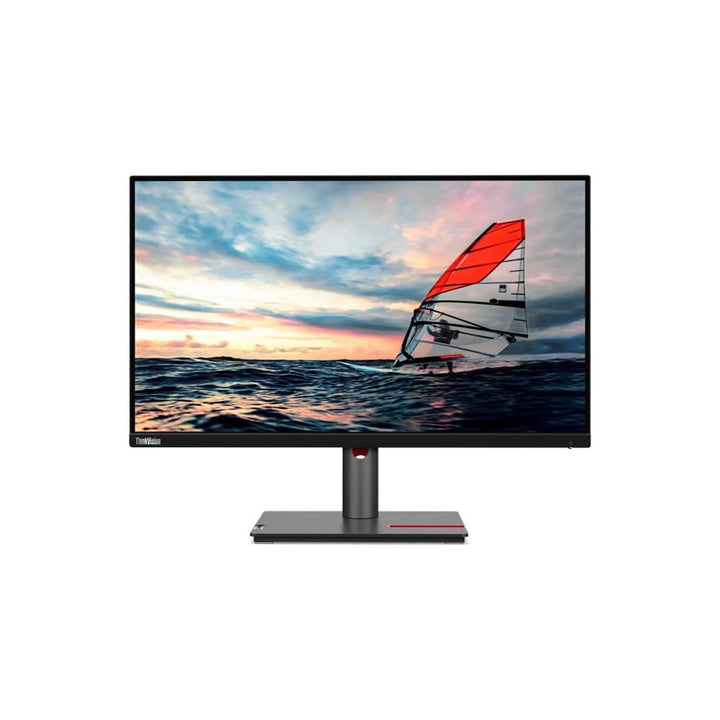


Lenovo ThinkVision P25i-30 24.5-inch FHD Monitor
PRODUCT DESCRIPTION
Lenovo ThinkVision P25i-30 (63F4MAR1MY) - 3 Years Local Warranty
A 24.5-Inch Full HD Business Monitor With a 100 Hz Panel and a DisplayPort Output
The ThinkVision P25i-30 is a 24.5-inch 1920 x 1080 display running 48–100 Hz, with 1300:1 contrast, a four-port USB hub, a DisplayPort 1.4 output for a second screen and a full ergonomic stand. It is the widescreen size that fits a standard desk with slightly more width than a 23.8-inch.
Still Has VGA — and That Is Often the Reason It Sells
Alongside HDMI 2.1 TMDS and DisplayPort 1.4 there is a VGA input. In fleets still running older thin clients, KVM switches, medical equipment or industrial controllers, that port decides which monitor gets specified. It is the only P-series model in this range that has one.
Be Clear About What This P-Series Model Does Not Have
Unusually for the P-series, Lenovo publishes no Delta E figure for the P25i-30 and ships no factory calibration report with it — the two things that otherwise distinguish P from T. There is also no USB-C and no Ethernet. It is a well-built business monitor rather than a colour-work or docking one, and we would rather say so.
A Note on Two Listings for the Same Model
We list this monitor twice, as part numbers ending WW and MY, at different prices and stock levels. Lenovo publishes no specification difference between them — the suffix is a market and channel designator, not a hardware one. Both resolve to live Lenovo product pages. This page is the MY listing; the other is linked in the ordering table below. Ask us which is in stock and we will quote whichever serves you better.
Lenovo ThinkVision P25i-30 Datasheet — Technical Specifications
General
| Product | Lenovo ThinkVision P25i-30 |
| Part Number | 63F4MAR1MY |
| Machine Type | 63F4 |
| Type | 24.5-inch Full HD business monitor |
| Warranty | 3-Year Limited Warranty (Lenovo, per PSREF) |
| Local Warranty (Singapore) | Included with every SourceIT purchase, with GST invoice |
Panel & Image
| Screen Size | 24.5" |
| Panel Type | In-Plane Switching (IPS), WLED backlight |
| Resolution | 1920 x 1080 (Full HD) |
| Aspect Ratio | 16:9 |
| Refresh Rate | 48 Hz to 100 Hz. Note that Lenovo's HDMI line for this model states support for 1920 x 1080 at 120 Hz — that is the port's signalling capability, not the panel's rate. Treat this as a 100 Hz monitor |
| Response Time | 4 ms Extreme mode / 6 ms Normal mode |
| Brightness | 250 cd/m² typical |
| Contrast Ratio | 1300:1 typical. Lenovo publishes no dynamic contrast figure for this model |
| Colour Gamut | 99% sRGB; 83% DCI-P3; 99% Rec.709. Lenovo publishes no CIE standard and no Adobe RGB figure |
| Colour Depth | 16.7 million colours. Lenovo states no bit depth for this model |
| Factory Calibration | Not published, and no calibration report ships in the box — the only monitor in this P-series range without one |
| Hardware Calibration | Not published by Lenovo for any monitor in this range. What Lenovo publishes is factory calibration — the panel is calibrated on the line and a printed report ships in the box. That is not the same as being able to recalibrate it yourself with a colorimeter |
| Viewing Angles | 178° horizontal / 178° vertical |
| Surface | Anti-glare |
| Bezel | Lenovo's published figures for this model read "side 17.6 mm, top and bottom 2 mm", which is not physically consistent with the rest of the range and appears to be a transposition in Lenovo's own sheet. We publish no bezel figures for this model rather than reproduce one we believe is wrong |
Connectivity
| Video Inputs | 1 x HDMI 2.1 TMDS, 1 x DisplayPort 1.4 (HBR2), 1 x VGA |
| DisplayPort Out | 1 x DisplayPort 1.4 out |
| USB-C | None |
| USB Hub | 1 x USB-B upstream (5 Gbps); 4 x USB-A downstream (5 Gbps). Lenovo publishes no BC 1.2 fast-charge port for this model |
| Network | None |
| Audio Out | 1 x 3.5 mm |
| Speakers | None. Lenovo publishes optional modular soundbar support |
| Camera | None built in. Lenovo publishes optional modular camera support |
| KVM Switch | Not published by Lenovo for this model |
Stand & Ergonomics
| Tilt | -5° to +23.5° |
| Swivel | 45° left and right |
| Pivot | -90° to +90° |
| Height Adjustment | Up to 155 mm |
| VESA | 100 x 100 mm |
Power & Certifications
| Power Consumption | 12.5 W typical / 52 W maximum |
| ENERGY STAR Power-On | 11.9 W; TEC 38.2 kWh |
| Sleep / Off Mode | < 0.5 W |
| Switch-off Mode | < 0.3 W |
| Power Supply | Internal — no external brick |
| Certifications | ENERGY STAR certified; EPEAT Gold registered; RoHS; TCO Certified 9.0; TCO edge 2.0; Eyesafe Certified 2.0; TÜV Rheinland Eye Comfort; TÜV Rheinland Low Blue Light |
| EU Energy Label | D class |
Physical
| Dimensions with Stand | 557.3 x 199.7 x 356.8 mm at lowest; 511.8 mm high at highest |
| Head Only | 557.3 x 49 x 328.5 mm |
| Weight | 5.4 kg with stand; 3.4 kg head only |
| Packaged | 730 x 160 x 422 mm; 8.4 kg |
Compatibility & Fit
Two listings, one monitor. SourceIT lists the P25i-30 under two Lenovo part numbers, 63F4MAR1WW and 63F4MAR1MY, at different prices and stock levels. We have checked, and Lenovo publishes no panel, port or feature difference between them — the suffix designates market and channel. Both are genuine Lenovo SKUs with live Lenovo product pages. Buy whichever is in stock; ask us and we will tell you which that is today.
Why VGA still matters. This is the only P-series monitor in our range with a VGA input. If your site runs older thin clients, analogue KVM switches, laboratory instruments or industrial control panels, that port is often the whole decision. Everything newer connects over HDMI 2.1 or DisplayPort 1.4.
What this monitor is not, stated plainly. It carries the P-series badge but not the two things that usually justify it: Lenovo publishes no Delta E figure and ships no calibration report. There is also no USB-C and no Ethernet, so a laptop needs a video cable, a USB cable and its own charger. If you want a calibrated P-series panel, the P24q-30 or P24Q-40 publish Delta E under 2. If you want docking, the P24QD-40 or P27QD-40 do it at 140 W. All are linked above.
On daisy-chaining. There is a DisplayPort 1.4 output. Lenovo's PSREF sheet does not mention daisy-chaining; Lenovo's own Singapore product page for this model does describe the DisplayPort as supporting it. We are showing you both sources rather than picking one — if chaining is central to your plan, ask us to get it confirmed before you order.
Package Contents & ThinkVision Ordering Information
In the box, per Lenovo PSREF:
- Monitor with stand
- 1 x DisplayPort cable (1.8 m) — regional availability
- 1 x HDMI cable (1.8 m) — regional availability
- 1 x USB-B to USB-A cable (1.8 m)
- 1 x power cable (1.8 m)
- Quick setup guide
No factory calibration report ships with this model, unlike the rest of the P-series range. Lenovo also flags the DisplayPort and HDMI cables as regionally variable — tell us how you intend to connect and we will confirm what is in the carton before it ships.
ThinkVision P-Series Ordering Information
| 62B2GAR1WW | ThinkVision P24h-2L — 23.8" QHD dock, 75 W USB-C, GbE, 1 W speakers |
| 63B4GAR6WW | ThinkVision P24q-30 — 23.8" QHD, Delta E<2, no USB-C |
| 64B2GAR1MY | ThinkVision P24Q-40 — 23.8" QHD, Delta E<2, USB hub — not a dock |
| 64B1GAR1MY | ThinkVision P24QD-40 — 23.8" QHD dock — 140 W USB-C, 2.5GbE, eKVM |
| 63F4MAR1WW | ThinkVision P25i-30 (WW) — 24.5" FHD, 100 Hz, DP out, VGA |
| 63F4MAR1MY (this listing) | ThinkVision P25i-30 (MY) — 24.5" FHD, 100 Hz, DP out, VGA |
| 63A1GAR1WW | ThinkVision P27h-30 — 27" QHD dock, 100 W USB-C, 95% DCI-P3, KVM |
| 64B3GAR2MY | ThinkVision P27QD-40 — 27" QHD dock — 140 W, 2.5GbE, eKVM, 98% DCI-P3 |
| 63D1RAR1WW | ThinkVision P32p-30 — 31.5" 4K Thunderbolt 4 dock, 100 W, KVM |
| 64A8XAR2MY | ThinkVision P32UD-40 — 31.5" 4K Thunderbolt 4, 140 W, 2.5GbE, eKVM |
| 64ADGAR1MY | ThinkVision P34WD-40 — 34" curved IPS Black, 140 W USB-C, eKVM, speakers |
| 64B4XAR1MY | ThinkVision P40WD-40 — 39.7" 5K2K IPS Black, Thunderbolt 4, 140 W, eKVM |
| 63DBRAR1MY | ThinkVision P49w-30 — 49" DQHD 32:9 curved, Thunderbolt 4, KVM |
Datasheet & Downloads
- Lenovo PSREF specification sheet — ThinkVision P25i-30 (PDF)
- Lenovo Singapore product page — 63F4MAR1MY
PSREF is Lenovo's own Product Specifications Reference and is the source for every figure on this page unless the table says otherwise. PSREF publishes its spec sheets per model rather than per part number, so this SKU does not appear inside the PDF itself; a per-part-number detail page also exists at psref.lenovo.com and will render in a normal browser if you need this exact configuration confirmed before ordering. Ask us and we will pull it for you.
Frequently Asked Questions — Lenovo ThinkVision P25i-30
Why do you list this monitor twice?
Because Lenovo sells it under two part numbers — 63F4MAR1MY on this page and 63F4MAR1WW on the other — and they reach us through different channels at different prices and stock levels. Lenovo publishes no specification difference between them. The suffix is a market designator. Ask us which is in stock and we will quote the better of the two.
Is it factory calibrated like the other P-series models?
No, and this is worth knowing before you pay a P-series price. Lenovo publishes no Delta E figure for the P25i-30 and ships no calibration report with it — it is the only model in this range without one. If colour accuracy is the reason you were looking at the P-series, the P24q-30, P24Q-40, P24QD-40, P27h-30 or P27QD-40 all publish average Delta E under 2 and include a printed report.
Does it have USB-C or Ethernet?
Neither. A laptop connects with a video cable for the picture, a USB-B cable for the hub, and its own charger. For one-cable docking, the P24QD-40 and P27QD-40 deliver 140 W with Ethernet; the P24h-2L and P27h-30 deliver 75 W and 100 W respectively.
Is it 100 Hz or 120 Hz?
100 Hz. Lenovo publishes a panel refresh range of 48–100 Hz. The 120 Hz figure that appears on the HDMI line of the same document describes what the port can signal, not what the panel can display. We publish the panel figure.
Can I chain a second display from it?
There is a DisplayPort 1.4 output, and Lenovo's Singapore product page describes it as supporting daisy-chaining — but Lenovo's PSREF specification sheet does not mention the capability. Two Lenovo sources, one silent. If chaining is central to your setup, ask us and we will get it confirmed in writing before you order.
What warranty applies in Singapore?
Lenovo PSREF states a 3-year limited warranty as the base warranty for this model, and every unit SourceIT sells comes with local Singapore warranty support and a GST invoice.


