
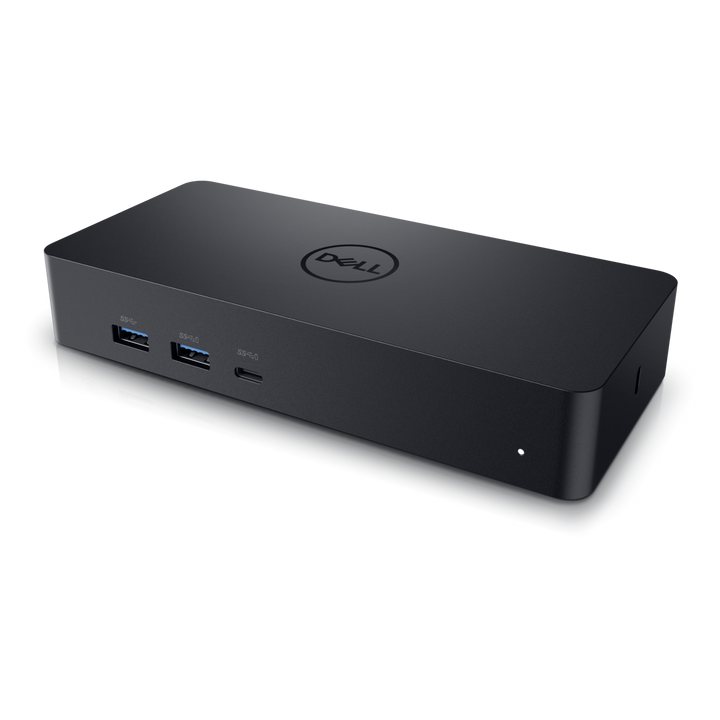


Dell D6000S Universal Dock with DisplayLink
Currently out of stock. Request a quote and
our team will confirm the latest price, availability and lead time.
PRODUCT DESCRIPTION
Dell Universal Dock - D6000S (452-BDSO) - 1 Year Dell Warranty
Any Laptop, USB-C or USB-A
Conveniently attach any laptop equipped with USB-C, or USB-A through the included adapter, using DisplayLink technology.
Up to Three Displays
Ultra HD 5K on a single screen or dual 4K at 60 Hz, with up to three displays over USB-C through two DisplayPort 1.2 ports and one HDMI 2.0 port.
One Cable for Everything
A single USB-C cable carries video, audio, data and up to 65 W of power to Dell and non-Dell laptops.
Buying for an office roll-out? Email sales@sourceit.com.sg for volume pricing and delivery lead time.
Dell D6000S Datasheet — Technical Specifications
General
| Product Name | Dell Universal Dock - D6000S |
| Model | D6000S |
| Dell SKU (Singapore) | 452-BDSO |
| Warranty | 1-year limited hardware warranty (Dell spec sheet); supplied locally by SourceIT with a GST invoice |
Host Connection
| Host Interface | USB-C, or USB-A via the included adapter |
| Technology | DisplayLink |
| AC Adapter | 130 W |
| Power Delivery | Up to 65 W to Dell and non-Dell laptops |
Ports
| Video | 2 x DisplayPort 1.2, 1 x HDMI 2.0 |
| USB Type-A | 4 x USB 3.2 Gen 1 (one with PowerShare) |
| USB Type-C | 1 x USB 3.2 Gen 1 with PowerShare |
| Network | Gigabit Ethernet (RJ-45) |
Display Support
| Maximum Displays | Up to 3 via USB-C; 2 via USB-A |
| Resolutions | Single 5120 x 2880 at 60 Hz, or dual 4K at 60 Hz |
Physical
| Dimensions | 168 x 78 x 30 mm |
| Weight | 380 g |
Compatibility & Software Support
Supported Operating Systems
Windows 7/8/8.1/10 (32/64-bit), Ubuntu 14.04.2 and later, Chrome OS build 58 and later, and macOS, per the Dell spec sheet.
Driver
DisplayLink driver required on the host; download from Dell Support below.
Host Laptops
Dell and non-Dell laptops with USB-C or USB-A. See Dell's platform list for tested systems.
Package Contents & Dell Docking Stations Ordering Information
In the Box
D6000S dock, USB-C cable with USB-A adapter (1 m), 130 W AC adapter.
Dell Docking Stations
| Model | Key feature |
| WD19S | USB-C, up to 130 W to Dell PCs (180 W adapter) |
| WD19DCS | Dual USB-C, up to 210 W to Dell Precision 7000 (240 W adapter) |
| WD19TBS | Thunderbolt 3, up to 130 W to Dell PCs |
| HD22Q | USB-C dock with Qi wireless charging pad |
| WD22TB4 | Thunderbolt 4 dock, 130 W to Dell PCs |
| UD22 | USB-C universal dock, up to 96 W to any USB-C laptop |
| D6000S (this listing) | Universal USB-C/USB-A dock with DisplayLink |
| WD25 | Dell Pro USB-C dock, 100 W to Dell PCs |
| SD25 | Dell Pro USB-C smart dock |
| SD25TB4 | Dell Pro Thunderbolt 4 smart dock |
| SD25TB5 | Dell Pro Thunderbolt 5 smart dock |
Datasheet & Downloads
| Dell spec sheet | Dell Universal Dock D6000S Spec Sheet (PDF) |
| Platform list | D6000S Compatible Platform List (PDF) |
| Manuals & drivers | Documents and drivers on Dell Support |
Need a PDF sent directly? Email sales@sourceit.com.sg quoting D6000S.
Frequently Asked Questions — Dell D6000S
Will it work with a USB-A laptop?
Yes, use the included USB-C to USB-A adapter; up to two displays are supported over USB-A.
How much power does it give my laptop?
Up to 65 W over USB-C, from the 130 W adapter.
Does it need a driver?
Yes, it uses DisplayLink, so install the DisplayLink driver from Dell Support.
Can it run a 5K monitor?
Yes, a single 5120 x 2880 display at 60 Hz, or dual 4K at 60 Hz.
What warranty do I get?
Dell's spec sheet states a 1-year limited hardware warranty (shared with the system warranty when bought with a Dell notebook); supplied locally by SourceIT with a GST invoice.
We Also Recommend


Dell Pro DA326 7-in-1 USB-C Travel Hub


Dell Pro Smart Dock SD25TB5 Thunderbolt 5 Docking Station


Dell Pro Smart Dock SD25 USB-C Docking Station


Dell Pro Dock WD25 USB-C Docking Station


Dell Pro Smart Dock SD25TB4 Thunderbolt 4 Docking Station