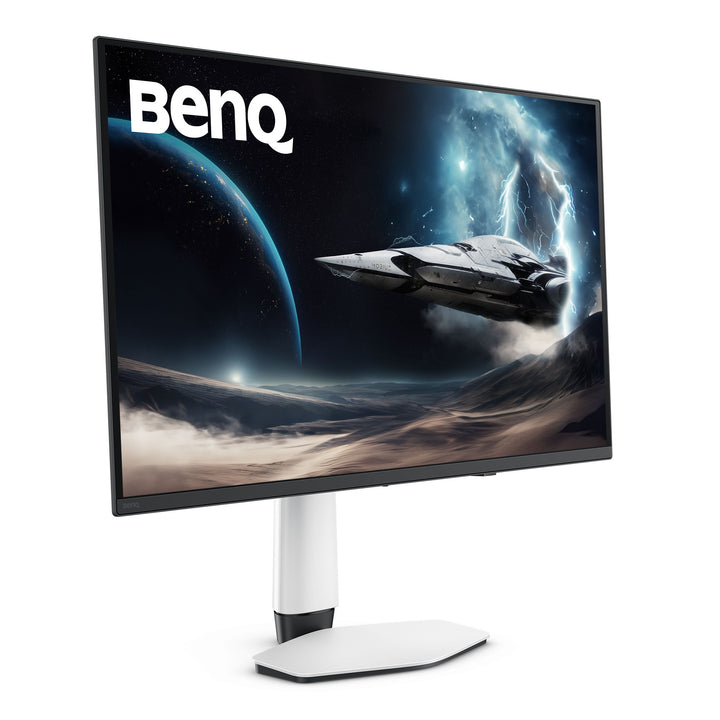


BenQ EX321UZ 31.5" 4K 240Hz MOBIUZ QD-OLED Gaming Monitor
PRODUCT DESCRIPTION
BenQ EX321UZ 31.5" 4K 240Hz MOBIUZ QD-OLED Gaming Monitor (EX321UZ) - 3 Year Local Warranty
31.5-Inch 4K QD-OLED at 140 PPI — The Flagship MOBIUZ Panel
The EX321UZ puts a 31.5-inch QD-OLED panel at 3840x2160, giving 140 pixels per inch across a desk-filling 16:9 canvas. Native contrast is quoted at 1,500,000:1 with a self-emissive panel, so black is genuinely black rather than a dimmed backlight, and BenQ rates the panel at 99% DCI-P3 with 1.07 billion display colours. Peak HDR brightness reaches 1000 nits against 300 nits typical SDR, certified to VESA DisplayHDR True Black 500. For a Singapore home setup or a studio edit bay, that combination handles late-night gaming and colour-aware content review on the same screen.
240Hz and 0.03ms GtG for Competitive Play
Refresh runs to 240Hz with a 0.03ms grey-to-grey response — the pixel transition is effectively instant, which is what removes the smeared trailing edges that LCD overdrive can never fully clear. FreeSync Premium Pro keeps the panel synchronised to the frame rate so tearing and stutter do not appear when frame times wobble, and BenQ's Motion Blur Reduction is available for players who want extra clarity in fast pans. Colour Vibrance and Light Tuner let you lift shadow detail and saturation per title without leaving the game.
HDMI 2.1 with eARC, DisplayPort 2.1 and a Built-In KVM
Two HDMI 2.1 inputs are provided, one of them carrying Enhanced Audio Return Channel so the monitor can pass console and PC audio out to a soundbar or AV receiver. DisplayPort 2.1 and a 90W USB-C input with DisplayPort Alt Mode round out the video inputs, so a laptop can drive the screen and charge on one cable. The built-in KVM switch moves one keyboard and mouse between the connected machines, which is what makes a single 31.5-inch panel workable for a work laptop and a gaming desktop sharing the same desk.
OLED Longevity Engineering, Not Just an OLED Panel
BenQ backs the panel with a layered protection approach: a graphene film plus an aluminium-plated mechanism disperses heat to slow pixel ageing, a reinforced surface treatment deepens perceived blacks by cutting ambient reflections, and a 3H hardness coating raises scratch resistance. Brightness Flow analyses the scene and adjusts pixel luminance in real time instead of using the abrupt automatic brightness limiting that makes some OLEDs flicker. Pixel Refresh, Pixel Shift, Idle Dimmer and Logo Dimming work in the background against static-image wear.
BenQ EX321UZ Datasheet — Technical Specifications
General
| Product | BenQ MOBIUZ EX321UZ 31.5" 4K QD-OLED Gaming Monitor |
| Part Number (SKU) | EX321UZ |
| Series | BenQ MOBIUZ (gaming) |
| Panel Type | OLED (QD-OLED) |
| Screen Size | 31.5 inch |
| Local Warranty (Singapore) | 3 Year Local Warranty — supplied by SourceIT with GST invoice |
Display
| Resolution (max.) | 3840 x 2160 |
| Pixel Density | 140 PPI |
| Aspect Ratio | 16:9 |
| Refresh Rate | 240 Hz |
| Response Time (GtG) | 0.03 ms |
| Brightness (typ.) | 300 nits |
| Brightness (peak, HDR) | 1000 nits |
| HDR | VESA DisplayHDR True Black 500 |
| Native Contrast | 1,500,000:1 |
| Colour Gamut | 99% DCI-P3 |
| Display Colours | 1.07 billion colours |
| Viewing Angle | 178° / 178° (CR>=10) |
| Screen Coating | Glare |
| Gamma | 1.8 - 2.6 |
| HDCP | 2.3 |
Gaming & Picture Features
| Adaptive Sync | FreeSync Premium Pro |
| Motion Blur Reduction | Yes |
| Colour Vibrance | Yes |
| Light Tuner | Yes |
| Factory Calibration Report | Yes |
| KVM Switch | Yes |
| Firmware Update by USB | Yes |
| Software | Colour Shuttle, Display QuicKit |
Audio
| Headphone Jack | Yes |
| Audio Return | HDMI 2.1 eARC |
Connectivity
| HDMI 2.1 (eARC) | 1 |
| HDMI 2.1 | 1 |
| DisplayPort 2.1 | 1 |
| USB-C (90W Power Delivery, DisplayPort Alt Mode, Data) | 1 |
| USB Type-C Upstream (USB 3.2 Gen 1, 5 Gbps, data only) | 1 |
| USB Type-A Downstream (USB 3.2 Gen 1, 5 Gbps, 4.5W charging) | 2 |
| USB Type-C Downstream (USB 3.2 Gen 1, 5 Gbps, 7.5W charging) | 1 |
Eye Care & Certification
| Flicker-free Technology | Yes |
| Low Blue Light | Yes |
| Colour Weakness Mode | Yes |
| TUV Certificate | Flicker-free, Low Blue Light (hardware solution) |
Physical
| Tilt (down/up) | -5° - 15° |
| Swivel (left/right) | 15° / 15° |
| Height Adjustment | 100 mm |
| Dimensions (HxWxD) | 598.14 x 718.88 x 223.48 mm |
| Dimensions (HxWxD, without base) | 418.14 x 718.88 x 82.93 mm |
| Net Weight | 8.29 kg (5.99 kg without base) |
| VESA Wall Mount | 100 x 100 mm |
Power
| Voltage Rating | 100 - 240 V |
| Power Supply | Built-in |
| Power Consumption (normal) | 45 W |
| Power Consumption (max) | 300 W |
| Power Consumption (sleep) | <0.5 W |
| USB-C Power Delivery | 90 W |
Specifications are taken from BenQ's published product data for this model. Where BenQ does not publish a figure for this exact model it has been left out rather than estimated.
Compatibility & Installation
Mounting
The supplied stand tilts -5° to 15°, swivels 15° each way and offers 100 mm of height adjustment. For arm or wall mounting the rear carries a 100 x 100 mm VESA pattern; the panel weighs 5.99 kg without the base, which is well within the range of a standard single-monitor gas-spring arm. BenQ notes the stand is shaped to sit a soundbar in front of the panel.
What it connects to
Two HDMI 2.1 ports (one with eARC), one DisplayPort 2.1 and one USB-C with DisplayPort Alt Mode and 90W Power Delivery. A PlayStation 5 or Xbox Series X drives 4K at high refresh over HDMI 2.1; a desktop GPU is best on DisplayPort 2.1; a USB-C laptop runs video, data and 90W charging on a single cable. Three downstream USB ports (two Type-A, one Type-C) and a headphone jack are on the monitor itself.
KVM and multi-machine desks
The built-in KVM switch lets one keyboard and mouse plugged into the monitor's downstream USB ports control whichever connected computer is on screen. Pair the USB-C input with the USB Type-C upstream port to bring a second machine into the switch.
Console audio
The eARC-equipped HDMI 2.1 port sends audio from the monitor back out to a soundbar or AV receiver, so console audio does not have to be split out separately. BenQ also supplies a remote control with this model, and the MOBIUZ console feature set covers Auto Low Latency Mode, Variable Refresh Rate and Consumer Electronics Control.
Software
Colour Shuttle provides game-specific colour profiles and Display QuicKit handles on-screen settings from the desktop. Firmware can be updated over USB from the monitor itself.
Package Contents & BenQ MOBIUZ Range
In the box
- BenQ EX321UZ monitor and stand
- Remote control
- DisplayPort 2.1 cable and HDMI 2.1 cable (may vary by region)
- Cleaning cloth
- Quick start guide, calibration report and safety instruction sheet
Package contents follow BenQ's product data for this model; items not listed by BenQ are not claimed here.
BenQ MOBIUZ and EX gaming range
| Model | Size |
| EX240 | 23.8" |
| EX240N | 23.8" |
| EX2510S | 24.5" |
| EX251 | 24.5" |
| EX2710S | 27" |
| EX2710Q | 27" |
| EX270M | 27" |
| EX270QM | 27" |
| EX271Q | 27" |
| EX271U | 27" |
| EX271QZ | 26.5" QD-OLED |
| EX271UZ | 26.5" QD-OLED |
| EX2710U | 27" |
| EX321UZ (this listing) | 31.5" QD-OLED |
| EX480UZ | 48" |
BenQ EW premium entertainment range
| Model | Size |
| EW2790U | 27" |
| EW2880U | 28" |
| EW3270U | 31.5" |
| EW3290U | 31.5" |
| EW3280U | 32" |
Datasheet & Downloads
SourceIT can email the current BenQ data sheet revision for the EX321UZ on request with a quotation.
Frequently Asked Questions — BenQ EX321UZ
What does the Z at the end of EX321UZ mean?
In the current MOBIUZ naming, the Z suffix marks the QD-OLED models. The EX321UZ, EX271UZ and EX271QZ all use self-emissive QD-OLED panels; MOBIUZ models without the Z, such as the EX271U and EX271Q, use LCD panels with an LED backlight. The practical differences are contrast, pixel response and how the screen behaves in a bright room.
How is this different from the 27-inch EX271UZ?
Both are 4K QD-OLED at 240Hz with 0.03ms response. The EX271UZ packs the same 3840x2160 into 26.5 inches for 166 PPI and is rated DisplayHDR True Black 400 with 250 nits typical. The EX321UZ spreads it across 31.5 inches at 140 PPI, is rated True Black 500 at 300 nits typical, and carries DisplayPort 2.1 rather than 1.4. Choose on desk depth and how large you want the image.
Should I worry about OLED burn-in?
BenQ ships a layered protection set on this model: Pixel Refresh, Pixel Shift, Idle Dimmer and Logo Dimming all reduce static-image stress, and a graphene film with an aluminium-plated mechanism disperses heat to slow pixel ageing. Brightness Flow stabilises luminance per scene instead of using abrupt automatic brightness limiting. Normal mixed use — games, video, desktop work — is what the panel is designed for.
Does it work well in a bright room?
The EX321UZ has a glare (glossy) screen coating, which is what gives QD-OLED its depth of black and colour purity, but it does reflect a lamp or window behind you more than a matte panel would. BenQ's reinforced surface treatment reduces that reflection and deepens perceived blacks. Typical SDR brightness is 300 nits with 1000 nits peak in HDR. If your desk faces a bright window all day, a matte LCD such as the EX271U may suit the room better.
Does it have built-in speakers?
BenQ does not list built-in speakers for the EX321UZ. It provides a headphone jack, and the HDMI 2.1 eARC port sends audio out to a soundbar or AV receiver. The stand is shaped so a soundbar can sit in front of the panel.
Will it run a PlayStation 5 or Xbox Series X properly?
Yes. Both HDMI ports are HDMI 2.1, and the MOBIUZ console feature set includes Auto Low Latency Mode, Variable Refresh Rate, Consumer Electronics Control and eARC. A remote control is supplied in the box.
What is the KVM switch for?
It shares one keyboard and mouse across two connected computers. Plug the peripherals into the monitor's downstream USB ports, connect one machine over USB-C and the other over the USB Type-C upstream port, and switch inputs to move control between them — useful if a work laptop and a gaming desktop share the desk.
Does it come with a Singapore warranty and a GST invoice?
Yes. BenQ Singapore carries a 3 year local warranty on this monitor, and every unit sold by SourceIT is supplied with a GST invoice.