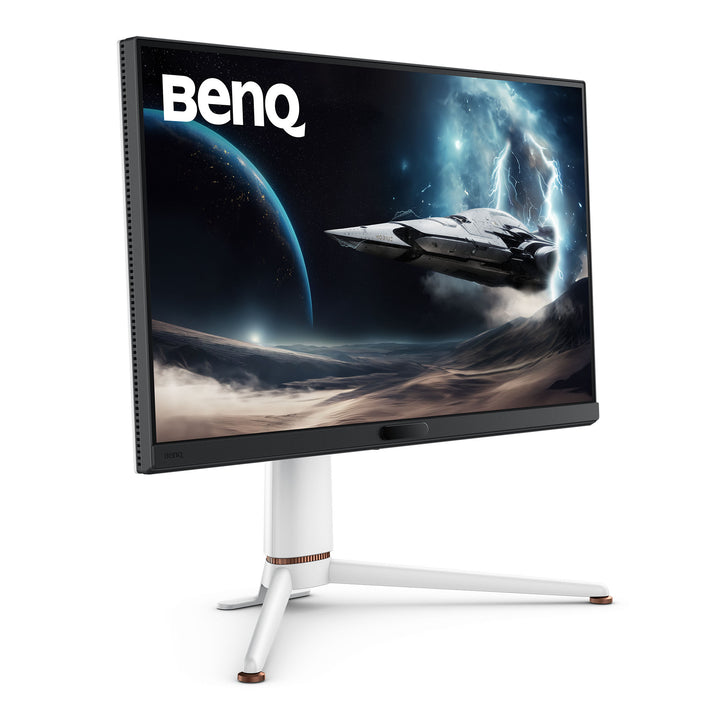


BenQ EX271Q 27" QHD 180Hz MOBIUZ Gaming Monitor
PRODUCT DESCRIPTION
BenQ EX271Q 27" QHD 180Hz MOBIUZ Gaming Monitor (EX271Q) - 3 Year Local Warranty
QHD at 27 Inches — The Resolution a Mid-Range GPU Can Actually Feed
The EX271Q runs 2560 x 1440 on a 27-inch IPS panel with an LED backlight, which lands at 108 pixels per inch — a comfortable reading size at desk distance without needing display scaling. Refresh reaches 180Hz over DisplayPort and 144Hz over HDMI, with a 1ms grey-to-grey response and AMA overdrive. For a buyer whose graphics card is strong but not flagship, QHD is where high frame rates stay reachable in modern titles instead of being a specification on paper.
DisplayHDR 400 with HDRi and 95% DCI-P3
Brightness is rated 350 nits typical with 400 nits peak in HDR, certified to VESA DisplayHDR 400 and accepting HDR10. Colour coverage is 95% DCI-P3 across 1.07 billion display colours. BenQ's HDRi combines HDR tone mapping with ambient light sensing from Brightness Intelligence Plus Gen2 so the picture responds to the room rather than applying one fixed curve, and Light Tuner and Colour Vibrance lift shadow detail and saturation per title from the supplied remote.
USB-C with 65W Charging and a Built-In KVM
Two HDMI 2.0 ports and one DisplayPort 1.4 handle consoles and a desktop GPU, while the USB-C input carries DisplayPort Alt Mode with 65W Power Delivery — a work laptop runs video, data and charging on one cable. The built-in KVM switch then shares a single keyboard and mouse between that laptop and the desktop, which is what turns a gaming monitor into the only screen a home office needs. Two downstream USB Type-A ports sit on the panel for peripherals.
Full Ergonomics, Portrait Pivot and All-Day Eye Care
The stand tilts, swivels 15 degrees each way, pivots a full 90 degrees into portrait and gives 100 mm of height adjustment, with a 100 x 100 mm VESA pattern for an arm. The matte screen coating keeps reflections down under overhead office lighting. Flicker-free operation, Low Blue Light and a Colour Weakness mode carry TUV certification, Brightness Intelligence Plus Gen2 tracks room light, and the monitor is EPEAT registered.
BenQ EX271Q Datasheet — Technical Specifications
General
| Product | BenQ MOBIUZ EX271Q 27" QHD Gaming Monitor |
| Part Number (SKU) | EX271Q |
| Series | BenQ MOBIUZ (gaming) |
| Panel Type | IPS, LED backlight |
| Screen Size | 27 inch |
| Local Warranty (Singapore) | 3 Year Local Warranty — supplied by SourceIT with GST invoice |
Display
| Resolution (max.) | 2560 x 1440 |
| Pixel Density | 108 PPI |
| Aspect Ratio | 16:9 |
| Refresh Rate | 180 Hz (DisplayPort), 144 Hz (HDMI) |
| Response Time (GtG) | 1 ms |
| Brightness (typ.) | 350 nits |
| Brightness (peak, HDR) | 400 nits |
| HDR | HDR10, VESA DisplayHDR 400 |
| Native Contrast | 1000:1 |
| Colour Gamut | 95% DCI-P3 |
| Display Colours | 1.07 billion colours |
| Viewing Angle | 178° / 178° (CR>=10) |
| Screen Coating | Matte |
| Gamma | 1.8 - 2.6 |
| HDCP | 2.2 |
| AMA (overdrive) | Yes |
Gaming & Picture Features
| Adaptive Sync | FreeSync Premium |
| Motion Blur Reduction | Yes |
| HDRi | Yes |
| Light Tuner | Yes |
| Colour Vibrance | Yes |
| KVM Switch | Yes |
| Video Format Support | Yes |
| Software | Colour Shuttle, Display QuicKit |
Audio
| Headphone Jack | Yes |
Connectivity
| HDMI 2.0 | 2 |
| DisplayPort 1.4 | 1 |
| USB-C (65W Power Delivery, DisplayPort Alt Mode, Data) | 1 |
| USB Type-C Upstream (USB 3.2 Gen 1, 5 Gbps, data only) | 1 |
| USB Type-A Downstream (USB 3.2 Gen 1, 5 Gbps, 4.5W charging) | 2 |
Eye Care & Certification
| Flicker-free Technology | Yes |
| Low Blue Light | Yes |
| Brightness Intelligence Plus Gen2 | Yes |
| Colour Weakness Mode | Yes |
| TUV Certificate | Low Blue Light (hardware solution) |
| EPEAT | Yes |
Physical
| Tilt (down/up) | -5° - 15° |
| Swivel (left/right) | 15° / 15° |
| Pivot | 90° |
| Height Adjustment | 100 mm |
| Dimensions (HxWxD, landscape) | 545.4 x 613.8 x 276.8 mm |
| VESA Wall Mount | 100 x 100 mm |
Power
| Voltage Rating | 100 - 240 V |
| Power Supply | Built-in |
| Power Consumption (normal) | 23.5 W |
| Power Consumption (max) | 170 W |
| Power Consumption (sleep) | <0.5 W |
| USB-C Power Delivery | 65 W |
Specifications are taken from BenQ's published product data for this model. Where BenQ does not publish a figure for this exact model it has been left out rather than estimated.
Compatibility & Installation
Mounting and orientation
The stand tilts -5° to 15°, swivels 15° each way, pivots 90° into portrait and offers 100 mm of height adjustment. The rear carries a 100 x 100 mm VESA pattern for a monitor arm or wall bracket — useful where two of these sit side by side on a compact desk.
What it connects to
Two HDMI 2.0 inputs, one DisplayPort 1.4 and one USB-C with DisplayPort Alt Mode and 65W Power Delivery. Use DisplayPort for the full 180Hz; HDMI tops out at 144Hz on this model. Two downstream USB Type-A ports and a headphone jack are on the monitor, and a USB Type-C upstream port brings a second machine into the hub.
KVM across two machines
The built-in KVM switch shares one keyboard and mouse between the USB-C connected laptop and a second computer on the USB Type-C upstream port. Switching video input moves the peripherals with it.
Audio
BenQ does not list built-in speakers for the EX271Q, and this model does not carry eARC. A headphone jack is provided on the panel, and a remote control is supplied in the box.
Software and scenarios
MOBIUZ Scenarios bundle colour, audio and eye-care settings into recallable profiles. Colour Shuttle supplies game-specific colour profiles and Display QuicKit brings monitor settings onto the desktop.
Package Contents & BenQ MOBIUZ Range
In the box
- BenQ EX271Q monitor and stand
- Remote control
- HDMI 2.0, USB 3.2 and USB-C cables (may vary by region)
- Quick start guide and warranty card
Package contents follow BenQ's product data for this model; items not listed by BenQ are not claimed here.
BenQ MOBIUZ and EX gaming range
| Model | Size |
| EX240 | 23.8" |
| EX240N | 23.8" |
| EX2510S | 24.5" |
| EX251 | 24.5" |
| EX2710S | 27" |
| EX2710Q | 27" |
| EX270M | 27" |
| EX270QM | 27" |
| EX271Q (this listing) | 27" |
| EX271U | 27" |
| EX271QZ | 26.5" QD-OLED |
| EX271UZ | 26.5" QD-OLED |
| EX2710U | 27" |
| EX321UZ | 31.5" QD-OLED |
| EX480UZ | 48" |
BenQ EW premium entertainment range
| Model | Size |
| EW2790U | 27" |
| EW2880U | 28" |
| EW3270U | 31.5" |
| EW3290U | 31.5" |
| EW3280U | 32" |
Datasheet & Downloads
SourceIT can email the current BenQ data sheet revision for the EX271Q on request with a quotation.
Frequently Asked Questions — BenQ EX271Q
Is it 180Hz on every input?
No. BenQ lists 180Hz over DisplayPort and 144Hz over HDMI for this model. Use the DisplayPort 1.4 input with a desktop GPU to reach the full refresh; HDMI 2.0 is the right port for a console.
What does the Q in EX271Q mean, and what would the Z add?
Q denotes the QHD (2560 x 1440) resolution; U models such as the EX271U are 4K. A Z suffix marks the QD-OLED panels. The EX271QZ is the QD-OLED counterpart at the same resolution: 1,500,000:1 contrast against this model's 1000:1, 0.03ms against 1ms, and 500Hz against 180Hz — at a considerably higher price, with a glossy screen instead of this matte one.
Does it have built-in speakers?
BenQ does not list built-in speakers for the EX271Q. A headphone jack is fitted on the panel. This model also does not carry eARC — if you want the monitor to pass console audio out to a soundbar, the EX271U does.
Can it charge my laptop?
Yes. The USB-C input supplies 65W Power Delivery alongside DisplayPort Alt Mode and data, so most thin-and-light laptops run and charge on a single cable while the monitor also hosts the keyboard and mouse.
What is the KVM switch for?
It shares one keyboard and mouse between two connected computers. Plug the peripherals into the monitor's downstream USB ports, connect one machine on USB-C and the other through the USB Type-C upstream port, then change input to move control.
Can I mount it in portrait?
Yes. The supplied stand pivots 90°, and also tilts, swivels and offers 100 mm of height adjustment. A 100 x 100 mm VESA pattern takes a standard arm.
Is it suitable for work as well as gaming?
Yes, and that is largely what the USB-C, KVM and portrait pivot are for. Brightness Intelligence Plus Gen2, Low Blue Light, flicker-free operation and a matte coating make it workable through a full day, and the panel is EPEAT registered.
Does it come with a Singapore warranty and a GST invoice?
Yes. BenQ Singapore carries a 3 year local warranty on this monitor, and every unit sold by SourceIT is supplied with a GST invoice.