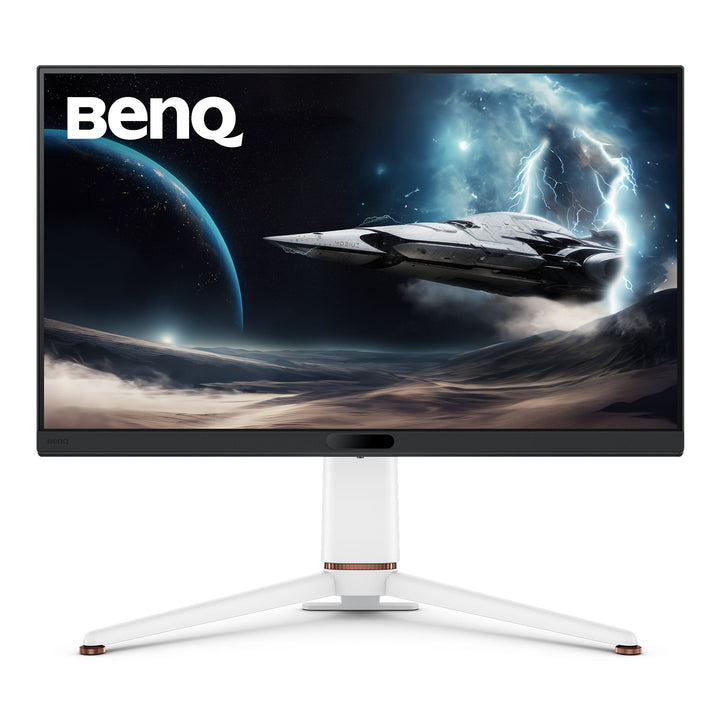


BenQ EX271U 27" 4K 165Hz MOBIUZ Gaming Monitor
PRODUCT DESCRIPTION
BenQ EX271U 27" 4K 165Hz MOBIUZ Gaming Monitor (EX271U) - 3 Year Local Warranty
27-Inch 4K IPS at 165Hz with a 400-Nit Matte Panel
The EX271U runs 3840 x 2160 on a 27-inch IPS panel with an LED backlight, giving 163 pixels per inch at 165Hz and a 1ms grey-to-grey response. Brightness is rated 400 nits with HDR10 and VESA DisplayHDR 400 certification, and the screen uses a matte coating — the practical advantage over a glossy OLED in a bright Singapore flat or an office with overhead lighting. Colour coverage is 95% DCI-P3 across 1.07 billion display colours, and every unit ships with a factory calibration report.
BenQ Picture Processing: HDRi, Light Tuner and Colour Vibrance
BenQ's detail-driven picture processing runs on top of the panel: HDRi blends HDR tone mapping with ambient light sensing so highlights stay bright without crushing shadow detail, Light Tuner lifts dark areas to reveal what is hiding in shadow, and Colour Vibrance adjusts saturation per title. Brightness Intelligence Plus Gen2 tracks room lighting and colour temperature. Motion Blur Reduction and FreeSync Premium keep motion clean and tear-free, and Colour Shuttle supplies game-specific colour profiles.
BenQ's eARC Gaming Monitor with a Built-In DAC
Three HDMI 2.1 inputs are fitted, one of them with Enhanced Audio Return Channel supporting up to 7.1 channels so console audio can pass back out to a soundbar or AV receiver. A built-in DAC improves headphone output through the monitor's own jack. DisplayPort 1.4 handles a desktop GPU, and the USB-C input provides DisplayPort Alt Mode with 65W Power Delivery — enough to run and charge most thin-and-light laptops on one cable.
KVM, Full Ergonomics and Pivot for a Working Desk
The built-in KVM switch shares one keyboard and mouse across two connected computers, so a work laptop on USB-C and a gaming desktop on DisplayPort can live on the same screen. The stand tilts, swivels, pivots a full 90 degrees into portrait and offers 100 mm of height adjustment; there are three downstream USB Type-A ports and one USB Type-C for peripherals. MOBIUZ Scenarios bundle colour, audio and eye-care settings so one keypress moves the monitor from a work profile to a game profile.
BenQ EX271U Datasheet — Technical Specifications
General
| Product | BenQ MOBIUZ EX271U 27" 4K Gaming Monitor |
| Part Number (SKU) | EX271U |
| Series | BenQ MOBIUZ (gaming) |
| Panel Type | IPS, LED backlight |
| Screen Size | 27 inch |
| Local Warranty (Singapore) | 3 Year Local Warranty — supplied by SourceIT with GST invoice |
Display
| Resolution (max.) | 3840 x 2160 |
| Pixel Density | 163 PPI |
| Aspect Ratio | 16:9 |
| Refresh Rate | 165 Hz |
| Response Time (GtG) | 1 ms |
| Brightness (typ.) | 400 nits |
| Brightness (peak, HDR) | 400 nits |
| HDR | HDR10, VESA DisplayHDR 400 |
| Native Contrast | 1200:1 |
| Colour Gamut | 95% DCI-P3 |
| Display Colours | 1.07 billion colours |
| Viewing Angle | 178° / 178° (CR>=10) |
| Screen Coating | Matte |
| Gamma | 1.8 - 2.6 |
| HDCP | 2.3 |
| AMA (overdrive) | Yes |
Gaming & Picture Features
| Adaptive Sync | FreeSync Premium |
| Motion Blur Reduction | Yes |
| HDRi | Yes |
| Light Tuner | Yes |
| Colour Vibrance | Yes |
| Factory Calibration Report | Yes |
| KVM Switch | Yes |
| Video Format Support | Yes |
| Software | Colour Shuttle, Display QuicKit |
Audio
| Headphone Jack | Yes (built-in DAC) |
| Audio Return | HDMI 2.1 eARC, up to 7.1 channels |
Connectivity
| HDMI 2.1 (eARC) | 1 |
| HDMI 2.1 | 2 |
| DisplayPort 1.4 | 1 |
| USB-C (65W Power Delivery, DisplayPort Alt Mode, Data) | 1 |
| USB Type-C Upstream (USB 3.2 Gen 1, 5 Gbps, data only) | 1 |
| USB Type-A Downstream (USB 3.2 Gen 1, 5 Gbps, 4.5W charging) | 3 |
| USB Type-C Downstream (USB 3.2 Gen 1, 5 Gbps, 7.5W charging) | 1 |
Eye Care & Certification
| Flicker-free Technology | Yes |
| Low Blue Light | Yes |
| Brightness Intelligence Plus Gen2 | Yes |
| Colour Weakness Mode | Yes |
| TUV Certificate | Flicker-free, Low Blue Light (hardware solution) |
| EPEAT | Yes |
Physical
| Tilt (down/up) | -5° - 15° |
| Swivel (left/right) | 15° / 15° |
| Pivot | 90° |
| Height Adjustment | 100 mm |
| Dimensions (HxWxD, landscape) | 545.4 x 613.8 x 276.8 mm |
| VESA Wall Mount | 100 x 100 mm |
Power
| Voltage Rating | 100 - 240 V |
| Power Supply | Built-in |
| Power Consumption (normal) | 32 W |
| Power Consumption (max) | 180 W |
| Power Consumption (sleep) | <0.5 W |
| USB-C Power Delivery | 65 W |
Specifications are taken from BenQ's published product data for this model. Where BenQ does not publish a figure for this exact model it has been left out rather than estimated.
Compatibility & Installation
Mounting and orientation
The supplied stand tilts -5° to 15°, swivels 15° each way, pivots 90° into portrait and gives 100 mm of height adjustment — portrait is genuinely useful for code, long documents and chat panels alongside a second screen. The rear carries a 100 x 100 mm VESA pattern for an arm or wall bracket.
What it connects to
Three HDMI 2.1 ports (one with eARC), one DisplayPort 1.4 and one USB-C with DisplayPort Alt Mode and 65W Power Delivery. A PlayStation 5 or Xbox Series X runs over HDMI 2.1; a desktop GPU is best on DisplayPort; a USB-C laptop gets video, data and charging on one cable. Downstream there are three USB Type-A ports and one USB Type-C port.
KVM across two machines
Plug a keyboard and mouse into the monitor's downstream USB ports and the built-in KVM switch passes them to whichever connected computer is on screen. Connect the second machine through the USB Type-C upstream port.
Audio
BenQ does not list built-in speakers for the EX271U. The eARC-capable HDMI 2.1 port supports up to 7.1 channels out to a soundbar or AV receiver, and the headphone jack is fed by a built-in DAC. A remote control is supplied in the box.
Software and scenarios
MOBIUZ Scenarios bundle colour, audio and eye-care settings into recallable profiles. Colour Shuttle supplies game-specific colour profiles and Display QuicKit brings settings onto the desktop.
Package Contents & BenQ MOBIUZ Range
In the box
- BenQ EX271U monitor and stand
- Remote control
- HDMI 2.1, USB 3.2 and USB-C cables (may vary by region)
- Quick start guide, warranty card and calibration report
Package contents follow BenQ's product data for this model; items not listed by BenQ are not claimed here.
BenQ MOBIUZ and EX gaming range
| Model | Size |
| EX240 | 23.8" |
| EX240N | 23.8" |
| EX2510S | 24.5" |
| EX251 | 24.5" |
| EX2710S | 27" |
| EX2710Q | 27" |
| EX270M | 27" |
| EX270QM | 27" |
| EX271Q | 27" |
| EX271U (this listing) | 27" |
| EX271QZ | 26.5" QD-OLED |
| EX271UZ | 26.5" QD-OLED |
| EX2710U | 27" |
| EX321UZ | 31.5" QD-OLED |
| EX480UZ | 48" |
BenQ EW premium entertainment range
| Model | Size |
| EW2790U | 27" |
| EW2880U | 28" |
| EW3270U | 31.5" |
| EW3290U | 31.5" |
| EW3280U | 32" |
Datasheet & Downloads
SourceIT can email the current BenQ data sheet revision for the EX271U on request with a quotation.
Frequently Asked Questions — BenQ EX271U
How is the EX271U different from the EX271UZ?
The Z suffix marks the QD-OLED models. The EX271U is an IPS LCD with an LED backlight — 1200:1 native contrast, 1ms GtG, 165Hz, 95% DCI-P3, matte coating, 400 nits. The EX271UZ is self-emissive QD-OLED — 1,500,000:1 contrast, 0.03ms GtG, 240Hz, 99% DCI-P3, glossy coating, 250 nits typical. Same resolution, different panels; they are not variations of one screen.
Which one suits a bright room better?
The EX271U. Its matte coating scatters reflections from windows and overhead lighting, and 400 nits is a higher SDR brightness than the OLED's 250 nits. The OLED wins decisively in a dim room, where its true blacks show; in a sunlit Singapore flat the matte LCD is often the more comfortable screen.
What is HDRi and how is it different from plain HDR?
HDRi is BenQ's own processing layer. It combines HDR tone mapping with the ambient light sensing of Brightness Intelligence Plus Gen2, so the picture adapts to the room rather than applying one fixed curve. The panel itself is certified to VESA DisplayHDR 400 and accepts HDR10.
Does it have built-in speakers?
BenQ does not list built-in speakers for the EX271U. It has a headphone jack fed by a built-in DAC, and the HDMI 2.1 eARC port passes up to 7.1 channels of audio out to a soundbar or AV receiver.
Can one keyboard and mouse drive two computers?
Yes, through the built-in KVM switch. Connect one machine on USB-C and the other through the USB Type-C upstream port, plug the peripherals into the monitor, and switching input moves control with the picture.
Can I use it in portrait?
Yes, the stand pivots a full 90° and also tilts, swivels and adjusts 100 mm in height. The 100 x 100 mm VESA pattern takes a standard arm if you would rather mount it.
How does it compare with the QHD EX271Q?
The EX271Q is the same 27-inch size at 2560 x 1440 with a 180Hz ceiling on DisplayPort, HDMI 2.0 inputs and no eARC. The EX271U steps up to 4K, HDMI 2.1 throughout, eARC and a calibration report. Pick on whether your GPU is happier feeding QHD or 4K.
Does it come with a Singapore warranty and a GST invoice?
Yes. BenQ Singapore carries a 3 year local warranty on this monitor, and every unit sold by SourceIT is supplied with a GST invoice.