
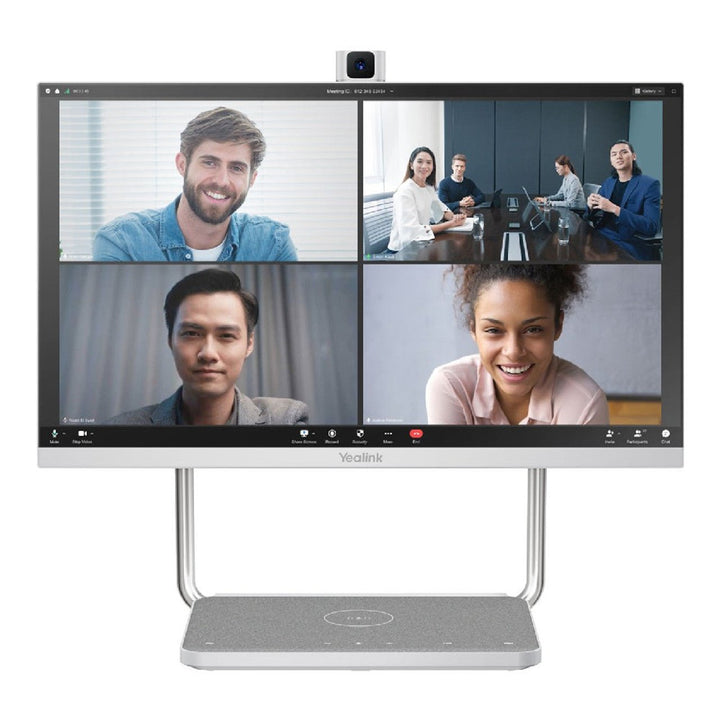


Yealink A24 DeskVision All-in-one Collaboration Display
Email sales@sourceit.com.sg or use Request for Quotation below and our team will confirm the latest price, availability and lead time.
PRODUCT DESCRIPTION
Yealink A24 DeskVision All-in-one Collaboration Display (1303161) - 2 Years Local Warranty
All-in-one 23.8" Touch Collaboration Display for the Personal Workspace
The Yealink DeskVision A24 packs a 23.8-inch Full HD (1920 x 1080) display with 10-point multi-touch, a retractable Full HD camera, dual microphones and top-firing stereo speakers into a single all-in-one desktop device. There is nothing extra to mount or cable up — an ideal fit for executive desks, home offices and focus rooms in Singapore's hybrid work setups, where every centimetre of desk space counts.
Dual-Mode: Teams Collaboration Device and PC Monitor in One
Running Android 10 with Yealink's dual-mode integration, the A24 works as a Microsoft Teams Display with a dedicated Teams button, and switches to PC Monitor Mode when you plug in your laptop. Yealink also offers the DeskVision A24 as a Zoom Rooms desktop collaboration appliance, so the same hardware slots into either UC ecosystem. One device covers calls, meetings and day-to-day desktop work.
Full HD Video and Noise-Cancelling Audio, Built In
The built-in 8-megapixel camera delivers video calls up to 1080p30 with an 83° field of view, and retracts automatically (or manually) into the chassis for physical privacy when not in use. Dual built-in microphones with Yealink's Intelligent Noise Cancellation Technology keep your voice clear in open-plan offices, while twin 3W top speakers handle the far end — no separate speakerphone or headset required.
USB-C Docking Station with 45W Power Delivery and Qi Charging
One USB-C cable connects your laptop for video, audio, touch and data while charging it with USB Power Delivery up to 45W. The A24 doubles as a docking hub with a USB-C 3.0 downstream port, two USB-A 3.0 ports, a USB-A 2.0 port, HDMI input and an RJ-45 Ethernet port — plus a built-in Qi wireless charging pad for your phone. Perfect for hot-desking: sit down, plug in one cable, and start working.
Why Buy the Yealink A24 DeskVision from SourceIT Singapore
SourceIT is a Singapore-based supplier of Yealink collaboration devices. Every A24 DeskVision (Part No. 1303161) ships with 2 years local Singapore warranty, a GST invoice, and local pre-sales advice to match the right personal collaboration device to your workspace.
Yealink A24 DeskVision Datasheet — Technical Specifications
| Model | Yealink DeskVision A24 All-in-one Collaboration Display |
| Part Number | 1303161 |
| Operating System | Android 10.0, dual-mode (Teams Display / PC Monitor Mode) |
| Warranty | 2 Years Local Warranty (Singapore) |
| Display Size | 23.8 inch |
| Resolution | 1920 x 1080 (Full HD), 60 Hz refresh rate |
| Touch | 10-point multi-touch |
| Contrast Ratio | 1000:1 |
| Viewing Angle | 178° (horizontal and vertical) |
| Colour Depth | 8-bit |
| Camera | 8 MP sensor, video up to 1080p30 |
| Field of View | 83° |
| Privacy | Retractable camera — automatically lifted or manually controlled lift |
| Microphones | Built-in dual microphones |
| Noise Suppression | Intelligent Noise Cancellation Technology |
| Speakers | 2 x 3W top-firing stereo speakers |
| USB-C (Upstream) | 1 x USB-C 3.0 upstream port with DP-In, USB Power Delivery up to 45W |
| USB-C (Downstream) | 1 x USB-C 3.0 downstream port |
| USB-A | 2 x USB-A 3.0 downstream ports; 1 x USB-A 2.0 downstream port |
| HDMI | 1 x HDMI-In port |
| Ethernet | 1 x RJ-45 Internet port |
| Wi-Fi | 2.4 GHz / 5 GHz dual-band |
| Bluetooth | Bluetooth 4.2 |
| Wireless Charging | Built-in Qi wireless charging for mobile phones |
| Dimensions (W x D x H) | 540 x 219 x 478 mm |
| Weight | 7.904 kg (N.W., per carton); 9.346 kg (G.W., per carton) |
| Power Consumption | 19W (typical) |
| Operating Temperature | 0–40°C |
| Operating Humidity | 10–95% |
Compatibility & Software Support
Microsoft Teams: The DeskVision A24 runs as a Microsoft Teams Display (Android-based) with a dedicated Teams button, and is listed by Yealink under its Microsoft Teams personal collaboration portfolio.
Zoom: Yealink also offers the DeskVision A24 as a Zoom Rooms desktop collaboration appliance for personal spaces and mini conference rooms.
PC Monitor Mode (BYOD): Connect any laptop over USB-C (with DP-In) or HDMI to use the A24 as a Full HD touch monitor, USB docking station and UC audio/video peripheral with whatever meeting software runs on your PC.
Package Contents & A24 Ordering Information
The A24 DeskVision ships as an all-in-one unit with integrated stand, camera, microphones and speakers — no separate components to assemble. (Yealink's published datasheet does not itemise in-box accessories; contact SourceIT if you need the full carton contents confirmed before ordering.)
| Yealink A24 DeskVision All-in-one Collaboration Display | 1303161 (this product) |
| CTP25 Touch Console | Companion 10.1" touch console for Yealink meeting rooms |
| MeetingBar A25 | All-in-one Android video bar for small/medium meeting rooms |
Datasheet & Downloads
Frequently Asked Questions — Yealink A24 DeskVision
What is the Yealink A24 DeskVision and who is it for?
It is a 23.8-inch all-in-one touch collaboration display with built-in Full HD camera, dual microphones and stereo speakers. It is designed for personal spaces — executive offices, home offices, hot desks and focus/mini rooms — where one device replaces a monitor, webcam, speakerphone and docking station.
Does the A24 DeskVision support Microsoft Teams and Zoom?
Yes. The A24 runs as an Android-based Microsoft Teams Display with a dedicated Teams button, and Yealink also offers it as a Zoom Rooms desktop collaboration appliance. In PC Monitor Mode it works with any meeting platform running on your connected laptop.
How good are the camera and microphones?
The built-in camera uses an 8 MP sensor delivering video up to 1080p30 with an 83° field of view, and retracts into the body for privacy. Dual built-in microphones with Yealink's Intelligent Noise Cancellation Technology suppress background noise, and twin 3W top speakers provide the audio output.
Can the A24 charge my laptop over USB-C?
Yes. The USB-C 3.0 upstream port carries DisplayPort video plus USB Power Delivery up to 45W, so one cable drives the display, touch, camera, audio and dock ports (USB-C, 2 x USB-A 3.0, 1 x USB-A 2.0, Ethernet) while charging your laptop. There is also a built-in Qi wireless charging pad for phones.
Should I choose the A24 DeskVision or a MeetingBar with a separate monitor?
For a personal desk or a 1-2 person space, the A24's all-in-one design is simpler and tidier. For shared meeting rooms with larger displays and more participants, an Android video bar such as the Yealink MeetingBar A25 paired with a room display is the better fit.
Does the A24 DeskVision come with local warranty?
Yes. Every A24 DeskVision sold by SourceIT comes with 2 years local Singapore warranty and a GST invoice.
Yealink DeskVision A24 — Product Video
We Also Recommend


Jabra Evolve2 75 MS Stereo Wireless BT with Stand USB-C


Jabra Evolve2 75 MS Stereo Wireless BT with Stand USB-A


Jabra Evolve2 75 MS Stereo ANC Wireless BT Headset USB-C


Jabra Evolve2 75 MS Stereo ANC Wireless BT Headset USB-A