
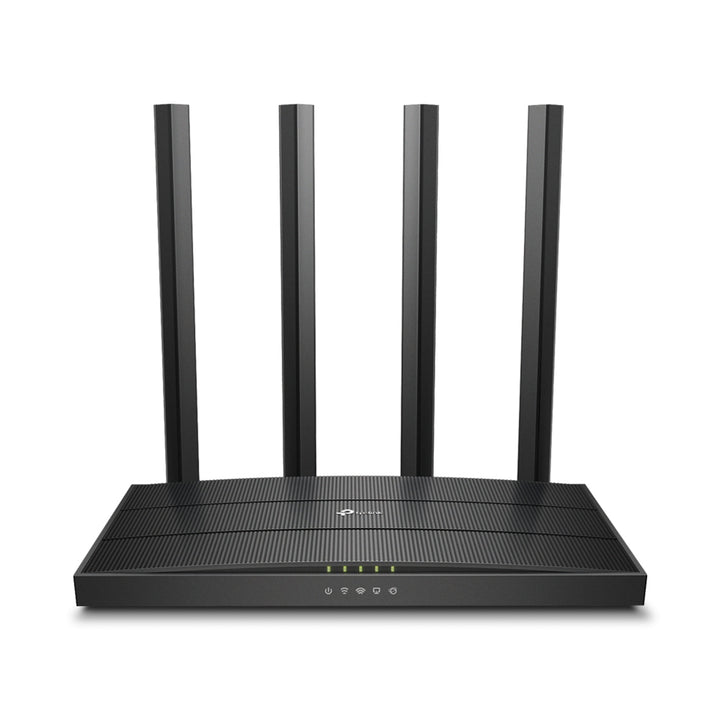


TP-Link Archer C80 AC1900 Wireless MU-MIMO Wi-Fi Router
PRODUCT DESCRIPTION
TP-Link AC1900 Wireless MU-MIMO Wi-Fi Router (Archer C80) - 3 Years Local Warranty
The Archer C80 is TP-Link's AC1900 Wi-Fi 5 router: 1300 Mbps on 5 GHz, 600 Mbps on 2.4 GHz, five Gigabit ports, a 1.2 GHz processor and four fixed antennas, with 3×3 MU-MIMO and OneMesh. It publishes WPA3 — unusual for a Wi-Fi 5 model — and suits a household on a 500 Mbps to 1 Gbps plan that does not need Wi-Fi 6.
AC1900 Speeds With 3×3 MU-MIMO
TP-Link rates the C80 at 1300 Mbps on 5 GHz using 802.11ac and 600 Mbps on 2.4 GHz using 802.11n. Its 3×3 MU-MIMO lets the router serve several MU-MIMO-capable clients at the same time rather than in sequence, and Airtime Fairness keeps a slow legacy device from holding the channel longer than it needs. MU-MIMO requires client devices that also support MU-MIMO.
Four Fixed Antennas and Beamforming
Coverage comes from four fixed high-performance antennas forming a signal-boosting array, and Beamforming that concentrates signal strength towards connected clients. TP-Link rates the result at three-bedroom houses. Working modes are Router and Access Point, so the C80 can replace an ISP-supplied router or sit behind one and take over the wireless side. The chassis measures 215 × 117 × 32 mm.
1.2 GHz Processor and Five Gigabit Ports
The C80 publishes a 1.2 GHz CPU and one Gigabit WAN port with four Gigabit LAN ports, so every wired connection runs at a full gigabit rather than the 10/100 ports found on cheaper models in the Archer C range. Buttons are WPS/Wi-Fi, power on/off and reset. TP-Link publishes no USB port for this model.
WPA3 and OneMesh on a Wi-Fi 5 Router
Published encryption is WPA, WPA2, WPA3 and WPA/WPA2-Enterprise with 802.1x — WPA3 on a Wi-Fi 5 router is worth noting if your IT policy requires it. Network security is an SPI firewall, access control, IP and MAC binding and an application layer gateway. OneMesh support means coverage can be extended with a compatible TP-Link extender rather than replacing the router. Parental controls are URL filtering and time controls, with QoS by device.
Power Rating: No Singapore Figure Published
TP-Link publishes the C80's power supply only as US Version 12 V DC, 1.5 A and EU Version 12 V DC, 1 A. No Singapore or universal figure appears on the Singapore page. Both published figures are reproduced above rather than one being chosen; confirm the adapter rating with us if it matters for your installation. TP-Link also publishes no VPN server row and no EasyMesh row for this model.
Ideal For
Singapore households that want full Gigabit wired ports, MU-MIMO, WPA3 and OneMesh headroom at Wi-Fi 5 pricing, where nothing on the network yet benefits from Wi-Fi 6. Supplied by SourceIT with local Singapore warranty and GST invoice.
Archer C80 Datasheet — Technical Specifications
General
| Model | Archer C80 |
| Official Product Name | AC1900 Wireless MU-MIMO Wi-Fi Router |
| Brand | TP-Link |
| Warranty | 3 Years Local Warranty (Singapore) |
Wireless
| Standards and Protocols | Wi-Fi 5 IEEE 802.11ac/n/a 5 GHz; IEEE 802.11n/b/g 2.4 GHz |
| Wi-Fi Speeds | AC1900 — 5 GHz: 1300 Mbps (802.11ac); 2.4 GHz: 600 Mbps (802.11n) |
| Wi-Fi Range | 3 Bedroom Houses — 4× Fixed High-Performance Antennas, Beamforming |
| Wi-Fi Capacity | Medium — Dual-Band, 3×3 MU-MIMO, Airtime Fairness |
| Working Modes | Router Mode, Access Point Mode |
Hardware
| Processor | 1.2 GHz CPU |
| Ethernet Ports | 1× Gigabit WAN Port, 4× Gigabit LAN Ports |
| USB Support | Not published — TP-Link's specification table for the Archer C80 lists no USB port |
| Buttons | WPS/Wi-Fi Button, Power On/Off Button, Reset Button |
| Power | US Version 12 V DC, 1.5 A; EU Version 12 V DC, 1 A (no Singapore figure is published) |
| Dimensions (W × D × H) | 8.5 × 4.6 × 1.26 in (215 × 117 × 32 mm) |
Security
| Network Security | SPI Firewall, Access Control, IP & MAC Binding, Application Layer Gateway |
| Guest Network | 1× 5 GHz Guest Network, 1× 2.4 GHz Guest Network |
| Wi-Fi Encryption | WPA, WPA2, WPA3, WPA/WPA2-Enterprise (802.1x) |
Software
| Protocols | IPv4, IPv6 |
| Mesh | OneMesh Supported — extends coverage without replacing existing devices |
| Parental Controls | URL Filtering, Time Controls |
| WAN Types | Dynamic IP, Static IP, PPPoE, PPTP, L2TP |
| Quality of Service | QoS by Device |
| Cloud Service | OTA Firmware Upgrade, TP-Link ID, DDNS |
| NAT Forwarding | Port Forwarding, Port Triggering, DMZ, UPnP |
| IPTV | IGMP Proxy, IGMP Snooping, Bridge, Tag VLAN |
| DHCP | Address Reservation, DHCP Client List, Server |
| DDNS | TP-Link, NO-IP, DynDNS |
| Management | Tether App, Webpage |
| Network Services Enabled by Default | Web Server (HTTP/HTTPS ports 80/443 TCP); DNS (port 53 TCP and UDP); DHCP Server (port 67 UDP); App management (port 20002 UDP); Alexa service (port 5353 UDP) |
Environment and Certification
| Certifications | FCC, CE, RoHS |
| Operating Temperature | 0°C to 40°C (32°F to 104°F) |
| Storage Temperature | -40°C to 70°C (-40°F to 158°F) |
| Operating Humidity | 10% to 90% non-condensing |
| Storage Humidity | 5% to 90% non-condensing |
| Wi-Fi Transmission Power | CE: <20 dBm (2.4 GHz), <23 dBm (5.15–5.25 GHz); FCC: <30 dBm (2.4 GHz and 5 GHz) |
TP-Link publishes no net weight, no USB row, no VPN server row and no EasyMesh row for the Archer C80. Those rows are left out rather than taken from another model.
Compatibility & Software Support
| Management App | TP-Link Tether (iOS and Android) |
| Web Management | Supported via browser |
| TP-Link Cloud | TP-Link ID, OTA firmware upgrade, DDNS |
| Mesh Compatibility | OneMesh — requires compatible TP-Link OneMesh products |
| Client Requirements | Internet Explorer 11+, Firefox 12.0+, Chrome 20.0+, Safari 4.0+, or another JavaScript-enabled browser |
| Internet Requirements | Cable or DSL modem if required by your plan, plus a subscription with an internet service provider |
Use of MU-MIMO requires client devices that also support MU-MIMO.
Package Contents & Ordering Information
Package Contents
| In the Box | Wi-Fi Router Archer C80, Power Adapter, RJ45 Ethernet Cable, Quick Installation Guide |
Ordering Information
| Model | Archer C80 |
| SKU | C80 |
| Warranty | 3 Years Local Warranty (Singapore) |
Datasheet & Downloads
Frequently Asked Questions — Archer C80
Does the Archer C80 support WPA3?
Yes. TP-Link publishes WPA, WPA2, WPA3 and WPA/WPA2-Enterprise (802.1x) for this model, which is uncommon on a Wi-Fi 5 router.
Are the ports Gigabit?
Yes — one Gigabit WAN port and four Gigabit LAN ports. The cheaper Archer C50 and C24 publish 10/100 Mbps ports instead.
Can I extend its coverage?
Yes. The C80 publishes OneMesh support, so a compatible TP-Link OneMesh range extender can join it as a single network under one Wi-Fi name.
What warranty does SourceIT provide?
Three years local Singapore warranty, under TP-Link's published replacement warranty terms. Every unit is supplied with a GST invoice.
Can SourceIT quote this for an office or a project?
Yes. Send us the quantity and we will quote with local warranty, delivery and support.


