

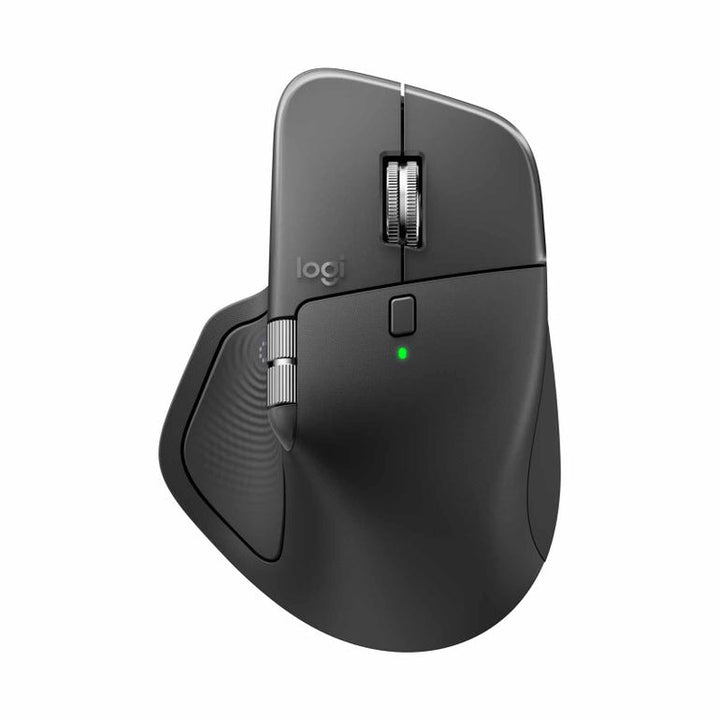


Logitech MX Master 4 Wireless Mouse Graphite
PRODUCT DESCRIPTION
Logitech MX Master 4 Wireless Mouse Graphite (910-007565) - 1 Year Local Warranty
Premium Wireless Mouse for Advanced Productivity
Logitech MX Master 4 Wireless Mouse Graphite (910-007565) is a high-performance wireless mouse designed for professionals, creators, and multitaskers who require precision, comfort, and intelligent workflow controls. It combines ergonomic design with advanced navigation features to enhance productivity across work and creative applications.
Ergonomic Design for Comfortable Daily Use
The MX Master 4 features a sculpted ergonomic shape that naturally supports the hand for long hours of usage. Its premium graphite finish, strategically placed controls, and thumb rest provide a comfortable and intuitive experience for office work, design tasks, and multitasking environments.
High-Precision Tracking with Multi-Device Support
Equipped with advanced tracking technology, the mouse delivers smooth and accurate cursor control across multiple surfaces, including glass. Users can pair and switch between multiple devices seamlessly, improving workflow efficiency across desktops, laptops, and tablets.
Smart Productivity Features for Efficient Workflows
The MX Master 4 includes customizable buttons, advanced scrolling, and app-specific profiles that help automate repetitive tasks and streamline navigation. Its wireless connectivity and long battery life make it suitable for professionals working in hybrid, office, or mobile environments.
Technical Specifications
General
Brand: Logitech
Model: 910-007565
Product Name: Logitech MX Master 4 Wireless Mouse
Product Type: Wireless Productivity Mouse
Deployment: Enterprise, hybrid work, office, creative professionals
Usage Mode: Multi-device wireless productivity mouse
Sensor & Performance
Sensor Type: Darkfield High Precision Sensor
DPI Range: 200 – 8000 DPI
Tracking Surface: Works on glass and multiple surfaces
Scrolling Technology: MagSpeed electromagnetic scrolling
Polling Rate: 125Hz
Haptic Feedback: Supported
Buttons & Controls
Buttons: 8 programmable buttons
Main Clicks: Quiet Click technology
Thumb Wheel: Horizontal scrolling supported
Gesture Controls: Supported
Actions Ring: Customizable shortcut ring
Haptic Sense Panel: Supported
Wireless Connectivity
Wireless Technology:
• Logi Bolt USB-C receiver
• Bluetooth Low Energy
Easy-Switch Devices: Up to 3 devices
Wireless Range: Up to 10 meters
Connectivity Enhancement: Improved radio chip and antenna placement
Compatibility
Operating Systems:
• Windows
• macOS
• Linux
• ChromeOS
• iPadOS
• Android
Business Certifications:
• Zoom Certified
• Works With Chromebook
• Intel Evo Certified
Battery & Charging
Battery Type: Rechargeable lithium battery
Battery Life: Up to 70 days on full charge
Charging Port: USB-C
Fast Charging: Supported
Quick Charge: 1 minute charge provides up to 3 hours usage
Software & Features
Software Support: Logi Options+
Customization: App-specific button customization
Flow Technology: Multi-computer workflow support
Smart Actions: Supported
Plugin Support: Adobe Photoshop, Lightroom, Zoom integration
Design & Ergonomics
Design Type: Sculpted right-handed ergonomic design
Grip Style: Palm grip optimized
Materials: Recycled plastic and low-carbon aluminum
Finish: Graphite
Quiet Operation: Reduced click noise for office environments
Sustainability
Recycled Plastic: Up to 54% post-consumer recycled plastic
Low Carbon Aluminum: Used in thumb wheel construction
Packaging: FSC-certified packaging materials
Physical Specifications
Dimensions:
• Height: ~50.8 mm
• Width: ~88.4 mm
• Depth: ~128.2 mm
Weight: Approx. 150 g
Package Contents
MX Master 4 Wireless Mouse
Logi Bolt USB-C receiver
USB-C charging cable
User documentation
Key Features
8K DPI Darkfield precision sensor
MagSpeed electromagnetic scrolling
Quiet click buttons
Haptic feedback support
Customizable Actions Ring shortcuts
Secure Logi Bolt wireless connectivity
Multi-device switching (up to 3 devices)
Up to 70 days battery life
Typical Use Cases
Business productivity and multitasking
Multi-device workstation setup
Creative workflow navigation
Hybrid workplace deployment
Enterprise standardized peripherals


