
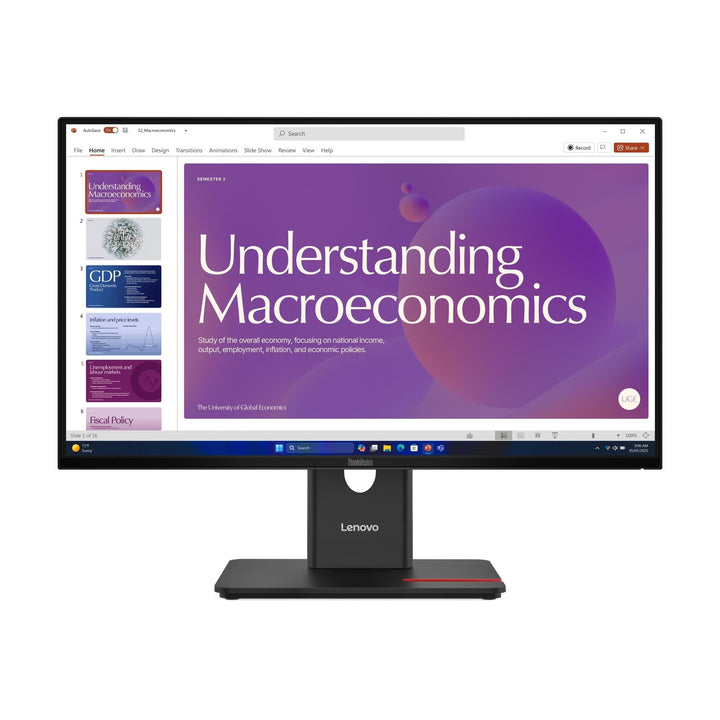


Lenovo ThinkVision T24D-40 23.8-inch FHD Monitor
PRODUCT DESCRIPTION
Lenovo ThinkVision T24D-40 (64B9GAR1MY) - 3 Years Local Warranty
A 23.8-Inch Full HD Dock: 100 W USB-C, Gigabit Ethernet, DisplayPort Out and Speakers
The D in T24D-40 means docking, and here it means a great deal. One USB-C cable carries video, up to 100 W of charging, gigabit Ethernet and three downstream USB ports. There is also a DisplayPort 1.4 output for a second display and 2 W x 2 built-in speakers.
The Same Panel as the T24-40, With the Dock Added
1500:1 contrast, 48–120 Hz, 99% sRGB and 99% BT.709 (CIE 1931), 250 cd/m² and a 10.5 mm bottom bezel — identical to the non-docking T24-40 beside it. What you pay the difference for is the connectivity: 100 W USB-C upstream, RJ45, the DisplayPort output and the speakers.
A DisplayPort Output, Which Its Siblings Mostly Lack
Chain a second display from this monitor over DisplayPort 1.4 rather than running two cables back to the laptop. Among the -40 generation only this model, the T27QD-40 and the T27QD-4v publish a DisplayPort out — the 4K and ultrawide models do not.
What Is Not Here
No VGA input, which the non-docking T24-40 still carries; no 3.5 mm audio jack despite the built-in speakers; no camera or microphone with this part number; and no HDMI cable in the box, which Lenovo reserves for one Brazilian model code.
Specification note. Every figure on this page is taken from Lenovo's own PSREF specification sheet for the ThinkVision T24D-40, with any item drawn from Lenovo's product datasheet instead labelled as such in the table. Lenovo publishes monitor specifications per model rather than per part number — the PSREF sheet we link does not itself list this SKU, and the suffix on a part number governs market and packaging rather than the panel or the ports. Where Lenovo publishes no figure, this page says so rather than estimating one, and where two Lenovo documents disagree we show the disagreement. Specifications and prices are subject to change by Lenovo without notice.
Lenovo ThinkVision T24D-40 Datasheet — Technical Specifications
General
| Product | Lenovo ThinkVision T24D-40 |
| Part Number | 64B9GAR1MY |
| Machine Type | 64B9 |
| Type | 23.8-inch Full HD USB-C docking monitor |
| Warranty | 3-Year Limited Warranty (Lenovo, per PSREF) |
| Local Warranty (Singapore) | Included with every SourceIT purchase, with GST invoice |
Panel & Image
| Screen Size | 23.8" |
| Panel Type | 4-side Ultra Thin In-Plane Switching (IPS), WLED backlight |
| Resolution | 1920 x 1080 (Full HD) |
| Aspect Ratio | 16:9 |
| Refresh Rate | 48 Hz to 120 Hz |
| Response Time | 4 ms GtG Extreme mode / 6 ms GtG Normal mode |
| Brightness | 250 cd/m² |
| Contrast Ratio | 1500:1 typical; 3,000,000:1 dynamic |
| Colour Gamut | 99% sRGB (CIE 1931); 99% BT.709 (CIE 1931) |
| Colour Depth | 8-bit (6-bit + FRC), 16.7 million colours |
| Viewing Angles | 178° horizontal / 178° vertical |
| Surface | Anti-glare |
| Bezel | 2.0 mm sides, 2.0 mm top, 10.5 mm bottom |
Connectivity
| USB-C (docking) | 1 x USB-C upstream, USB 5 Gbps (3.2 Gen 1) — DisplayPort 1.4 Alt Mode (HBR2) and USB Power Delivery 3.0 up to 100 W, plus data and Ethernet on the same cable |
| Video Inputs | 1 x HDMI 1.4 (supports 1920 x 1080 at 120 Hz), 1 x DisplayPort 1.4 (HBR2, 21.6 Gbps), plus video over USB-C. No VGA |
| DisplayPort Out | 1 x DisplayPort 1.4 out — chain a second display from the monitor |
| USB Hub | 3 x USB-A downstream (5 Gbps), one with BC 1.2 fast charging; 1 x USB-C downstream (5 Gbps, 15 W, data only). No USB-B upstream port |
| Network | 1 x RJ45 gigabit Ethernet |
| Audio Out | Not published by Lenovo. No 3.5 mm jack appears in this model's connector list, so plan on audio coming from the PC rather than the monitor |
| Speakers | Integrated, 2 W x 2 |
| Camera / Microphone | None. Lenovo publishes "no camera" and "no microphone" for this model |
| KVM Switch | Not published by Lenovo for this model |
Stand & Ergonomics
| Tilt | -5° to +23.5° |
| Swivel | 45° left and right |
| Pivot | -90° to +90° |
| Height Adjustment | Up to 155 mm |
| VESA | 100 x 100 mm |
Power & Certifications
| Power Consumption | 16 W typical / 157 W maximum |
| ENERGY STAR Power-On | 14 W; TEC 50 kWh |
| Sleep / Off Mode | < 0.5 W |
| Switch-off Mode | < 0.3 W |
| Power Supply | Internal — no external brick |
| Certifications | ENERGY STAR certified; EPEAT Gold registered; RoHS (2011/65/EU); TCO Certified generation 10; TCO Edge 2.1; Eyesafe Certified 2.0; TÜV Rheinland Eye Comfort (5-star); TÜV Rheinland Low Blue Light |
| EU Energy Label | D class |
Physical
| Dimensions with Stand | 539.8 x 190.0 x 350.8 mm at lowest; 505.8 mm high at highest |
| Head Only | 539.8 x 45.3 x 314.8 mm |
| Weight | 5.6 kg with stand; 3.5 kg head only |
| Packaged | 730.0 x 112.0 x 420.0 mm; 8.0 kg |
Compatibility & Fit
What "docking" means on this monitor, precisely. One USB-C cable from the laptop carries the picture, up to 100 W of charging, gigabit-class Ethernet from the monitor's RJ45 port, and the downstream USB ports. Close the laptop lid, plug in one cable, and the desk is live. Check your machine's own power requirement against that figure first — it covers the great majority of business ultrabooks, but a mobile workstation with a 170 W adapter should keep using it.
Decoding the model names in this range, because the letters do real work and Lenovo does not publish a key. D means USB-C docking — a 100 W upstream port with DisplayPort Alt Mode, Ethernet and usually a DisplayPort output. v means video conferencing — a built-in 5-megapixel IR and RGB camera with Windows Hello and a microphone. t means touch. Q means QHD, UD means 4K UHD and WD means an ultrawide. So a T24-4v has the camera but no dock, while a T24D-4v has both. These are read off Lenovo's own product titles rather than from a naming document, because Lenovo publishes none.
The DisplayPort output is worth planning around. Rather than running two video cables back to the laptop, connect the laptop to this monitor over USB-C and run a second display from the DisplayPort 1.4 out. One cable to the laptop, two screens on the desk. Note that Lenovo publishes the port but does not use the phrase "daisy chain" or state a chain limit, so if you are planning three or more displays, ask us to confirm the topology with Lenovo first.
No VGA, unlike the T24-40. The docking model drops the VGA input in favour of the DisplayPort output. If you still have legacy VGA sources on the desk, the non-docking T24-40 keeps that port.
Audio, precisely. There are 2 W x 2 speakers built in — adequate for calls and notification sounds — but Lenovo publishes no 3.5 mm headphone jack on this model. Headphones plug into the laptop, not the monitor.
Cables. Lenovo footnotes the HDMI cable to one Brazilian model code only. This part number ships with a DisplayPort 1.4 cable and a USB-C to USB-C cable, and no HDMI cable.
Package Contents & ThinkVision Ordering Information
In the box, per Lenovo PSREF:
- Monitor with stand
- 1 x DisplayPort 1.4 cable (1.8 m)
- 1 x USB-C to USB-C Gen 1 cable (1.8 m)
- 1 x power cable (1.8 m)
- Quick setup guide
No HDMI cable is supplied with this part number — Lenovo restricts it to one Brazilian model code. Ask us to add one if you need it.
ThinkVision T-Series Ordering Information
| 64A4MARXMY | ThinkVision T24-40 — 23.8" FHD, 48–120 Hz, USB hub — not a dock |
| 64B9GAR1MY (this listing) | ThinkVision T24D-40 — 23.8" FHD dock — USB-C 100 W, GbE, speakers |
| 64B6MAR1MY | ThinkVision T24-4v — 23.8" FHD, 5 MP IR camera, 3 W speakers — not a dock |
| 64B7UAR1MY | ThinkVision T24D-4v — 23.8" FHD dock, 5 MP IR camera, Teams certified |
| 64D2GAR2MY | ThinkVision T24D-4t — 23.8" FHD 20-point touch dock, 350 nits |
| 64A5MAR6MY | ThinkVision T27-40 — 27" FHD, 48–120 Hz, USB hub — not a dock |
| 64A6GAR6MY | ThinkVision T27Q-40 — 27" QHD, 48–120 Hz, USB hub — not a dock |
| 64AAGAR2MY | ThinkVision T27QD-40 — 27" QHD dock — USB-C 100 W, GbE, DP out |
| 64B8UAR1MY | ThinkVision T27QD-4v — 27" QHD dock, 5 MP IR camera, 5 W speakers, Teams |
| 64AFGAR2MY | ThinkVision T27UD-40 — 27" 4K dock — USB-C 10 Gbps, 100 W, GbE |
| 64B0GAR1MY | ThinkVision T32UD-40 — 31.5" 4K dock — USB-C 10 Gbps, 100 W, GbE |
| 64AEGAR1MY | ThinkVision T34WD-40 — 34" 21:9 curved 1500R VA dock — 100 W, GbE |
Datasheet & Downloads
PSREF is Lenovo's own Product Specifications Reference and is the source for every figure on this page unless the table says otherwise. PSREF publishes its spec sheets per model rather than per part number, so this SKU does not appear inside the PDF itself; a per-part-number detail page also exists at psref.lenovo.com and will render in a normal browser if you need this exact configuration confirmed before ordering. Ask us and we will pull it for you.
Frequently Asked Questions — Lenovo ThinkVision T24D-40
How much power does it give my laptop?
Up to 100 W over the USB-C cable, using USB Power Delivery 3.0, alongside DisplayPort 1.4 Alt Mode video and gigabit Ethernet. That covers essentially every business ultrabook and most 15-inch laptops. A mobile workstation rated at 170 W should keep its own adapter.
Can I run a second monitor from it?
Yes — there is a DisplayPort 1.4 output. Connect your laptop to this monitor over USB-C and run the second screen from the DP out. Lenovo publishes the port but does not state a maximum chain length, so for three or more displays ask us to check the topology with Lenovo before you order.
Does it have a headphone socket?
No. It has 2 W x 2 built-in speakers, but Lenovo publishes no 3.5 mm audio jack for this model. Headphones connect to the laptop.
How is it different from the T24-40?
Same panel, different connectivity. The T24D-40 adds a 100 W USB-C docking port, gigabit Ethernet, a DisplayPort output and 2 W x 2 speakers. It drops the VGA input the T24-40 keeps. If the desk has a laptop, buy this one; if it has a desktop PC, the T24-40 is the same picture for less.
Does it have a camera for video calls?
No. Lenovo states "no camera" and "no microphone" for the T24D-40. The T24D-4v is the same docking monitor with a built-in 5-megapixel IR and RGB camera, a microphone and 5 W speakers — and it is Microsoft Teams certified. It is linked in the ordering table above.
What warranty applies in Singapore?
Lenovo PSREF states a 3-year limited warranty as the base warranty for this model, and every unit SourceIT sells comes with local Singapore warranty support and a GST invoice.


