
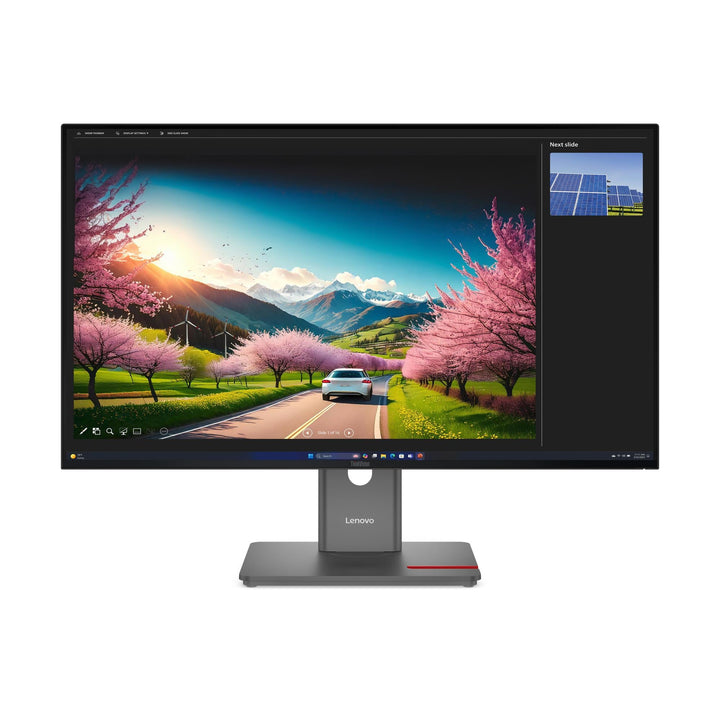


Lenovo ThinkVision P32UD-40 32-inch 4K UHD Monitor
PRODUCT DESCRIPTION
Lenovo ThinkVision P32UD-40 (64A8XAR2MY) - 3 Years Local Warranty
31.5-Inch 4K, Thunderbolt 4 at 140 W, 2.5-Gigabit Ethernet and eKVM
The ThinkVision P32UD-40 is the current-generation 4K professional display: 3840 x 2160 at 10-bit with 98% DCI-P3 (CIE 1976), calibrated to Delta E under 2 in both sRGB and DCI-P3, docking over Thunderbolt 4 at up to 140 W with 2.5-gigabit Ethernet, an eKVM switch and both a DisplayPort 1.4 output and a Thunderbolt 4 output.
140 W Over Thunderbolt 4 — the Combination That Docks Anything
Thunderbolt 4's guaranteed 40 Gbps, plus USB Power Delivery 3.1 at 140 W, covers mobile workstations and creator laptops that a 100 W dock leaves charging slowly. For a 4K desk that has to work for a ThinkPad P-series or a 16-inch MacBook Pro as well as an ultrabook, this is the specification that does not need caveats.
A 24–120 Hz Panel at 1500:1
Lenovo publishes 1500:1 contrast — half again the P32p-30's 1000:1 — with a 24–120 Hz refresh range at 350 cd/m² and HDR10 compliance. It is a materially better panel than the previous 4K generation, not merely a newer one.
Two Honest Notes Before You Order
Lenovo publishes no daisy-chain capability for this model, despite it having both a DisplayPort 1.4 output and a Thunderbolt 4 output — the hardware is there, the statement is not, so we will not claim it. And the TÜV Rheinland Eye Comfort rating here is five stars while the EU energy label is E class; if a tender sets an energy-class floor, check it early.
Specification note. Every figure on this page is taken from Lenovo's own PSREF specification sheet for the ThinkVision P32UD-40, with any item drawn from Lenovo's product datasheet instead labelled as such in the table. Lenovo publishes monitor specifications per model rather than per part number — the PSREF sheet we link does not itself list this SKU, and the suffix on a part number governs market and packaging rather than the panel or the ports. Where Lenovo publishes no figure, this page says so rather than estimating one, and where two Lenovo documents disagree we show the disagreement. Specifications and prices are subject to change by Lenovo without notice.
Lenovo ThinkVision P32UD-40 Datasheet — Technical Specifications
General
| Product | Lenovo ThinkVision P32UD-40 |
| Part Number | 64A8XAR2MY |
| Machine Type | 64A8 |
| Type | 31.5-inch 4K UHD Thunderbolt 4 docking monitor with eKVM |
| Colour | Raven black |
| Warranty | 3-Year Limited Warranty (Lenovo, per PSREF) |
| Local Warranty (Singapore) | Included with every SourceIT purchase, with GST invoice |
Panel & Image
| Screen Size | 31.5" — Lenovo markets this model as 32"; the engineering figure is 31.5" |
| Panel Type | 4-side Ultra Thin Bezel In-Plane Switching (IPS), WLED backlight. Flat panel |
| Resolution | 3840 x 2160 (4K UHD), 140 dpi |
| Aspect Ratio | 16:9 |
| Active Area | 697.3 x 392.2 mm; pixel pitch 0.1815 mm |
| Refresh Rate | 24 Hz to 120 Hz |
| Response Time | 4 ms GtG Extreme mode / 6 ms GtG Normal mode |
| Brightness | 350 cd/m². No separate peak or HDR brightness figure is published |
| Contrast Ratio | 1500:1 typical; 3,000,000:1 dynamic |
| Colour Gamut | 99% sRGB (CIE 1931); 98% DCI-P3 (CIE 1976); 99% BT.709 (CIE 1931). Adobe RGB not published |
| Colour Depth | 10-bit (8-bit + FRC), 1.07 billion colours |
| Factory Calibration | Average Delta E under 2 at sRGB and DCI-P3, with a printed calibration report in the box |
| Hardware Calibration | Not published by Lenovo for any monitor in this range. What Lenovo publishes is factory calibration — the panel is calibrated on the line and a printed report ships in the box. That is not the same as being able to recalibrate it yourself with a colorimeter |
| HDR | HDR10 compliance. No DisplayHDR tier and no local-dimming zone count is published, so we make no HDR performance claim beyond compliance |
| Viewing Angles | 178° horizontal / 178° vertical |
| Surface | Anti-glare |
| Bezel | 2.0 mm sides, 2.0 mm top, 11.5 mm bottom |
Connectivity
| Thunderbolt 4 In (docking) | 1 x Thunderbolt 4 at 40 Gbps, USB upstream — USB Power Delivery 3.1 up to 140 W and DisplayPort 1.4 Alt Mode at HBR3, plus data and Ethernet |
| Thunderbolt 4 Out | 1 x Thunderbolt 4 output |
| Video Inputs | 1 x HDMI 2.1 TMDS (supports 3840 x 2160 at 120 Hz), 1 x DisplayPort 1.4 (HBR3, 32.4 Gbps), plus video over Thunderbolt 4 |
| DisplayPort Out | 1 x DisplayPort 1.4 out |
| Daisy Chain | Not published by Lenovo for this model, despite both a DisplayPort 1.4 output and a Thunderbolt 4 output being present. The hardware is there; the capability statement is not, so we do not claim it. Ask us and we will get it confirmed by Lenovo for your layout |
| USB Hub | 1 x USB-B upstream (5 Gbps); 4 x USB-A downstream (5 Gbps), one with BC 1.2; 1 x USB-C downstream (5 Gbps, 15 W, data only) |
| Network | 2.5-gigabit Ethernet, 1 x RJ45 |
| KVM Switch | Yes — KVM switch with eKVM |
| Picture-in-Picture / Picture-by-Picture | Both supported |
| Audio Out | Not published by Lenovo. No 3.5 mm jack appears in this model's connector list — audio comes from the PC |
| Speakers | None built in. Lenovo offers the MS30 Monitor Soundbar as a separately-sold accessory that clips to the display |
| Camera | None with this part number. Lenovo bundles the ThinkVision VoIP Stack MC60 webcam only on separate model codes. It is available as an accessory — ask us to quote one |
| Security | Kensington Nano Security Slot (2.5 x 6 mm) |
Stand & Ergonomics
| Tilt | -5° to +23.5° |
| Swivel | 45° left and right |
| Pivot | 90° |
| Height Adjustment | Up to 155 mm |
| VESA | 100 x 100 mm |
Features
| Software | Lenovo ThinkColour; Lenovo Display Fleet Manager (LDFM) |
| AI Power Saving Mode | Supported |
| Multi-sync | Supported |
| Mirrored Power Button | Yes |
| Power Management | Smart Power |
Power & Certifications
| Power Consumption | 23 W typical / 240 W maximum |
| ENERGY STAR Power-On | 18.3 W; TEC 63.4 kWh |
| Sleep / Off Mode | < 0.5 W |
| Switch-off Mode | < 0.3 W |
| Power Supply | Internal — no external brick |
| Certifications | ENERGY STAR certified; EPEAT Gold registered; RoHS (2011/65/EU); TCO Certified generation 10; TCO Edge 2.1; Volatile Organic Compound certification; Eyesafe Certified 2.0; TÜV Rheinland Eye Comfort (5 stars); TÜV Rheinland Low Blue Light (hardware solution) |
| EU Energy Label | E class |
Physical
| Dimensions with Stand | 714.3 x 218.0 x 439.5 mm at lowest; 594.5 mm high at highest |
| Head Only | 714.3 x 46.0 x 413.2 mm |
| Weight | 8.1 kg (17.9 lb) with stand; 5.2 kg head only |
| Packaged | 824.0 x 162.0 x 528.0 mm; 11.5 kg |
Compatibility & Fit
What actually separates the P-series from the T-series. Lenovo's own marketing puts the P-series under "Best-in-Class Performance for Leading Professionals" and the T-series under "Enhanced Productivity for Modern Taskers", but it never states in prose that colour accuracy is the dividing line. The evidence is in the specification sheets instead: most P-series models publish a factory calibration figure of Delta E under 2 and ship a printed calibration report in the box, and T-series models do not. That is the difference we are willing to stand behind, and it is why this page cites the per-model figure rather than a slogan.
Thunderbolt 4 plus 140 W is the combination worth paying for. Thunderbolt 4 guarantees 40 Gbps and a certified feature set where "USB-C" guarantees nothing in particular; 140 W of USB Power Delivery 3.1 covers the machines that ship with a 135 W adapter. Together they mean this monitor docks a mobile workstation as cleanly as it docks an ultrabook. A Thunderbolt cable is supplied — keep it with the monitor, because a generic USB-C cable will not carry Thunderbolt.
A USB-C-only laptop still works. The port accepts USB-C with DisplayPort Alt Mode and delivers power normally; you get USB-C behaviour rather than Thunderbolt behaviour. Tell us the laptop model and we will tell you which.
Calibrated in two colour spaces. Delta E under 2 at sRGB and DCI-P3, with a printed report, on a panel covering 99% sRGB and 98% DCI-P3 at 10-bit. Combined with 4K at 31.5 inches this is a genuine content-production display, not a productivity monitor with a colour badge.
Maximum draw is 240 W. That is the panel plus up to 140 W leaving the monitor for the laptop — the highest figure in this range. Size the desk circuit accordingly.
On the two output ports. This monitor has both a DisplayPort 1.4 out and a Thunderbolt 4 out, yet Lenovo publishes no daisy-chain capability or chain limit for it. We are not going to tell you it chains when Lenovo has not said so. If a multi-display chain is central to your plan, ask us and we will get a written answer from Lenovo before you commit.
Package Contents & ThinkVision Ordering Information
In the box, per Lenovo PSREF:
- Monitor with stand
- 1 x DisplayPort 1.4 cable (1.8 m)
- 1 x Thunderbolt cable (1.5 m, 40 Gbps)
- 1 x USB-B to USB-A Gen 1 cable (1.8 m)
- 1 x power cable (1.8 m)
- Factory calibration report
- Quick setup guide
Keep the Thunderbolt cable with the monitor. A generic USB-C cable will not carry Thunderbolt, and may not carry 140 W and 4K video together. No HDMI cable and no webcam are supplied.
ThinkVision P-Series Ordering Information
| 62B2GAR1WW | ThinkVision P24h-2L — 23.8" QHD dock, 75 W USB-C, GbE, 1 W speakers |
| 63B4GAR6WW | ThinkVision P24q-30 — 23.8" QHD, Delta E<2, no USB-C |
| 64B2GAR1MY | ThinkVision P24Q-40 — 23.8" QHD, Delta E<2, USB hub — not a dock |
| 64B1GAR1MY | ThinkVision P24QD-40 — 23.8" QHD dock — 140 W USB-C, 2.5GbE, eKVM |
| 63F4MAR1WW | ThinkVision P25i-30 (WW) — 24.5" FHD, 100 Hz, DP out, VGA |
| 63F4MAR1MY | ThinkVision P25i-30 (MY) — 24.5" FHD, 100 Hz, DP out, VGA |
| 63A1GAR1WW | ThinkVision P27h-30 — 27" QHD dock, 100 W USB-C, 95% DCI-P3, KVM |
| 64B3GAR2MY | ThinkVision P27QD-40 — 27" QHD dock — 140 W, 2.5GbE, eKVM, 98% DCI-P3 |
| 63D1RAR1WW | ThinkVision P32p-30 — 31.5" 4K Thunderbolt 4 dock, 100 W, KVM |
| 64A8XAR2MY (this listing) | ThinkVision P32UD-40 — 31.5" 4K Thunderbolt 4, 140 W, 2.5GbE, eKVM |
| 64ADGAR1MY | ThinkVision P34WD-40 — 34" curved IPS Black, 140 W USB-C, eKVM, speakers |
| 64B4XAR1MY | ThinkVision P40WD-40 — 39.7" 5K2K IPS Black, Thunderbolt 4, 140 W, eKVM |
| 63DBRAR1MY | ThinkVision P49w-30 — 49" DQHD 32:9 curved, Thunderbolt 4, KVM |
Datasheet & Downloads
- Lenovo PSREF specification sheet — ThinkVision P32UD-40 (PDF)
- Lenovo ThinkVision P32UD-40 product datasheet (PDF)
PSREF is Lenovo's own Product Specifications Reference and is the source for every figure on this page unless the table says otherwise. PSREF publishes its spec sheets per model rather than per part number, so this SKU does not appear inside the PDF itself; a per-part-number detail page also exists at psref.lenovo.com and will render in a normal browser if you need this exact configuration confirmed before ordering. Ask us and we will pull it for you.
Frequently Asked Questions — Lenovo ThinkVision P32UD-40
Is it 31.5 inches or 32?
Lenovo's engineering specification says 31.5 inches; Lenovo's own Singapore product title rounds it to 32. We publish the engineering figure in the specification table so the two never quietly contradict each other.
Do I need a Thunderbolt laptop?
No — a USB-C laptop with DisplayPort Alt Mode will drive the display and charge from it normally. A Thunderbolt 4 host unlocks the guaranteed 40 Gbps and the full topology. Tell us your laptop model and we will confirm what you will get.
Can I daisy-chain displays from it?
Lenovo does not publish a daisy-chain capability for this model, even though it has both a DisplayPort 1.4 output and a Thunderbolt 4 output. We will not claim what Lenovo has not stated. Ask us and we will get it confirmed in writing for your specific layout before you order.
How does it compare with the P32p-30?
This model is newer and stronger: 140 W instead of 100 W, 2.5-gigabit Ethernet instead of gigabit, 1500:1 contrast instead of 1000:1, 98% DCI-P3 instead of 95%, calibration in two colour spaces instead of one, HDR10 compliance where the P32p-30 publishes none, a 24–120 Hz range instead of a fixed 60 Hz, TCO generation 10 instead of 9.0, and an eKVM. It is also 2 kg lighter. The P32p-30's remaining advantages are a 3.5 mm audio jack and a published daisy-chain figure.
What does "factory calibrated" actually mean here?
It means Lenovo calibrated this panel on the production line, measured the result and put a printed report in the box — so the monitor is accurate out of the carton without you buying a colorimeter. What it does not mean is hardware calibration: Lenovo publishes no hardware-calibration support for any ThinkVision P-series model, so you cannot write a new calibration into the monitor's own lookup table later. For most design, marketing and video-review work the factory calibration is what matters; for a print house that recalibrates monthly, it is worth a conversation before you order.
What warranty applies in Singapore?
Lenovo PSREF states a 3-year limited warranty as the base warranty for this model, and every unit SourceIT sells comes with local Singapore warranty support and a GST invoice.


