
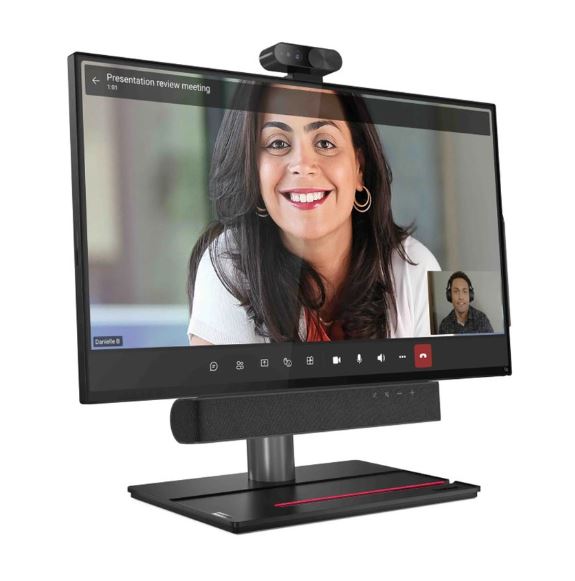


Lenovo ThinkSmart View Plus Video Conferencing Kit
Email sales@sourceit.com.sg or use Request for Quotation below and our team will confirm the latest price, availability and lead time.
PRODUCT DESCRIPTION
Lenovo ThinkSmart View Plus (12CN0002SG) - 3 Years Local Warranty
A 27-Inch Teams Device for a Desk, a Reception Counter or a Phone Booth
Lenovo's own name for this product is ThinkSmart View Plus – Microsoft Teams Display, and its datasheet positions it for "virtual reception, hoteling and hotdesking" and "executive desk, telehealth, remote learning and phone booth". It is a self-contained 27-inch touchscreen that runs Teams on its own — no PC, no dock, no cables to a laptop. Walk up, sign in, take the call.
A Teams Display, Which Is Not the Same Thing as a Teams Room
Worth being precise about, because the two are often confused. This is an Android device running the Microsoft Teams Display app, not a Windows Teams Rooms system. It belongs to a different Microsoft certification programme, and it does not appear on Microsoft's Teams Rooms certified-hardware list — correctly, because it is not a Teams Rooms device. If you are fitting out a meeting room, the ThinkSmart One or the Core kits in the ordering table are what you want. If you are fitting out a desk or a reception point, this is.
A Detachable 4K Camera and a Detachable Soundbar
The camera lifts off — it is a USB device with a physical privacy shutter and an LED indicator, so a device on a shared desk can be visibly, physically blind when nobody is using it. The 5 W stereo soundbar is magnetic and detachable too. Add a quad-microphone array, ambient light and proximity sensors, facial recognition sign-in and a meeting status light, and it behaves like a Teams device rather than a monitor running an app.
It Doubles as a Monitor, and It Adjusts Like One
A DisplayPort input lets a laptop drive the 27-inch panel directly, with DisplayPort out for a second screen and USB-C carrying data, Power Delivery and DisplayPort in one cable. The stand tilts -5° to +35°, swivels 45° each way and lifts 110 mm, with a phone stand built into the base and a passive stylus in the box. VESA 200 x 200 mm mounting is available as a separate kit.
Lenovo ThinkSmart View Plus Datasheet — Technical Specifications
General
| Product | Lenovo ThinkSmart View Plus |
| Part Number | 12CN0002SG |
| Machine Type | 12CN |
| What This Product Is | 27-inch all-in-one Microsoft Teams Display — a desk and shared-space device, not a room conferencing system |
| Warranty | PSREF lists both 3-year courier or carry-in service and 3-year limited onsite service |
| Local Warranty (Singapore) | Included with every SourceIT purchase, with GST invoice |
ThinkSmart View Plus — the Device
| Platform | Android 10 running the Microsoft Teams Display app. This is not a Windows Teams Rooms system |
| Processor | Qualcomm Snapdragon QCS8250, 8 cores — four Kryo Gold at 2.85 GHz and four Kryo Silver at 1.8 GHz — 4 MB cache, Adreno 650 graphics |
| Memory | 8 GB soldered LPDDR5, no slots |
| Storage | 128 GB UFS 3.1 on the systemboard |
| Display | 27-inch IPS, FHD 1920 x 1080, 16:9, 1000:1, 10-point multitouch, anti-glare and anti-fingerprint |
| Camera | 4K detachable USB camera with an LED indicator and a privacy shutter. PSREF states an 8 MP sensor with a 3840 x 2160 active array; Lenovo's own datasheet says 4K at 13 MP. Two Lenovo documents disagree on the sensor |
| Camera Field of View | Not published by Lenovo in either document. The datasheet says only "wide field of vision" |
| Microphones | Quad-microphone array. Pickup range not published |
| Speakers | Detachable magnetic soundbar, 5 W x 2 stereo. Sound pressure level not published |
| Sensors | Ambient light and proximity; facial recognition; meeting status light |
| Ports | Top: 1 x USB-C 3.2 Gen 1 and the camera pin hole. Bottom: 1 x DisplayPort 1.2 in, 1 x DisplayPort 1.2 out (works only with a DisplayPort input), 1 x RJ-45, power, 1 x USB-C 3.2 Gen 1 with Power Delivery 2.0 and DisplayPort, 2 x USB-A 3.2 Gen 1 |
| Display Support | Up to two independent displays — the built-in panel plus one external |
| Network | Gigabit Ethernet; Qualcomm Wi-Fi 6 QCA6391 2x2; Bluetooth 5.1 |
| Stand | Adjustable: tilt -5° to +35°, swivel 45° left and right, lift to 110 mm, with a phone stand. VESA 200 x 200 mm kit sold separately |
| In the Box | View Plus Stylus Pen, passive, per PSREF's bundled-accessories field |
| Dimensions and Weight | 615.3 x 273 x 600.6 mm; approximately 12.6 kg. Black |
| Warranty | PSREF lists both "3-year courier or carry-in service" and "3-year limited onsite service" without reconciling them. Ask us and we will confirm which applies to your order |
| Certifications | RoHS; TÜV Rheinland Low Blue Light |
Platform & Certification
| Platform | Microsoft Teams Display app, preinstalled on Android 10 |
| Programme | This is a Teams Display, not a Teams Room. It is not on Microsoft's Teams Rooms certified-hardware list, which is correct for its category rather than a gap |
| Independent Confirmation | We found no Microsoft page independently naming this exact model. We report Lenovo's preload; we do not make a certification claim we cannot substantiate |
| Is the Platform Licence Included? | Not published by Lenovo. Lenovo's datasheets say the platform is "preloaded" or the device is "certified", which describes the software image and the testing programme rather than the subscription entitlement. Budget for the platform licence separately unless we confirm otherwise for your order |
Compatibility & Fit
A Teams Display and a Teams Room are different products
This is a personal or shared desk device. Lenovo classifies it as a Microsoft Teams Display and sells it for reception desks, hot-desking, executive desks, telehealth and phone booths. It runs Android with the Teams Display app, not the Windows Teams Rooms software, and it belongs to a different Microsoft certification programme.
If what you actually need is a meeting room — a table with several people around it and a screen on the wall — the ThinkSmart One bars and the ThinkSmart Core kits in the ordering table are the room products, and we will happily quote one instead. Our store title calls this a "Video Conferencing Kit", which undersells how specific its purpose is; Lenovo's own name is the more accurate one.
Two figures Lenovo does not publish, and one it publishes twice
Lenovo publishes no camera field of view for this device in either its PSREF sheet or its datasheet — the datasheet says only "wide field of vision". It publishes no microphone pickup range and no speaker sound pressure level. And its two documents disagree on the camera sensor: PSREF says 8 megapixels with a 3840 x 2160 active array, while the datasheet says 4K at 13 megapixels. We show you both rather than choosing. If any of these decide your purchase, ask us and we will get Lenovo to confirm.
What you still need to supply. A network drop or Wi-Fi, and the Microsoft 365 licensing that entitles the user to Teams. The VESA 200 x 200 mm mounting kit is sold separately if you are not using the included stand.
Package Contents & ThinkSmart Ordering Information
In the box, per Lenovo PSREF:
- ThinkSmart View Plus 27-inch all-in-one
- Detachable 4K USB camera with privacy shutter
- Detachable magnetic stereo soundbar
- Adjustable stand with integrated phone stand
- View Plus Stylus Pen, passive
- Power adapter
Not included: the VESA 200 x 200 mm mounting kit, which Lenovo sells separately, and any Microsoft licensing. The stylus is Lenovo's published bundled accessory for this machine type; the camera, soundbar and stand are integral parts of the product rather than separately listed accessories.
ThinkSmart Room and Desk Systems Ordering Information
| 11RXS0240R | Lenovo ThinkSmart Core Device for Logitech — Bare compute box for a Logitech room. No camera, mic or speaker |
| 11RXS0090R | Lenovo ThinkSmart Core Device for Logitech — Bare compute box for a Logitech room. No camera, mic or speaker |
| 11RXS00A0R | Lenovo ThinkSmart Core Device for Logitech — Bare compute box for a Logitech room. No camera, mic or speaker |
| 11H1000-5SG | Lenovo ThinkSmart Hub for Microsoft Teams — All-in-one with a 10.1-inch screen, mics and speakers. No camera |
| 11H3000-6SG | Lenovo ThinkSmart Hub for Zoom — All-in-one with a 10.1-inch screen, mics and speakers. No camera |
| 11H1000KSG | Lenovo ThinkSmart Hub Gen 2 for Microsoft Teams Rooms — All-in-one with a 10.1-inch screen, mics and speakers. No camera |
| 11H3000KSG | Lenovo ThinkSmart Hub Gen 2 for Zoom — All-in-one with a 10.1-inch screen, mics and speakers. No camera |
| 12CN0002SG (this listing) | Lenovo ThinkSmart View Plus — 27-inch Microsoft Teams Display — a desk device, not a room system |
| 12BS0005SG | Lenovo ThinkSmart One + ThinkSmart Controller for Microsoft Teams Rooms — Collaboration bar with camera and audio built in, plus a USB controller |
| 12BU0007SG | Lenovo ThinkSmart One + ThinkSmart Controller for Zoom Rooms — Collaboration bar with camera and audio built in, plus a USB controller |
| 12BW0004SG | Lenovo ThinkSmart One + IP Controller for Microsoft Teams Rooms — Collaboration bar with camera and audio built in, plus a PoE controller |
| 12BY0004SG | Lenovo ThinkSmart One + IP Controller for Zoom Rooms — Collaboration bar with camera and audio built in, plus a PoE controller |
| 11RTZ9AXUK | Lenovo ThinkSmart Bar — Standalone soundbar. No camera |
| 12XH0008SG | Lenovo ThinkSmart Tiny Kit for Microsoft Teams — Tiny-form-factor compute for a Teams room. No camera, mic or speaker |
Datasheet & Downloads
PSREF is Lenovo's own Product Specifications Reference and is the source for every figure on this page unless the table says otherwise. PSREF publishes per model rather than per part number, so this SKU does not appear inside the PDF itself. Where a Lenovo datasheet and PSREF disagree, both are listed above and the page shows the conflict.
Frequently Asked Questions — Lenovo ThinkSmart View Plus
Is this a meeting room system?
No — it is a Microsoft Teams Display, a desk device. Lenovo sells it for reception desks, hot-desking, executive desks, telehealth and phone booths. It runs the Teams Display app on Android rather than Windows Teams Rooms software. For a meeting room, look at the ThinkSmart One bars or the ThinkSmart Core kits in the ordering table above and we will quote one.
Can I use it as a monitor for my laptop?
Yes. It has a DisplayPort 1.2 input, and a USB-C port carrying data, Power Delivery 2.0 and DisplayPort. There is also a DisplayPort output for a second screen, though Lenovo notes it works only when a DisplayPort input is in use. It supports up to two independent displays in total — its own panel plus one external.
What is the camera's field of view?
Lenovo does not publish it. Neither the PSREF sheet nor the datasheet gives a figure; the datasheet says only "wide field of vision". We are not going to estimate it. Lenovo's two documents also disagree on the sensor — PSREF says 8 megapixels, the datasheet says 13 — and both agree it outputs 4K. Ask us if this decides your purchase.
Can the camera be removed?
Yes. The camera is a detachable USB unit with a physical privacy shutter and an LED indicator, and the soundbar is magnetically detachable as well. On a shared desk or a reception counter that matters: the device can be visibly and physically blind when it is not in use.
What warranty applies in Singapore?
Lenovo's PSREF sheet lists both "3-year courier or carry-in service" and "3-year limited onsite service" for this product without reconciling them — those are meaningfully different service levels. We are flagging that rather than picking the better-sounding one. Ask us and we will confirm which applies to your order. Every unit SourceIT sells carries local Singapore warranty support and a GST invoice.
Is a Microsoft licence included?
No, and Lenovo does not claim one. The device ships with the Teams Display app preinstalled; the user still needs the Microsoft 365 licensing that entitles them to Teams. Budget for that separately.
We Also Recommend


Lenovo ThinkStation P8 TWR AMD Ryzen 7995WX /512GB /1TB+2TB /W7900
Lenovo ThinkStation P8 TWR AMD Ryzen 7985WX / 512GB /1TB+2TB /W7900


Lenovo ThinkStation P8 TWR Ryzen 7985WX /512GB /512GB /RTX5000


