
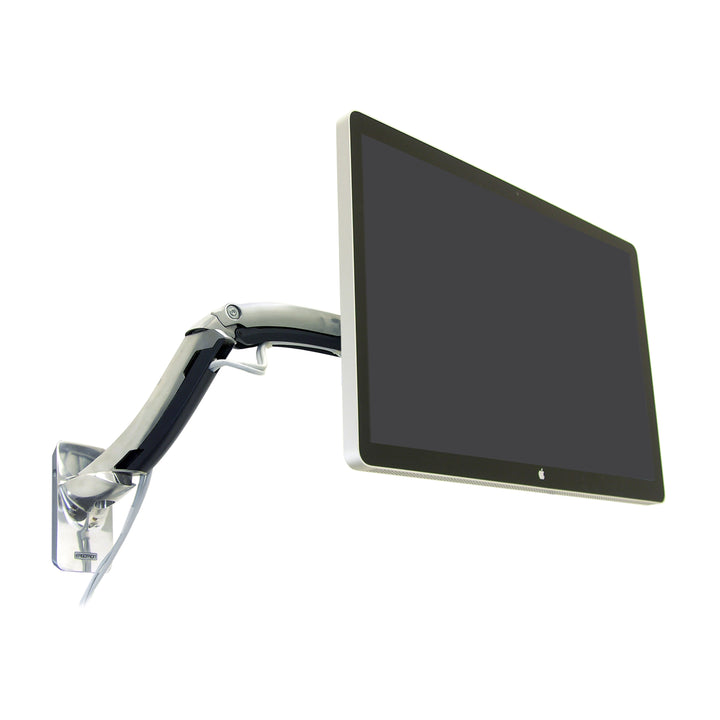


Ergotron MX Wall Monitor Arm
PRODUCT DESCRIPTION
Ergotron MX Wall Monitor Arm (45-228-026) - 10 Years Local Warranty
Heavy Displays up to 42″, Straight Off the Wall
The Ergotron MX Wall Monitor Arm carries a display of up to 42″ weighing 14 to 30 lbs (6.3 to 13.6 kg) — the largest screen size in Ergotron's MX range, with the same heavy-duty capacity as the MX desk arm. Wall-mounting a screen that size frees the entire work surface beneath it, which is why this arm is specified so often for compact offices, clinical bays, workshop benches and reception counters where desk area is the scarce resource.
Constant Force Motion: 360° Pan, 80° Tilt, 90° Rotation
Patented Constant Force™ technology moves a 13.6 kg display with fingertip pressure and holds it exactly where you leave it. The arm pans a full 360°, tilts 80° in total (75° up, 5° down), rotates 90° between portrait and landscape and lifts through 5″ (13 cm). Swing the screen out to share it with a colleague or a patient, angle it away from window glare, then fold it back against the wall.
Mounted at the Right Height, Not Just the Convenient One
Ergotron recommends installing the MX Wall Mount LCD Arm no higher than 60″ (152 cm) above the floor — a deliberate ergonomic limit. Above that height the display sits over a comfortable eye line and the arm's lift range cannot recover it. Ergotron's installation guide covers both wood-stud and concrete fixing, which matters in Singapore's predominantly reinforced-concrete and brick construction.
Portrait Rotation for Signage and Document Work
The 90° rotation is not a novelty on a wall arm. Rotated to portrait, a wall-mounted display becomes a wayfinding or digital-signage panel in a lobby, a full-page document view in a clinical or legal setting, or a monitoring dashboard on a plant-room wall — all from the same mount.
Polished Aluminium, Backed 10 Years
Polished aluminium construction gives the rigidity a heavy wall-mounted display needs, with a clean professional finish appropriate to customer-facing spaces. VESA adaptor brackets and the vertical mount base are supplied in the box. Ergotron backs the MX Wall Monitor Arm with a 10-year manufacturer warranty; SourceIT supplies it with local Singapore warranty and a GST invoice.
Ergotron MX Wall Monitor Arm Datasheet — Technical Specifications
General
| Product Name | Ergotron MX Wall Monitor Arm |
| Part Number | 45-228-026 |
| Number of Displays | 1 |
| Mounting Method | Wall mount (vertical mount base included) |
| Lift Technology | Patented Constant Force™ motion technology |
| Installation Height | Ergotron recommends installing no higher than 60″ (152 cm) above the floor |
| Manufacturer Warranty | 10-Year Manufacturer Warranty (Ergotron) |
| Local Warranty (Singapore) | Supplied by SourceIT Pte Ltd with local Singapore warranty and GST invoice |
Display Compatibility
| Typical Screen Size | Up to 42″ |
| Weight Capacity | 14 – 30 lbs (6.3 – 13.6 kg) |
| VESA Pattern | Most VESA-compliant monitors and HDTV displays |
| Screen Orientation | Portrait and landscape (90° rotation) |
Adjustment & Motion
| Lift (Height Adjustment) | 5″ (13 cm) |
| Tilt | 80° total (75° up / 5° down) |
| Pan | 360° |
| Rotation | 90° |
Design & Durability
| Finish | Polished Aluminium |
| Shipping Dimensions | 29.25 x 10.5 x 6.5 in (74.5 x 26.5 x 16 cm) |
| Shipping Weight | 10.25 lbs (4.65 kg) |
| Manufacturer Warranty | 10-Year Manufacturer Warranty (Ergotron) |
| Local Warranty (Singapore) | Yes — SourceIT Pte Ltd |
Ergotron footnote: monitor depth greater than 4″ (10.2 cm) may diminish weight capacity. Ergotron does not publish an extension/reach figure for the MX Wall Monitor Arm on its official datasheet, so SourceIT does not quote one.
Compatibility & Fit
The Ergotron MX Wall Monitor Arm is rated for one display up to 42″ weighing 14 to 30 lbs (6.3 to 13.6 kg) — the largest screen size of any arm in the MX range and the same heavy capacity as the MX desk arm. The 14 lb (6.3 kg) minimum applies here too. Constant Force™ motion is counter-balanced against the load, so a display lighter than 6.3 kg will not hold position. For a light screen or a tablet on the wall, the MX Mini Wall Arm (45-437-026) is the correct product — it is rated to 8 lbs (3.6 kg) with no minimum.
Deep displays: Ergotron notes that a monitor depth greater than 4″ (10.2 cm) may diminish capacity. Larger televisions and older heavy-housing panels close to the 42″ ceiling should be checked with SourceIT first.
VESA fit: Ergotron states the MX Wall Arm fits most VESA-compliant monitors and HDTV displays, and supplies VESA adaptor brackets in the box. Send SourceIT your display model and we will confirm the pattern against Ergotron's compatibility data before you order.
Wall mounting and installation height: Ergotron specifically recommends that the MX Wall Mount LCD Arm be installed no higher than 60″ (152 cm) above the floor. That is an ergonomic limit, not just a safety one — mounted higher, a 13.6 kg screen sits above a comfortable eye line and the arm's 5″ of lift cannot bring it back down. Ergotron's installation guide covers both wood-stud and concrete fixing. In Singapore's reinforced-concrete and brick construction, concrete anchors are the usual route; hollow partition walls require a stud or a structural backing plate. Ask SourceIT if you are unsure about the substrate.
Number of screens: one. For a heavier or larger wall installation see the LX HD Wall Swing Arm (45-268-026) or the LX HD Pivot Wall Mount (45-269-009), which handles displays up to 49″.
Package Contents & MX Series Ordering Information
In the Box
- MX Wall Mount Arm
- Vertical mount base
- VESA adaptor brackets
- Mounting hardware and instructions
MX Series Ordering Information
| Ergotron MX Desk Monitor Arm — Polished Aluminium | 45-214-026 |
| Ergotron MX Wall Monitor Arm — Polished Aluminium (this listing) | 45-228-026 |
| Ergotron MX Mini Wall Arm — Polished Aluminium | 45-437-026 |
Ergotron lists the MX Wall Monitor Arm in polished aluminium (45-228-026) only — no black or white finish variant appears in Ergotron's official documentation for this model.
Related Ergotron Wall Arms at SourceIT
Datasheet & Downloads
Frequently Asked Questions — Ergotron MX Wall Monitor Arm
How large a display does the MX Wall Arm actually take?
Up to 42″, at 14 to 30 lbs (6.3 to 13.6 kg). That is the largest screen size in the MX range. Ergotron also notes a monitor deeper than 4″ (10.2 cm) may reduce effective capacity, so check deep or heavy-housing panels with us before ordering.
Is there a minimum monitor weight?
Yes — 14 lbs (6.3 kg). The Constant Force™ mechanism is counter-balanced against the load and a lighter screen will not hold its height. For light displays and tablets on a wall, use the MX Mini Wall Arm (45-437-026), which is rated to 8 lbs (3.6 kg) with no minimum.
How high should it be mounted on the wall?
Ergotron specifically recommends installing the MX Wall Mount LCD Arm no higher than 60″ (152 cm) above the floor. Mounted higher, the screen sits above a comfortable eye line and the arm's 5″ (13 cm) of lift cannot bring it back down — so this is an ergonomic limit worth respecting, not just a safety note.
What kind of wall can it be fixed to?
Ergotron's installation guide covers both wood-stud and concrete fixing. In Singapore's typical reinforced-concrete and brick construction, concrete anchors are the usual route. A hollow plasterboard partition needs a stud or a structural backing plate — a 13.6 kg display on an extended arm generates real leverage. If you are unsure of the substrate, describe it to SourceIT and we will advise before installation.
How far does the arm extend from the wall?
Ergotron does not publish an extension figure for the MX Wall Monitor Arm on its official datasheet, and SourceIT does not quote numbers Ergotron has not stated. What is confirmed is the motion: 5″ (13 cm) of lift, 80° of tilt, a full 360° of pan and 90° of rotation. If reach is critical to your installation, contact us and we will obtain the figure from Ergotron for your project.
Can it rotate to portrait?
Yes — 90° of rotation between portrait and landscape, which suits wayfinding, digital signage, dashboards and document-heavy clinical or back-office workflows.
How does it compare with the MX Desk Monitor Arm and the LX HD wall mounts?
The MX Desk Monitor Arm (45-214-026) shares the same 14–30 lbs capacity but clamps to a desk and caps at 30″. This wall arm frees the desk entirely and takes screens up to 42″. Above that, the LX HD Pivot Wall Mount (45-269-009) handles displays to 49″ and the LX HD Wall Swing Arm (45-268-026) is built for heavy monitors and televisions.
Does the Ergotron MX Wall Monitor Arm come with a Singapore warranty?
Yes. Every Ergotron MX Wall Monitor Arm sold by SourceIT comes with local Singapore warranty and a GST invoice; Ergotron backs the MX Wall Monitor Arm with a 10-year manufacturer warranty.


