

Dell P2418HT 23.8" Full HD Touch Monitor
PRODUCT DESCRIPTION
Dell 24 Touch Monitor P2418HT (210-ALLG) - Local Dell Warranty
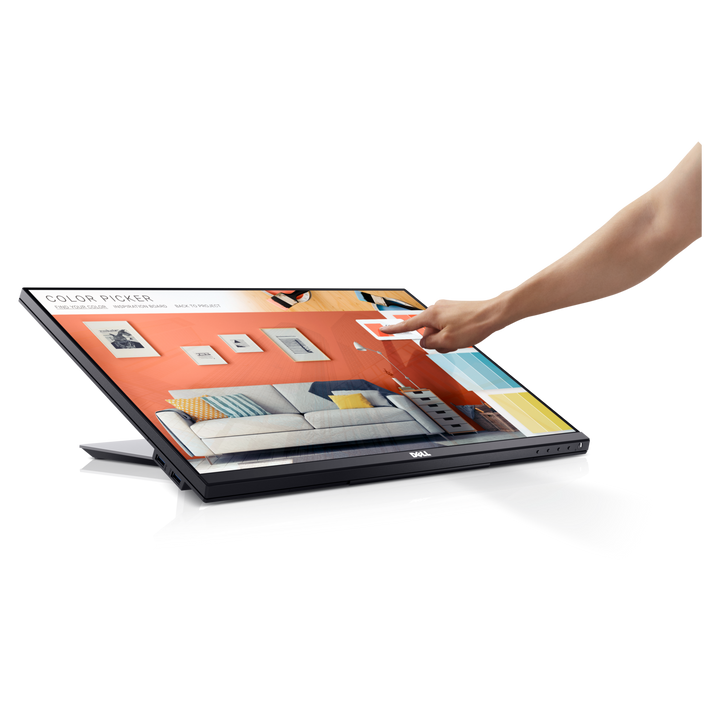
10-point touch, Windows certified
Projected capacitive touch with 10 touch points and bare-finger input, certified for Windows 10, on a 23.8-inch Full HD (1920 x 1080) IPS panel with 178/178 degree viewing angles.
Stand built for touch
The articulating stand tilts from -5 to +60 degrees, swivels -30 to +30 degrees and adjusts 90 mm in height, so the screen can be pulled down to a comfortable touch angle. VESA 100 x 100 mm mounting is supported.
Connect and share peripherals
DisplayPort 1.2, HDMI 1.4 and VGA inputs, plus a USB 3.0 hub (2 x USB 3.0 including one BC 1.2 charging port, 2 x USB 2.0) and an audio line-out. Anti-glare 3H coating and flicker-free ComfortView.
Equipping a whole office? Email sales@sourceit.com.sg for volume pricing, delivery lead time and availability of current Dell successors.
Dell P2418HT Datasheet — Technical Specifications
Display
| Screen Size | 23.8 in viewable (60.47 cm), 24 in class |
| Panel Type | IPS (In-Plane Switching), active matrix TFT LCD |
| Resolution | 1920 x 1080 (Full HD) at 60 Hz |
| Aspect Ratio | 16:9 |
| Pixel Pitch | 0.2745 mm |
| Pixels Per Inch | 93 |
| Brightness | 250 cd/m² (typical) |
| Contrast Ratio | 1000:1 (typical); 8,000,000:1 (dynamic) |
| Response Time | 6 ms (grey-to-grey) |
| Viewing Angle | 178° horizontal / 178° vertical |
| Colour Support | 16.7 million colours |
| Colour Gamut | 72% (CIE 1931); 84% (CIE 1976) |
| Screen Coating | Anti-glare, 3H hard coating |
| Backlight | White LED edgelight system |
| Horizontal / Vertical Refresh | 30-83 kHz / 50-76 Hz |
Touch
| Touch Technology | Projected capacitive |
| Touch Points | 10-point |
| Input | Bare finger |
| Touch Response Time | 35 ms |
| Touch Resolution | 4096 x 4096 |
| OS Certification | Windows 10 certified |
Connectivity
| Video Inputs | 1 x DisplayPort 1.2 (HDCP 1.4), 1 x HDMI 1.4 (HDCP 1.4), 1 x VGA |
| USB Upstream | 1 x USB 3.0 |
| USB Downstream | 1 x USB 3.0, 1 x USB 3.0 with BC 1.2 charging (2 A max), 2 x USB 2.0 |
| Audio | 1 x 3.5 mm audio line-out |
Ergonomics
| Height Adjustment | 90 mm |
| Tilt | -5° to +60° |
| Swivel | -30° to +30° |
| Pivot | Not available |
| VESA Mounting | 100 x 100 mm |
| Cable Management | Yes |
| Security | Security lock slot (cable lock sold separately), anti-theft stand lock slot |
Eye Comfort
| Flicker-free / Low Blue Light | Flicker-free screen with Dell ComfortView |
Power
| Input Voltage | 100-240 VAC, 50/60 Hz ± 3 Hz, 1.5 A max |
| Power Consumption (Max) | 51 W |
| Standby Mode | 0.2 W |
Physical
| Dimensions with Stand (W x D x H) | 537.8 x 234.8 x 323.2-419.6 mm |
| Dimensions without Stand (W x D x H) | 537.8 x 54.1 x 321.4 mm |
| Weight with Stand and Cables | 7.42 kg |
| Weight Panel Only | 3.12 kg |
| Stand Assembly Weight | 3.78 kg |
| Shipping Weight | 9.50 kg |
| Border Width | 5.4 mm top/left/right; 19.51 mm bottom |
| Operating Temperature | 0 to 40 °C |
| Operating Humidity | 10-80% (non-condensing) |
| Environmental | ENERGY STAR, EPEAT Gold, TCO Certified Displays, RoHS |
Warranty
| Dell SKU (Singapore) | 210-ALLG |
| Local Warranty (Singapore) | Dell's P2418HT spec sheet lists 3 Years Advanced Exchange Service and Limited Hardware Warranty; please confirm Singapore coverage with SourceIT before ordering |
Compatibility & Software Support
Connections
Connects to PCs and notebooks over DisplayPort, HDMI or VGA; the USB 3.0 upstream cable must be connected for touch input and to enable the built-in USB hub.
Software
Dell Display Manager; touch works with Windows 10 (Windows-certified touch).
Package Contents & Dell P-Series 22–24-inch Monitors Ordering Information
In the Box
Monitor with stand (riser and base), cable cover, power cable, DisplayPort cable (DP to DP), VGA cable, USB 3.0 upstream cable, cable sleeve, Quick Setup Guide and Safety/Environmental/Regulatory information.
Dell P-Series 22–24-inch Monitors
| Model | Key feature |
| P2223HC 21.5" | Full HD IPS, USB-C 65W hub, DP MST out |
| P2222H 21.5" | Full HD IPS, HDMI + DP + VGA, 4-port USB hub |
| P2319H 23" | Full HD IPS, DP/HDMI/VGA, USB 3.0 hub |
| P2418HT 23.8" Touch (this listing) | Full HD IPS, 10-point touch, 60° tilt stand |
| P2422H 23.8" | Full HD IPS, 99% sRGB, 4-port USB 5Gbps hub |
| P2422HE 23.8" | Full HD IPS, USB-C 65W hub with RJ-45 |
| P2423 24" 16:10 | WUXGA 16:10 IPS, DP/HDMI/DVI/VGA, USB hub |
| P2423D 23.8" | QHD IPS, DP/HDMI, USB 3.2 hub |
| P2423DE 23.8" | QHD IPS, USB-C 90W hub, RJ45 |
| Pro 24 Plus P2424HT | Current-generation 24-inch touch USB-C hub monitor |
| Pro 24 Plus P2425H | Current-generation 24-inch Full HD |
| Pro 24 Plus P2425HE | Current-generation 24-inch Full HD USB-C hub |
| Pro 24 Plus P2425 | Current-generation 24-inch 16:10 WUXGA |
| Pro 24 Plus P2425D | Current-generation 24-inch QHD |
| Pro 24 Plus P2425DE | Current-generation 24-inch QHD USB-C hub |
Datasheet & Downloads
| Dell product page | Dell Singapore - P2418HT (210-ALLG) |
| User guide | Dell P2418HT User's Guide (PDF) |
| Datasheet | Dell 24 Touch Monitor P2418HT spec sheet (PDF) |
| Manuals & drivers | Dell Support - P2418HT drivers, manuals and documents |
Need a PDF sent directly? Email sales@sourceit.com.sg quoting P2418HT.
Frequently Asked Questions — Dell P2418HT
How many touch points does the P2418HT support?
It uses projected capacitive touch with 10 touch points, bare-finger input and a 35 ms touch response, and is Windows 10 certified.
Why does touch not work when connected by HDMI only?
Touch data travels over USB. Connect the supplied USB 3.0 upstream cable between the monitor and the computer in addition to the video cable.
Can I tilt the screen back for touch use?
Yes. The stand tilts from -5° to +60°, swivels ±30° and adjusts 90 mm in height. It does not pivot to portrait.
Can it be wall or arm mounted?
Yes. The stand is removable and the panel has VESA 100 x 100 mm mounting holes.


