
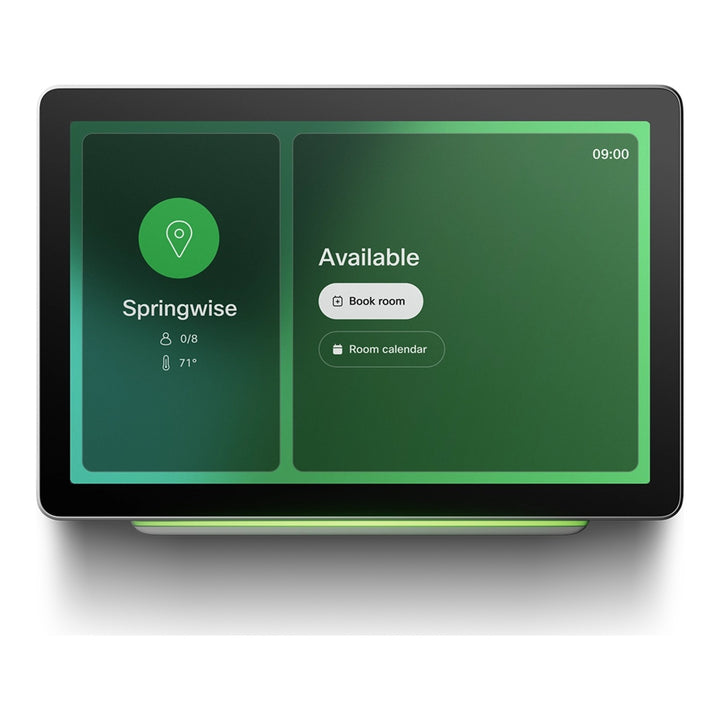


Cisco Room Navigator 10.1" Wall Mount Touch Controller
Email sales@sourceit.com.sg or use Request for Quotation below and our team will confirm the latest price, availability and lead time.
PRODUCT DESCRIPTION
Cisco Room Navigator Wall Mount Version (CS-T10-WM-K9=) — Local Warranty
A 10.1-inch touch panel for meeting rooms and room booking
The Cisco Room Navigator for Wall (CS-T10-WM-K9=), formerly the Webex Room Navigator, is a 10.1-inch PoE-powered touch panel that mounts on a wall or glass partition. It can act as the touch controller for a Cisco video device inside the room, or be installed outside the room as a booking panel showing availability with a coloured status light. The = suffix denotes the spare/standalone part number. Cisco has announced end-of-sale for this part number; see the Compatibility section for dates and the Cisco-named replacement.
Three ways to use it
As a room controller, the Navigator starts and joins meetings, shares content and controls the camera on a paired Cisco Room, Board or Desk Series device, as well as room peripherals such as lights and blinds through the RoomOS API. As a room booking panel, it shows the room calendar and lets people book instant meetings. In standalone mode it registers directly to Webex Control Hub and can run room booking or a persistent third-party web app.
10.1-inch anti-glare touchscreen
The capacitive touch LCD has a 1920 x 1200 resolution with anti-glare and anti-fingerprint treatment. The wall bracket holds the panel at a 15° tilted angle for comfortable use when standing.
360-degree room status light
A multicolour LED visible through 360 degrees shows room status at a glance: green for available, yellow for an upcoming meeting and red for in use or booked. This makes the wall version suited to corridors and meeting-room doors.
Environmental sensors
Built-in sensors measure temperature, humidity and air quality (TVOC) in the space where the panel is installed.
Single-cable PoE installation
The Navigator is powered by PoE (802.3af Class 0) over one Cat5e or Cat6 cable of up to 100 m. It can connect directly to the PoE port on a Cisco video device, or to a PoE network switch and pair remotely over the LAN. A Cisco PoE injector (CS-POE-INJ=) is available separately for sites without a PoE port.
Cisco Room Navigator for Wall Datasheet — Technical Specifications
Display
| Screen | 10.1-inch capacitive touch LCD |
| Resolution | 1920 x 1200 |
| Surface | Anti-glare and anti-fingerprint |
| Memory | 4 GB |
Connectivity & Power
| Ethernet | 1x RJ-45, 100 Mbps, for LAN or direct pairing |
| Service port | 1x micro-USB |
| Power | PoE 802.3af Class 0 |
| Cabling | Cat5e or Cat6, up to 100 m (330 ft) |
| Pairing | Direct to the PoE port on a Cisco video device, or remotely via LAN (IP) |
Sensors & Status Light
| Temperature | 0°C to 35°C range, ±2°C accuracy |
| Humidity | 20% to 90% RH range, ±10% RH accuracy |
| Air quality (TVOC) | 1–5 scale, ±1 accuracy |
| Status light | Multicolour LED viewable through 360° |
Physical & Environment
| Dimensions (H x L x D) | 6.9 x 24.2 x 16.4 cm (2.8 x 9.53 x 6.3 in.) |
| Weight | 0.92 kg (2.03 lb) |
| Mounting | Wall bracket at 15° tilt; glass, brick or drywall |
| Recommended height | 120 cm (47 in.) |
| Operating temperature | 0°C to 35°C |
| Storage temperature | -20°C to 60°C, 10% to 90% RH (non-condensing) |
| Compliance model | TTC5-15 |
Compatibility & Software Support
Compatible devices
Cisco lists the Room Navigator as compatible with the Cisco Room Series, Board Series (Board S, Board Pro and Board Pro G2) and Desk Series. Related SourceIT listings include the Cisco Room Kit Pro, Cisco Room Kit EQ, Cisco Room Bar and Cisco Codec Pro.
Software
Runs Cisco RoomOS (9.14.3 or later). It is certified as a Microsoft Teams Rooms console and Teams panel when used in a Microsoft Teams Rooms deployment. Standalone room booking requires RoomOS 11.3 or later on Webex-registered devices, or RoomOS 11.8 or later on customer-managed devices.
Standalone registration
In standalone mode the Navigator is registered directly to Webex Control Hub as its own workspace device using an activation code, and can run room booking or a persistent web app.
End-of-Sale notice
Cisco announced end-of-sale for the original Room Navigator wall mount part numbers on 6 October 2023, with end-of-sale and last ship on the same date. End of service contract renewal: 1 January 2028. Last date of support: 31 October 2028. Cisco names the Cisco Room Navigator - Wall Mount, First Light (White), Spare (CS-T10-WM-L-K9=) as the migration product for CS-T10-WM-K9=. The current Room Navigator for Wall carries the same compliance model number (TTC5-15).
Warranty
This unit is supplied with Local Warranty. Keep your SourceIT invoice as proof of purchase for warranty claims.
Package Contents & Cisco Room Navigator Ordering Information
In the Box
Per the Cisco Room Navigator wall mount installation guide: Room Navigator with wall bracket and template, plus sticker and template for glass wall mounting. Wall fixings suited to the wall type and the PoE injector are not included.
Cisco Room Navigator Family
| Model | Key difference |
| Cisco Room Navigator, Wall Mount (CS-T10-WM-K9=) (this listing) | Original wall-mount spare part number; end-of-sale announced |
| Cisco Room Navigator for Wall, First Light (CS-T10-WM-L-K9=) | Cisco-named replacement |
| Cisco Room Navigator for Wall, Carbon Black (CS-T10-WM-C-K9=) | Current wall version in Carbon Black |
| Wall bracket spare (CS-T10-WM-BR= / CS-T10-WM-BR-C=) | Replacement wall bracket |
| Cisco Room Navigator for Table | Table-stand version for use inside the room |
| Cisco Room Bar with Navigator (CS-BAR-W-K9) | Video bar bundled with a Room Navigator |
Datasheet & Downloads
| Document | Link |
| Cisco Room Navigator for Wall Data Sheet | cisco.com |
| Installation Guide: Wall Mount (PDF) | cisco.com |
| Room Navigator as a standalone device | help.webex.com |
| Room Navigator support & documentation | cisco.com |
| End-of-Sale and End-of-Life Announcement | cisco.com |
Frequently Asked Questions — Cisco Room Navigator for Wall
Does it need a separate power supply?
No. It is powered by PoE (802.3af Class 0), either from the PoE port on a Cisco video device or a PoE switch. A Cisco PoE injector (CS-POE-INJ=) is available separately.
Can it be used as a room booking panel outside the meeting room?
Yes. The wall version can be configured as a room booking device showing availability, the room calendar and a red/yellow/green status light.
Can it be mounted on glass?
Yes. Adhesive stickers and a template for glass wall mounting are included.
Does it work with Microsoft Teams Rooms?
Cisco states it is certified as a Microsoft Teams Rooms console and Teams panel.
What is the difference between CS-T10-WM-K9= and CS-T10-WM-L-K9=?
CS-T10-WM-K9= is the original wall-mount spare part number, now end-of-sale. Cisco names CS-T10-WM-L-K9= (First Light) as its replacement.


