
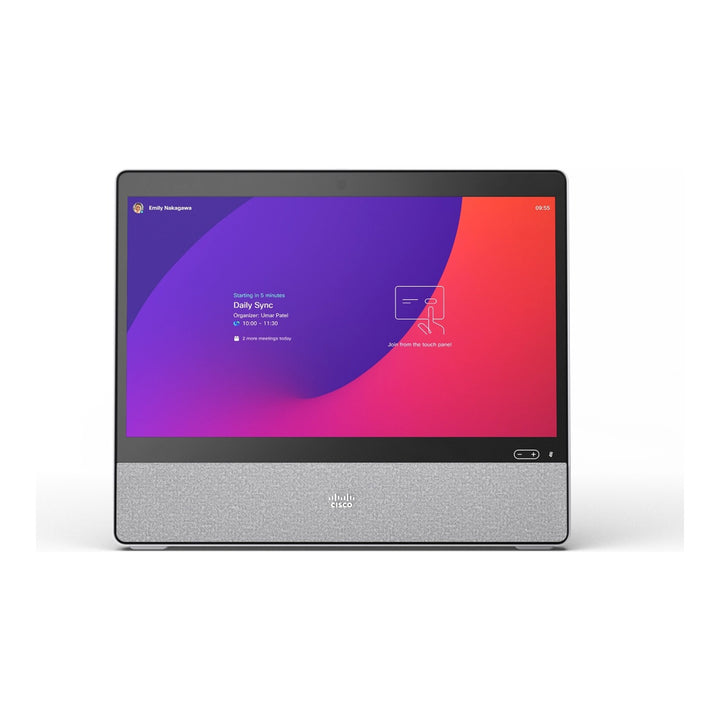


Cisco Desk 24-inch Video Collaboration Device, First Light
Email sales@sourceit.com.sg or use Request for Quotation below and our team will confirm the latest price, availability and lead time.
PRODUCT DESCRIPTION
Cisco Desk 24-inch Video Collaboration Device, First Light (CS-DESK-K9) — 1 Year Local Warranty
A personal video and whiteboard device for the desk
The Cisco Desk (CS-DESK-K9), formerly the Webex Desk, is an all-in-one collaboration device built for personal workspaces, shared hot desks and home offices. It combines a 24-inch 1080p touchscreen, an 8MP camera, a four-microphone array and a full-range speaker in one unit running Cisco RoomOS, so a user can join video meetings, share content and whiteboard without a separate PC. This listing is the First Light (light grey) colour version.
24-inch 1080p touchscreen
The display is a 24-inch high-contrast VA LED panel at 1920 x 1080 (16:9), with projected capacitive multi-touch and an anti-glare finish. Brightness is 300 cd/m², colour gamut is 72% NTSC (95% sRGB) and viewing angle is ±89°. The touchscreen is used for meeting controls, annotation on shared content and the built-in whiteboard.
8MP camera with privacy shutter
The integrated 8MP camera (1/3.2-inch CMOS, f/2.0) has a 64° horizontal and 50° vertical field of view, automatic focus, brightness and white balance, and automatic tilt adjustment. A physical privacy shutter with an LED indicator lets users close the lens when the camera is not in use.
Clear audio for open-plan and home offices
A full-range centre speaker with passive bass radiators covers 80 Hz to 20 kHz. Voice is picked up by a dynamic four-microphone array with automatic gain control, focused microphone pickup and AI-powered noise removal, which reduces keyboard and background noise for people on the far end. USB and Bluetooth headsets are also supported.
Laptop screen and USB camera over one cable
Connect a laptop over USB-C (DisplayPort Alternate Mode) or HDMI 2.0 to use the Cisco Desk as a 1080p60 monitor. Over USB-C, the Desk also passes touch back to the computer and lets the laptop use the Desk’s camera, microphones and speakers with any software client, so the same screen works for both RoomOS meetings and PC-based calls.
Cloud or on-premises, centrally managed
The Cisco Desk runs RoomOS 11 or later and can be registered to the Webex cloud or deployed on-premises. Webex-registered devices are managed centrally in Webex Control Hub. Cisco lists Webex, Microsoft Teams, Zoom and Google Meet among the meeting platforms the device supports, and the embedded SIP/H.323 engine provides 4-way multipoint with the optional MultiSite licence.
Cisco Desk Datasheet — Technical Specifications
Display
| Screen | 24-inch LCD, high-contrast VA LED panel |
| Resolution | 1920 x 1080 (16:9) |
| Touch | Projected capacitive, multi-touch, anti-glare |
| Brightness | 300 cd/m² |
| Contrast ratio | 1000:1 (typical) |
| Viewing angle | ±89° (typical) |
| Colour | 16.7M colours; 72% NTSC (95% sRGB) |
Camera
| Sensor | 8MP, 1/3.2-inch CMOS |
| Field of view | 64° horizontal, 50° vertical |
| Aperture | f/2.0 |
| Frame rate | Up to 30 fps |
| Focus | Automatic focus, brightness and white balance; 10 cm to infinity |
| Other | Automatic tilt adjustment; privacy shutter with LED light |
Audio
| Loudspeaker | Full-range centre speaker with passive bass radiators, 80 Hz to 20 kHz |
| Microphones | Dynamic four-microphone array |
| Processing | Automatic gain control, AI-powered noise removal, focused microphone pickup, active lip synchronisation |
| Audio standards | G.711, G.722, G.722.1, G.729, AAC-LD, Opus |
| Headsets | USB headset; Bluetooth headset (wideband) |
Video & Content
| Video standards | H.263, H.264 AVC |
| Encode | 1080p30 video stream; 1080p60 content stream |
| Decode | Up to 4K content from Webex |
| Multipoint | 4-way embedded SIP/H.323 conferencing with MultiSite option |
Inputs, Outputs & Ports
| Video inputs | USB-C DisplayPort Alternate Mode up to 1920 x 1080p60; HDMI 2.0 type A input |
| USB-C BYOD | Display extension (1920 x 1080 @ 60 fps), touch redirect, use of Desk camera, microphones and speakers with any software client |
| USB | 1x USB type-A; 1x Micro-B (service only) |
| Network | Ethernet (RJ-45); 3 m network cable included |
| Wireless sharing | Webex App and Webex Meetings |
| Security slot | Kensington security lock |
Power, Physical & Environment
| Power | 70W maximum; networked standby 7.5W maximum (external power supply included) |
| Dimensions (W x H x D) | 56.5 x 47.4 x 7.0 cm (22.2 x 18.7 x 2.8 in.) |
| Weight | 8.7 kg (19.2 lb) |
| Operating temperature | 0°C to 35°C, 20% to 90% RH |
| Storage temperature | -20°C to 60°C, 10% to 90% RH (non-condensing) |
| Compliance model | TTC7-30 |
Compatibility & Software Support
Operating system and registration
The Cisco Desk runs Cisco RoomOS 11 or later. It can be registered to the Webex cloud and managed in Webex Control Hub, or deployed on-premises with standards-based SIP/H.323 calling. Activation uses a one-time code generated in Webex.
Meeting platforms
Cisco lists Webex, Microsoft Teams, Zoom and Google Meet as supported meeting platforms for the Cisco Desk. When connected to a laptop over USB-C, the camera, microphones and speakers can be used with any software client.
Encryption
Webex end-to-end encryption is supported, along with H.323 and SIP point-to-point encryption (H.235 v3 and AES) with automatic key generation and exchange.
Optional licences and accessories
MultiSite embedded multipoint (LIC-DESK-MS), stylus kit with 2 styluses and 4 tips (CS-DESK-STYLUSKIT=), wall mount kit (CS-DESK-WALL=), VESA adapter (CS-DESK-VESA=) and metal speaker grille (CS-DESK-MG=) are ordered separately.
Lifecycle status
Cisco lists the Cisco Desk as an available product. No end-of-sale notice has been published for CS-DESK-K9 at the time of writing.
Warranty
This unit is supplied with a 1 Year Local Warranty. Cisco’s data sheet describes the manufacturer’s own coverage as a 90-day limited liability warranty. Keep your SourceIT invoice as proof of purchase for warranty claims.
Package Contents & Cisco Desk Series Ordering Information
In the Box
Cisco Desk, desk stand, 3 m network cable, 1.8 m USB-C cable for the USB passthrough feature, and power supply.
Cisco Desk Series
| Model | Key difference |
| Cisco Desk, First Light (CS-DESK-K9) (this listing) | 24-inch 1080p touchscreen, 8MP camera, First Light colour |
| Cisco Desk, Carbon Black (CS-DESK-C-K9) | Same device in Carbon Black |
| Cisco Desk, No radio (CS-DESK-NR-K9) | Version without radio, for sites that restrict wireless |
| Cisco Desk Pro (CS-DESKPRO-K9) | 27-inch 4K touchscreen, 12MP 4K camera, HDMI output (end-of-sale announced) |
| Cisco Desk Pro G2 (CS-DESKP-C-K9) | Current 27-inch Desk Pro generation |
| Cisco Desk Camera 4K (CD-DSKCAM-C-WW) | USB webcam for a PC, not a standalone device |
Datasheet & Downloads
| Document | Link |
| Cisco Desk Data Sheet | cisco.com |
| Cisco Desk support & documentation | cisco.com |
| Cisco Desk Installation Guide (PDF) | cisco.com |
| Get started with your Cisco Desk | help.webex.com |
| Official product page | webex.com |
Frequently Asked Questions — Cisco Desk
Is the Cisco Desk the same product as the Webex Desk?
Yes. Cisco renamed its Webex-branded devices; CS-DESK-K9 is the same 24-inch device now listed by Cisco as the Cisco Desk.
Can I use it as a monitor for my laptop?
Yes. Connect over USB-C (DisplayPort Alt Mode) or HDMI for a 1080p60 display. Over USB-C the laptop can also use the Desk’s touchscreen, camera, microphones and speakers.
Does the Cisco Desk need a PC to join meetings?
No. It runs RoomOS and joins meetings on its own once registered to Webex or an on-premises call control platform.
Is the Cisco Desk powered over Ethernet?
No. It is powered by the included external power supply (70W maximum). The Ethernet cable provides network connectivity only.
Does it have a privacy shutter?
Yes. The camera has a physical privacy shutter with an LED indicator.
Can it be wall mounted?
Yes, with the optional Cisco Desk wall mount kit (CS-DESK-WALL=) or VESA adapter (CS-DESK-VESA=), ordered separately.


