
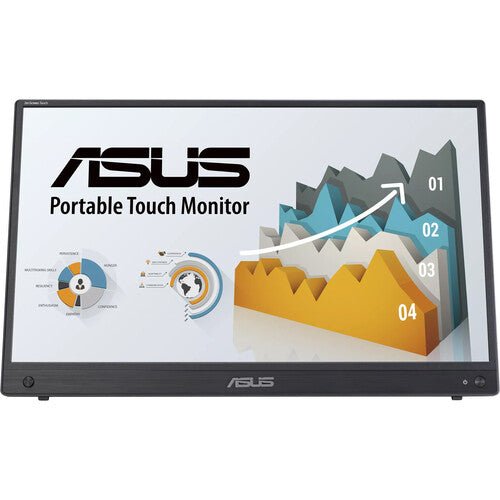


ASUS ZenScreen Touch MB16AHT 16" Portable Monitor
PRODUCT DESCRIPTION
ASUS ZenScreen Touch MB16AHT 16" Portable Monitor (ASU-MB16AHT / 90LM0890-B01110) - 3 Years Local Warranty
A 15.6-Inch Touchscreen Second Display That Travels with the Laptop
The ASUS ZenScreen Touch MB16AHT is a 15.6-inch Full HD (1920 x 1080) portable monitor with a 10-point capacitive touchscreen built in — a genuinely different proposition from the non-touch ZenScreen models in the same range. For a Singapore professional who wants a second screen that also takes direct finger input for sketching, annotating a document or running a touch-first application, this is the model in the catalogue built for that job.
At 1.01 kg and 12 mm thick, it still travels in a laptop bag without adding meaningful bulk, so the touch capability does not come at the cost of portability.
10-Point Projective Capacitive Touch
ASUS specifies the touch layer as projective capacitive with 10-point multi-touch support, recognising swipe, scroll, drag and pinch gestures directly on the glass. That is the same touch technology family used in tablets and touch laptops, not a resistive single-touch panel, so gestures register accurately and support two-hand interaction. It suits presentations where a client points at the screen, document mark-up, and any Windows touch-enabled workflow — spreadsheets, annotation tools, digital signage content — without reaching for a mouse.
IPS Panel with TÜV-Certified Eye Care
The panel underneath the touch layer is IPS with a 178°/178° viewing angle, anti-glare surface, 250 cd/m² typical brightness and a 700:1 contrast ratio — figures ASUS publishes for the standard (non-touch) FHD ZenScreen line, adjusted here for the touch glass stack. ASUS Eye Care is TÜV Rheinland-certified for Flicker-Free operation and Low Blue Light filtering, both active without digging through the on-screen menu, and the panel also carries ASUS SPLENDID preset modes and a QuickFit alignment grid for document and photo work.
Kickstand, Tripod Socket and Landscape/Portrait Use
A fold-out kickstand tilts from +15° to +35°, and a rear 1/4"-threaded tripod socket accepts a standard photography tripod or compatible monitor arm as an alternative to the kickstand. Both landscape and portrait orientation are supported, which matters more on a touch monitor than a passive one — portrait suits document review and annotation, landscape suits presentation and video content.
Dual USB-C and Mini-HDMI for Flexible Connection
Connectivity is dual USB-C (DisplayPort Alt Mode) ports plus a Mini-HDMI input, so the MB16AHT connects to a USB-C laptop over a single cable for most everyday use, or to an HDMI-only source using the Mini-HDMI port and a separate power connection. ASUS's own specification for this model does not publish a USB-C Power Delivery wattage figure, and the box includes a dedicated power adapter alongside the USB-C and Mini-HDMI cables — so unlike the single-cable USB-C-only ZenScreen models, plan on the supplied adapter for power rather than assuming the host laptop alone will run both video and touch reliably in every configuration.
Supplied Locally, with GST Invoice and Singapore Warranty
SourceIT supplies the ASUS ZenScreen Touch MB16AHT with a full GST invoice and local Singapore warranty support. ASUS's manufacturer term for this model is 3 years.
Looking for a touch monitor specifically, or would a lower-cost non-touch ZenScreen do the job? Email sales@sourceit.com.sg with your use case and we will help you pick the right model.
ASUS MB16AHT Datasheet — Technical Specifications
General
| ASUS Product Name | ASUS ZenScreen Touch MB16AHT Portable Monitor |
| Part Number (SKU) | ASU-MB16AHT / 90LM0890-B01110 |
| Range | ASUS ZenScreen Touch portable monitor series |
| Panel Type | IPS with 10-point projective capacitive touch overlay |
| Form Factor | Portable, USB Type-C powered, touchscreen |
| Manufacturer Warranty | 3-Year Manufacturer Warranty (ASUS) |
| Local Warranty (Singapore) | Included with every unit supplied by SourceIT, together with a GST invoice |
Display
| Panel Size | 15.6-inch (16" class) |
| Aspect Ratio | 16:9 |
| Resolution | 1920 x 1080 (Full HD) |
| Display Surface | Anti-Glare, touch glass overlay |
| Backlight Type | LED |
| Viewing Angle (CR≧10, H/V) | 178° / 178° |
| Pixel Pitch | 0.179 mm |
| Brightness (Typ.) | 250 cd/m² |
| Contrast Ratio (Typ.) | 700:1 |
| Display Colours | 262K |
| Response Time | 5 ms (GTG) |
| Refresh Rate (Max) | 60 Hz |
| Flicker-Free | Yes — TÜV Rheinland certified |
Touch
| Touch Technology | Projective capacitive, 10-point multi-touch |
| Supported Gestures | Swipe, scroll, drag, pinch-to-zoom |
| Operating System Support | Full touch support on Windows; touch input is not supported on macOS or ChromeOS as a standard driverless feature — confirm your host OS with us before ordering if touch is the primary reason for purchase |
Features
| ASUS SPLENDID Technology | Yes |
| QuickFit | Yes (photo / alignment grid) |
| HDCP | Yes |
| Low Blue Light | Yes — TÜV Rheinland certified |
Audio & I/O
| Speaker | Built-in stereo speakers, 1 W x 2 |
| I/O Ports | USB Type-C x 2 (DisplayPort Alt Mode), Mini-HDMI x 1, 3.5 mm earphone jack |
Power
| Power Consumption | 9.88 W (typical) |
| Power Saving Mode | < 0.5 W |
| Power Off Mode | < 0.3 W |
| Input Voltage | 100–240 V, 50/60 Hz |
| USB-C Power Delivery Wattage | Not published by ASUS as a fixed figure — a dedicated power adapter is included in the box for reliable operation regardless of host laptop power output |
Physical & Environmental
| Kickstand Tilt Range | +15° to +35° |
| Tripod Socket | Yes — 1/4" thread |
| Dimensions without Stand (W x H x D) | 359.9 x 226.8 x 12 mm |
| Net Weight without Stand | 1.01 kg |
| Package Contents | USB-C to USB-A cable, USB-C to USB-C cable, Mini-HDMI to HDMI cable, power adapter, protective sleeve, tripod hole cover, quick start guide |
| Certifications | TÜV Low Blue Light, TÜV Flicker-free |
Connectivity & Portability
Touchscreen Compatibility
Touch input works fully under Windows without extra drivers. It is not a standard driverless feature on macOS or ChromeOS, so if touch is the reason you are buying this model rather than a lower-cost ZenScreen, confirm your host operating system with us before ordering — email sales@sourceit.com.sg with your laptop or tablet model.
Video and Power Connections
Two USB-C (DisplayPort Alt Mode) ports and one Mini-HDMI port cover most laptops, tablets and desktop sources. ASUS does not publish a fixed USB-C Power Delivery wattage for this model, and the carton includes a dedicated power adapter — unlike the single-cable USB-C-only ZenScreen models in our catalogue, treat the adapter as the reliable power path here, particularly when running the touch overlay and display together from an older or lower-wattage USB-C port.
Kickstand, Tripod Mount and Orientation
The integrated kickstand tilts from +15° to +35°, and the rear 1/4" tripod socket takes a standard photography tripod or compatible monitor arm in place of the kickstand. Both landscape and portrait orientation are supported.
Weight and Everyday Carry
At 1.01 kg without the sleeve, the MB16AHT sits in the middle of the ZenScreen portable range by weight — heavier than the thinnest non-touch models, which is the trade-off for the touch glass and the built-in stereo speakers, but still well within what a laptop bag carries comfortably day to day.
Package Contents & ZenScreen Ordering Information
In the Box
USB-C to USB-A cable, USB-C to USB-C cable, Mini-HDMI to HDMI cable, power adapter, protective sleeve, tripod hole cover, quick start guide.
Other ASUS ZenScreen Portable Monitors from SourceIT
SourceIT also carries the following ASUS ZenScreen portable monitors — email sales@sourceit.com.sg quoting the part number to check stock and lead time:
| ASU-MB229CF / 90LM08S5-B01A10 | 21.5" FHD portable monitor, 100Hz, USB-C PD 60W, 2.1-channel speakers, C-clamp stand |
| ASU-MB16QHG / 90LM08NG-B01110 | 16" WQXGA (2560x1600) portable monitor, 120Hz, DisplayHDR 400, 100% DCI-P3 |
| ASU-MB249C / 90LM0865-B02110 | 23.8" FHD portable monitor, 75Hz Adaptive-Sync, USB-C PD 60W, speakers, C-clamp stand |
| ASU-MB16AHG / 90LM08U0-B01110 | 15.6" FHD portable monitor, 144Hz Adaptive-Sync, dual USB-C, Mini-HDMI |
| ASU-MB16AHV / 90LM0381-B02310 | 15.6" FHD portable monitor, dual USB-C, Mini-HDMI, antibacterial surface |
| ASU-MB16ACV / 90LM0381-B01310 | 15.6" FHD portable monitor, USB-C hybrid signal, antibacterial surface |
| ASU-MB169CK / 90LM0AZ3-B01111 | 15.6" FHD portable monitor, dual USB-C, 360° kickstand |
| ASU-MB166CR / 90LM07D3-B03110 | 15.6" FHD portable monitor, single USB-C, 360° kickstand |
| ASU-MB14AC / 90LM0631-B01110 | 14" FHD portable monitor, USB-C hybrid signal, compact body |
| ASU-MB166C / 90LM07D3-B01110 | 15.6" FHD portable monitor, single USB-C, folding sleeve/stand |
| ASU-MB165B | 15.6" HD (1366x768) portable monitor, standard USB signal and power, entry-level |
The MB16AHT is the only touchscreen model in this list — if touch input is not a requirement, any of the non-touch models above will generally cost less for a comparable panel size and resolution. Email us your use case and budget and we will point you to the right fit.
Datasheet & Downloads
ASUS hosts the official product and specification pages for this model.
| ASUS Singapore product page | ASUS ZenScreen Touch MB16AHT — Overview |
| ASUS Singapore specifications page | ASUS ZenScreen Touch MB16AHT — Full Specifications |
For the PDF datasheet, user manual or driver downloads, email sales@sourceit.com.sg quoting MB16AHT and we will send you the current files directly.
Frequently Asked Questions — ASUS MB16AHT
Does the touchscreen work with macOS?
Touch input is not a standard driverless feature on macOS or ChromeOS. It works fully under Windows. If touch is the main reason for buying this model, tell us your host laptop or tablet's operating system before you order and we will confirm compatibility.
How many fingers can it register at once?
The touch layer is projective capacitive with 10-point multi-touch, so it recognises swipe, scroll, drag and pinch-to-zoom gestures, including two-hand interaction.
Do I need the power adapter, or does USB-C alone run it?
ASUS does not publish a fixed USB-C Power Delivery wattage for this model, and a dedicated power adapter is included in the box. Unlike the single-cable USB-C-only ZenScreen models in our catalogue, plan on using the supplied adapter for reliable operation, particularly when the touch overlay is in active use.
Can it run in portrait mode?
Yes. The integrated kickstand and the rear tripod socket both support landscape and portrait orientation.
What is the difference between the MB16AHT and the non-touch ZenScreen models?
The core panel specification — 15.6-inch Full HD IPS, TÜV-certified Eye Care — is broadly the same as the standard ZenScreen FHD line. The MB16AHT adds a 10-point capacitive touch overlay and built-in stereo speakers, at the cost of slightly more weight and thickness than the thinnest non-touch models, and typically at a higher price for the touch capability.
Does it have built-in speakers?
Yes — built-in stereo speakers rated at 1 W x 2, unlike several of the thinner non-touch ZenScreen models, which have no speaker at all.
What is in the box?
The monitor, a USB-C to USB-A cable, a USB-C to USB-C cable, a Mini-HDMI to HDMI cable, a power adapter, a protective sleeve, a tripod hole cover and a quick start guide.
How much does it weigh, and will it fit in a normal laptop bag?
1.01 kg without the sleeve. It is heavier than the thinnest ZenScreen models because of the touch glass and speakers, but it still fits comfortably alongside a laptop in a standard bag.
Does it come with a Singapore warranty and a GST invoice?
Yes. Every ASUS ZenScreen Touch MB16AHT sold by SourceIT comes with local Singapore warranty and a GST invoice; ASUS backs the MB16AHT with a 3-year manufacturer warranty.


