
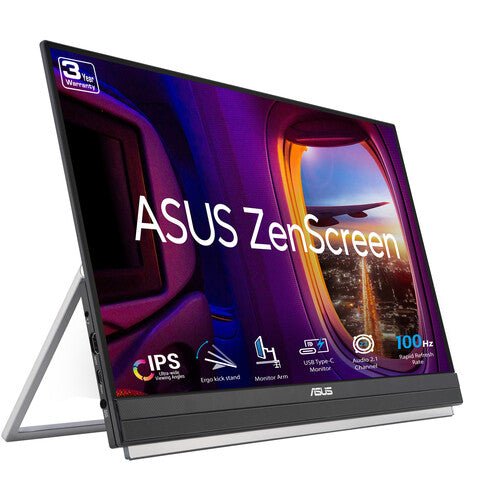


ASUS ZenScreen MB229CF 22" portable monitor
PRODUCT DESCRIPTION
ASUS ZenScreen MB229CF 21.5" Portable Monitor (ASU-MB229CF / 90LM08S5-B01A10) - 3 Years Local Warranty
A Larger 21.5-Inch Portable Monitor for a Real Second Workspace
The ASUS ZenScreen MB229CF is a 21.5-inch Full HD (1920 x 1080) IPS portable monitor built for people who want more than a laptop-bag-sized second screen — a genuine full-size second workspace that still folds down for a car boot, a shared meeting room or a hot-desk setup, rather than living permanently on one desk. For a Singapore team splitting time between office and client site, it is the portable option that does not feel like a compromise on screen real estate.
At 2.2 kg without its stand and roughly 4.0 kg with the full stand assembly fitted, it is heavier than the 15.6-inch ZenScreen models, which is the expected trade-off for the larger panel.
100Hz Refresh Rate — Smoother Than a Standard 60Hz Portable Screen
Where most portable monitors run a fixed 60Hz, the MB229CF supports up to 100Hz with a 5ms (GTG) response time, and the difference shows up in everyday scrolling and video playback, not just gaming. Adaptive-Sync support synchronises the refresh rate to what the connected graphics card is outputting, reducing the torn horizontal line that shows up on-screen when frame rate and refresh rate fall out of step during fast motion.
USB-C with 60W Power Delivery — Single-Cable Operation
A single USB-C port carries DisplayPort Alt Mode video and up to 60W of Power Delivery, so one cable can carry video and charge a compatible laptop at the same time. That is enough to power most ultrabooks under typical office load, though a heavier gaming or workstation laptop under sustained high draw may still need its own charger alongside the monitor connection — check your laptop's rated charging wattage against 60W if you are relying on the monitor as the sole power source. An HDMI 1.4 input is also fitted for sources without USB-C video output.
C-Clamp Arm, Partition Hook and Carrying Handle — Three Ways to Mount It
Unlike the smaller ZenScreen models that rely on a simple fold-out kickstand, the MB229CF ships with a genuinely adjustable stand: tilt from -5° to +20°, ±90° swivel, ±90° pivot into portrait, height adjustment of up to 180 mm, and 0–144 mm of forward/back extension. A C-clamp arm and a partition-hook kit are both included, so the monitor can be clamped to a desk edge or hung on a cubicle partition instead of needing desk surface at all — genuinely useful in a shared or hot-desking office. A built-in carrying handle doubles as a basic kickstand for quick setup, and the panel is also 100 x 100 mm VESA compatible for a monitor arm.
Built-In 2.1-Channel Speakers and Eye Care
A 2.1-channel speaker system with a 1.5W woofer is built in, which is a step up from the stereo speakers (or no speakers at all) on most of the smaller ZenScreen models — useful for video calls or media playback without pairing a separate speaker. ASUS Eye Care technology (TÜV Rheinland-certified Flicker-Free and Low Blue Light) is active on this panel as standard.
Supplied Locally, with GST Invoice and Singapore Warranty
SourceIT supplies the ASUS ZenScreen MB229CF with a full GST invoice and local Singapore warranty support. ASUS's manufacturer term for this model is 3 years.
Comparing the MB229CF against the 23.8-inch MB249C in our catalogue? Email sales@sourceit.com.sg and we will help you pick the right screen size for your desk.
ASUS MB229CF Datasheet — Technical Specifications
General
| ASUS Product Name | ASUS ZenScreen MB229CF Portable Monitor |
| Part Number (SKU) | ASU-MB229CF / 90LM08S5-B01A10 |
| Range | ASUS ZenScreen portable monitor series |
| Panel Type | IPS |
| Form Factor | Portable, USB Type-C powered, adjustable stand |
| Manufacturer Warranty | 3-Year Manufacturer Warranty (ASUS) |
| Local Warranty (Singapore) | Included with every unit supplied by SourceIT, together with a GST invoice |
Display
| Panel Size | 21.5-inch (22" class) |
| Aspect Ratio | 16:9 |
| Resolution | 1920 x 1080 (Full HD) |
| Display Surface | Anti-Glare |
| Viewing Angle (CR≧10, H/V) | 178° / 178° |
| Brightness (Typ.) | 250 cd/m² |
| Display Colours | 16.7 million |
| Response Time | 5 ms (GTG) |
| Refresh Rate (Max) | Up to 100 Hz |
| Adaptive Sync | Yes |
| Flicker-Free | Yes — TÜV Rheinland certified |
| Low Blue Light | Yes — TÜV Rheinland certified |
Audio & I/O
| Speaker | 2.1-channel with 1.5 W woofer |
| I/O Ports | USB Type-C x 1 (DisplayPort Alt Mode, up to 60 W Power Delivery), HDMI 1.4 x 1, 3.5 mm earphone jack |
Portability & Power
| USB-C Power Delivery | Up to 60 W |
| Net Weight without Stand | 2.2 kg |
| Net Weight with Full Stand | 4.0 kg |
| Stand Adjustment | Tilt -5° to +20°, swivel ±90°, pivot ±90° (portrait), height adjustment up to 180 mm, extend/retract 0–144 mm |
| Mounting Accessories Included | C-clamp arm, partition hook |
| VESA Mount | 100 x 100 mm compatible |
| Tripod Socket | Yes — 1/4" thread |
Physical & Environmental
| Dimensions without Stand (W x H x D) | 487 x 318 x 22 mm |
| Dimensions with Full Stand (W x H x D) | 487 x 722 x 301 mm |
| Package Contents | USB-C cable, HDMI cable, power cord, power adapter, partition hook, L-shaped screwdriver, quick start guide, warranty card |
| Certifications | FSC MIX, TÜV Low Blue Light, TÜV Flicker-free |
Connectivity & Portability
Single-Cable USB-C Operation
The single USB-C port carries DisplayPort Alt Mode video and up to 60W of Power Delivery, so a compatible laptop can be driven and charged from one cable. Most ultrabooks under normal office load charge comfortably within 60W; a gaming or workstation laptop under sustained heavy load may draw more than the monitor can supply, in which case keep the laptop's own charger connected as well. HDMI 1.4 is available for sources without USB-C DisplayPort Alt Mode output, though HDMI carries video only, not power.
Mounting Options — Stand, C-Clamp or Partition Hook
Three mounting paths are included in the box: the adjustable stand itself (tilt, swivel, pivot and height adjustment), a C-clamp arm for clamping to a desk edge without using desk surface, and a partition hook for hanging the monitor on a cubicle divider. The panel is also 100 x 100 mm VESA compatible for a third-party monitor arm. This range of options is what separates the MB229CF from the smaller ZenScreen models, which rely on a simple fold-out kickstand.
Weight and Moving It Between Desks
Without its stand, the panel alone weighs 2.2 kg — manageable to carry between a home office and a client site, though noticeably heavier than the 15.6-inch ZenScreen models. With the full stand assembly fitted, total weight rises to 4.0 kg, so for genuine day-to-day portability most users travel with the panel and swap between the C-clamp, partition hook or a bare kickstand rather than the whole stand.
Refresh Rate and Adaptive-Sync in Practice
Up to 100Hz with Adaptive-Sync is noticeably smoother than a fixed 60Hz portable monitor for scrolling, video and light gaming, without the screen tearing that appears when the graphics card's frame rate and the monitor's refresh rate are out of step.
Package Contents & ZenScreen Ordering Information
In the Box
USB-C cable, HDMI cable, power cord, power adapter, partition hook, L-shaped screwdriver, quick start guide, warranty card.
Other ASUS ZenScreen Portable Monitors from SourceIT
SourceIT also carries the following ASUS ZenScreen portable monitors — email sales@sourceit.com.sg quoting the part number to check stock and lead time:
| ASU-MB16AHT / 90LM0890-B01110 | 15.6" FHD portable touchscreen monitor, 10-point touch, dual USB-C, Mini-HDMI |
| ASU-MB16QHG / 90LM08NG-B01110 | 16" WQXGA (2560x1600) portable monitor, 120Hz, DisplayHDR 400, 100% DCI-P3 |
| ASU-MB249C / 90LM0865-B02110 | 23.8" FHD portable monitor, 75Hz Adaptive-Sync, USB-C PD 60W, speakers, C-clamp stand |
| ASU-MB16AHG / 90LM08U0-B01110 | 15.6" FHD portable monitor, 144Hz Adaptive-Sync, dual USB-C, Mini-HDMI |
| ASU-MB16AHV / 90LM0381-B02310 | 15.6" FHD portable monitor, dual USB-C, Mini-HDMI, antibacterial surface |
| ASU-MB16ACV / 90LM0381-B01310 | 15.6" FHD portable monitor, USB-C hybrid signal, antibacterial surface |
| ASU-MB169CK / 90LM0AZ3-B01111 | 15.6" FHD portable monitor, dual USB-C, 360° kickstand |
| ASU-MB166CR / 90LM07D3-B03110 | 15.6" FHD portable monitor, single USB-C, 360° kickstand |
| ASU-MB14AC / 90LM0631-B01110 | 14" FHD portable monitor, USB-C hybrid signal, compact body |
| ASU-MB166C / 90LM07D3-B01110 | 15.6" FHD portable monitor, single USB-C, folding sleeve/stand |
| ASU-MB165B | 15.6" HD (1366x768) portable monitor, standard USB signal and power, entry-level |
Need the larger 23.8-inch MB249C instead, or a lighter 15.6-inch model for daily carry? Email us your use case and we will help you choose.
Datasheet & Downloads
ASUS hosts the official product and specification pages for this model.
| ASUS Singapore product page | ASUS ZenScreen MB229CF — Overview |
| ASUS Singapore specifications page | ASUS ZenScreen MB229CF — Full Specifications |
For the PDF datasheet, user manual or driver downloads, email sales@sourceit.com.sg quoting MB229CF and we will send you the current files directly.
Frequently Asked Questions — ASUS MB229CF
Will a single USB-C cable really run and charge my laptop?
Yes, up to 60W of Power Delivery over the same USB-C cable that carries video. That covers most ultrabooks under typical office load. A gaming or workstation laptop drawing more than 60W under sustained heavy load may still need its own charger connected alongside the monitor.
How does 100Hz help on a productivity monitor rather than a gaming one?
Adaptive-Sync at up to 100Hz makes everyday scrolling and video playback noticeably smoother than a fixed 60Hz screen, and it eliminates the tearing that shows up when frame rate and refresh rate fall out of step — a comfort improvement, not just a gaming one.
What mounting options come in the box?
The adjustable stand itself, a C-clamp arm for clamping to a desk edge, and a partition hook for hanging the monitor on a cubicle divider. The panel is also 100 x 100 mm VESA compatible for a third-party arm.
How heavy is it to carry around daily?
2.2 kg for the panel alone, rising to 4.0 kg with the full stand fitted. It is noticeably heavier than the 15.6-inch ZenScreen models — most people travel with just the panel and use the C-clamp or partition hook rather than the whole stand assembly.
Does it have built-in speakers good enough for video calls?
Yes — a 2.1-channel system with a 1.5W woofer, a step up from the stereo or no-speaker setup on the smaller ZenScreen models.
What video inputs does it have besides USB-C?
One HDMI 1.4 input, for sources without USB-C DisplayPort Alt Mode output. HDMI carries video only, not power, so a source connected over HDMI needs its own power source for the monitor via the included adapter.
How does the MB229CF compare with the larger MB249C in your catalogue?
The MB229CF is 21.5 inches with a 100Hz refresh rate and a more elaborate adjustable stand including a C-clamp and partition hook. The MB249C is a larger 23.8-inch panel at 75Hz with a lighter carrying-handle stand design. Email us your desk size and preferred screen real estate and we will help you choose.
Does it come with a Singapore warranty and a GST invoice?
Yes. Every ASUS ZenScreen MB229CF sold by SourceIT comes with local Singapore warranty and a GST invoice; ASUS backs the MB229CF with a 3-year manufacturer warranty.


