
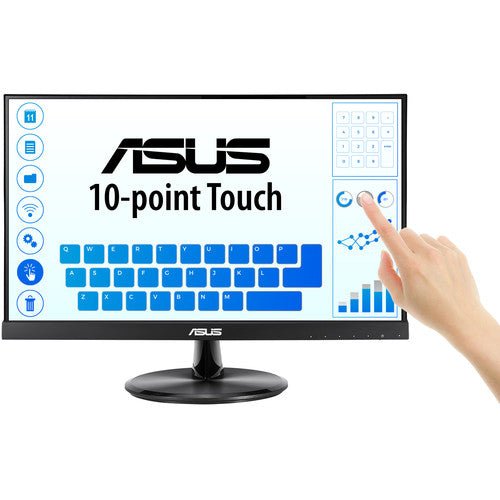


ASUS VT229H 22" FHD Touch Monitor
PRODUCT DESCRIPTION
ASUS VT229H 22" FHD Touch Monitor (ASU-VT229H / 90LM0490-B01110) - 3 Year Warranty
Compact 22" FHD Touch Monitor for Interactive Workflows
The ASUS VT229H is a 21.5-inch Full HD touch monitor built for point-of-sale counters, interactive kiosks, training rooms and office workstations across Singapore that need reliable touch input in a compact, frameless footprint. The IPS panel delivers 1920 x 1080 resolution with 178°/178° viewing angles, so the display stays clear and consistent whether it is being read head-on at a counter or from an angle by someone standing beside it.
10-Point Projective Capacitive Touch
Touch input is projective capacitive with 10-point multi-touch, the same underlying technology used in modern smartphones and tablets — accurate finger-tap recognition, smooth pinch-to-zoom and swipe gestures, and a protective glass surface over the sensor so the touch layer holds up to counter and kiosk use. Touch signal runs over a USB connection separate from the video input, and the panel is built for Windows-based touch applications.
IPS Panel with Wide Viewing Angles
Full 178°/178° viewing angles mean colour and contrast hold up when a customer, student or colleague is viewing the screen from an angle rather than straight on — the normal situation at a POS counter or shared kiosk, where a narrower-angle panel would visibly wash out.
ASUS Eye Care Technology
TÜV Rheinland-certified Flicker-Free and Low Blue Light technology reduce eye strain for staff who face this screen for a full shift, whether at a retail counter, reception desk or training station.
HDMI and VGA Connectivity with VESA Mounting
HDMI 1.4 and legacy VGA (D-Sub) cover both modern and older POS and kiosk controllers, and a 100 x 100 mm VESA mount pattern lets the VT229H be wall-mounted, arm-mounted or built into a kiosk enclosure rather than restricted to the bundled desktop stand.
ASUS VT229H Datasheet — Technical Specifications
General
| ASUS Product Name | ASUS Touch Display VT229H |
| Part Number (SKU) | ASU-VT229H / 90LM0490-B01110 |
| Range | ASUS Touch VT-series |
| Product Type | 22" FHD touch monitor |
| Panel Type | IPS |
| Screen Size | 21.5 inch (22" class) |
| Manufacturer Warranty | 3-Year Warranty (ASUS) |
| Local Warranty (Singapore) | Included with every unit supplied by SourceIT, together with a GST invoice |
Display
| Resolution | Full HD, 1920 x 1080 |
| Aspect Ratio | 16:9 |
| Brightness | 250 cd/m² typical |
| Contrast Ratio | 1000:1 typical |
| Response Time | 5 ms (GtG) |
| Refresh Rate | 60 Hz |
| Viewing Angle | 178° horizontal / vertical |
| Display Surface | Glossy with protective glass over the touch sensor |
Touch Technology
| Touch Type | Projective capacitive, 10-point multi-touch |
| Touch Surface | Protective glass over the sensor |
| Touch Signal | USB 2.0 (separate from video input) |
| OS Compatibility | Optimised for Windows touch gestures |
Connectivity
| Video Inputs | 1 x HDMI 1.4, 1 x VGA (D-Sub) |
| Touch Interface | 1 x USB 2.0 (Type-B upstream) |
| Audio | 3.5 mm earphone jack, built-in stereo speakers 1.5W x 2 |
Ergonomics & Physical
| Stand Adjustment | Tilt only |
| VESA Mount | 100 x 100 mm compatible |
| Security | Kensington lock slot |
| Dimensions (with stand) | 491.5 x 367.7 x 204.4 mm |
| Dimensions (without stand) | 491.5 x 301.6 x 52.0 mm |
| Weight | 3.7 kg with stand, 3.18 kg without stand |
Power
| Power Consumption | 18.56W typical operation |
| Power Saving Mode | <0.5W |
| Power Off Mode | <0.5W |
| Package Contents | Power cable, HDMI cable, USB cable, quick start guide, warranty card |
Touch Setup & Connectivity
Getting Touch Working
Video runs over HDMI or VGA and touch runs separately over USB — both cables need to be connected to the host for touch to function, which is the standard arrangement for this class of touch monitor. Once connected, Windows recognises the panel as a 10-point touch digitiser with no driver installation required on Windows 10 or 11.
Touch Technology and Durability
The projective capacitive sensor sits under a protective glass layer, which is what makes this touch type suitable for continuous counter or kiosk use rather than occasional office touch input — it resists scratching and everyday knocks far better than a resistive touch film. Ten simultaneous touch points support natural multi-finger gestures: pinch-to-zoom, two-finger scroll and rotate all work as expected in touch-aware applications.
Mounting for Kiosk and POS Deployments
The 100 x 100 mm VESA mount pattern is a standard fit for POS stands, kiosk enclosures and wall or arm mounts, so the VT229H is not restricted to the bundled tilt stand. A Kensington lock slot is fitted for securing the unit in an unattended retail or public-facing location.
Legacy and Modern Host Compatibility
HDMI 1.4 covers modern PCs, thin clients and POS terminals, while the VGA (D-Sub) input keeps older POS controllers and legacy kiosk hardware usable without an adapter — a genuine consideration when retrofitting touch onto an existing till or kiosk system rather than a brand-new deployment.
Driver Installation and Plug-and-Play
Windows 10 and 11 recognise the 10-point touch digitiser natively through standard HID (Human Interface Device) touch drivers, so no ASUS-specific software installation is required to get basic touch working. Where a kiosk application needs custom gesture handling or calibration, that is configured at the application level rather than through a monitor driver.
Audio and Notification Sounds
The built-in 1.5W x 2 speakers handle system and notification sounds directly from the connected HDMI source, or independently over the 3.5 mm audio jack if the source device does not carry audio over its video connection — useful when a VGA-connected legacy POS controller has no digital audio output of its own.
Package Contents & Ordering Information
In the Box
Power cable, HDMI cable, USB cable, quick start guide and warranty card.
Other ASUS Touch and Business Monitors from SourceIT
SourceIT also carries the following ASUS touch, business and docking monitors — email sales@sourceit.com.sg quoting the part number to check stock and lead time:
| ASU-VT169HE / 90LM09V1-B01110 | 16" FHD touch monitor, smaller footprint |
| ASU-VT168HR / 90LM02G1-B02110 | 16" HD touch monitor, entry-level |
| ASU-BE24ECSBT / 90LM05M1-B05310 | 24" FHD multi-touch business monitor with USB-C 80W PD |
| ASU-BE24EQK / 90LM05M1-B01310 | 23.8" FHD business monitor with webcam |
| ASU-VP32AQ / 90LM06T0-B01E10 | 32" QHD eye care monitor, non-touch |
Datasheet & Downloads
ASUS hosts the official product and specification pages for this model. The links below are ASUS's current Singapore pages for this model.
| ASUS Singapore product page | ASUS VT229H — Overview |
| ASUS Singapore specifications page | ASUS VT229H — Full Specifications |
For the PDF datasheet or driver downloads, email sales@sourceit.com.sg quoting VT229H and we will send you the current files directly.
Frequently Asked Questions — ASUS VT229H
What kind of touch technology does the VT229H use, and how many touch points does it support?
It uses projective capacitive touch with 10-point multi-touch support under a protective glass surface — the same underlying sensor type as a modern smartphone screen, rather than an older resistive (pressure-sensitive) touch film.
Do I need a separate USB cable for touch to work, or does it work over HDMI alone?
You need both. HDMI or VGA carries the video signal, and a separate USB cable carries the touch signal back to the host. Both must be connected for touch input to function — this is standard for this class of monitor.
Is it suitable for a POS till or a public-facing kiosk?
Yes. The protective glass touch surface, frameless design, VESA mount compatibility and Kensington lock slot are all aimed at exactly this use case, and both HDMI and legacy VGA inputs mean it can slot into existing POS or kiosk hardware without an adapter.
Can I wall-mount or arm-mount it instead of using the bundled stand?
Yes, the panel is 100 x 100 mm VESA compatible, so a standard wall mount, monitor arm or kiosk enclosure bracket will fit.
Does it work with a Mac?
The panel is optimised and tested for Windows touch gestures. It will display video from a Mac over HDMI, but touch input support on macOS is not something ASUS documents for this model — treat it as a Windows-first touch monitor and confirm with us before relying on Mac touch support.
How loud are the built-in speakers?
They are 1.5W x 2, which is enough for notification sounds and basic audio at a counter or kiosk, but not intended to replace dedicated speakers for music or presentation audio.
What is the difference between the VT229H and the smaller VT169HE and VT168HR in your catalogue?
The VT229H is the largest of the three at 21.5 inches with Full HD resolution and an IPS panel. The VT169HE is a smaller 15.6-inch Full HD IPS touch monitor, and the VT168HR is a 15.6-inch HD (1366 x 768) TN-panel touch monitor at a lower price point. Email sales@sourceit.com.sg with your kiosk or counter footprint and budget and we will help you choose.
Is it suitable for a shared multi-monitor workstation, not just a single kiosk?
Yes — the frameless design specifically supports multi-monitor setups where several VT229H panels sit side by side, and the 100 x 100 mm VESA mount pattern accommodates multi-monitor arm systems for office use as well as standalone kiosk deployment.
What software features does the on-screen menu offer beyond basic brightness and contrast?
ASUS Splendid video preset modes are included for quick colour/contrast profile switching, QuickFit provides an on-screen alignment overlay useful for document and photo preview tasks, and HDCP support ensures protected video content (such as streaming services) displays correctly without a black-screen error.
Is any calibration or software setup needed before touch works out of the box?
No. Windows 10 and 11 recognise the touch digitiser through standard HID touch drivers as soon as both the video and USB touch cables are connected — there is no ASUS-specific driver to install for basic touch functionality, which keeps deployment across multiple kiosk or POS units simple.
Does SourceIT provide a Singapore warranty and GST invoice with this monitor?
Yes. Every ASUS VT229H sold by SourceIT comes with local Singapore warranty support and a GST invoice; ASUS backs the panel itself with a 3-year manufacturer warranty.


