
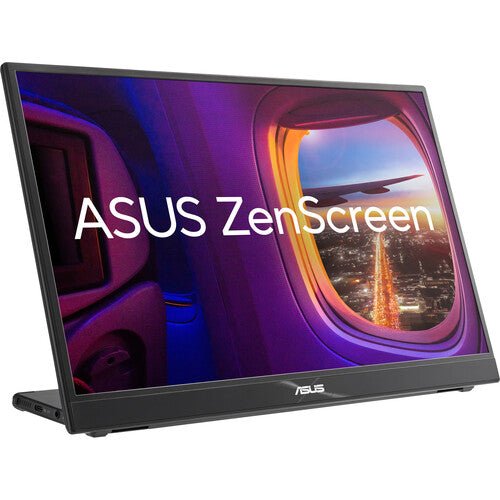


ASUS ZenScreen MB16QHG 16" Portable Monitor
PRODUCT DESCRIPTION
ASUS ZenScreen MB16QHG 16" Portable Monitor (ASU-MB16QHG / 90LM08NG-B01110) - 3 Years Local Warranty
A WQXGA Portable Monitor for Creative and High-Performance Work
The ASUS ZenScreen MB16QHG is the premium panel in the ZenScreen portable range: a 16-inch WQXGA (2560 x 1600, 16:10) IPS display rather than the Full HD 16:9 panel used on most of the other ZenScreen models. The 16:10 aspect ratio gives more vertical workspace than 16:9 at the same diagonal size, and the higher resolution gives noticeably more working detail — useful for a Singapore creative professional, developer or analyst who wants a genuinely sharper second screen rather than just a larger one.
120Hz Refresh Rate — Unusual on a Portable Monitor
A 120Hz refresh rate with a 5ms (GTG) response time is well above the 60Hz that most portable monitors are limited to, and it is a genuine differentiator within the ZenScreen range itself — the MB16AHG tops out at 144Hz on a Full HD panel, while the MB16QHG combines high refresh rate with the higher WQXGA resolution. Scrolling, video playback and light gaming all benefit from the extra smoothness.
DisplayHDR 400 and 100% DCI-P3 Colour Gamut
ASUS specifies DisplayHDR 400 (HDR10) support and 100% DCI-P3 colour coverage, both figures well above the anti-glare, sRGB-range panels used on the entry ZenScreen models. Brightness runs up to 500 cd/m² typical with a 1200:1 contrast ratio. For colour-critical work — photo editing, video review, design proofing — this is the ZenScreen model built for that job rather than general office use.
Ultra-Thin Profile with L-Shaped Kickstand
At around 7 mm at its thinnest point and roughly 1.2 kg, the MB16QHG is thinner than most of the FHD ZenScreen models despite the higher-spec panel inside it. An integrated L-shaped kickstand and a rear 1/4" tripod socket support both landscape and portrait positioning, and ASUS DisplayWidget software adds auto-rotation so the image follows the physical orientation of the panel.
Dual USB-C and HDMI 2.0 Connectivity
Two USB-C (DisplayPort Alt Mode) ports plus an HDMI 2.0 input cover most laptops, desktops and USB-C phones or tablets. Typical power draw is rated at under 13W; ASUS does not publish a separate fixed Power Delivery wattage figure for this model, so most modern USB-C laptop ports handle the draw over the same cable carrying video without a separate charger.
Supplied Locally, with GST Invoice and Singapore Warranty
SourceIT supplies the ASUS ZenScreen MB16QHG with a full GST invoice and local Singapore warranty support. ASUS's manufacturer term for this model is 3 years.
Deciding between the WQXGA MB16QHG and the 144Hz Full HD MB16AHG? Email sales@sourceit.com.sg with your priority — resolution and colour, or raw refresh rate — and we will help you choose.
ASUS MB16QHG Datasheet — Technical Specifications
General
| ASUS Product Name | ASUS ZenScreen MB16QHG Portable Monitor |
| Part Number (SKU) | ASU-MB16QHG / 90LM08NG-B01110 |
| Range | ASUS ZenScreen portable monitor series |
| Panel Type | IPS |
| Form Factor | Portable, USB Type-C powered |
| Manufacturer Warranty | 3-Year Manufacturer Warranty (ASUS) |
| Local Warranty (Singapore) | Included with every unit supplied by SourceIT, together with a GST invoice |
Display
| Panel Size | 16-inch (15.6" viewable, 16" class) |
| Aspect Ratio | 16:10 |
| Resolution | 2560 x 1600 (WQXGA) |
| Display Surface | Anti-Glare |
| Viewing Angle (CR≧10, H/V) | 178° / 178° |
| Pixel Pitch | 0.135 mm |
| Brightness (Typ.) | 500 cd/m² |
| Contrast Ratio (Typ.) | 1200:1 |
| Display Colours | 16.7 million |
| Colour Gamut | 100% DCI-P3 |
| HDR Support | HDR10 / DisplayHDR 400 |
| Response Time | 5 ms (GTG) |
| Refresh Rate (Max) | Up to 120 Hz |
| Flicker-Free | Yes — TÜV Rheinland certified |
| Low Blue Light | Yes — TÜV Rheinland certified |
Features
| ASUS SPLENDID Technology | Yes |
| GamePlus | Yes |
| QuickFit | Yes (photo / alignment grid) |
| HDCP | HDCP 2.2 |
| DisplayWidget | Yes — auto landscape/portrait rotation |
Audio & I/O
| Speaker | No built-in speaker |
| I/O Ports | USB Type-C x 2 (DisplayPort Alt Mode), HDMI 2.0 x 1, 3.5 mm earphone jack |
Portability & Power
| Power Consumption | < 13 W (typical) |
| Power Saving Mode | < 0.5 W |
| Power Off Mode | < 0.3 W |
| Input Voltage | 100–240 V, 50/60 Hz (via host USB-C port) |
| USB-C Power Delivery Wattage | Not published by ASUS as a fixed figure — one of the two USB-C ports carries the video and power connection to a compatible host |
| Net Weight without Stand | Approx. 1.2 kg |
| Kickstand | Integrated L-shaped kickstand, landscape and portrait |
| Tripod Socket | Yes — 1/4" thread |
Physical & Environmental
| Dimensions without Stand (W x H x D) | 359.7 x 247.1 x 7–20.6 mm |
| Package Contents | ZenScreen sleeve/stand, warranty card, USB Type-C cable, HDMI cable, quick start guide |
| Certifications | TÜV Low Blue Light, TÜV Flicker-free |
Connectivity & Portability
What It Connects To
Two USB-C (DisplayPort Alt Mode) ports and one HDMI 2.0 input mean most modern laptops, tablets and phones with USB-C video output connect over a single cable, while desktop towers and older laptops without USB-C video can use HDMI instead. ASUS does not publish a fixed Power Delivery wattage for this model; most current USB-C laptop ports drive the roughly 13W typical draw comfortably from the same cable that carries video.
Resolution and Refresh Rate Trade-Off
The MB16QHG is the only ZenScreen model in our catalogue combining WQXGA (2560 x 1600) resolution with a 120Hz refresh rate. If raw refresh rate on a Full HD panel is the priority instead, the MB16AHG runs up to 144Hz at 1920 x 1080; if resolution and colour accuracy for creative work matter more, the MB16QHG's 100% DCI-P3 gamut and DisplayHDR 400 support are the deciding factors.
Kickstand, Tripod Mount and Auto-Rotation
The integrated L-shaped kickstand supports both landscape and portrait positioning, and the rear 1/4" tripod socket accepts a standard tripod or compatible monitor arm instead. With ASUS DisplayWidget software installed on the host laptop, the screen automatically detects physical rotation and switches the displayed image between landscape and portrait.
Thin, Light and Travel-Friendly
At around 7 mm thick at its thinnest point and roughly 1.2 kg, the MB16QHG is one of the thinnest panels in the ZenScreen range, which matters for anyone carrying it daily alongside a laptop despite the higher-spec panel inside it.
Package Contents & ZenScreen Ordering Information
In the Box
ZenScreen sleeve/stand, warranty card, USB Type-C cable, HDMI cable, quick start guide.
Other ASUS ZenScreen Portable Monitors from SourceIT
SourceIT also carries the following ASUS ZenScreen portable monitors — email sales@sourceit.com.sg quoting the part number to check stock and lead time:
| ASU-MB16AHT / 90LM0890-B01110 | 15.6" FHD portable touchscreen monitor, 10-point touch, dual USB-C, Mini-HDMI |
| ASU-MB229CF / 90LM08S5-B01A10 | 21.5" FHD portable monitor, 100Hz, USB-C PD 60W, 2.1-channel speakers, C-clamp stand |
| ASU-MB249C / 90LM0865-B02110 | 23.8" FHD portable monitor, 75Hz Adaptive-Sync, USB-C PD 60W, speakers, C-clamp stand |
| ASU-MB16AHG / 90LM08U0-B01110 | 15.6" FHD portable monitor, 144Hz Adaptive-Sync, dual USB-C, Mini-HDMI |
| ASU-MB16AHV / 90LM0381-B02310 | 15.6" FHD portable monitor, dual USB-C, Mini-HDMI, antibacterial surface |
| ASU-MB16ACV / 90LM0381-B01310 | 15.6" FHD portable monitor, USB-C hybrid signal, antibacterial surface |
| ASU-MB169CK / 90LM0AZ3-B01111 | 15.6" FHD portable monitor, dual USB-C, 360° kickstand |
| ASU-MB166CR / 90LM07D3-B03110 | 15.6" FHD portable monitor, single USB-C, 360° kickstand |
| ASU-MB14AC / 90LM0631-B01110 | 14" FHD portable monitor, USB-C hybrid signal, compact body |
| ASU-MB166C / 90LM07D3-B01110 | 15.6" FHD portable monitor, single USB-C, folding sleeve/stand |
| ASU-MB165B | 15.6" HD (1366x768) portable monitor, standard USB signal and power, entry-level |
The MB16QHG is the only WQXGA / DCI-P3 / HDR model in the ZenScreen range we carry — if you don't need that level of colour and resolution, the Full HD models will generally cost less. Email us your priority and we will help you choose.
Datasheet & Downloads
ASUS hosts the official product and specification pages for this model.
| ASUS Singapore product page | ASUS ZenScreen MB16QHG — Overview |
| ASUS Singapore specifications page | ASUS ZenScreen MB16QHG — Full Specifications |
For the PDF datasheet, user manual or driver downloads, email sales@sourceit.com.sg quoting MB16QHG and we will send you the current files directly.
Frequently Asked Questions — ASUS MB16QHG
What does the 16:10 aspect ratio actually give me over a standard 16:9 panel?
More vertical workspace at the same diagonal size — useful for documents, code and spreadsheets where extra height matters more than extra width. Combined with the 2560 x 1600 resolution, the working area is meaningfully larger than a same-size Full HD panel.
Is this monitor aimed at gaming or creative work?
Creative and professional work first — the 100% DCI-P3 colour gamut and DisplayHDR 400 support are the standout features. The 120Hz refresh rate is a genuine bonus for scrolling and light gaming, but the panel's selling point is colour accuracy and resolution, not competitive gaming response times.
How does it compare with the 144Hz MB16AHG in your catalogue?
The MB16AHG runs a Full HD panel at up to 144Hz, prioritising raw refresh rate. The MB16QHG runs the higher WQXGA resolution and 100% DCI-P3 colour gamut at up to 120Hz, prioritising resolution and colour accuracy. Choose based on whether refresh rate or resolution/colour matters more for your work.
Do I need a separate power adapter?
No adapter is required for normal use — one of the two USB-C ports carries both video and the monitor's power draw (under 13W typical) from a compatible host laptop.
Can it run in portrait mode?
Yes, via the integrated L-shaped kickstand, and with ASUS DisplayWidget software installed the image automatically follows the physical rotation of the panel.
Does it have built-in speakers?
No. There is a 3.5 mm earphone jack for audio out, but no built-in speaker on this model.
What is in the box?
The monitor, a ZenScreen sleeve/stand, a USB Type-C cable, an HDMI cable, a quick start guide and a warranty card.
Does it come with a Singapore warranty and a GST invoice?
Yes. Every ASUS ZenScreen MB16QHG sold by SourceIT comes with local Singapore warranty and a GST invoice; ASUS backs the MB16QHG with a 3-year manufacturer warranty.


