
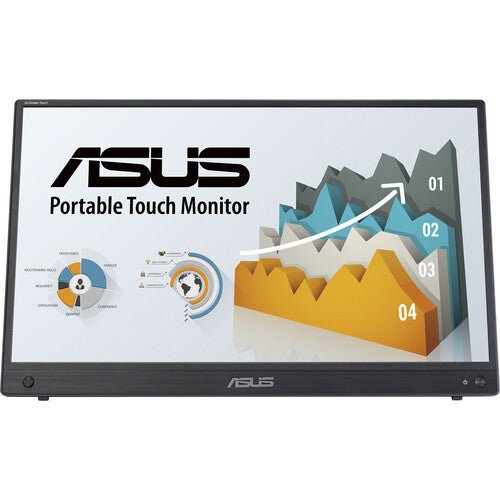


ASUS ZenScreen Touch MB16AMTR 16" Portable Screen
PRODUCT DESCRIPTION
ASUS ZenScreen Touch MB16AMTR 16" Portable Screen (ASU-MB16AMTR / 90LM04S0-B02110) - 3 Year Warranty
16" Touch Portable Monitor for Mobile Productivity in Singapore
The ASUS ZenScreen Touch MB16AMTR is a 15.6-inch Full HD (1920 x 1080) IPS portable monitor with a built-in touchscreen, aimed at professionals who need a second display that travels — client sites, co-working spaces, hotel rooms or a second desk — and want to interact with it directly rather than only through a connected keyboard and mouse.
10-Point Projective Capacitive Touch
Touch input is 10-point projective capacitive, supporting swipe, scroll, drag and pinch gestures the same way a modern tablet does. That makes the MB16AMTR genuinely useful for annotating a document mid-presentation, navigating a touch-first application, or simply operating the screen directly when a mouse is not to hand. It is optimised for Windows touch gestures.
Built-In 7800mAh Battery — No Wireless, Wired Simplicity Instead
Unlike the wireless ZenScreen Go MB16AWP in our catalogue, the MB16AMTR is a wired-only design — there is no WiFi screen mirroring — and it makes up for that with two USB-C ports and a slightly larger runtime, at roughly 4 hours on the internal 7800mAh battery depending on workload. One USB-C port carries DisplayPort Alt Mode video plus USB 3.2 data, and the second is dedicated to 10W USB-C Power Delivery charging, so video and charging do not have to compete for the same port. A mini HDMI input covers sources without USB-C video output.
IPS Panel for Clear, Consistent Visuals on the Move
The 15.6-inch IPS panel keeps colour and contrast steady across viewing angles, and an anti-glare surface with LED backlight keeps it usable under mixed lighting — a meeting room, a hotel desk lamp, or daylight through a window.
Kickstand, Tripod Socket and ASUS Eye Care
A built-in kickstand supports both landscape and portrait orientations, and a standard 1/4" tripod socket gives an alternative mounting option for presentations or video calls. TÜV Rheinland-certified Flicker-Free backlighting and Low Blue Light filtering carry over from ASUS's desktop monitor line for comfortable extended use.
Supplied Locally with GST Invoice and Singapore Warranty
SourceIT supplies the ASUS ZenScreen Touch MB16AMTR with a full GST invoice and local Singapore warranty support. ASUS backs this model with a 3-year manufacturer warranty worldwide.
ASUS MB16AMTR Datasheet — Technical Specifications
General
| ASUS Product Name | ASUS ZenScreen Touch MB16AMTR |
| Part Number (SKU) | ASU-MB16AMTR / 90LM04S0-B02110 |
| Range | ASUS ZenScreen Touch |
| Product Type | 16" touch portable monitor with built-in battery |
| Panel Type | IPS |
| Screen Size | 15.6 inch (16" class) |
| Manufacturer Warranty | 3-Year Warranty (ASUS) |
| Local Warranty (Singapore) | Included with every unit supplied by SourceIT, together with a GST invoice |
Display
| Resolution | Full HD, 1920 x 1080 (16:9) |
| Brightness | 250 cd/m² typical |
| Contrast Ratio | 700:1 typical |
| Response Time | 5 ms (GtG) |
| Refresh Rate | 60 Hz |
| Pixel Pitch | 0.179 mm |
| Display Colours | 16.7 million |
| Viewing Angle | 170° horizontal / 170° vertical |
| Surface Treatment | Anti-glare |
Touch Technology
| Touch Type | Projective capacitive, 10-point multi-touch |
| Supported Gestures | Swipe, scroll, drag, pinch |
| OS Compatibility | Optimised for Windows touch gestures |
Battery
| Battery Capacity | 7800 mAh |
| Battery Runtime | Approx. 4 hours, depending on workload |
| Charging | Via USB-C, 10W Power Delivery |
| Power Consumption | 10 W operating, <0.5 W power saving mode |
Features
| Eye Care | TÜV Rheinland-certified Flicker-Free and Low Blue Light |
| Splendid Preset Modes | ASUS Splendid display modes |
| QuickFit | Yes, on-screen alignment grid |
| HDCP | Supported |
Connectivity & Audio
| USB-C | 2 x USB-C — one with DisplayPort Alt Mode + USB 3.2 data, one dedicated to DC power input / 10W Power Delivery |
| Video Input | 1 x mini HDMI |
| Audio | 3.5 mm earphone jack, built-in stereo speakers 1W x 2 |
Physical
| Kickstand | Integrated, landscape and portrait |
| Tripod Socket | 1/4" standard tripod socket |
| Dimensions | Approx. 359.9 x 226.8 x 11.9 mm |
| Net Weight | Approx. 1.15 kg |
| Package Contents | USB-C to USB-C cable, mini HDMI to HDMI cable, protective smart cover, quick start guide, warranty card |
Touch Setup & Connectivity
Getting Touch Working
Connect via USB-C (DisplayPort Alt Mode with USB 3.2 data) and Windows recognises the panel as a 10-point touch digitiser automatically, with no driver installation required on Windows 10 or 11 — video and touch signal share the single USB-C cable in this configuration.
Two USB-C Ports, Two Different Jobs
One USB-C port carries DisplayPort Alt Mode video plus USB 3.2 data (and touch signal back to the host); the second USB-C port is dedicated to charging, accepting up to 10W USB-C Power Delivery. Keeping charging on a separate port means the monitor can stay powered from a wall charger or power bank while the video/touch connection to the laptop stays uninterrupted.
No Wireless Mirroring on This Model
The MB16AMTR is wired-only — there is no WiFi, Miracast or AirPlay screen mirroring built in. If cable-free presenting matters more than touch input, the ZenScreen Go MB16AWP in our catalogue is the wireless alternative, though it does not have a touchscreen.
Mini HDMI for Non-USB-C Sources
The mini HDMI input covers laptops, consoles or other devices without USB-C video output. Note that touch input requires the USB-C connection — it does not function over the mini HDMI-only path, since HDMI carries video only and not the USB touch signal.
Positioning with the Kickstand or a Tripod
The integrated kickstand supports both landscape and portrait orientation, and the 1/4" tripod socket accepts any standard tripod or compatible monitor mount for a more deliberate setup.
Touch Input While Charging
Because charging and video/touch sit on two separate USB-C ports, plugging in a charger does not interrupt the touch connection to the host device — the screen keeps responding to touch input while topping up the battery, which matters for a long presentation or workshop session run from mains power.
Everyday Use Cases for a Touch Portable Monitor
Beyond the obvious second-screen role, the touchscreen makes the MB16AMTR genuinely useful for on-site client demos where someone needs to interact with the screen directly, sales presentations where tapping through slides feels more natural than a remote clicker, and retail or interactive kiosk-style setups that need to travel between locations rather than being permanently installed.
Weight and Footprint for Travel
At approximately 1.15 kg and around 11.9 mm thick, the MB16AMTR sits comfortably in a laptop bag alongside a laptop itself, without adding meaningful bulk to daily travel between meetings or sites.
Package Contents & Ordering Information
In the Box
USB-C to USB-C cable, mini HDMI to HDMI cable, protective smart cover, quick start guide and warranty card.
Other ASUS Portable and Touch Monitors from SourceIT
SourceIT also carries the following ASUS portable and touch monitors — email sales@sourceit.com.sg quoting the part number to check stock and lead time:
| ASU-MB16AWP / 90LM07I1-B02310 | 16" wireless portable monitor, WiFi/Miracast/AirPlay mirroring, no touch |
| ASU-VT229H / 90LM0490-B01110 | 22" FHD desktop touch monitor, 10-point touch |
| ASU-VA249QG / 90LM02W1-B01321 | 24" FHD eye care monitor, 120Hz, 1ms MPRT |
Datasheet & Downloads
ASUS hosts the official product and specification pages for this model. The links below are ASUS's current Singapore pages for this model.
| ASUS Singapore product page | ASUS ZenScreen Touch MB16AMTR — Overview |
| ASUS Singapore specifications page | ASUS ZenScreen Touch MB16AMTR — Full Specifications |
For the PDF datasheet or driver downloads, email sales@sourceit.com.sg quoting MB16AMTR and we will send you the current files directly.
Frequently Asked Questions — ASUS ZenScreen Touch MB16AMTR
What kind of touchscreen does this monitor have?
A 10-point projective capacitive touchscreen supporting swipe, scroll, drag and pinch gestures — the same underlying sensor type as a modern tablet — optimised for Windows.
Do I need a special cable for touch to work?
Touch works over the USB-C connection, which carries video, USB 3.2 data and touch signal together on one cable. It does not work over the mini HDMI input, which carries video only.
Why are there two USB-C ports?
One handles video and touch (DisplayPort Alt Mode plus USB 3.2 data); the other is dedicated to charging via up to 10W USB-C Power Delivery. Splitting the roles means the monitor can stay charging from a separate power source without interrupting the video/touch connection to your laptop.
How long does the battery last?
Approximately 4 hours on the internal 7800mAh battery, depending on workload and brightness — enough for most meetings or working sessions away from a power outlet.
Does it support wireless screen mirroring like the MB16AWP?
No. The MB16AMTR is a wired-only design — there is no WiFi, Miracast or AirPlay. If wireless mirroring matters more to you than touch input, the ZenScreen Go MB16AWP is the model to choose instead.
Can I use it with a phone or tablet, not just a laptop?
Yes, via USB-C to a phone or tablet that supports DisplayPort Alt Mode video output, or via mini HDMI with an adapter for devices without USB-C video output (touch will not function over the HDMI path).
Does it come with a protective cover?
Yes, a protective smart cover is included in the box, which also typically doubles as the fold-out stand on this class of ZenScreen product.
What eye care certifications does it carry?
TÜV Rheinland-certified Flicker-Free backlighting and Low Blue Light filtering.
Does SourceIT provide a Singapore warranty and GST invoice with this monitor?
Yes. Every ASUS ZenScreen Touch MB16AMTR sold by SourceIT comes with local Singapore warranty support and a GST invoice; ASUS backs the panel itself with a 3-year manufacturer warranty.


