
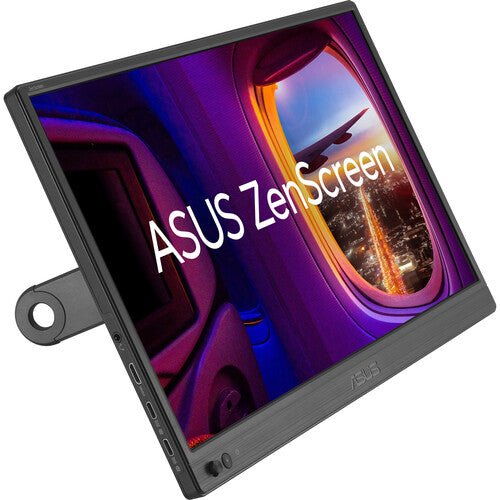


ASUS ZenScreen MB16AHV 16" Portable Monitor
PRODUCT DESCRIPTION
ASUS ZenScreen MB16AHV 15.6" Portable Monitor (ASU-MB16AHV / 90LM0381-B02310) - 3 Years Local Warranty
A Dependable 15.6-Inch Second Screen for Everyday Mobility
The ASUS ZenScreen MB16AHV is a 15.6-inch Full HD (1920 x 1080) IPS portable monitor built for straightforward everyday use — a lightweight, reliable second screen rather than a specification showcase. For a Singapore professional who mainly needs a dependable extra display for spreadsheets, documents and video calls while moving between office, home and client sites, this is the no-frills option in the ZenScreen range.
At approximately 0.9 kg and around 10 mm thick, it sits comfortably alongside a laptop in a standard bag.
IPS Panel with Anti-Glare Surface
The panel is IPS with a 178°/178° viewing angle, 250 cd/m² typical brightness and an 800:1 contrast ratio, with an anti-glare surface treatment to cut down on reflections under office lighting. ASUS Eye Care — TÜV Rheinland-certified Flicker-Free and Low Blue Light filtering — is active by default, and ASUS SPLENDID preset modes, GamePlus overlays and a QuickFit alignment grid round out the software feature set shared across the ZenScreen range.
Antibacterial Surface Treatment
ASUS applies an antibacterial treatment to the surfaces of this model, a detail worth noting for anyone deploying the monitor in a genuinely shared environment — a hot-desking office, a training room, a reception counter — rather than a single dedicated user's desk. It does not change how the monitor performs day to day, but it is a real point of difference against ZenScreen models that do not carry this treatment.
Dual USB-C with Power Delivery and Mini-HDMI
Two USB-C (DisplayPort Alt Mode) ports handle both video and power, rated at up to 15W Power Delivery, plus a Mini-HDMI input for sources without USB-C video output. The 15W figure is enough to run the panel itself over USB-C without a separate adapter from most laptops, though it is not intended to meaningfully charge the host laptop — treat this as a display-power connection rather than a laptop-charging one.
Kickstand, Tripod Socket and Auto-Rotation
An integrated kickstand tilts from +15° to +35°, and a rear 1/4" tripod socket accepts a standard tripod or compatible monitor arm instead. With ASUS DisplayWidget software installed on the host laptop, the screen auto-detects rotation and switches between landscape and portrait.
ASUS SPLENDID, GamePlus and QuickFit
ASUS SPLENDID preset display modes make it quick to switch between colour profiles for different tasks, GamePlus overlays add crosshair, timer and FPS-counter tools that are handy even outside competitive gaming, and QuickFit provides an on-screen grid for aligning photos, ruled paper sizes or spreadsheet layouts directly against the display — the same core software feature set carried across the ZenScreen range.
Supplied Locally, with GST Invoice and Singapore Warranty
SourceIT supplies the ASUS ZenScreen MB16AHV with a full GST invoice and local Singapore warranty support. ASUS's manufacturer term for this model is 3 years.
Looking at the similar MB16ACV in our catalogue too? Email sales@sourceit.com.sg and we will explain the difference before you order.
ASUS MB16AHV Datasheet — Technical Specifications
General
| ASUS Product Name | ASUS ZenScreen MB16AHV Portable Monitor |
| Part Number (SKU) | ASU-MB16AHV / 90LM0381-B02310 |
| Range | ASUS ZenScreen portable monitor series |
| Panel Type | IPS |
| Form Factor | Portable, USB Type-C powered |
| Manufacturer Warranty | 3-Year Manufacturer Warranty (ASUS) |
| Local Warranty (Singapore) | Included with every unit supplied by SourceIT, together with a GST invoice |
Display
| Panel Size | 15.6-inch (16" class) |
| Aspect Ratio | 16:9 |
| Resolution | 1920 x 1080 (Full HD) |
| Display Surface | Anti-Glare, antibacterial treatment |
| Viewing Angle (CR≧10, H/V) | 178° / 178° |
| Pixel Pitch | 0.179 mm |
| Brightness (Typ.) | 250 cd/m² |
| Contrast Ratio (Typ.) | 800:1 |
| Display Colours | 262K |
| Response Time | 5 ms (GTG) |
| Refresh Rate (Max) | 60 Hz |
| Flicker-Free | Yes — TÜV Rheinland certified |
| Low Blue Light | Yes — TÜV Rheinland certified |
Features
| ASUS SPLENDID Technology | Yes |
| GamePlus | Yes |
| QuickFit | Yes (photo / alignment grid) |
| Trace Free Technology | Yes |
| HDCP | HDCP 1.4 |
| DisplayWidget | Yes — auto landscape/portrait rotation |
| Antibacterial Treatment | Yes, on bezel and rear surface |
Audio & I/O
| Speaker | No built-in speaker |
| I/O Ports | USB Type-C x 2 (DisplayPort Alt Mode), Mini-HDMI x 1 |
Portability & Power
| USB-C Power Delivery | Up to 15 W |
| Power Consumption | < 15 W (typical) |
| Power Saving Mode | < 0.5 W |
| Power Off Mode | < 0.3 W |
| Net Weight without Stand | Approx. 0.9 kg |
| Kickstand Tilt Range | +15° to +35° |
| Tripod Socket | Yes — 1/4" thread |
Physical & Environmental
| Dimensions without Stand (W x H x D) | 358 x 225 x 10 mm |
| Package Contents | ZenScreen sleeve, warranty card, USB Type-C cable, Mini-HDMI cable, quick start guide |
| Certifications | TÜV Low Blue Light, TÜV Flicker-free |
Connectivity & Portability
USB-C Power Delivery — What 15W Covers
The USB-C connection is rated to deliver up to 15W to the monitor, enough to run the panel itself from most laptops without a separate power adapter for the display. This is a display-power figure, not a laptop-charging one — do not expect the monitor's USB-C port to meaningfully charge the host laptop the way a 60W or 100W dock would.
Mini-HDMI for Non-USB-C Sources
Where the source device has no USB-C video output, the Mini-HDMI port covers it, though HDMI carries video only and the monitor still needs its USB-C connection or a separate power source for power.
Kickstand, Tripod Mount and Orientation
The kickstand tilts from +15° to +35°, and the rear 1/4" tripod socket takes a standard tripod or compatible monitor arm instead. Both landscape and portrait orientation are supported, and ASUS DisplayWidget software auto-detects physical rotation.
Weight for Daily Carry
At approximately 0.9 kg, the MB16AHV is comfortably in the lighter half of the ZenScreen range, suited to being carried daily rather than left permanently at one desk.
Package Contents & ZenScreen Ordering Information
In the Box
ZenScreen sleeve, warranty card, USB Type-C cable, Mini-HDMI cable, quick start guide.
Other ASUS ZenScreen Portable Monitors from SourceIT
SourceIT also carries the following ASUS ZenScreen portable monitors — email sales@sourceit.com.sg quoting the part number to check stock and lead time:
| ASU-MB16AHT / 90LM0890-B01110 | 15.6" FHD portable touchscreen monitor, 10-point touch, dual USB-C, Mini-HDMI |
| ASU-MB229CF / 90LM08S5-B01A10 | 21.5" FHD portable monitor, 100Hz, USB-C PD 60W, 2.1-channel speakers, C-clamp stand |
| ASU-MB16QHG / 90LM08NG-B01110 | 16" WQXGA (2560x1600) portable monitor, 120Hz, DisplayHDR 400, 100% DCI-P3 |
| ASU-MB249C / 90LM0865-B02110 | 23.8" FHD portable monitor, 75Hz Adaptive-Sync, USB-C PD 60W, speakers, C-clamp stand |
| ASU-MB16AHG / 90LM08U0-B01110 | 15.6" FHD portable monitor, 144Hz Adaptive-Sync, dual USB-C, Mini-HDMI |
| ASU-MB16ACV / 90LM0381-B01310 | 15.6" FHD portable monitor, USB-C hybrid signal, antibacterial surface |
| ASU-MB169CK / 90LM0AZ3-B01111 | 15.6" FHD portable monitor, dual USB-C, 360° kickstand |
| ASU-MB166CR / 90LM07D3-B03110 | 15.6" FHD portable monitor, single USB-C, 360° kickstand |
| ASU-MB14AC / 90LM0631-B01110 | 14" FHD portable monitor, USB-C hybrid signal, compact body |
| ASU-MB166C / 90LM07D3-B01110 | 15.6" FHD portable monitor, single USB-C, folding sleeve/stand |
| ASU-MB165B | 15.6" HD (1366x768) portable monitor, standard USB signal and power, entry-level |
The MB16AHV shares the same panel size and core specification as the MB16ACV; the difference is mainly the connection type — dual USB-C with Mini-HDMI here, versus a hybrid USB-C signal on the ACV. Email us and we will explain which suits your laptop.
Datasheet & Downloads
ASUS hosts the official product and specification pages for this model.
| ASUS Singapore product page | ASUS ZenScreen MB16AHV — Overview |
| ASUS Singapore specifications page | ASUS ZenScreen MB16AHV — Full Specifications |
For the PDF datasheet, user manual or driver downloads, email sales@sourceit.com.sg quoting MB16AHV and we will send you the current files directly.
Frequently Asked Questions — ASUS MB16AHV
Will the USB-C connection charge my laptop as well as run the monitor?
Not meaningfully. The 15W Power Delivery figure is sized to run the monitor itself, not to charge a host laptop. If you need single-cable laptop charging as well as video, the MB229CF and MB249C in our catalogue support up to 60W Power Delivery.
What is the antibacterial treatment, and does it matter for a single user?
It is a surface treatment ASUS applies to the bezel and rear of this model, most relevant where the monitor is shared across a hot-desking office or training room rather than used by one person at a fixed desk. It has no effect on display performance.
Does it have HDMI as well as USB-C?
Yes, one Mini-HDMI input, for sources without USB-C DisplayPort Alt Mode video output.
Can it run in portrait mode?
Yes, via the integrated kickstand, and with ASUS DisplayWidget software installed the display auto-detects physical rotation.
How does the MB16AHV differ from the MB16ACV in your catalogue?
The core panel spec is the same 15.6-inch Full HD IPS with antibacterial treatment. The MB16AHV connects via dual USB-C plus Mini-HDMI; the MB16ACV instead uses a hybrid USB-C signal solution that also supports USB-A hosts via driver. Choose based on which connection type matches your laptop.
Does it have built-in speakers?
No. Audio needs to be output from the connected laptop or a separate speaker.
What is in the box?
The monitor, a ZenScreen sleeve, a USB Type-C cable, a Mini-HDMI cable, a warranty card and a quick start guide.
Does it come with a Singapore warranty and a GST invoice?
Yes. Every ASUS ZenScreen MB16AHV sold by SourceIT comes with local Singapore warranty and a GST invoice; ASUS backs the MB16AHV with a 3-year manufacturer warranty.


