
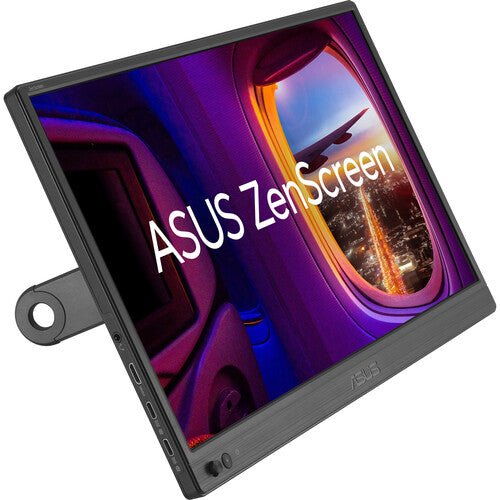


ASUS ZenScreen MB169CK 16" Portable USB Monitor
PRODUCT DESCRIPTION
ASUS ZenScreen MB169CK 15.6" Portable USB Monitor (ASU-MB169CK / 90LM0AZ3-B01111) - 3 Years Local Warranty
A 360° Kickstand Portable Monitor with Dual USB-C
The ASUS ZenScreen MB169CK is a 15.6-inch Full HD (1920 x 1080) IPS portable monitor built around a 360° adjustable kickstand rather than the simpler fold-out stand used on several other ZenScreen models. For a Singapore user who wants to fine-tune the exact viewing angle — not just a fixed tilt range — this is the ZenScreen model built for that flexibility, while staying light enough for daily carry.
At approximately 0.78 kg and around 12 mm thick, it is one of the lighter and thinner panels in the ZenScreen range.
360° Kickstand for Precise Angle Control
Rather than the fixed-range tilt found on the fold-out kickstand models, the MB169CK's 360° kickstand allows continuous angle adjustment across its full range, in both landscape and portrait orientation. That matters when the monitor needs to sit at an unusual angle — propped on an armrest, angled toward a second person, or laid nearly flat for shared viewing — rather than the narrower range a simple tilt kickstand allows.
IPS Panel with TÜV-Certified Eye Care
The panel is IPS with a 178°/178° viewing angle, 250 cd/m² typical brightness and an 800:1 contrast ratio, anti-glare surface, and ASUS Eye Care (TÜV Rheinland-certified Flicker-Free and Low Blue Light) active by default. ASUS SPLENDID preset modes, GamePlus overlays and a QuickFit alignment grid round out the feature set.
Dual USB-C and Mini-HDMI for Flexible Connection
Two USB-C (DisplayPort Alt Mode) ports carry both video and power over a single cable to a compatible host, and a Mini-HDMI input is fitted for sources without USB-C video output. Typical power draw is rated at 7.64W; ASUS does not publish a separate fixed Power Delivery wattage figure for this model, and most current USB-C laptop ports handle the draw comfortably over the same cable carrying video.
Auto-Rotation with ASUS DisplayWidget
With ASUS DisplayWidget software installed on the host laptop, the screen automatically detects physical rotation and switches the displayed image between landscape and portrait — a useful pairing with the 360° kickstand's flexible positioning.
ASUS SPLENDID, GamePlus and QuickFit
ASUS SPLENDID preset display modes, GamePlus overlays (crosshair, timer, FPS counter) and a QuickFit alignment grid for photo and document work round out the software feature set — the same core tools shared across the ZenScreen range, layered on top of the 360° kickstand's positioning flexibility.
Supplied Locally, with GST Invoice and Singapore Warranty
SourceIT supplies the ASUS ZenScreen MB169CK with a full GST invoice and local Singapore warranty support. ASUS's manufacturer term for this model is 3 years.
Comparing the dual-USB-C MB169CK against the single-USB-C MB166CR in our catalogue? Email sales@sourceit.com.sg and we will help you decide.
ASUS MB169CK Datasheet — Technical Specifications
General
| ASUS Product Name | ASUS ZenScreen MB169CK Portable USB Monitor |
| Part Number (SKU) | ASU-MB169CK / 90LM0AZ3-B01111 |
| Range | ASUS ZenScreen portable monitor series |
| Panel Type | IPS |
| Form Factor | Portable, USB Type-C powered, 360° kickstand |
| Manufacturer Warranty | 3-Year Manufacturer Warranty (ASUS) |
| Local Warranty (Singapore) | Included with every unit supplied by SourceIT, together with a GST invoice |
Display
| Panel Size | 15.6-inch (16" class) |
| Aspect Ratio | 16:9 |
| Resolution | 1920 x 1080 (Full HD) |
| Display Surface | Anti-Glare |
| Viewing Angle (CR≧10, H/V) | 178° / 178° |
| Pixel Pitch | 0.179 mm |
| Brightness (Typ.) | 250 cd/m² |
| Contrast Ratio (Typ.) | 800:1 |
| Display Colours | 262K |
| Response Time | 5 ms (GTG) |
| Refresh Rate (Max) | 60 Hz |
| Flicker-Free | Yes — TÜV Rheinland certified |
| Low Blue Light | Yes — TÜV Rheinland certified |
Features
| ASUS SPLENDID Technology | Yes |
| GamePlus | Yes |
| QuickFit | Yes (photo / alignment grid) |
| Trace Free Technology | Yes |
| HDCP | HDCP 1.4 |
| DisplayWidget | Yes — auto landscape/portrait rotation |
Audio & I/O
| Speaker | No built-in speaker |
| I/O Ports | USB Type-C x 2 (DisplayPort Alt Mode), Mini-HDMI x 1 |
Portability & Power
| Power Consumption | 7.64 W (typical) |
| Power Saving Mode | < 0.5 W |
| Power Off Mode | < 0.3 W |
| Input Voltage | 100–240 V, 50/60 Hz (via host USB-C port) |
| USB-C Power Delivery Wattage | Not published by ASUS as a fixed figure |
| Net Weight without Stand | Approx. 0.78 kg |
| Kickstand | 360° adjustable, landscape and portrait |
| Tripod Socket | Yes — 1/4" thread |
Physical & Environmental
| Dimensions without Stand (W x H x D) | 360 x 226 x 12 mm |
| Package Contents | 360° kickstand cover, warranty card, USB Type-C cable, Mini-HDMI cable, quick start guide |
| Certifications | TÜV Low Blue Light, TÜV Flicker-free |
Connectivity & Portability
What It Connects To
Two USB-C (DisplayPort Alt Mode) ports and one Mini-HDMI input cover most laptops, tablets, gaming consoles and other DP-Alt-Mode-capable devices. ASUS does not publish a fixed Power Delivery wattage for this model; the 7.64W typical draw is comfortably within what most current USB-C laptop ports supply over the same cable carrying video.
360° Kickstand — What the Extra Range Gives You
Unlike the fixed-range fold-out kickstand on several other ZenScreen models, the MB169CK's 360° kickstand allows continuous positioning across its full range in both landscape and portrait. That covers unusual mounting situations — a very low or very high angle, propping the screen for a second viewer, or laying it closer to flat — that a simple tilt kickstand cannot reach.
Auto-Rotation with DisplayWidget
ASUS DisplayWidget software, installed on the host laptop, auto-detects when the panel has been physically rotated and switches the displayed image between landscape and portrait to match — genuinely useful given how easily the 360° kickstand allows that rotation.
Weight and Daily Carry
At approximately 0.78 kg, the MB169CK is among the lighter models in the ZenScreen range, comparable to the MB166C and MB166CR, and lighter than the touchscreen MB16AHT or the larger MB229CF and MB249C.
Package Contents & ZenScreen Ordering Information
In the Box
360° kickstand cover, warranty card, USB Type-C cable, Mini-HDMI cable, quick start guide.
Other ASUS ZenScreen Portable Monitors from SourceIT
SourceIT also carries the following ASUS ZenScreen portable monitors — email sales@sourceit.com.sg quoting the part number to check stock and lead time:
| ASU-MB16AHT / 90LM0890-B01110 | 15.6" FHD portable touchscreen monitor, 10-point touch, dual USB-C, Mini-HDMI |
| ASU-MB229CF / 90LM08S5-B01A10 | 21.5" FHD portable monitor, 100Hz, USB-C PD 60W, 2.1-channel speakers, C-clamp stand |
| ASU-MB16QHG / 90LM08NG-B01110 | 16" WQXGA (2560x1600) portable monitor, 120Hz, DisplayHDR 400, 100% DCI-P3 |
| ASU-MB249C / 90LM0865-B02110 | 23.8" FHD portable monitor, 75Hz Adaptive-Sync, USB-C PD 60W, speakers, C-clamp stand |
| ASU-MB16AHG / 90LM08U0-B01110 | 15.6" FHD portable monitor, 144Hz Adaptive-Sync, dual USB-C, Mini-HDMI |
| ASU-MB16AHV / 90LM0381-B02310 | 15.6" FHD portable monitor, dual USB-C, Mini-HDMI, antibacterial surface |
| ASU-MB16ACV / 90LM0381-B01310 | 15.6" FHD portable monitor, USB-C hybrid signal, antibacterial surface |
| ASU-MB166CR / 90LM07D3-B03110 | 15.6" FHD portable monitor, single USB-C, 360° kickstand |
| ASU-MB14AC / 90LM0631-B01110 | 14" FHD portable monitor, USB-C hybrid signal, compact body |
| ASU-MB166C / 90LM07D3-B01110 | 15.6" FHD portable monitor, single USB-C, folding sleeve/stand |
| ASU-MB165B | 15.6" HD (1366x768) portable monitor, standard USB signal and power, entry-level |
The MB166CR shares the same 360° kickstand but connects over a single USB-C port rather than dual USB-C — a lower-cost option if you only need one connection type. Email us and we will explain the difference.
Datasheet & Downloads
ASUS hosts the official product and specification pages for this model.
| ASUS Singapore product page | ASUS ZenScreen MB169CK — Overview |
| ASUS Singapore specifications page | ASUS ZenScreen MB169CK — Full Specifications |
For the PDF datasheet, user manual or driver downloads, email sales@sourceit.com.sg quoting MB169CK and we will send you the current files directly.
Frequently Asked Questions — ASUS MB169CK
What does a 360° kickstand actually let me do that a normal one doesn't?
Continuous angle adjustment across the full range rather than a fixed tilt band — useful for propping the screen at an unusual angle, angling it toward a second person, or laying it closer to flat, in both landscape and portrait.
Do I need a separate power adapter?
No adapter is required for normal use — either USB-C port carries both video and power (7.64W typical) from a compatible host laptop.
Can it run in portrait mode?
Yes, and with ASUS DisplayWidget software installed the image automatically follows the physical rotation of the panel.
How does the MB169CK compare with the MB166CR in your catalogue?
Both share the 360° kickstand and the same core Full HD IPS panel. The MB169CK has two USB-C ports plus Mini-HDMI; the MB166CR has a single USB-C port and no HDMI. Choose the MB169CK if you want the extra connection flexibility.
Does it have built-in speakers?
No built-in speaker on this model.
Does it have an HDMI port?
Yes, one Mini-HDMI input, for sources without USB-C DisplayPort Alt Mode video output.
How much does it weigh?
Approximately 0.78 kg — among the lighter panels in the ZenScreen range.
Is the MB169CK suited to presenting to a client across a table?
Yes, better than most — the 360° kickstand's continuous angle range makes it straightforward to angle the screen toward a second person sitting opposite, which a fixed-tilt kickstand handles less comfortably.
Does it come with a Singapore warranty and a GST invoice?
Yes. Every ASUS ZenScreen MB169CK sold by SourceIT comes with local Singapore warranty and a GST invoice; ASUS backs the MB169CK with a 3-year manufacturer warranty.


