
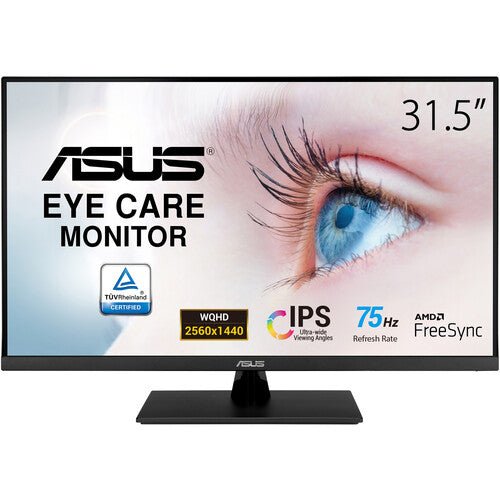


ASUS VP32AQ 32" QHD Eye Care Monitor
PRODUCT DESCRIPTION
ASUS VP32AQ 32" QHD Eye Care Monitor (ASU-VP32AQ / 90LM06T0-B01E10) - 3 Year Warranty
Large 32" QHD Display for Everyday Productivity
The ASUS VP32AQ is a 32-inch (31.5" viewable) QHD monitor built for offices in Singapore that need a genuinely spacious canvas without stepping up to a 4K price tag. The IPS panel runs at 2560 x 1440 with 178°/178° viewing angles, so spreadsheets, side-by-side documents and browser tabs all stay sharp and readable across the full width of the screen — the kind of QHD business monitor that suits a shared desk or a single power user equally well.
ASUS Eye Care Technology for All-Day Screens
TÜV Rheinland-certified Flicker-Free and Low Blue Light technology are built into the panel, addressing the two most common causes of eye fatigue on a monitor that stays on for a full working day. For an office running back-to-back video calls and long document sessions, that certification is not a marketing badge — it is a measurable reduction in flicker and blue-light output that HR and facilities teams increasingly ask for by name.
HDR10 and 100% sRGB Colour Coverage
HDR10 support widens the dynamic range for video and image content, and 100% sRGB colour coverage keeps everyday colour reproduction accurate for design reviews, marketing decks and product photography — without needing a colour-calibrated professional display. At 350 cd/m² typical brightness and a 1000:1 contrast ratio, the VP32AQ is tuned for a bright office environment rather than a darkened studio.
75Hz Refresh and Adaptive-Sync for Smoother Motion
A 75Hz refresh rate paired with Adaptive-Sync (FreeSync) support reduces screen tearing and stutter, which is noticeable in everyday use — scrolling long documents, dragging windows across a 32-inch canvas, or watching video content — even though this is not a dedicated gaming panel. 5 ms (GtG) response time keeps that motion clean.
Simple Connectivity, Built-In Audio
Connectivity is deliberately kept simple: 1 x DisplayPort 1.2 and 1 x HDMI 1.4, plus a 3.5 mm earphone jack, cover the standard desktop and laptop connections most Singapore offices need. Built-in 2W x 2 stereo speakers mean a clean single-cable-plus-power setup with no external speakers required.
ASUS VP32AQ Datasheet — Technical Specifications
General
| ASUS Product Name | ASUS Eye Care Display VP32AQ |
| Part Number (SKU) | ASU-VP32AQ / 90LM06T0-B01E10 |
| Range | ASUS Eye Care VP-series |
| Product Type | QHD eye care business monitor |
| Panel Type | IPS with anti-glare surface |
| Screen Size | 31.5 inch (32" class) |
| Manufacturer Warranty | 3-Year Warranty (ASUS) |
| Local Warranty (Singapore) | Included with every unit supplied by SourceIT, together with a GST invoice |
Display
| Resolution | QHD, 2560 x 1440 |
| Aspect Ratio | 16:9 |
| Brightness | 350 cd/m² typical |
| Contrast Ratio | 1000:1 typical |
| Response Time | 5 ms (GtG) |
| Refresh Rate | Up to 75 Hz, Adaptive-Sync (FreeSync) |
| Viewing Angle | 178° horizontal / vertical |
| HDR | HDR10 |
Colour Performance
| Colour Depth | 10-bit (1.073 billion colours), driven from an 8-bit + FRC panel |
| Colour Gamut | 100% sRGB |
| Display Modes | ASUS Splendid video preset modes |
Connectivity
| Video Inputs | 1 x DisplayPort 1.2, 1 x HDMI 1.4 |
| Audio | 3.5 mm earphone jack, built-in stereo speakers 2W x 2 |
| Gaming Aids | GamePlus (crosshair, timer, FPS counter), Adaptive-Sync 48–75 Hz |
Ergonomics & Physical
| Stand Adjustment | Tilt +8° to -5°; no swivel, pivot or height adjustment on the bundled stand |
| VESA Mount | 100 x 100 mm compatible |
| Dimensions (with stand) | 714.6 x 485.7 x 201.8 mm |
| Dimensions (without stand) | 714.6 x 423.7 x 50.4 mm |
| Weight | 7.82 kg with stand, 6.2 kg without stand |
Power
| Power Consumption | <25W typical operation |
| Power Saving Mode | <0.5W |
| Power Off Mode | <0.3W |
| Package Contents | Power cable, DisplayPort cable, HDMI cable, quick start guide, warranty card |
Connectivity & Ergonomics
Video Inputs and Host Compatibility
The VP32AQ connects over DisplayPort 1.2 or HDMI 1.4 — one of each is fitted, so a desktop and a laptop can be swapped between without unplugging cables. There is no USB-C input on this model; if you need single-cable USB-C connectivity to a laptop, ask us about the BE24ECSBT or VA34VCPSN in our catalogue instead.
Stand and Mounting
The bundled stand offers tilt only, from +8° to -5°, with no swivel, pivot or height adjustment. For a sit-stand desk or a shared workstation where height needs to change through the day, the 100 x 100 mm VESA mount lets you fit a standard monitor arm in place of the bundled stand.
Eye Comfort for Long Working Hours
TÜV Rheinland-certified Flicker-Free and Low Blue Light technology run without any noticeable colour shift, so the eye-comfort features do not come at the cost of accurate everyday colour — useful in an office that also reviews marketing or product imagery on the same screen used for spreadsheets and documents.
Adaptive-Sync for Smooth Motion
Adaptive-Sync (FreeSync) operates across the 48–75 Hz range, which is what keeps scrolling and video playback free of tearing on this panel. It works with compatible AMD graphics and is a genuine quality-of-life improvement even outside gaming use.
Colour and HDR in Everyday Use
100% sRGB coverage means colour reproduction on the VP32AQ matches what most office software, browsers and marketing tools assume as their reference colour space, so what you design or review on screen is representative of how it will look elsewhere. HDR10 support adds extra dynamic range when playing HDR-encoded video content, though as with most non-professional monitors, actual HDR brightness is modest compared to a dedicated HDR display — it is a genuine improvement over SDR rather than a cinema-grade HDR experience.
Where the VP32AQ Fits in an Office Fleet
At 32 inches and QHD resolution, this model sits between a standard 24-inch FHD office monitor and a premium 4K display — a sensible standard-issue upgrade for a team that wants more working space without retraining staff on 4K scaling quirks in older applications. It is a straightforward, no-frills productivity monitor rather than a touch, docking or webcam model; if your requirement includes any of those, see the sibling products listed below.
Package Contents & Ordering Information
In the Box
Power cable, DisplayPort cable, HDMI cable, quick start guide and warranty card.
Other ASUS Business Monitors from SourceIT
SourceIT also carries the following ASUS business, touch and docking monitors — email sales@sourceit.com.sg quoting the part number to check stock and lead time:
| ASU-VT229H / 90LM0490-B01110 | 22" FHD touch monitor |
| ASU-VT169HE / 90LM09V1-B01110 | 16" FHD touch monitor |
| ASU-VT168HR / 90LM02G1-B02110 | 16" HD touch monitor |
| ASU-BE24ECSBT / 90LM05M1-B05310 | 24" FHD multi-touch business monitor |
| ASU-BE24EQK / 90LM05M1-B01310 | 23.8" FHD business monitor with webcam |
| ASU-VA34VCPSN / 90LM08JJ-B01110 | 34" curved ultrawide docking monitor |
| ASU-VP279QGL / 90LM01T0-B01A10 | 27" FHD gaming monitor |
Datasheet & Downloads
ASUS hosts the official product and specification pages for this model. The links below are ASUS's current Singapore pages for this model.
| ASUS Singapore product page | ASUS VP32AQ — Overview |
| ASUS Singapore specifications page | ASUS VP32AQ — Full Specifications |
For the PDF datasheet or driver downloads, email sales@sourceit.com.sg quoting VP32AQ and we will send you the current files directly.
Frequently Asked Questions — ASUS VP32AQ
Is the VP32AQ suitable for design or photo work, or is it strictly for office documents?
It covers 100% sRGB and supports 10-bit colour with HDR10, which is enough for accurate everyday design review, marketing decks and photo work. It is not a factory-calibrated professional monitor, so if you need Delta E < 2 verified colour accuracy for print or client-facing colour work, ask us about the ASUS ProArt range instead.
Does it have USB-C or a docking function?
No. The VP32AQ connects over DisplayPort 1.2 and HDMI 1.4 only, with no USB-C input, USB hub or power delivery. If you need single-cable USB-C docking, the ASU-BE24ECSBT (80W PD) or ASU-VA34VCPSN (65W PD) in our catalogue are the models to look at.
Can the stand adjust for height, or do I need a monitor arm?
The bundled stand offers tilt only. If you need height adjustment, the 100 x 100 mm VESA mount pattern lets you fit a standard monitor arm — we can advise on a compatible arm if you let us know your desk setup.
What refresh rate does it support, and is it good for gaming?
It runs at up to 75 Hz with Adaptive-Sync (FreeSync) support across 48–75 Hz. That is enough to visibly smooth out scrolling, video and light gaming, though this is an eye-care office monitor rather than a dedicated gaming panel — for a gaming-focused build in the same catalogue, see the ASU-VP279QGL.
How does the eye care certification actually work?
TÜV Rheinland has independently tested and certified this panel's Flicker-Free operation and Low Blue Light filtering. Both run without a visible colour cast, so you get the comfort benefit without having to manually toggle a warm-tone mode that shifts your colours.
What is the difference between VP32AQ and a 4K ASUS monitor at a similar size?
The VP32AQ is QHD (2560 x 1440), which is sharp and spacious for office use but not as dense as 4K UHD (3840 x 2160). If your work needs the extra pixel density of 4K at 32 inches, ask us about ASUS's 4K options — we can compare specifications and pricing for your use case.
Does it include speakers, and is the audio good enough without external speakers?
Yes, built-in 2W x 2 stereo speakers are fitted. They are adequate for calls, notifications and casual media playback; for music or serious video conferencing volume, most offices still prefer a headset or external speakers, but no additional hardware is required for basic use.
What is the power consumption, and does it matter for a multi-monitor office deployment?
Typical operating consumption is under 25W, dropping to under 0.5W in power-saving standby. Across a floor of desks each running one or two monitors, that is a meaningful, cumulative difference versus older or larger panels, and it is a figure facilities teams often ask for when sizing power circuits for a new office fit-out.
Does SourceIT provide a Singapore warranty and GST invoice with this monitor?
Yes. Every ASUS VP32AQ sold by SourceIT comes with local Singapore warranty support and a GST invoice; ASUS backs the panel itself with a 3-year manufacturer warranty.


