
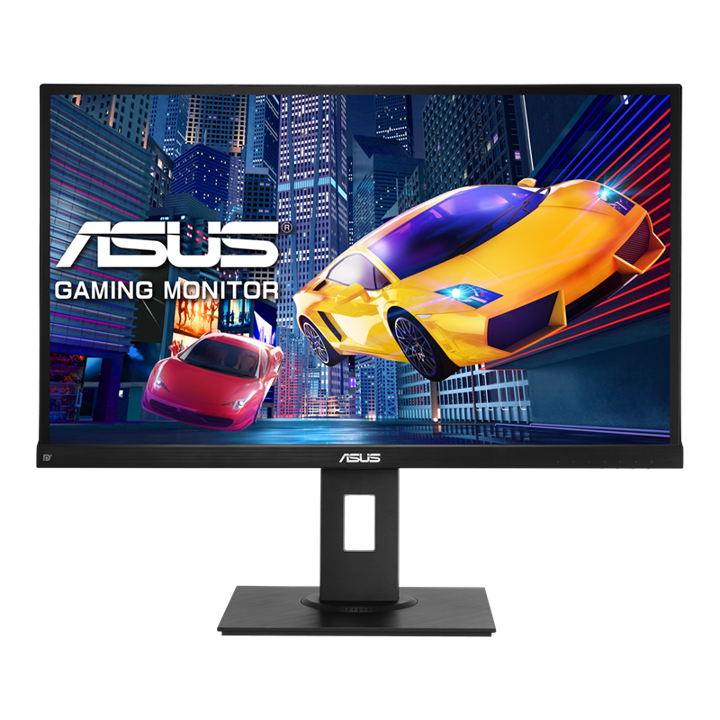


ASUS VP279QGL 27" FHD Gaming Monitor
PRODUCT DESCRIPTION
ASUS VP279QGL 27" FHD Gaming Monitor (ASU-VP279QGL / 90LM01T0-B01A10) - 3 Year Warranty
27" FHD Gaming Monitor for Smooth Everyday Performance
The ASUS VP279QGL pairs a 27-inch Full HD IPS panel with a 75Hz refresh rate and Adaptive-Sync (FreeSync) support, aimed at buyers in Singapore who want a genuine step up in motion smoothness over a standard 60Hz office monitor without paying for a dedicated high-refresh esports panel. It works equally well as an entry-level gaming display and as a sharper everyday monitor for general productivity.
Smooth Gameplay with 75Hz and Adaptive-Sync
A 75Hz refresh rate combined with Adaptive-Sync (AMD FreeSync) operating across 48–75 Hz eliminates screen tearing and reduces stutter on compatible AMD graphics hardware. ASUS Extreme Low Motion Blur (ELMB) technology further sharpens fast-moving content, and the panel is rated at 1ms MPRT response time with ELMB enabled for reduced motion blur in fast-paced games.
IPS Panel with Accurate Colour and Wide Viewing Angles
Unlike many entry-level gaming panels that use TN technology, the VP279QGL uses IPS, giving 178°/178° viewing angles and 100% sRGB colour coverage — genuinely useful for a monitor that will spend as much time on browsing, streaming and office work as it does gaming.
Eye Care Technology for Extended Usage
TÜV Rheinland-certified Flicker-Free and Low Blue Light technology reduce eye strain across long gaming or work sessions, addressing the two most common causes of screen-related eye fatigue.
Ergonomic Design with Versatile Connectivity
The stand offers a full ergonomic range — tilt -5° to +30°, swivel, pivot to portrait orientation, and up to 130 mm of height adjustment — unusual at this price point, alongside DisplayPort 1.2, HDMI 1.4 and legacy VGA connectivity plus built-in stereo speakers.
ASUS VP279QGL Datasheet — Technical Specifications
General
| ASUS Product Name | ASUS Gaming Display VP279QGL |
| Part Number (SKU) | ASU-VP279QGL / 90LM01T0-B01A10 |
| Range | ASUS VP-series gaming monitors |
| Product Type | 27" FHD entry-level gaming monitor |
| Panel Type | IPS, non-glare surface |
| Screen Size | 27 inch |
| Manufacturer Warranty | 3-Year Warranty (ASUS) |
| Local Warranty (Singapore) | Included with every unit supplied by SourceIT, together with a GST invoice |
Display
| Resolution | Full HD, 1920 x 1080 |
| Aspect Ratio | 16:9 |
| Brightness | 250 cd/m² typical |
| Contrast Ratio | 1000:1 typical; ASUS Smart Contrast Ratio up to 100,000,000:1 |
| Colour Gamut | 100% sRGB |
| Viewing Angle | 178° horizontal / vertical |
Refresh Rate, Response Time & Adaptive Sync
| Refresh Rate | Up to 75 Hz |
| Response Time | 1 ms MPRT (with ELMB enabled) |
| Adaptive Sync | Adaptive-Sync / AMD FreeSync, 48–75 Hz |
| Motion Enhancement | ASUS Extreme Low Motion Blur (ELMB), Trace Free technology |
| Gaming Aids | GamePlus (crosshair, timer, FPS counter, display alignment) |
Connectivity
| Video Inputs | 1 x DisplayPort 1.2, 1 x HDMI 1.4, 1 x VGA (D-Sub) |
| Audio | 3.5 mm audio output, built-in stereo speakers 2W x 2 |
Ergonomics & Physical
| Stand Adjustment | Tilt -5° to +30°, swivel, pivot (portrait mode), height adjustment up to 130 mm |
| VESA Mount | 100 x 100 mm compatible |
| Security | Kensington lock slot |
| Design | Frameless |
| Dimensions (with stand) | Approx. 622.6 x 523.8 x 226.4 mm |
| Weight | Approx. 7.0 kg |
Power
| Power Consumption | <19W typical |
| Power Saving Mode | <0.5W |
| Power Off Mode | <0.5W |
| Voltage | 100–240V, 50/60Hz |
| Package Contents | Power cable, DisplayPort or HDMI cable, quick start guide, warranty card |
Gaming Performance & Ergonomics
Adaptive-Sync in Practice
Adaptive-Sync (AMD FreeSync) operates across 48–75 Hz and requires a compatible AMD graphics card and a driver setting enabled on the PC side — this is not an NVIDIA G-Sync certified panel, though many NVIDIA GPUs can also run FreeSync monitors via NVIDIA's own "G-Sync Compatible" mode; confirm compatibility with your specific graphics card if this matters for your setup.
1ms MPRT and ELMB
The 1ms response figure is MPRT (Moving Picture Response Time), measured with ASUS Extreme Low Motion Blur (ELMB) enabled — a backlight strobing technique that reduces perceived motion blur in fast-paced content. ELMB and Adaptive-Sync cannot run simultaneously on most ASUS panels of this generation; you select one or the other depending on whether you prioritise tear-free smoothness or maximum motion clarity for a given game.
Why IPS Instead of TN at This Price
Many similarly priced 75Hz gaming monitors use TN panels for lower cost; ASUS instead fits an IPS panel here, trading a small amount of raw response time for materially better colour accuracy and viewing angles — a sensible trade-off for a monitor that will also be used for browsing, streaming and office work rather than competitive esports alone.
Full Ergonomic Stand
Tilt, swivel, pivot to portrait and 130 mm of height adjustment are all included on the bundled stand, which is a genuinely unusual amount of adjustment range at this price point — many competing 27-inch gaming monitors offer tilt only.
GamePlus and Everyday Display Tools
GamePlus adds an on-screen crosshair overlay, a timer, an FPS counter and display-alignment gridlines, toggled through a hotkey without needing to alt-tab out of a game. ASUS SPLENDID preset display modes and Trace Free motion-smoothing settings round out the on-screen adjustment options for both gaming and general content.
27" Full HD — Pixel Density Considerations
At 27 inches and 1920 x 1080, pixel density is lower than a 24-inch Full HD panel, which some users notice as slightly softer text at close viewing distances. This is a deliberate trade-off in favour of a larger, more immersive screen size at this price and refresh rate; if sharper text density matters more than screen size for your use case, ask us about ASUS's QHD options instead.
Package Contents & Ordering Information
In the Box
Power cable, DisplayPort or HDMI cable, quick start guide and warranty card.
Other ASUS Touch, Business and Docking Monitors from SourceIT
SourceIT also carries the following ASUS monitors — email sales@sourceit.com.sg quoting the part number to check stock and lead time:
| ASU-VP32AQ / 90LM06T0-B01E10 | 32" QHD eye care monitor, 75Hz, larger canvas |
| ASU-VA34VCPSN / 90LM08JJ-B01110 | 34" curved ultrawide docking monitor, up to 100Hz |
| ASU-BE24ECSBT / 90LM05M1-B05310 | 24" FHD multi-touch business monitor with USB-C 80W PD docking |
Datasheet & Downloads
ASUS hosts the official product page for this model. The link below is ASUS's current Singapore page for this model.
| ASUS Singapore product page | ASUS VP279QGL — Overview |
For the PDF datasheet or driver downloads, email sales@sourceit.com.sg quoting VP279QGL and we will send you the current files directly.
Frequently Asked Questions — ASUS VP279QGL
Is this a good monitor for competitive esports, or is it more of a general-use gaming monitor?
75Hz and 1ms MPRT are a solid step up from a standard 60Hz office monitor, but competitive esports titles are usually played on 144Hz+ panels. The VP279QGL is best thought of as a well-rounded everyday monitor that also handles casual and entry-level gaming well, rather than a dedicated esports display.
Does it support NVIDIA G-Sync?
It is an AMD FreeSync (Adaptive-Sync) certified panel, not NVIDIA G-Sync certified. Many NVIDIA graphics cards can still run it in "G-Sync Compatible" mode, but this is not guaranteed by ASUS for every GPU — check compatibility with your specific card if this matters to you.
Can I use ELMB and Adaptive-Sync at the same time?
No, on this generation of ASUS panel the two features are mutually exclusive — you choose ELMB for maximum motion clarity in fast games, or Adaptive-Sync for tear-free smoothness, depending on the title and your graphics card.
Why does ASUS use an IPS panel instead of a faster TN panel at this price?
IPS gives materially better colour accuracy and viewing angles than TN, at the cost of a small amount of raw pixel response time. Since this monitor is aimed at buyers who use it for general work and browsing as well as gaming, ASUS prioritised the IPS panel's all-round image quality.
Does the stand support height adjustment, or only tilt?
The full stand supports tilt, swivel, pivot into portrait orientation and up to 130 mm of height adjustment — more adjustment range than most competing monitors at this price.
What connectivity does it have — does it support USB-C?
DisplayPort 1.2, HDMI 1.4 and VGA are fitted; there is no USB-C input or docking function on this model. For USB-C docking, see the ASU-BE24ECSBT or ASU-VA34VCPSN in our catalogue.
Is the built-in audio good enough for gaming, or should I use a headset?
The built-in 2W x 2 speakers are adequate for casual use and notifications, but most gamers will still prefer a headset for positional audio and voice chat during competitive play.
Can this monitor be used in portrait orientation?
Yes, the stand supports pivot into portrait mode, which suits coding, document review or social-media-style vertical content, alongside its landscape gaming use.
What is Trace Free technology, and how is it different from ELMB?
Trace Free is a pixel-overdrive setting that speeds up colour transitions to reduce ghosting, while ELMB is a backlight strobing technique that reduces perceived motion blur — the two address motion clarity from different angles, and Trace Free runs continuously in the background regardless of whether ELMB or Adaptive-Sync is active.
How does the VP279QGL compare with the smaller VP32AQ in terms of gaming features?
Both run at up to 75Hz with Adaptive-Sync, but the VP279QGL adds ELMB and 1ms MPRT response along with GamePlus overlays — features the VP32AQ does not have — making the VP279QGL the more gaming-focused of the two, while the VP32AQ leans toward eye-care office productivity at a larger 32-inch size.
What does GamePlus actually do?
It is an on-screen overlay toggled by hotkey, adding a customisable crosshair, an on-screen timer, an FPS counter and alignment gridlines for multi-monitor setups — useful utility features that do not require any software installed on the PC.
Does SourceIT provide a Singapore warranty and GST invoice with this monitor?
Yes. Every ASUS VP279QGL sold by SourceIT comes with local Singapore warranty support and a GST invoice; ASUS backs the panel itself with a 3-year manufacturer warranty.


