
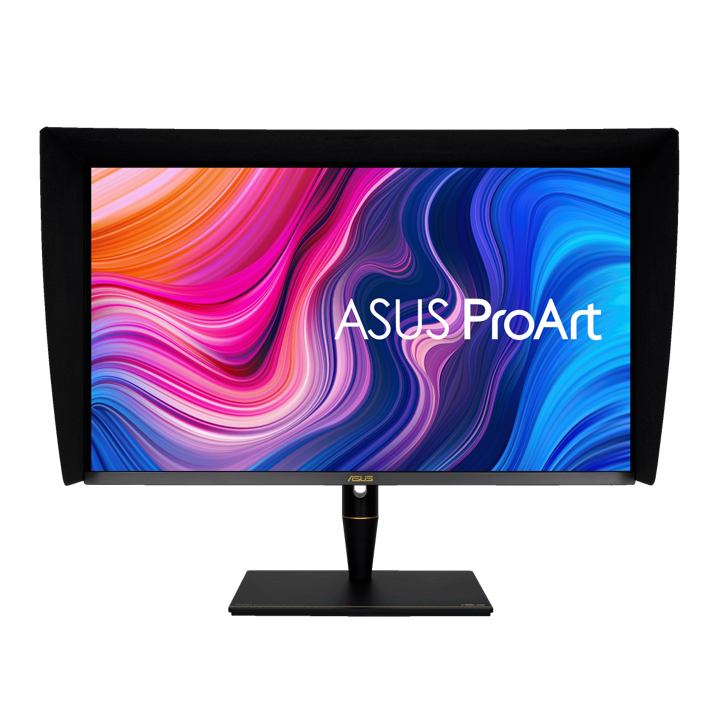


ASUS ProArt PA32UCX 32" 4K HDR IPS Mini LED Professional Monitor
PRODUCT DESCRIPTION
ASUS ProArt PA32UCX 32" 4K HDR IPS Mini LED Professional Monitor (ASU-PA32UCX-PK / 90LM03HC-B01320) - 3 Year Warranty
Reference-Grade 4K HDR Monitor for Video Editing and Color Grading
The ASUS ProArt PA32UCX is a flagship 32-inch 4K HDR IPS Mini LED professional monitor built for colour-critical video editing, color grading, VFX and broadcast production. As a 4K HDR monitor for video editing, it targets studios and post-production houses in Singapore that need reference-level accuracy rather than a general office display, and it is supplied as a complete monitor, not a bare panel — calibrated, warrantied and ready to plug into a professional workflow.
Mini LED Backlight with 1152 Local Dimming Zones
A Mini LED backlight with 1152 local dimming zones gives the PA32UCX fine-grained control over brightness across the panel, driving peak brightness of up to 1200 cd/m² against a typical brightness of 600 cd/m² and HDR contrast up to 1,000,000:1. That combination of zone count and peak brightness is what lets HDR highlights and near-black shadow detail sit correctly in the same frame — the kind of local control a standard-backlight IPS panel cannot match, and the reason this model sits above the PA32UCR-K in the ProArt line.
True 10-Bit Colour, Delta E < 1, Wide Gamut Coverage
The panel outputs true 10-bit colour (1.07 billion colours) across 99% DCI-P3, 99.5% Adobe RGB and 100% sRGB, with 89% Rec.2020 coverage, and ships factory-calibrated to a Delta E of less than 1 — the tolerance professional colourists specify when a screen has to be trusted without a second reference monitor in the room. This is a professional color-accurate display for Singapore studios where the delivered file, not the on-screen preview, is what the client judges.
Dolby Vision, HDR10 and HLG in One Panel
Multi-format HDR support across Dolby Vision, HDR10 and HLG means the PA32UCX can preview mastering work against the actual delivery standard rather than an approximation, which matters when a single production pipeline has to output for streaming platforms, broadcast and cinema on different standards. Uniformity compensation and multiple HDR preview modes keep colour and contrast consistent panel-wide and across viewing angles, which is what makes this monitor viable for a shared studio review station as well as a single editor's desk.
Thunderbolt 3 Connectivity and Hardware Calibration
Two Thunderbolt 3 (USB-C) ports carry video, data and up to 60W of power delivery, alongside 3 x HDMI 2.0 and 1 x DisplayPort 1.2 — enough to daisy-chain a second display or run a single-cable connection to a Thunderbolt-equipped laptop without a separate dock. The panel supports ASUS ProArt hardware calibration and is Calman Ready with ColourSpace integration, so an in-house colourist can re-verify and correct the calibration on a schedule rather than trusting the factory pass indefinitely.
ASUS PA32UCX-PK Datasheet — Technical Specifications
General
| ASUS Product Name | ASUS ProArt Display PA32UCX |
| Part Number (SKU) | ASU-PA32UCX-PK / 90LM03HC-B01320 |
| Range | ASUS ProArt PA-series, UCX Mini LED family |
| Product Type | Professional 4K HDR Mini LED monitor |
| Panel Type | IPS with Mini LED backlight |
| Screen Size | 32 inch, 138 PPI |
| Manufacturer Warranty | 3-Year Warranty (ASUS), LCD zero bright dot coverage |
| Local Warranty (Singapore) | Included with every unit supplied by SourceIT, together with a GST invoice |
Display
| Resolution | 4K UHD, 3840 x 2160 |
| Aspect Ratio | 16:9 |
| Brightness | Up to 1200 cd/m² peak HDR, 600 cd/m² typical |
| Contrast Ratio | Up to 1,000,000:1 (HDR), 20,000:1 typical |
| Local Dimming | Mini LED backlight, 1152 local dimming zones |
| Response Time | 5 ms (GtG) |
| Refresh Rate | 60 Hz |
| Viewing Angle | 178° horizontal / vertical |
Color Performance
| Color Depth | True 10-bit (1.07 billion colours) |
| Color Gamut | 99% DCI-P3, 99.5% Adobe RGB, 100% sRGB, 89% Rec.2020 |
| Color Accuracy | Delta E < 1, factory calibrated |
| Factory Calibration | Calman Verified |
| HDR Formats | Dolby Vision, HDR10, HLG |
| Professional Features | ASUS ProArt hardware calibration, Calman Ready, ColourSpace integration, Picture-in-Picture (PiP) and Picture-by-Picture (PbP), uniformity compensation |
Connectivity
| Video Inputs | 2 x Thunderbolt 3 (USB-C), 3 x HDMI 2.0, 1 x DisplayPort 1.2 |
| USB-C Power Delivery | Up to 60W |
| USB Hub | 3 x USB 3.2 Gen 1 Type-A |
| Audio | Built-in stereo speakers, 1 x headphone jack |
Ergonomics & Physical
| Stand Adjustment | Tilt, swivel, pivot and height adjustment |
| VESA Mount | 100 x 100 mm compatible |
| Dimensions (with stand) | 727 x 470–600 x 240 mm |
| Weight | 14.0 kg with stand, 11.0 kg without stand |
Power
| Power Consumption | Approx. 60W typical operation |
| Package Contents | Power cable, HDMI cable, DisplayPort cable, Thunderbolt/USB-C cable, USB upstream cable, calibration report, quick start guide, warranty card |
Compatibility, Connectivity & Setup
Video Inputs and Host Compatibility
The PA32UCX connects to a Mac or PC over Thunderbolt 3, HDMI 2.0 or DisplayPort 1.2, and is compatible with both Windows and macOS editing suites. A Thunderbolt-equipped MacBook Pro or workstation can run video, data and up to 60W of charging over a single USB-C cable, while an HDMI or DisplayPort connection suits a desktop grading workstation with its own power supply.
Calibration Tools and Software
ASUS ProArt hardware calibration is supported directly, and the panel is Calman Ready with ColourSpace integration, so an existing colorimeter and calibration software licence in your studio can re-profile this monitor on your own schedule rather than relying solely on the factory pass. This is what keeps a Delta E < 1 panel inside tolerance after months of use in a working studio.
Daisy Chain and Multi-Display Setup
With three HDMI 2.0 ports, a DisplayPort 1.2 input and two Thunderbolt 3 ports, the PA32UCX supports multi-source setups for review stations where a client feed, a grading workstation and a laptop preview may all need to be switched between quickly using Picture-in-Picture or Picture-by-Picture modes.
Operating System and Software Compatibility
The panel is compatible with Windows and macOS and is suited to professional colour-critical software such as DaVinci Resolve, Adobe Premiere Pro, Photoshop and comparable grading and editing tools. Confirm your specific GPU and cabling requirements with us before ordering if you are connecting through a docking station or KVM switch, since Thunderbolt daisy-chaining behaviour can vary by host.
Package Contents & ProArt Ordering Information
In the Box
Power cable, HDMI cable, DisplayPort cable, Thunderbolt/USB-C cable, USB upstream cable, factory calibration report, quick start guide and warranty card.
ASUS ProArt Professional Monitor Range — Ordering Information
| PA32UCX-PK / 90LM03HC-B01320 (this listing) | 32" 4K UHD, IPS Mini LED, 1152 zones | 1200 nits HDR, Dolby Vision/HDR10/HLG, 2x Thunderbolt 3 |
| PA27UCX-K / 90LM04NC-B01310 | 27" 4K UHD, IPS Mini LED, 576 zones | 1000 nits HDR, Dolby Vision/HDR10/HLG, USB-C 90W |
| PA32UCR-K / 90LM03H3-B01310 | 32" 4K UHD, IPS Mini LED, 576 zones | 1000 nits HDR, HDR10/HLG, X-Rite i1 Display Pro included |
| PA329CRV / 90LM02C0-B01K10 | 32" 4K UHD, IPS | HDR10, USB-C 96W, dual DisplayPort 1.4 daisy chain |
| PA329CV / 90LM06P1-B01110 | 32" 4K UHD, IPS | HDR10, USB-C 90W, desk C-clamp mount included |
| PA279CRV / 90LM08E0-B01K10 | 27" 4K UHD, IPS | HDR10, USB-C 96W, dual DisplayPort 1.4 daisy chain |
| PA279CV / 90LM06M1-B01110 | 27" 4K UHD, IPS | HDR10, USB-C 65W |
| PA328QV / 90LM00X0-B02310 | 32" QHD (2560x1440), IPS, 75Hz | HDR10, DisplayPort + dual HDMI |
All eight ProArt models above are current ASUS ProArt professional monitor configurations carried by SourceIT. Email sales@sourceit.com.sg quoting the part number to check stock and lead time.
Datasheet & Downloads
ASUS hosts the official product and specification pages for this model. The links below are ASUS's current Singapore product and specification pages for this model.
| ASUS Singapore product page | ASUS PA32UCX-PK — Overview |
| ASUS Singapore specifications page | ASUS PA32UCX-PK — Full Specifications |
For the PDF datasheet, factory calibration report template or driver downloads, email sales@sourceit.com.sg quoting PA32UCX-PK and we will send you the current files directly.
Frequently Asked Questions — ASUS PA32UCX-PK
Is the PA32UCX suitable for HDR mastering and delivery, not just preview?
Yes. With Dolby Vision, HDR10 and HLG support, 1200 cd/m² peak brightness, 1152-zone Mini LED local dimming and a factory Delta E < 1, the PA32UCX is built for HDR mastering and delivery work, not just watching HDR content. ASUS positions this model at the top of the ProArt Mini LED range for exactly that reason.
What is the difference between the PA32UCX and the PA32UCR-K in your catalogue?
The PA32UCX carries more Mini LED local dimming zones (1152 vs 576), higher peak brightness (1200 vs 1000 cd/m²) and Dolby Vision support that the PA32UCR-K does not have, alongside Thunderbolt 3 connectivity rather than USB-C DisplayPort Alt Mode. Both share the same 32-inch 4K panel size, factory calibration discipline and Calman Verified accuracy. Email sales@sourceit.com.sg with your budget and HDR requirements and we will help you choose.
Does it come with a calibration device in the box?
The PA32UCX ships factory-calibrated with a calibration report, but does not include a colorimeter in the box — that is specific to the PA32UCR-K in our range, which bundles an X-Rite i1 Display Pro. If you need a bundled calibrator, ask us about the PA32UCR-K instead.
Can I run two Thunderbolt displays from one laptop through this monitor?
The PA32UCX has two Thunderbolt 3 ports, which supports daisy-chaining a second Thunderbolt display from a single host connection, subject to your laptop's Thunderbolt controller and total bandwidth. Confirm your exact laptop model with us before planning a daisy-chain setup.
Is macOS fully supported, including HDR and wide-gamut colour management?
Yes, the PA32UCX is compatible with macOS as well as Windows, and professional colour software on both platforms can address its wide-gamut, 10-bit panel through standard ICC colour management and the monitor's own hardware calibration support.
How much rack or desk space does it need, and is height adjustment included?
The stand offers tilt, swivel, pivot and height adjustment across a 470–600 mm range, and the panel is VESA 100 x 100 mm compatible if you prefer a monitor arm instead of the bundled stand. Overall footprint with stand is 727 x 470–600 x 240 mm.
What does the 3-year warranty cover, and is local support included?
ASUS backs the PA32UCX with a 3-year warranty including LCD zero bright dot coverage. Every unit SourceIT supplies comes with local Singapore support and a full GST invoice.
How do I keep this monitor calibrated over its working life?
The panel supports ASUS ProArt hardware calibration and is Calman Ready with ColourSpace integration, so your studio's existing colorimeter and calibration software can re-profile it periodically. We recommend re-calibrating on the same schedule you already use for your other reference monitors.
Does SourceIT provide a Singapore warranty and GST invoice with this monitor?
Yes. Every ASUS ProArt PA32UCX-PK sold by SourceIT comes with local Singapore warranty support and a GST invoice; ASUS backs the panel itself with a 3-year manufacturer warranty.


