
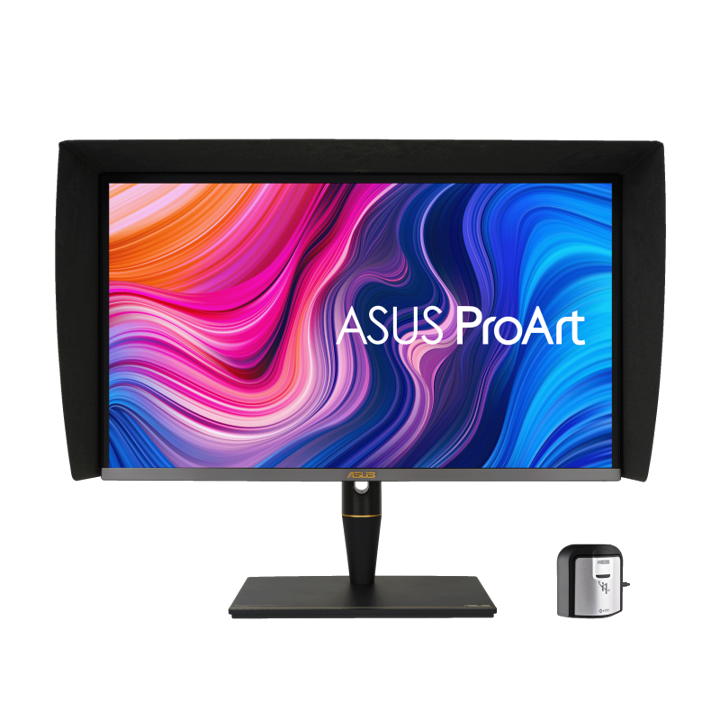


ASUS ProArt PA27UCX 27" 4K HDR Mini LED Professional Monitor
PRODUCT DESCRIPTION
ASUS ProArt PA27UCX 27" 4K HDR Mini LED Professional Monitor (ASU-PA27UCX-K / 90LM04NC-B01310) - 3 Year Warranty
A Compact Reference-Grade 4K HDR Monitor for Colour Work
The ASUS ProArt PA27UCX brings the same Mini LED HDR discipline as its 32-inch sibling into a 27-inch IPS panel, giving content creators, video editors and colour specialists a smaller-footprint 4K HDR monitor for video editing and colour grading where desk space is tighter than a full studio bay. As with every ProArt monitor SourceIT carries, this is a complete, factory-calibrated unit ready to integrate into a professional colour pipeline, not a raw panel.
Mini LED Backlight with 576 Local Dimming Zones
A Mini LED backlight with 576 local dimming zones drives peak brightness of up to 1000 cd/m² against a typical 300 cd/m², with HDR contrast up to 1,000,000:1. That zone count gives meaningfully finer local dimming control than a standard edge-lit or full-array backlight, which is what lets HDR highlights hold detail next to near-black shadows on the same frame — the core reason a Mini LED panel is specified for HDR mastering rather than a conventional IPS display.
True 10-Bit Colour, Delta E < 1, DisplayHDR 1000 Certified
The panel delivers true 10-bit colour across 97% DCI-P3, 99.5% Adobe RGB and 100% sRGB, factory calibrated to a Delta E of less than 1 and Calman Verified, with VESA DisplayHDR 1000 certification confirming the brightness and contrast claims against an independent standard rather than ASUS's own marketing figures alone. This is the accuracy tolerance a professional color-accurate display needs for photography, video editing and design work where colour has to be trusted on sight.
Dolby Vision, HDR10 and HLG Across the Panel
Multi-format HDR support across Dolby Vision, HDR10 and HLG lets creators preview against the actual delivery standard for streaming, broadcast or cinema rather than a generic approximation. Off-Axis Contrast Optimization (OCO) reduces the halo effect around bright objects that local-dimming displays are prone to, and uniformity compensation keeps colour and contrast consistent panel-wide, which matters when a client is reviewing footage from an angle beside the operator's chair.
USB-C with 90W Power Delivery and Full Connectivity
A single USB-C port carries DisplayPort Alt Mode video plus up to 90W of Power Delivery, enough to run video and charge most creative laptops from one cable, alongside 1 x DisplayPort 1.2 and 2 x HDMI 2.0 for desktop workstations. The panel supports ASUS ProArt hardware calibration and professional calibration tool compatibility, so studios standardising on a particular colorimeter can keep this monitor in their existing calibration workflow.
ASUS PA27UCX-K Datasheet — Technical Specifications
General
| ASUS Product Name | ASUS ProArt Display PA27UCX |
| Part Number (SKU) | ASU-PA27UCX-K / 90LM04NC-B01310 |
| Range | ASUS ProArt PA-series, UCX Mini LED family |
| Product Type | Professional 4K HDR Mini LED monitor |
| Panel Type | IPS with Mini LED backlight, anti-glare surface |
| Screen Size | 27 inch, ~163 PPI |
| Manufacturer Warranty | 3-Year Warranty (ASUS), LCD zero bright dot coverage |
| Local Warranty (Singapore) | Included with every unit supplied by SourceIT, together with a GST invoice |
Display
| Resolution | 4K UHD, 3840 x 2160 |
| Aspect Ratio | 16:9 |
| Brightness | Up to 1000 cd/m² peak HDR, 300 cd/m² typical |
| Contrast Ratio | Up to 1,000,000:1 (HDR), 1000:1 typical |
| Local Dimming | Mini LED backlight, 576 local dimming zones |
| Response Time | 4 ms (GtG) |
| Refresh Rate | 60 Hz, Adaptive-Sync supported |
| Viewing Angle | 178° horizontal / vertical |
Color Performance
| Color Depth | True 10-bit (1.07 billion colours) |
| Color Gamut | 97% DCI-P3, 99.5% Adobe RGB, 100% sRGB |
| Color Accuracy | Delta E < 1, factory calibrated |
| Factory Calibration | Calman Verified |
| HDR Formats & Certification | Dolby Vision, HDR10, HLG; VESA DisplayHDR 1000 certified |
| Professional Features | ASUS ProArt hardware calibration, Off-Axis Contrast Optimization (OCO), Picture-in-Picture (PiP) and Picture-by-Picture (PbP), uniformity compensation |
Connectivity
| Video Inputs | 1 x USB-C (DisplayPort Alt Mode + Power Delivery), 1 x DisplayPort 1.2, 2 x HDMI 2.0 |
| USB-C Power Delivery | Up to 90W |
| USB Hub | 4 x USB 3.2 Type-A |
| Audio | Built-in stereo speakers, 1 x headphone jack |
Ergonomics & Physical
| Stand Adjustment | Tilt, swivel, pivot and height adjustment |
| VESA Mount | 100 x 100 mm compatible |
| Dimensions (with stand) | 625 x 545 x 229 mm |
| Weight | 11.5 kg with stand, 7.6 kg without stand |
Power
| Power Consumption | Approx. <46W typical operation, <0.5W power saving mode |
| Package Contents | Power cable, HDMI cable, DisplayPort cable, USB-C cable, USB upstream cable, calibration report, quick start guide, warranty card |
Compatibility, Connectivity & Setup
Video Inputs and Host Compatibility
The PA27UCX connects over USB-C (DisplayPort Alt Mode with up to 90W Power Delivery), DisplayPort 1.2 or HDMI 2.0, and works with both Windows and macOS. A single USB-C cable to a compatible laptop carries video, data and charging power simultaneously, which suits a hot-desk colourist setup or a compact home-studio bay without a separate charger and video cable.
Calibration Tools and Software
ASUS ProArt hardware calibration is supported directly, and the panel is compatible with professional calibration tools, so an in-house colorimeter and calibration software licence can re-verify the factory Delta E < 1 pass on your own maintenance schedule rather than relying on it indefinitely.
Multi-Source Review with PiP and PbP
Picture-in-Picture and Picture-by-Picture modes let two sources — for example a grading workstation and a client laptop — share the screen for side-by-side review without physically swapping cables, which is useful in a smaller studio bay where a second monitor is not practical.
Operating System and Software Compatibility
The panel is compatible with Windows and macOS and suits professional colour-critical software such as DaVinci Resolve, Adobe Premiere Pro, Photoshop and comparable tools. Confirm GPU and USB-C alt-mode compatibility with us before ordering if you plan to drive it through a docking station.
Package Contents & ProArt Ordering Information
In the Box
Power cable, HDMI cable, DisplayPort cable, USB-C cable, USB upstream cable, factory calibration report, quick start guide and warranty card.
ASUS ProArt Professional Monitor Range — Ordering Information
| PA32UCX-PK / 90LM03HC-B01320 | 32" 4K UHD, IPS Mini LED, 1152 zones | 1200 nits HDR, Dolby Vision/HDR10/HLG, 2x Thunderbolt 3 |
| PA27UCX-K / 90LM04NC-B01310 (this listing) | 27" 4K UHD, IPS Mini LED, 576 zones | 1000 nits HDR, Dolby Vision/HDR10/HLG, USB-C 90W |
| PA32UCR-K / 90LM03H3-B01310 | 32" 4K UHD, IPS Mini LED, 576 zones | 1000 nits HDR, HDR10/HLG, X-Rite i1 Display Pro included |
| PA329CRV / 90LM02C0-B01K10 | 32" 4K UHD, IPS | HDR10, USB-C 96W, dual DisplayPort 1.4 daisy chain |
| PA329CV / 90LM06P1-B01110 | 32" 4K UHD, IPS | HDR10, USB-C 90W, desk C-clamp mount included |
| PA279CRV / 90LM08E0-B01K10 | 27" 4K UHD, IPS | HDR10, USB-C 96W, dual DisplayPort 1.4 daisy chain |
| PA279CV / 90LM06M1-B01110 | 27" 4K UHD, IPS | HDR10, USB-C 65W |
| PA328QV / 90LM00X0-B02310 | 32" QHD (2560x1440), IPS, 75Hz | HDR10, DisplayPort + dual HDMI |
All eight ProArt models above are current ASUS ProArt professional monitor configurations carried by SourceIT. Email sales@sourceit.com.sg quoting the part number to check stock and lead time.
Datasheet & Downloads
ASUS hosts the official product and specification pages for this model. The links below are ASUS's current Singapore product and specification pages for this model.
| ASUS Singapore product page | ASUS PA27UCX-K — Overview |
| ASUS Singapore specifications page | ASUS PA27UCX-K — Full Specifications |
For the PDF datasheet, factory calibration report template or driver downloads, email sales@sourceit.com.sg quoting PA27UCX-K and we will send you the current files directly.
Frequently Asked Questions — ASUS PA27UCX-K
How does the PA27UCX compare to the 32-inch PA32UCX in your catalogue?
Both share the same Mini LED HDR discipline, Dolby Vision/HDR10/HLG support and Delta E < 1 factory calibration. The PA27UCX is the smaller-footprint 27-inch model with 576 local dimming zones and 1000 cd/m² peak brightness, connecting over USB-C with 90W Power Delivery; the PA32UCX is the 32-inch flagship with 1152 zones, 1200 cd/m² peak brightness and Thunderbolt 3. Email sales@sourceit.com.sg with your desk space and budget and we will help you decide.
Is this monitor DisplayHDR certified, not just marketed as HDR-capable?
Yes. The PA27UCX carries VESA DisplayHDR 1000 certification, which independently verifies the brightness, contrast and local dimming performance behind the HDR claim, rather than relying solely on ASUS's own published figures.
Can I charge my laptop through the same cable that carries video?
Yes. The USB-C port carries DisplayPort Alt Mode video and up to 90W of Power Delivery simultaneously, which is enough to charge most 14–16 inch creative laptops from the single cable.
What does Off-Axis Contrast Optimization actually do?
OCO reduces the visible halo or blooming effect that can appear around bright objects on a local-dimming HDR display when viewed from an angle, which matters in a studio where a client or second reviewer is not sitting dead-centre in front of the screen.
Does it work with macOS colour management for photography and design work?
Yes, the panel is compatible with macOS as well as Windows and integrates with standard ICC colour management alongside its own ASUS ProArt hardware calibration support.
What is the response time and is it suitable for reviewing motion content?
Response time is 4 ms (GtG) with a 60 Hz refresh rate and Adaptive-Sync support, which is tuned for accurate colour review of video and motion graphics rather than competitive gaming, consistent with its positioning as a professional colour monitor.
How much desk space does the stand need, and can I use a monitor arm instead?
Footprint with the bundled stand is 625 x 545 x 229 mm with tilt, swivel, pivot and height adjustment. The panel is also VESA 100 x 100 mm compatible if you prefer a desk-mounted monitor arm.
Does SourceIT provide a Singapore warranty and GST invoice with this monitor?
Yes. Every ASUS ProArt PA27UCX-K sold by SourceIT comes with local Singapore warranty support and a GST invoice; ASUS backs the panel with a 3-year warranty including LCD zero bright dot coverage.


