
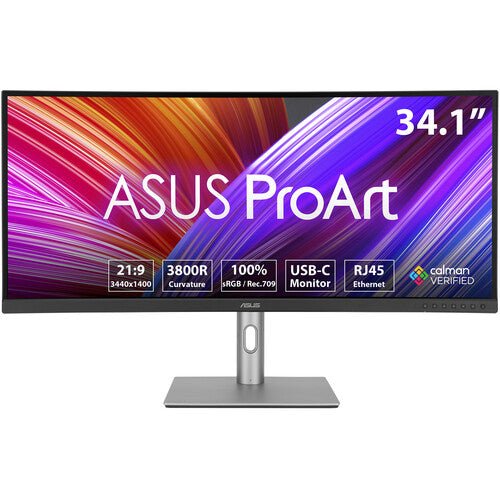


ASUS ProArt Display PA34VCNV 34.1" 4K Curved Professional Monitor
PRODUCT DESCRIPTION
ASUS ProArt Display PA34VCNV 34.1" Curved Professional Monitor (ASU-PA34VCNV / 90LM04A0-B02310) - 3 Year Warranty
A 34.1-Inch 3800R Curved Ultrawide for Editing and Colour Work
The ASUS ProArt PA34VCNV is a 34.1-inch curved professional monitor built around a 21:9 ultrawide panel at 3440 x 1440 resolution — roughly two and a half times the pixel area of a Full HD screen. It is aimed at video editors, colourists, designers and photographers in a Singapore studio or office who want a single wide canvas for a timeline, preview window and asset panel side by side, rather than two separate monitors and a bezel down the middle.
Note for anyone comparing panels: this is a WQHD-class ultrawide at 3440 x 1440, not a 4K panel. If you need true 4K UHD resolution in the ProArt range, the 27-inch PA279CRV and 32-inch PA329CRV in our catalogue are the 3840 x 2160 models — email sales@sourceit.com.sg if you are unsure which resolution class fits your workflow.
3800R Curvature for Consistent Eye-to-Screen Distance
At this width, a flat panel puts the edges of the screen noticeably further from your eyes than the centre. The PA34VCNV's 3800R curve keeps every point on the display closer to an equal viewing distance, which is the practical reason to choose a curved ultrawide over a flat one at 34 inches — less need to turn your head to track content at the far edges during long editing or grading sessions.
Factory-Calibrated Colour with 100% sRGB Coverage
The panel is factory calibrated and Calman Verified, delivering 100% sRGB / Rec. 709 colour gamut coverage at true 10-bit colour depth, with a Delta E of less than 2 out of the box. Every unit ships with an individual colour calibration report, so what you see in the box has already been measured against a reference rather than left to a generic panel spec.
HDR10 Support and 96W USB-C Single-Cable Connectivity
HDR10 support lets you preview HDR-graded footage with visibly better highlight and shadow detail than an SDR-only panel. A single USB-C cable carries DisplayPort Alt Mode video plus up to 96W of Power Delivery — enough to power most creative laptops, including 16-inch models, from one cable. Two DisplayPort 1.4 inputs support daisy chaining a second display, alongside two HDMI 2.0 ports and a built-in RJ45 Ethernet port that shares a wired network connection through the same USB-C link.
An Ergonomic Stand, Without Pivot
The stand offers tilt from -5° to +23°, swivel of ±15° and height adjustment of up to 130mm, with a quick-release, screw-free VESA 100 x 100mm mount for an arm. Being a curved ultrawide panel, it does not rotate into portrait orientation — that is a deliberate trade-off of the curved form factor, not a missing feature, and something to check against your workflow if you rely on a portrait monitor for code or document review.
Supplied Locally, with GST Invoice and Singapore Warranty
SourceIT supplies the ASUS ProArt PA34VCNV with a full GST invoice and local Singapore support. ASUS backs this model with a 3-year warranty. If you are also weighing a 4K panel such as the PA279CRV or PA329CRV, or a smaller WQHD monitor such as the PA278CV, email sales@sourceit.com.sg with your workflow and desk space and we will help you choose.
ASUS PA34VCNV Datasheet — Technical Specifications
General
| ASUS Product Name | ASUS ProArt Display PA34VCNV |
| Part Number (SKU) | ASU-PA34VCNV / 90LM04A0-B02310 |
| Range | ASUS ProArt PA-series, curved ultrawide |
| Product Type | Professional curved ultrawide monitor, IPS, factory calibrated |
| Panel Type | IPS, curved, 3800R |
| Screen Size | 34.1 inch, 21:9 |
| Manufacturer Warranty | 3-Year Warranty (ASUS), LCD Zero Bright Dot coverage |
| Local Warranty (Singapore) | Included with every unit supplied by SourceIT, together with a GST invoice |
Display
| Resolution | 3440 x 1440 (WQHD ultrawide) |
| Refresh Rate | 60 Hz maximum |
| Response Time | 5 ms (GtG) |
| Brightness | 300 cd/m² typical |
| Contrast Ratio | 1000:1 typical |
| Pixel Pitch | 0.2325 mm |
| Viewing Angles | 178° / 178° (H/V) |
| Surface | Anti-glare, flicker-free, low blue light hardware solution |
Color Performance
| Color Depth | True 10-bit (1.073 billion colours) |
| Color Accuracy | Delta E < 2, factory calibrated, Calman Verified |
| Color Gamut | 100% sRGB / Rec. 709 |
| HDR Support | HDR10 |
| Certifications | Calman Verified, TCO Certified, EPEAT Silver, ENERGY STAR — as published on the ASUS Singapore specifications page for this model |
| Professional Features | ASUS ProArt Preset, ProArt Palette, flicker-free and low blue light eye care |
Connectivity
| Video Inputs | 1 x USB-C (DisplayPort Alt Mode + up to 96W Power Delivery), 2 x DisplayPort 1.4 with daisy chain, 2 x HDMI 2.0 |
| USB Hub | 1 x USB 3.2 Gen 1 Type-C, 2 x USB 3.2 Gen 1 Type-A |
| Network | RJ45 Ethernet, shared over the USB-C connection |
| Audio | Built-in speakers, 2 x 2W; earphone jack |
Ergonomics & Physical
| Stand Adjustment | Tilt +23° to -5°, swivel ±15°, height adjustment 0–130mm; no pivot (curved panel) |
| VESA Mount | 100 x 100 mm, quick-release screw-free mount |
| Dimensions (with stand) | 817.2 x 569.2 x 240.0 mm |
| Weight | 10.8 kg with stand, 7.8 kg without |
| Kensington Lock | Yes |
Power
| Power Consumption | 26.9W typical operation, <0.5W standby |
| Package Contents | Power cable, USB-C cable, DisplayPort cable, HDMI cable, quick start guide, warranty card, colour calibration report |
Connectivity & Ergonomics
Video Inputs and Host Compatibility
The PA34VCNV connects over USB-C (DisplayPort Alt Mode with up to 96W Power Delivery), DisplayPort 1.4 or HDMI 2.0, and is compatible with Windows and macOS. A single USB-C cable to a compatible laptop carries video, data, wired network and charging power together, which removes several cables from an editing desk.
Daisy Chaining and Wired Networking
Both DisplayPort 1.4 inputs support daisy chaining, so a second DisplayPort monitor can be connected from this unit's DisplayPort output without a second cable run back to the host. The built-in RJ45 Ethernet port shares a wired connection over the same USB-C cable, useful on a desk where Wi-Fi is inconsistent or a studio policy requires a wired link for large file transfers.
Curve, Viewing Comfort and the Missing Pivot
The 3800R curvature keeps the left and right edges of the 34.1-inch panel closer to an equal distance from your eyes than a flat ultrawide would, which reduces the amount of head turning needed to track content across the full width during long sessions. This is a curved panel, so it does not pivot into portrait orientation — if portrait rotation matters to your workflow, the flat-panel PA278CV, PA278QV, PA247CV or PA248QV in our catalogue all pivot ±90°.
Stand Adjustment and Mounting
Tilt runs from -5° to +23°, swivel is ±15° either side, and height adjustment covers 0–130mm. The quick-release VESA 100 x 100mm mount lets the panel come off the bundled stand without tools for a monitor arm, useful where desk space is tight relative to the panel's width.
Operating System and Software Compatibility
Compatible with Windows and macOS and suited to Adobe Creative Cloud, DaVinci Resolve and general design and editing software. Confirm your laptop's USB-C alt-mode, Power Delivery and Ethernet-over-USB-C support with us before ordering if you plan to rely on the single-cable connection for all three at once.
Package Contents & ProArt Ordering Information
In the Box
Power cable, USB-C cable, DisplayPort cable, HDMI cable, quick start guide, warranty card and an individual colour calibration report.
ASUS ProArt Professional Monitor Range — Ordering Information
| PA34VCNV / 90LM04A0-B02310 (this listing) | 34.1" WQHD ultrawide, IPS, 3800R curved | HDR10, USB-C 96W, dual DisplayPort 1.4 daisy chain, RJ45 |
| PA278CV / 90LM06Q0-B01310 | 27" WQHD, IPS, flat | USB-C 65W, dual DisplayPort 1.2 daisy chain |
| PA278QV / 90LM05L1-B01310 | 27" WQHD, IPS, flat | No USB-C; DVI-D, Mini DisplayPort, HDMI |
| PA247CV / 90LM03Y1-B01310 | 23.8" FHD, IPS, flat | USB-C 65W, dual DisplayPort 1.2 daisy chain |
| PA248QV / 90LM05K1-B01310 | 24.1" WUXGA 16:10, IPS, flat | No USB-C; DisplayPort, HDMI, VGA |
| PA279CRV / 90LM08E0-B01K10 | 27" 4K UHD, IPS, flat | HDR10, USB-C 96W, dual DisplayPort 1.4 daisy chain |
| PA329CRV / 90LM02C0-B01K10 | 32" 4K UHD, IPS, flat | HDR10, USB-C 96W, dual DisplayPort 1.4 daisy chain |
All seven ProArt models above are current ASUS ProArt professional monitor configurations carried by SourceIT. Email sales@sourceit.com.sg quoting the part number to check stock and lead time.
Datasheet & Downloads
ASUS hosts the official product and specification pages for this model. The links below are ASUS's current Singapore product and specification pages for this model.
| ASUS Singapore product page | ASUS PA34VCNV — Overview |
| ASUS Singapore specifications page | ASUS PA34VCNV — Full Specifications |
For the PDF datasheet, factory calibration report template or driver downloads, email sales@sourceit.com.sg quoting PA34VCNV and we will send you the current files directly.
Frequently Asked Questions — ASUS PA34VCNV
Is the PA34VCNV a 4K monitor?
No. Despite "4K" appearing in some listing titles, ASUS's own specification page confirms this panel is 3440 x 1440, a 21:9 WQHD-class ultrawide — not 3840 x 2160. If you need true 4K UHD resolution, the 27-inch PA279CRV or 32-inch PA329CRV in our catalogue are the correct panels. Email sales@sourceit.com.sg if you would like us to confirm resolution before you order.
Why choose a curved ultrawide over two separate monitors?
A single 34.1-inch 21:9 panel avoids the bezel gap of a dual-monitor setup and gives one continuous canvas for a timeline, preview and asset panel side by side. The 3800R curve keeps the edges close to the same viewing distance as the centre, which reduces head movement across the width compared with a flat ultrawide of the same size.
Does it pivot into portrait orientation?
No. The curved panel design does not support pivot rotation — this is a limitation of the curved form factor, not a missing accessory. If portrait rotation is important to your workflow, the flat-panel PA278CV, PA278QV, PA247CV and PA248QV in our range all pivot ±90°.
Is 100% sRGB coverage enough for professional design and photo work?
Yes, for the great majority of web, UI, photo and general design deliverables that target the sRGB colour space. If your workflow specifically requires wide-gamut DCI-P3 or Adobe RGB coverage, the PA279CRV and PA329CRV in our catalogue cover those gamuts as well.
Will 96W USB-C power delivery charge my laptop while driving the display?
Yes, up to 96W is available over the USB-C port alongside DisplayPort Alt Mode video and the shared RJ45 network connection, sufficient for most 16-inch professional laptops from a single cable.
Can I daisy chain a second monitor from this display?
Yes, both DisplayPort 1.4 inputs support daisy chaining a second DisplayPort monitor from a single host connection, subject to your GPU's total DisplayPort bandwidth.
Does it support HDR content?
The panel supports HDR10, giving improved highlight and shadow detail on HDR-graded content compared with an SDR-only display, at 300 cd/m² typical brightness.
How much desk space does it need, and is it VESA mountable?
Footprint with the bundled stand is 817.2 x 569.2 x 240.0 mm, with tilt, swivel and height adjustment (no pivot). The panel uses a quick-release, screw-free VESA 100 x 100mm mount for a monitor arm.
Does SourceIT provide a Singapore warranty and GST invoice with this monitor?
Yes. Every ASUS ProArt PA34VCNV sold by SourceIT comes with local Singapore warranty support and a GST invoice; ASUS backs the panel with a 3-year warranty.


