
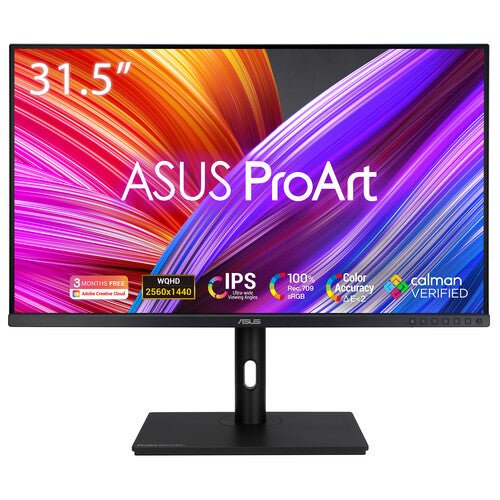


ASUS ProArt Display PA328QV 32" 4K Professional Monitor
PRODUCT DESCRIPTION
ASUS ProArt Display PA328QV 32" 4K Professional Monitor (ASU-PA328QV / 90LM00X0-B02310) - 3 Year Warranty
A 32-Inch QHD Professional Monitor for Creative and Office Work
The ASUS ProArt PA328QV is a 32-inch professional monitor built around a 2560 x 1440 QHD IPS panel rather than 4K — a large-format, factory-calibrated colour-accurate display for Singapore studios and offices where a bigger, sharper QHD workspace and a 75Hz refresh rate matter more than 4K pixel density. It suits content creation, design and general productivity work across a spacious 31.5-inch viewable screen.
Factory-Calibrated 100% sRGB with Delta E < 2
The panel is factory calibrated and Calman Verified, delivering 100% sRGB and Rec.709 colour gamut coverage at true 10-bit colour depth and a Delta E of less than 2 out of the box — consistent, trustworthy colour for photo editing, video review and design projects without needing a 4K-resolution premium.
75Hz Refresh Rate with Adaptive-Sync
A 75Hz refresh rate paired with Adaptive-Sync support gives noticeably smoother on-screen motion than the 60Hz standard across the rest of the ProArt CV/CRV line, which benefits general video review, UI scrolling and everyday responsiveness on a large 32-inch canvas, while the IPS panel keeps colour consistent from wide viewing angles.
Flexible HDMI and DisplayPort Connectivity
DisplayPort 1.2 and dual HDMI 2.0 inputs, alongside a 4-port USB 3.2 Gen 1 Type-A hub, cover desktop workstations and laptops that connect over a traditional video cable rather than USB-C — a straightforward connectivity set for an office or studio standardising on conventional cabling rather than single-cable USB-C docking.
TCO Certified for Sustainable Office Procurement
The PA328QV carries TCO Certification alongside TÜV-certified low blue light and flicker-free eye care, which matters for organisations with sustainability or responsible-procurement requirements in their IT purchasing policy, on top of the usual ergonomic stand with tilt, swivel, pivot and height adjustment.
Supplied Locally, with GST Invoice and Singapore Warranty
SourceIT supplies the ASUS ProArt PA328QV with a full GST invoice and local Singapore support. ASUS backs this model with a 3-year warranty. Deciding between a QHD workspace here and a 4K ProArt panel like the PA329CV or PA279CV in our catalogue? Email sales@sourceit.com.sg with your resolution and connectivity needs and we will help you choose.
ASUS PA328QV Datasheet — Technical Specifications
General
| ASUS Product Name | ASUS ProArt Display PA328QV |
| Part Number (SKU) | ASU-PA328QV / 90LM00X0-B02310 |
| Range | ASUS ProArt PA-series, QV family |
| Product Type | Professional QHD monitor, IPS, factory calibrated |
| Panel Type | IPS, LED backlight |
| Screen Size | 32 inch (31.5-inch viewable) |
| Manufacturer Warranty | 3-Year Warranty (ASUS), LCD zero bright dot coverage; security update support through 2026 |
| Local Warranty (Singapore) | Included with every unit supplied by SourceIT, together with a GST invoice |
Display
| Resolution | QHD, 2560 x 1440 |
| Refresh Rate | Up to 75 Hz |
| Response Time | 5 ms (GtG) |
| Brightness | 350 cd/m² typical, 400 cd/m² peak HDR |
| Contrast Ratio | 1000:1 |
| Pixel Pitch | 0.272 mm |
Color Performance
| Color Depth | True 10-bit (1.07 billion colours) |
| Color Accuracy | Delta E < 2, factory calibrated, Calman Verified |
| Color Gamut | 100% sRGB, 100% Rec.709 |
| HDR Support | HDR10, VESA DisplayHDR 400 (entry-level) |
| Professional Features | ASUS ProArt Preset, ProArt Palette, QuickFit Plus alignment overlays, Adaptive-Sync (48–75 Hz), flicker-free and low blue light eye care, Picture-in-Picture (PiP) and Picture-by-Picture (PbP) |
Connectivity
| Video Inputs | 1 x DisplayPort 1.2, 2 x HDMI 2.0 |
| USB Hub | 4 x USB 3.2 Gen 1 Type-A |
| Audio | Built-in speakers, 2 x 2W; earphone jack |
Ergonomics & Physical
| Stand Adjustment | Tilt, swivel, pivot and height adjustment |
| VESA Mount | 100 x 100 mm compatible |
| Dimensions (with stand) | 714.8 x 465.6 x 595.6 mm |
| Weight | 11.5 kg with stand, 7.0 kg without stand |
Power
| Power Consumption | 23.96W typical operation |
| Certifications | TCO Certified; TÜV low blue light and flicker-free certified |
| Package Contents | Power cable, DisplayPort cable, HDMI cable, quick start guide, warranty card |
Compatibility, Connectivity & Setup
Video Inputs and Host Compatibility
The PA328QV connects over DisplayPort 1.2 or one of two HDMI 2.0 inputs, and is compatible with Windows and macOS. Unlike the CV and CRV models in the ProArt range, it does not offer USB-C DisplayPort Alt Mode or power delivery, so a desktop or laptop with a dedicated video output cable is the intended connection method.
75Hz Refresh Rate and Adaptive-Sync
Adaptive-Sync across a 48–75 Hz range reduces tearing and stutter, and the 75Hz maximum refresh rate gives smoother scrolling and motion than the 60Hz standard on most other ProArt models — useful for general productivity and video review rather than competitive gaming.
Alignment Tools and USB Hub
QuickFit Plus provides on-screen grid and ruler overlays for print and photo layout alignment, and the 4-port USB 3.2 Gen 1 Type-A hub lets keyboard, mouse and storage peripherals connect through the monitor rather than directly into a desktop's rear panel.
Operating System and Software Compatibility
Compatible with Windows and macOS and suited to Adobe Creative Cloud, general design software and everyday office productivity applications. Confirm your GPU's DisplayPort/HDMI version with us before ordering if connecting through a docking station or KVM switch.
Package Contents & ProArt Ordering Information
In the Box
Power cable, DisplayPort cable, HDMI cable, quick start guide and warranty card.
ASUS ProArt Professional Monitor Range — Ordering Information
| PA32UCX-PK / 90LM03HC-B01320 | 32" 4K UHD, IPS Mini LED, 1152 zones | 1200 nits HDR, Dolby Vision/HDR10/HLG, 2x Thunderbolt 3 |
| PA27UCX-K / 90LM04NC-B01310 | 27" 4K UHD, IPS Mini LED, 576 zones | 1000 nits HDR, Dolby Vision/HDR10/HLG, USB-C 90W |
| PA32UCR-K / 90LM03H3-B01310 | 32" 4K UHD, IPS Mini LED, 576 zones | 1000 nits HDR, HDR10/HLG, X-Rite i1 Display Pro included |
| PA329CRV / 90LM02C0-B01K10 | 32" 4K UHD, IPS | HDR10, USB-C 96W, dual DisplayPort 1.4 daisy chain |
| PA329CV / 90LM06P1-B01110 | 32" 4K UHD, IPS | HDR10, USB-C 90W, desk C-clamp mount included |
| PA279CRV / 90LM08E0-B01K10 | 27" 4K UHD, IPS | HDR10, USB-C 96W, dual DisplayPort 1.4 daisy chain |
| PA279CV / 90LM06M1-B01110 | 27" 4K UHD, IPS | HDR10, USB-C 65W |
| PA328QV / 90LM00X0-B02310 (this listing) | 32" QHD (2560x1440), IPS, 75Hz | HDR10, DisplayPort + dual HDMI |
All eight ProArt models above are current ASUS ProArt professional monitor configurations carried by SourceIT. Email sales@sourceit.com.sg quoting the part number to check stock and lead time.
Datasheet & Downloads
ASUS hosts the official product and specification pages for this model. The links below are ASUS's current Singapore product and specification pages for this model.
| ASUS Singapore product page | ASUS PA328QV — Overview |
| ASUS Singapore specifications page | ASUS PA328QV — Full Specifications |
For the PDF datasheet, factory calibration report template or driver downloads, email sales@sourceit.com.sg quoting PA328QV and we will send you the current files directly.
Frequently Asked Questions — ASUS PA328QV
Why does this ProArt model use QHD resolution instead of 4K?
The PA328QV is positioned as a large-format, budget-conscious ProArt option — 2560 x 1440 QHD gives a spacious 32-inch workspace with a 75Hz refresh rate and lower GPU demand than 4K, while keeping the same factory colour calibration discipline as the rest of the ProArt CV/CRV range. If 4K resolution is required, the PA329CV, PA329CRV or 27-inch equivalents in our catalogue are the better fit.
Is there USB-C connectivity on this model?
No. The PA328QV connects over DisplayPort 1.2 or HDMI 2.0 only, without USB-C DisplayPort Alt Mode or power delivery. If single-cable USB-C laptop connectivity is important to you, the PA329CV or PA279CV in our range include it.
Does the higher 75Hz refresh rate make this suitable for gaming?
It is not marketed or optimised as a gaming display — this is a colour-accurate professional monitor first. The 75Hz refresh rate and Adaptive-Sync do give smoother general motion and scrolling than the 60Hz standard elsewhere in the ProArt range, which is a genuine quality-of-life benefit for everyday use.
Is 100% sRGB coverage sufficient for my design or photo work?
For sRGB-based deliverables — most web, social, general print and office output — yes, 100% sRGB with Delta E < 2 factory calibration is accurate and dependable. DCI-P3 wide-gamut video work would instead point to the PA329CRV or PA279CRV in our catalogue.
What sustainability certifications does it carry?
TCO Certified, alongside TÜV-certified low blue light and flicker-free display technology, which supports organisations with responsible-procurement or sustainability requirements in their IT purchasing policy.
How many peripherals can I connect through the built-in USB hub?
Four USB 3.2 Gen 1 Type-A ports are available on the built-in hub, enough for a keyboard, mouse, external drive and a fourth peripheral without reaching around to a desktop's rear panel.
How much desk space does it need, and is it VESA mountable?
Footprint with the bundled stand is approximately 714.8 x 465.6 x 595.6 mm with tilt, swivel, pivot and height adjustment, and the panel is VESA 100 x 100 mm compatible for a monitor arm.
Does SourceIT provide a Singapore warranty and GST invoice with this monitor?
Yes. Every ASUS ProArt PA328QV sold by SourceIT comes with local Singapore warranty support and a GST invoice; ASUS backs the panel with a 3-year warranty including LCD zero bright dot coverage.
What eye care features does it include for long working sessions?
Flicker-free backlight technology and a TÜV-certified low blue light mode are both built in, aimed at reducing eye strain during extended design, editing or office sessions on the large 32-inch panel.


