
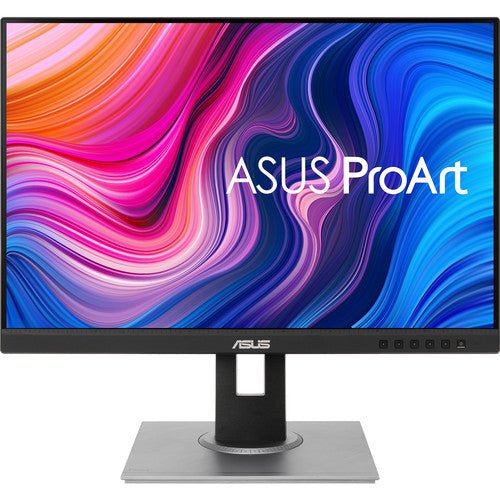


ASUS ProArt Display PA278QV 27" WQHD Professional Monitor
PRODUCT DESCRIPTION
ASUS ProArt Display PA278QV 27" WQHD Professional Monitor (ASU-PA278QV / 90LM05L1-B01310) - 3 Year Warranty
A 27-Inch WQHD Professional Monitor with Legacy Connectivity
The ASUS ProArt PA278QV is a 27-inch professional monitor at 2560 x 1440 (WQHD) resolution and 109 PPI pixel density, calibrated to the same colour standard as its USB-C sibling but built around a wider spread of traditional video inputs rather than USB-C. It suits design offices and studios connecting older desktop workstations, or anywhere a Dual-Link DVI or Mini DisplayPort input is still in regular use.
Factory-Calibrated Colour with 100% sRGB Coverage
The panel is factory calibrated and Calman Verified, covering 100% sRGB and 100% Rec. 709 at a Delta E of less than 2 out of the box. Every unit ships with an individual colour calibration report specific to that panel, and ProArt Preset provides quick switching between sRGB, Rec. 709 and several other viewing modes.
No USB-C — the "QV" Distinction from the CV Models
Where the CV models in this range add USB-C with Power Delivery, the QV models in ASUS's ProArt line trade that away for a broader set of legacy inputs: standard DisplayPort 1.2, Mini DisplayPort, HDMI 1.4 and Dual-Link DVI, alongside a four-port USB 3.2 Type-A hub. If your workstation still needs a DVI or Mini DisplayPort connection, this model covers it where the CV sibling does not; if you have a modern USB-C laptop, the PA278CV in our catalogue is the simpler single-cable option instead.
75Hz Refresh and a Full Ergonomic Stand
A 75Hz maximum refresh rate gives smoother on-screen motion than a standard 60Hz office monitor, and the stand offers a wide range of adjustment — tilt, ±90° swivel, 90° pivot into portrait orientation and height adjustment — useful for document proofing, code review or a vertical layout alongside horizontal design work.
QuickFit Virtual Scale for Print and Layout Work
ASUS QuickFit Virtual Scale overlays on-screen rulers and page-size guides so a document or photo print can be checked against its actual physical dimensions before it goes to print, directly on the panel.
Supplied Locally, with GST Invoice and Singapore Warranty
SourceIT supplies the ASUS ProArt PA278QV with a full GST invoice and local Singapore support. ASUS backs this model with a 3-year warranty. Not sure whether the USB-C PA278CV or this Dual-Link DVI-equipped PA278QV suits your setup better? Email sales@sourceit.com.sg with the ports on your workstation and we will confirm.
ASUS PA278QV Datasheet — Technical Specifications
General
| ASUS Product Name | ASUS ProArt Display PA278QV |
| Part Number (SKU) | ASU-PA278QV / 90LM05L1-B01310 |
| Range | ASUS ProArt PA-series, QV family (legacy connectivity) |
| Product Type | Professional WQHD monitor, IPS, factory calibrated |
| Panel Type | IPS, flat |
| Screen Size | 27 inch, 109 PPI |
| Manufacturer Warranty | 3-Year Warranty (ASUS), LCD Zero Bright Dot coverage; 3-year product security update support through 31 Dec 2026 |
| Local Warranty (Singapore) | Included with every unit supplied by SourceIT, together with a GST invoice |
Display
| Resolution | 2560 x 1440 (WQHD) |
| Refresh Rate | 75 Hz maximum |
| Response Time | 5 ms (GtG) |
| Brightness | 350 cd/m² typical |
| Contrast Ratio | 1000:1 typical |
| Pixel Pitch | 0.233 mm |
| Viewing Angles | 178° / 178° (H/V) |
| Surface | Anti-glare, flicker-free, low blue light hardware solution |
Color Performance
| Color Depth | 8-bit (16.7 million colours) |
| Color Accuracy | Delta E < 2, factory calibrated, Calman Verified |
| Color Gamut | 100% sRGB |
| HDR Support | Not published by ASUS for this model |
| Professional Features | ASUS ProArt Preset, ProArt Palette, QuickFit Virtual Scale, flicker-free and low blue light eye care |
Connectivity
| Video Inputs | 1 x DisplayPort 1.2, 1 x Mini DisplayPort, 1 x HDMI 1.4, 1 x Dual-Link DVI-D — no USB-C |
| USB Hub | 4 x USB 3.2 Gen 1 Type-A |
| Audio | Built-in speakers, 2 x 2W; earphone jack; PC audio input |
Ergonomics & Physical
| Stand Adjustment | Tilt +35° to -5°, swivel ±90°, pivot ±90°, height adjustment 0–150mm |
| VESA Mount | 100 x 100 mm compatible |
| Dimensions (with stand) | 615.0 x 532.0 x 226.0 mm |
| Weight | 7.56 kg with stand, 4.83 kg without |
| Kensington Lock | Yes |
Power
| Power Consumption | 12.5W typical operation, <0.5W standby |
| Package Contents | HDMI cable, DisplayPort cable, Dual-Link DVI cable, USB Type-B to A cable, power cord, quick start guide, warranty card, colour pre-calibration report |
Connectivity & Ergonomics
Video Inputs and Host Compatibility
The PA278QV connects over DisplayPort 1.2, Mini DisplayPort, HDMI 1.4 or Dual-Link DVI-D, and is compatible with Windows and macOS. There is no USB-C on this model — where a single-cable USB-C connection with Power Delivery matters more to you than legacy port coverage, the PA278CV in our catalogue is the model to choose instead.
Why Dual-Link DVI and Mini DisplayPort Still Matter
A number of desktop workstations and older graphics cards in Singapore studios and offices still output over Dual-Link DVI or Mini DisplayPort rather than HDMI or USB-C. The PA278QV covers both directly, without needing an adapter, which is the main reason to choose this model over the CV sibling if your existing hardware uses either connector.
Full Ergonomic Range, Including Wider Swivel
Tilt runs from -5° to +35°, swivel is a full ±90° either side, and the panel pivots 90° into portrait orientation, with height adjustment of up to 150mm. The swivel range on this model is wider than the CV sibling's ±45°, which is useful where the monitor needs to turn to face a second desk position.
QuickFit Virtual Scale and Alignment Tools
QuickFit Virtual Scale overlays on-screen rulers and standard page-size guides so a photo or document can be checked against its true physical dimensions before printing, without a separate measuring tool.
Operating System and Software Compatibility
Compatible with Windows and macOS and suited to Adobe Creative Cloud and general office and design software. Confirm which video input your existing graphics card or laptop dock supports before ordering — email us your hardware model and we will check compatibility.
Package Contents & ProArt Ordering Information
In the Box
HDMI cable, DisplayPort cable, Dual-Link DVI cable, USB Type-B to A cable, power cord, quick start guide, warranty card and an individual colour pre-calibration report.
ASUS ProArt Professional Monitor Range — Ordering Information
| PA34VCNV / 90LM04A0-B02310 | 34.1" WQHD ultrawide, IPS, 3800R curved | HDR10, USB-C 96W, dual DisplayPort 1.4 daisy chain, RJ45 |
| PA278CV / 90LM06Q0-B01310 | 27" WQHD, IPS, flat | USB-C 65W, dual DisplayPort 1.2 daisy chain |
| PA278QV / 90LM05L1-B01310 (this listing) | 27" WQHD, IPS, flat | No USB-C; DVI-D, Mini DisplayPort, HDMI |
| PA247CV / 90LM03Y1-B01310 | 23.8" FHD, IPS, flat | USB-C 65W, dual DisplayPort 1.2 daisy chain |
| PA248QV / 90LM05K1-B01310 | 24.1" WUXGA 16:10, IPS, flat | No USB-C; DisplayPort, HDMI, VGA |
| PA279CRV / 90LM08E0-B01K10 | 27" 4K UHD, IPS, flat | HDR10, USB-C 96W, dual DisplayPort 1.4 daisy chain |
| PA329CRV / 90LM02C0-B01K10 | 32" 4K UHD, IPS, flat | HDR10, USB-C 96W, dual DisplayPort 1.4 daisy chain |
All seven ProArt models above are current ASUS ProArt professional monitor configurations carried by SourceIT. Email sales@sourceit.com.sg quoting the part number to check stock and lead time.
Datasheet & Downloads
ASUS hosts the official product and specification pages for this model. The links below are ASUS's current Singapore product and specification pages for this model.
| ASUS Singapore product page | ASUS PA278QV — Overview |
| ASUS Singapore specifications page | ASUS PA278QV — Full Specifications |
For the PDF datasheet, factory calibration report template or driver downloads, email sales@sourceit.com.sg quoting PA278QV and we will send you the current files directly.
Frequently Asked Questions — ASUS PA278QV
What is the actual difference between the PA278QV and the PA278CV in your catalogue?
Both are 27-inch WQHD panels with the same 100% sRGB coverage, Delta E < 2 calibration and 75Hz refresh rate. The QV model has no USB-C and instead offers DisplayPort, Mini DisplayPort, HDMI and Dual-Link DVI — a wider spread of connectivity aimed at older or desktop-class hardware. The CV model drops the Mini DisplayPort and DVI inputs in favour of USB-C with 65W Power Delivery and a second daisy-chainable DisplayPort. Choose based on what output your workstation actually has.
Why would I need Dual-Link DVI in 2026?
A meaningful number of desktop workstations, older graphics cards and certain proofing or CAD setups in Singapore offices still use DVI as their primary or only high-resolution output. If that describes your hardware, the PA278QV connects directly without an adapter; the PA278CV does not have a DVI input at all.
Is 100% sRGB coverage enough for professional design work?
Yes, for the great majority of web, UI, general photo and design deliverables that target the sRGB colour space. This is a sRGB-native panel rather than a wide-gamut one; ProArt Preset provides several viewing modes but does not add hardware gamut beyond sRGB.
Does it support USB-C at all?
No. This model has no USB-C port. If a single-cable USB-C connection with charging is what you need, the PA278CV in our catalogue is the model with that connectivity.
Does it pivot into portrait orientation?
Yes, a full 90° pivot is supported alongside tilt, a wide ±90° swivel and height adjustment, which suits document proofing, code review or a vertical layout check.
What is QuickFit Virtual Scale useful for?
It overlays on-screen rulers and standard page-size guides so you can check a document or photo against its true physical dimensions directly on the panel before sending it to print.
How much desk space does it need, and is it VESA mountable?
Footprint with the bundled stand is 615.0 x 532.0 x 226.0 mm, with tilt, a wide swivel range, pivot and height adjustment, and the panel is VESA 100 x 100mm compatible for a monitor arm.
Does SourceIT provide a Singapore warranty and GST invoice with this monitor?
Yes. Every ASUS ProArt PA278QV sold by SourceIT comes with local Singapore warranty support and a GST invoice; ASUS backs the panel with a 3-year warranty.


