
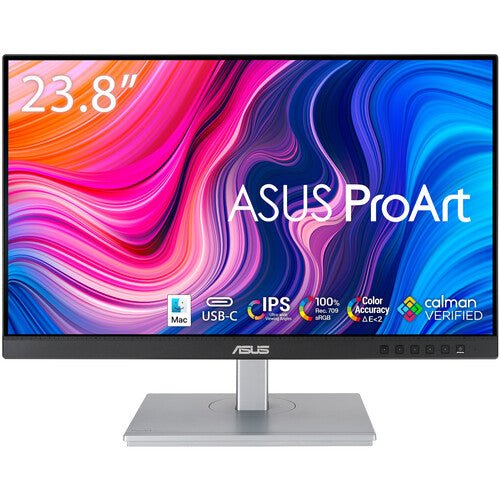


ASUS ProArt Display PA247CV 23.8" FHD Professional Monitor
PRODUCT DESCRIPTION
ASUS ProArt Display PA247CV 23.8" FHD Professional Monitor (ASU-PA247CV / 90LM03Y1-B01310) - 3 Year Warranty
A Compact 23.8-Inch Professional Monitor for Colour-Conscious Desks
The ASUS ProArt PA247CV is a 23.8-inch professional monitor at 1920 x 1080 (Full HD) resolution, aimed at designers, photo editors and general office users who need factory-checked colour accuracy in a smaller footprint than a 27-inch panel. It suits a compact desk, a secondary calibrated monitor alongside a larger primary display, or an entry point into the ProArt colour-accuracy standard without stepping up to WQHD or 4K.
Factory-Calibrated Colour with 100% sRGB Coverage
The panel is factory calibrated to a Delta E of less than 2 out of the box, covering 100% sRGB. Every unit ships with an individual colour pre-calibration report, and on-panel gamma adjustment (1.8/2.0/2.2/2.4/2.6) plus 6-axis colour adjustment give finer manual control than a typical office monitor's on-screen menu.
USB-C with 65W Power Delivery — the "CV" in the Name
As with the other CV models in ASUS's ProArt range, the defining feature here is USB-C: a single cable carries DisplayPort Alt Mode video plus up to 65W of Power Delivery, enough to charge most ultrabooks and many 14-inch creative laptops. Two DisplayPort 1.2 inputs support daisy chaining a second monitor, alongside one HDMI 1.4 port and a four-port USB 3.2 Type-A hub.
The sibling PA248QV in our catalogue is the same-generation model without USB-C, built instead around DisplayPort, HDMI and VGA — see the comparison in the FAQ below if you are choosing between the two.
75Hz Refresh and a Full Ergonomic Stand
A 75Hz maximum refresh rate gives smoother on-screen motion than a standard 60Hz office monitor, and the stand offers tilt, ±90° swivel, 90° pivot into portrait orientation and height adjustment on a quick-release stand — useful for document proofing or a vertical coding layout on a monitor otherwise set up for colour-accurate design work.
A Sensible Secondary Monitor for a Colour-Accurate Primary Setup
Many Singapore design studios and photo/video teams run a large colour-accurate primary display for the working canvas and a smaller secondary panel for reference palettes, browser tabs, chat and project management. The PA247CV's factory calibration means that secondary screen does not become the weak link in your colour chain — a genuine advantage over pairing a calibrated primary with an uncalibrated office monitor, where colours can visibly shift between the two screens.
Supplied Locally, with GST Invoice and Singapore Warranty
SourceIT supplies the ASUS ProArt PA247CV with a full GST invoice and local Singapore support. ASUS backs this model with a 3-year warranty. Comparing this against the larger PA278CV, or the non-USB-C PA248QV? Email sales@sourceit.com.sg with your desk space and connectivity needs and we will help you choose.
ASUS PA247CV Datasheet — Technical Specifications
General
| ASUS Product Name | ASUS ProArt Display PA247CV |
| Part Number (SKU) | ASU-PA247CV / 90LM03Y1-B01310 |
| Range | ASUS ProArt PA-series, CV family (USB-C) |
| Product Type | Professional FHD monitor, IPS, factory calibrated |
| Panel Type | IPS, flat |
| Screen Size | 23.8 inch, 93 PPI |
| Manufacturer Warranty | 3-Year Warranty (ASUS), LCD Zero Bright Dot coverage; 3-year product security update support through 31 Dec 2026 |
| Local Warranty (Singapore) | Included with every unit supplied by SourceIT, together with a GST invoice |
Display
| Resolution | 1920 x 1080 (Full HD) |
| Refresh Rate | 75 Hz maximum |
| Response Time | 5 ms (GtG) |
| Brightness | 300 cd/m² typical |
| Contrast Ratio | 1000:1 typical |
| Surface | Anti-glare, flicker-free, low blue light hardware solution |
Color Performance
| Color Depth | 8-bit (16.7 million colours) |
| Color Accuracy | Delta E < 2, factory calibrated |
| Color Gamut | 100% sRGB |
| HDR Support | Not published by ASUS for this model |
| Professional Features | Gamma adjustment (1.8/2.0/2.2/2.4/2.6), 6-axis colour adjustment, ASUS ProArt Preset, flicker-free and low blue light eye care |
Connectivity
| Video Inputs | 1 x USB-C (DisplayPort Alt Mode + up to 65W Power Delivery), 2 x DisplayPort 1.2 with daisy chain, 1 x HDMI 1.4 |
| USB Hub | 4 x USB 3.2 Gen 1 Type-A |
| Audio | Built-in speakers, 2 x 2W; audio jack |
Ergonomics & Physical
| Stand Adjustment | Tilt +35° to -5°, swivel ±90°, pivot ±90°, height adjustment 0–130mm; quick-release stand |
| VESA Mount | 100 x 100 mm compatible |
| Dimensions (with stand) | 539.7 x 471.8 x 211.4 mm |
| Weight | 6.3 kg with stand, 4.2 kg without |
Power
| Power Consumption | 11.07W typical operation, <0.5W standby |
| Package Contents | USB-C cable, DisplayPort cable, power cord, quick-release stand, colour pre-calibration report |
Connectivity & Ergonomics
Video Inputs and Host Compatibility
The PA247CV connects over USB-C (DisplayPort Alt Mode with up to 65W Power Delivery), DisplayPort 1.2 or HDMI 1.4, and is compatible with Windows and macOS. A single USB-C cable to a compatible laptop carries video, data and charging power together, suiting a compact single-cable desk setup.
Daisy Chaining a Second Display
Both DisplayPort 1.2 inputs support daisy chaining, so a second DisplayPort monitor can be connected from this unit's DisplayPort output without a second cable run back to the host — a practical way to pair two of these compact panels on one desk.
Full Ergonomic Range, Including Pivot
Tilt runs from -5° to +35°, swivel is a full ±90° either side, and the panel pivots 90° into portrait orientation, with height adjustment of up to 130mm on a quick-release stand. That covers most desk positions for a compact secondary or primary monitor.
Manual Colour Tools
Gamma adjustment across five presets (1.8 to 2.6) and 6-axis colour adjustment give finer manual control over the panel's output than a standard office monitor menu, useful for matching this screen to a reference or to a second monitor on the same desk.
Operating System and Software Compatibility
Compatible with Windows and macOS and suited to Adobe Creative Cloud and general office and design software. Confirm your laptop's USB-C alt-mode and power delivery support with us before ordering if you plan to rely on the single-cable connection.
Package Contents & ProArt Ordering Information
In the Box
USB-C cable, DisplayPort cable, power cord, quick-release stand and an individual colour pre-calibration report.
ASUS ProArt Professional Monitor Range — Ordering Information
| PA34VCNV / 90LM04A0-B02310 | 34.1" WQHD ultrawide, IPS, 3800R curved | HDR10, USB-C 96W, dual DisplayPort 1.4 daisy chain, RJ45 |
| PA278CV / 90LM06Q0-B01310 | 27" WQHD, IPS, flat | USB-C 65W, dual DisplayPort 1.2 daisy chain |
| PA278QV / 90LM05L1-B01310 | 27" WQHD, IPS, flat | No USB-C; DVI-D, Mini DisplayPort, HDMI |
| PA247CV / 90LM03Y1-B01310 (this listing) | 23.8" FHD, IPS, flat | USB-C 65W, dual DisplayPort 1.2 daisy chain |
| PA248QV / 90LM05K1-B01310 | 24.1" WUXGA 16:10, IPS, flat | No USB-C; DisplayPort, HDMI, VGA |
| PA279CRV / 90LM08E0-B01K10 | 27" 4K UHD, IPS, flat | HDR10, USB-C 96W, dual DisplayPort 1.4 daisy chain |
| PA329CRV / 90LM02C0-B01K10 | 32" 4K UHD, IPS, flat | HDR10, USB-C 96W, dual DisplayPort 1.4 daisy chain |
All seven ProArt models above are current ASUS ProArt professional monitor configurations carried by SourceIT. Email sales@sourceit.com.sg quoting the part number to check stock and lead time.
Datasheet & Downloads
ASUS hosts the official product and specification pages for this model. The links below are ASUS's current Singapore product and specification pages for this model.
| ASUS Singapore product page | ASUS PA247CV — Overview |
| ASUS Singapore specifications page | ASUS PA247CV — Full Specifications |
For the PDF datasheet, factory calibration report template or driver downloads, email sales@sourceit.com.sg quoting PA247CV and we will send you the current files directly.
Frequently Asked Questions — ASUS PA247CV
What is the actual difference between the PA247CV and the PA248QV in your catalogue?
Both are compact, factory-calibrated ProArt panels in the roughly 24-inch class with 100% sRGB coverage. The PA247CV is a 23.8-inch 1920 x 1080 panel with USB-C 65W Power Delivery and dual daisy-chainable DisplayPort. The PA248QV is a 24.1-inch 1920 x 1200 (16:10) panel with no USB-C, instead offering DisplayPort, HDMI and VGA. If you want single-cable USB-C connectivity, choose the PA247CV; if you want the taller 16:10 aspect ratio or need a VGA input, the PA248QV is the better fit.
Will 65W USB-C power delivery charge my laptop while driving the display?
Yes, for most ultrabooks and many 14-inch creative laptops. Larger high-performance laptops that draw more than 65W under load may charge more slowly over this port — check your laptop's rated power draw, or ask us and we will confirm.
Is this monitor suitable as a colour-accurate secondary display?
Yes. Factory calibration to Delta E < 2 with 100% sRGB coverage makes it a reasonable colour-accurate secondary screen alongside a larger primary monitor, at a smaller footprint and lower cost than a 27-inch ProArt panel.
Can I daisy chain a second monitor from this display?
Yes, both DisplayPort 1.2 inputs support daisy chaining a second DisplayPort monitor from a single host connection, subject to your GPU's total DisplayPort bandwidth.
Does it pivot into portrait orientation?
Yes, a full 90° pivot is supported alongside tilt, ±90° swivel and height adjustment on the quick-release stand.
What manual colour controls does it offer beyond factory calibration?
Five gamma presets (1.8 to 2.6) and 6-axis colour adjustment are available through the on-screen menu, giving finer manual tuning than a typical office monitor.
How much desk space does it need, and is it VESA mountable?
Footprint with the bundled stand is 539.7 x 471.8 x 211.4 mm, with tilt, swivel, pivot and height adjustment, and the panel is VESA 100 x 100mm compatible for a monitor arm.
Does SourceIT provide a Singapore warranty and GST invoice with this monitor?
Yes. Every ASUS ProArt PA247CV sold by SourceIT comes with local Singapore warranty support and a GST invoice; ASUS backs the panel with a 3-year warranty.
Is this a good choice as a secondary monitor next to a larger calibrated display?
Yes. Because the PA247CV is factory calibrated to the same Delta E < 2 standard as the larger ProArt panels in our range, it avoids the visible colour mismatch you get pairing a calibrated primary monitor with an uncalibrated secondary one, at a smaller footprint and lower cost than stepping up to a second 27-inch panel.


