
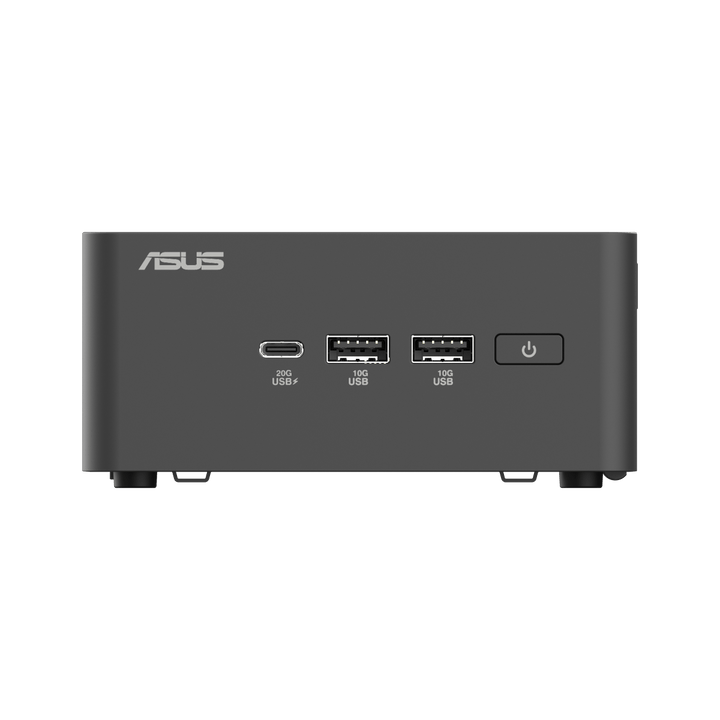


ASUS NUC 15 PRO C3-100U INTEL Barebone RNUC15CRHI300000I
PRODUCT DESCRIPTION
ASUS NUC 15 Pro C3-100U Barebone (RNUC15CRHI300000I) - 3 Years Onsite Warranty
A Barebone Mini PC Singapore Integrators Configure to Spec
The ASUS NUC 15 Pro C3-100U Barebone (RNUC15CRHI300000I) is the entry point into ASUS's Arrow Lake-generation NUC 15 Pro chassis, built around the Intel Core 3 100U processor. As a barebone mini PC, the chassis, motherboard, processor and I/O are fitted by ASUS, but memory, storage and an operating system are not included — you or your integrator fit them before the unit can boot into anything. That makes it a system-builder platform for resellers and IT teams who want to specify their own RAM, drive and OS combination, typically for kiosk, digital signage, thin-client and light office deployments where the Core 3 tier's efficiency and low list price matter more than raw throughput.
If you would rather receive a complete, ready-to-use system, our ASUS NUC 15 Pro Core Ultra 5 225H and Core Ultra 7 255H systems (RNUC15CRHU5073C3, RNUC15CRHU5063C3, RNUC15CRHU7073C3, RNUC15CRHU7074C3) ship with memory, storage and Windows 11 Pro already fitted.
Intel Core 3 100U — Six Cores, 25 W, No NPU
The fitted processor is the Intel Core 3 Processor 100U: 2 performance cores and 4 efficient cores for 6 cores and 8 threads total, up to 4.7 GHz max turbo, 10 MB of Intel Smart Cache and a 15 W processor base power (ASUS documents this platform at cTDP 25 W in the NUC chassis). Graphics are Intel Graphics with 64 execution units — capable of office, browser and light video workloads, and enough for dual 4K monitors, but there is no Arc-branded GPU and no dedicated NPU on the Core 3 tier, which is the main thing separating it from the Core Ultra 5/7 configurations in the same chassis family.
Memory: Up to 96 GB Across Two SO-DIMM Slots — Your Choice
Two SO-DIMM slots support dual-channel DDR5, up to 96 GB total, with nothing fitted at the factory. Match the memory to the workload the finished build is destined for — a kiosk or thin-client image typically needs far less than 96 GB, while a shared workstation build benefits from maxing it out. We can supply compatible DDR5 SO-DIMM modules alongside the barebone if you would rather order both together.
Storage: Two M.2 Gen4 Slots, No Drive Fitted
Storage is equally open: an M.2 2280 PCIe Gen4 x4 slot and a second M.2 2242 PCIe Gen4 x4 slot, each documented by ASUS as supporting 128 GB to 2 TB NVMe SSDs. On the Tall chassis SKU an additional 2.5-inch SATA bay is available for bulk or lower-cost storage. None of these drives ship fitted — this barebone gives you the slots and the flexibility, not the parts.
Wi-Fi 7, Dual Thunderbolt 4 and Dual HDMI 2.1
Networking is Intel Wi-Fi 7 with Bluetooth 5.4, plus a wired Intel i226-V 2.5 Gb Ethernet port. Video and data I/O is generous for a barebone in this class: two Thunderbolt 4 Type-C ports (DisplayPort 2.1 / USB4 capable) and two HDMI 2.1 ports, enough to drive up to four 4K displays once an OS and GPU driver are installed — useful for signage walls and multi-monitor kiosk builds even on the entry Core 3 tier. Intel vPro and firmware TPM are supported on this platform for remote management and platform security once configured.
No Operating System Fitted — Windows, Ubuntu or RHEL, Your Choice
ASUS documents this platform as supporting Windows 11 64-bit, Ubuntu 24.04 LTS 64-bit and Red Hat Enterprise Linux 64-bit, but none of these are preinstalled — you fit and licence the OS of your choice after adding memory and storage.
Supplied Locally, with GST Invoice and Singapore Onsite Warranty
SourceIT supplies the ASUS NUC 15 Pro C3-100U Barebone with a full GST invoice and local Singapore support. ASUS backs this barebone platform with a 3-year onsite warranty covering the supplied hardware — memory, storage and any OS you fit yourself are outside that manufacturer warranty and are your own component choices to manage.
Not sure whether the Core 3, Core 5 or Core 7 barebone tier fits your project, or whether a fully-configured system would suit better? Email sales@sourceit.com.sg with what you are building and we will help you decide.
ASUS RNUC15CRHI300000I Datasheet — Technical Specifications
General
| ASUS Product Name | ASUS NUC 15 Pro C3-100U Barebone — Mini PC for Commercial Use |
| SKU | RNUC15CRHI300000I |
| Internal Item Code | 90AR00Q2-M00120 |
| Range | ASUS NUC 15 Pro (Arrow Lake platform), Barebone |
| Form Factor | Mini PC, Barebone (Slim or Tall chassis) |
| What Is NOT Included | Memory, storage (M.2 / SATA drives) and operating system are not fitted or included — supplied separately by the integrator |
| Manufacturer Warranty | 3-Year Onsite Warranty (ASUS), covering the barebone hardware as supplied |
| Local Warranty (Singapore) | Included with every unit supplied by SourceIT, together with a GST invoice |
Processor & Graphics
| Processor | Intel Core 3 Processor 100U (2 Performance + 4 Efficient cores, cTDP 25 W in this chassis) |
| Cores / Threads | 6 cores / 8 threads |
| Max Turbo Frequency | 4.7 GHz |
| Cache | 10 MB Intel Smart Cache |
| Graphics | Intel Graphics, 64 execution units — no Arc branding, no dedicated NPU on this tier |
Memory Support (Not Included)
| Memory Type | DDR5 SO-DIMM, dual-channel |
| Slots / Maximum | 2 x SO-DIMM slots, up to 96 GB total, per ASUS |
| Included With Barebone | No memory fitted — specify and order separately |
Storage Support (Not Included)
| Primary M.2 Slot | 1 x M.2 2280, PCIe Gen4 x4, supports 128 GB to 2 TB NVMe SSD |
| Secondary M.2 Slot | 1 x M.2 2242, PCIe Gen4 x4, supports 128 GB to 2 TB NVMe SSD |
| 2.5-inch SATA Bay | Available on the Tall chassis SKU for bulk or lower-cost storage |
| Included With Barebone | No drives fitted — specify and order separately; refer to the latest ASUS QVL list for qualified drives |
Connectivity & Display
| Wireless LAN | Intel Wi-Fi 7, Bluetooth 5.4 |
| Wired LAN | 1 x Intel i226-V 2.5 Gb Ethernet |
| Video I/O | 2 x Thunderbolt 4 Type-C (DisplayPort 2.1 / USB4 capable), 2 x HDMI 2.1 |
| Display Support | Up to four 4K displays across Thunderbolt 4 and HDMI once an OS is installed |
| USB | USB 3.2 Gen 2 Type-A and Type-C ports, plus USB 2.0 |
Security & Management
| Platform Security | Intel vPro (platform support), firmware TPM (Intel PTT) |
| Fleet Management | Compatible with ASUS Control Center once an OS and agent are installed |
Operating System (Not Included)
| OS Included | None — operating system is not fitted at the factory |
| Documented OS Support | Windows 11 64-bit, Ubuntu 24.04 LTS 64-bit, Red Hat Enterprise Linux 64-bit, per ASUS |
Physical
| Dimensions, Slim Chassis | Approx. 117 x 112 x 36.8 mm, per ASUS |
| Dimensions, Tall Chassis | Approx. 117 x 112 x 54 mm, per ASUS |
Warranty Term (As Supplied)
| Barebone Hardware | 3 Years Onsite (ASUS) |
| Memory, Storage, OS Fitted by Integrator | Covered by the component supplier's own warranty, not by ASUS's barebone warranty |
Connectivity & Setup / Expansion
Fitting Memory Before First Boot
Both SO-DIMM slots need DDR5 memory fitted before the system will boot into an OS at all. Dual-channel operation (both slots populated with matching modules) is worth doing even on the Core 3 tier, since Intel Graphics also draws its bandwidth from system memory — a single stick will boot but leaves performance on the table. Up to 96 GB total is supported across the two slots, though a kiosk or thin-client build rarely needs anywhere near that.
Choosing and Fitting Storage
The primary M.2 2280 PCIe Gen4 slot is the natural home for your main OS drive; the secondary M.2 2242 slot suits a second smaller drive or a cache/scratch disk depending on your build. On the Tall chassis SKU, the 2.5-inch SATA bay adds a third option for bulk storage. Check ASUS's current QVL (qualified vendor list) before committing to a specific drive model, particularly for the M.2 2242 slot where physical size compatibility matters.
Installing an Operating System
With memory and storage fitted, you install the operating system of your choice from a USB installer in the usual way — Windows 11 64-bit, Ubuntu 24.04 LTS 64-bit and Red Hat Enterprise Linux 64-bit are the platforms ASUS documents as supported. Windows licensing is not included with this barebone and needs to be purchased and applied separately if that is your chosen OS.
Networking and Multi-Display Setup
Intel Wi-Fi 7 with Bluetooth 5.4 and a wired 2.5G Ethernet port cover networking. Two Thunderbolt 4 Type-C ports and two HDMI 2.1 ports handle video output for up to four displays, which is generous headroom for a Core 3-tier barebone and makes this a genuine option for a signage wall or a multi-monitor kiosk running a locked-down image, not just a single-screen thin client.
Choosing Between the Core 3, Core 5 and Core 7 Barebone Tiers
All three NUC 15 Pro barebones in our catalogue — this Core 3-100U, the Core 5-210H and the Core 7-240H — share the same chassis, memory and storage slots, Wi-Fi 7, dual Thunderbolt 4 and dual HDMI 2.1. The difference is entirely in the processor: cores, threads, cache and turbo clock step up at each tier, with no NPU on any of the three (that starts with the Core Ultra 5/7 full-system range). Choose the Core 3 for the lightest, most price-sensitive kiosk and thin-client builds; step up to Core 5 or Core 7 where the finished build needs more headroom for multitasking or background processing.
Package Contents & Ordering Information
What Ships in the Box
The barebone chassis with motherboard, Intel Core 3 100U processor, wireless module and I/O already fitted, plus the external power adapter, power cord and ASUS user documentation. Memory, storage (M.2 and SATA drives) and an operating system are not included and are not fitted — these are specified and ordered separately based on your intended build.
Components You Will Need to Order Alongside This Barebone
| DDR5 SO-DIMM memory | Up to two modules, matched pair recommended for dual-channel, up to 96 GB total |
| M.2 2280 NVMe SSD (primary) | 128 GB to 2 TB, PCIe Gen4 x4 |
| M.2 2242 NVMe SSD (secondary, optional) | 128 GB to 2 TB, PCIe Gen4 x4 |
| 2.5-inch SATA SSD/HDD (optional, Tall SKU) | Ask SourceIT for current options |
| Operating system licence (if Windows) | Windows 11 64-bit — not included; Ubuntu 24.04 LTS and RHEL are free/subscription Linux alternatives ASUS also documents as supported |
Email sales@sourceit.com.sg with your intended memory, storage and OS configuration and we will quote the full build, or supply the barebone alone if you are sourcing components elsewhere.
Related ASUS NUC 15 Pro Barebones in Our Catalogue
ASUS NUC 15 Pro C5-210H Barebone (RNUC15CRHC500000I, 90AR00Q2-M00130) steps up to the Intel Core 5 210H; ASUS NUC 15 Pro C7-240H Barebone (RNUC15CRHC700000I, 90AR00Q2-M00140) steps up further to the Intel Core 7 240H — same chassis, memory, storage and connectivity as this listing, referenced here by SKU for comparison only. For a complete, ready-to-use system with memory, storage and Windows 11 Pro already fitted, see our ASUS NUC 15 Pro Core Ultra 5 225H (RNUC15CRHU5073C3, RNUC15CRHU5063C3) and Core Ultra 7 255H (RNUC15CRHU7073C3, RNUC15CRHU7074C3) systems, also in our catalogue.
Datasheet & Downloads
ASUS hosts the official product and specification pages for this model. The links below are ASUS's current Singapore product and specification pages for this model family.
| ASUS Singapore product page | ASUS NUC 15 Pro — Overview |
| ASUS Singapore specifications page | ASUS NUC 15 Pro — Full Specifications |
For the PDF datasheet, user manual, the current ASUS QVL for compatible memory and storage, or driver downloads, email sales@sourceit.com.sg quoting RNUC15CRHI300000I and we will send you the current files directly.
Frequently Asked Questions — ASUS NUC 15 Pro C3-100U Barebone RNUC15CRHI300000I
What exactly does "barebone" mean here — what am I actually getting?
You get the chassis, motherboard, Intel Core 3 100U processor, wireless module and I/O ports, all fitted by ASUS. You do not get memory, storage or an operating system — none of those are included, and the unit cannot boot into anything usable until you or your integrator fits them.
Does this processor have an NPU or Arc graphics?
No. The Core 3 100U uses Intel Graphics with 64 execution units and no dedicated NPU — that AI-acceleration hardware starts with the Core Ultra 5/7 configurations in our NUC 15 Pro full-system range. For everyday office, browser and signage workloads this does not matter; for on-device AI features it does.
How much memory can it actually take?
Up to 96 GB total across two SO-DIMM slots, running dual-channel DDR5 when both slots are populated with matching modules. None of that memory is fitted or included — you choose the capacity and we can supply it alongside the barebone if you want it delivered as one build.
What storage options does it support?
Two M.2 slots — a 2280 slot and a 2242 slot, both PCIe Gen4 and documented for drives up to 2 TB — plus an optional 2.5-inch SATA bay on the Tall chassis SKU. All are empty as supplied.
How many displays can it drive?
Up to four 4K displays across two Thunderbolt 4 Type-C ports (DisplayPort 2.1 / USB4 capable) and two HDMI 2.1 ports, once an OS and GPU driver are installed — generous for a Core 3-tier barebone and a genuine option for a signage wall.
Does it come with Windows?
No. ASUS documents this platform as supporting Windows 11 64-bit, Ubuntu 24.04 LTS 64-bit and Red Hat Enterprise Linux 64-bit, but none are preinstalled or licensed with the barebone.
How does this compare with the Core 5-210H and Core 7-240H barebones?
Same chassis, memory, storage and connectivity across all three. The difference is the processor: this Core 3-100U is the entry tier (6 cores / 8 threads, 4.7 GHz), the Core 5-210H steps up to 8 cores / 12 threads, and the Core 7-240H tops out at 10 cores / 16 threads with more cache and a higher turbo clock. Choose based on the multitasking headroom your finished build actually needs.
Does the warranty cover the memory and storage I fit myself?
No. ASUS's 3-year onsite warranty on this barebone covers the hardware ASUS actually supplies — the chassis, motherboard, CPU and fitted I/O. Memory and storage you or your integrator fit afterward are covered by whatever warranty came with those specific components.
Does it come with a Singapore warranty and a GST invoice regardless?
Yes. Every ASUS NUC 15 Pro C3-100U Barebone sold by SourceIT comes with local Singapore support and a GST invoice on the barebone hardware, backed by ASUS's 3-year onsite warranty on that hardware as supplied.


