
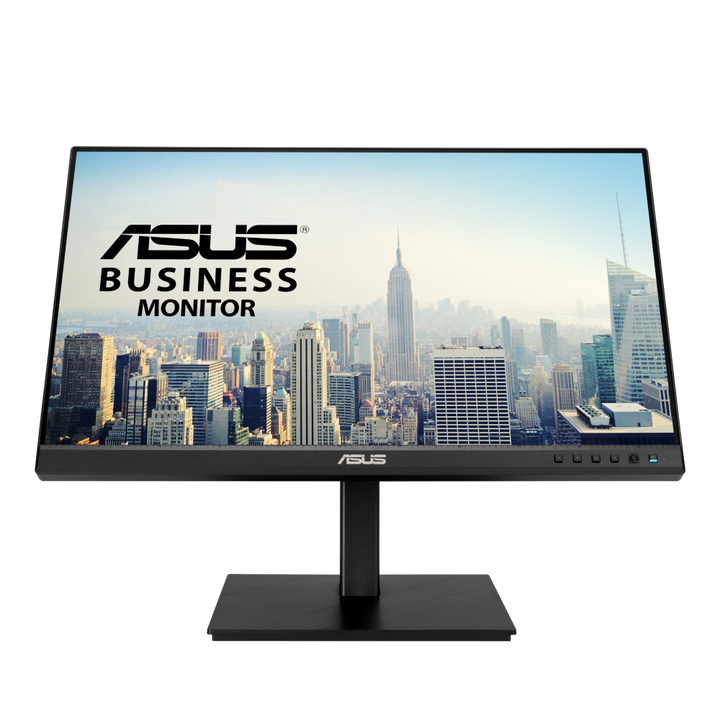


ASUS BE24ECSBT 24" FHD Multi-touch Monitor
Prices in SGD, excluding 9% GST.
PRODUCT DESCRIPTION
ASUS BE24ECSBT 24" FHD Multi-touch Monitor (ASU-BE24ECSBT / 90LM05M1-B05310) - 3 Year On-Site Warranty
Professional 24" FHD Multi-Touch Monitor for Business Use
The ASUS BE24ECSBT combines a 23.8-inch Full HD IPS touch panel with full USB-C docking, aimed at Singapore offices that want a single monitor to handle interactive presentations, hotdesking and everyday productivity from one cable. It is one of the more capable business touch monitors in ASUS's line-up: touch input, single-cable laptop charging and a daisy-chainable DisplayPort output are all built into the same 24-inch panel.
10-Point Multi-Touch for Interactive Productivity
Projective capacitive 10-point multi-touch drives smooth swipe, zoom and tap gestures for Windows-based applications, which suits meeting-room presentations and interactive workflows as much as it suits individual desk use.
USB-C Connectivity with Up to 80W Power Delivery
A single USB-C cable carries video (DisplayPort Alt Mode), data and up to 80W of power delivery — enough to charge most business laptops, including higher-power ultrabooks, from the monitor alone. Combined with 2 x DisplayPort 1.4 (with daisy-chain support), 1 x HDMI 1.4 and a 3-port USB 3.2 Gen 1 hub, the BE24ECSBT functions as a genuine single-cable dock rather than just a display.
Built for Hybrid Work and Hotdesking
Integrated stereo speakers, an ambient light sensor for automatic brightness adjustment, and a full ergonomic stand make this monitor practical for shared hotdesk setups where different people connect throughout the day — sit down, plug in one USB-C cable, and both charging and a second display are ready.
Ergonomic Design for Comfort and Flexibility
The stand offers tilt (-5° to +35°), 180° swivel, ±90° pivot to portrait orientation, and up to 130 mm of height adjustment, so the panel can be set correctly for any desk or user without an aftermarket monitor arm. Flicker-free technology and Low Blue Light complete the comfort features for long working hours.
ASUS BE24ECSBT Datasheet — Technical Specifications
General
| ASUS Product Name | ASUS Business Display BE24ECSBT |
| Part Number (SKU) | ASU-BE24ECSBT / 90LM05M1-B05310 |
| Range | ASUS BE-series business monitors |
| Product Type | 24" FHD multi-touch docking monitor |
| Panel Type | IPS with anti-glare surface |
| Screen Size | 23.8 inch (24" class) |
| Manufacturer Warranty | 3-Year On-Site Warranty (ASUS) |
| Local Warranty (Singapore) | Included with every unit supplied by SourceIT, together with a GST invoice |
Display
| Resolution | Full HD, 1920 x 1080 |
| Aspect Ratio | 16:9 |
| Brightness | 300 cd/m² typical |
| Contrast Ratio | 1000:1 typical |
| Response Time | 5 ms (GtG) |
| Refresh Rate | Up to 75 Hz |
| Viewing Angle | 178° horizontal / vertical |
| Colour Gamut | 100% sRGB |
Touch Technology
| Touch Type | 10-point projective capacitive multi-touch |
| Touch Signal | Carried over the USB-C connection alongside video and data |
| OS Compatibility | Optimised for Windows 10/11 touch gestures |
Connectivity & Docking
| USB-C | 1 x USB-C (DisplayPort Alt Mode, data and touch, up to 80W Power Delivery) |
| DisplayPort | 2 x DisplayPort 1.4, supports daisy-chaining |
| HDMI | 1 x HDMI 1.4 |
| USB Hub | 3 x USB 3.2 Gen 1 Type-A |
| Audio | 3.5 mm audio jack, built-in stereo speakers 2W x 2 |
Ergonomics & Physical
| Stand Adjustment | Tilt -5° to +35°, swivel ±180°, pivot ±90° (portrait), height adjustment up to 130 mm |
| VESA Mount | 100 x 100 mm compatible |
| Security | Kensington lock slot |
| Weight | Approx. 6.1 kg |
Power
| Power Consumption | Approx. 13.2W (panel only, excluding USB-C PD load) |
| Power Saving Mode | <0.5W |
| Power Off Mode | 0W (hard switch) |
| Voltage | 100–240V, 50/60Hz |
| Package Contents | Power cable, USB-C cable, DisplayPort cable, HDMI cable, quick start guide, warranty card |
USB-C Docking, Touch & Setup
Single-Cable Docking in Practice
A laptop with USB-C DisplayPort Alt Mode support connects with one cable and gets video, data (including touch), and up to 80W of charging in return. 80W covers the great majority of business laptops on the market, including higher-draw 16-inch machines that a 65W dock cannot keep charged under load — confirm your exact laptop's charging requirement with us if you are close to that limit.
Daisy-Chaining a Second Display
The two DisplayPort 1.4 outputs support daisy-chaining, so a second monitor can be connected from this one using a single DisplayPort cable back to the host, rather than running two separate cables from the laptop — useful for a dual-monitor hotdesk without doubling the cable count.
Touch Over USB-C
Because touch signal is carried over the same USB-C connection as video and data, touch works immediately once the single USB-C cable is connected — no separate USB cable is needed for touch, unlike the smaller VT-series touch monitors in our catalogue that require a dedicated USB link.
Hotdesk-Friendly Ergonomics
Full tilt, swivel, pivot and height adjustment mean the same physical monitor can be correctly positioned for different users through the day without needing an aftermarket arm — genuinely useful in a shared or activity-based seating office.
Ambient Light Sensor
An onboard ambient light sensor automatically adjusts panel brightness to match room lighting conditions through the day, which both improves visual comfort and removes the need for users to manually adjust brightness as natural light changes near a window desk.
What This Monitor Is Not
The BE24ECSBT does not include a built-in webcam or microphone array — if video conferencing hardware built into the display is your priority rather than touch and docking, the ASU-BE24EQK in our catalogue is the better fit. The two models are designed to complement rather than duplicate each other in ASUS's BE-series line-up.
Package Contents & Ordering Information
In the Box
Power cable, USB-C cable, DisplayPort cable, HDMI cable, quick start guide and warranty card.
Other ASUS Touch, Business and Docking Monitors from SourceIT
SourceIT also carries the following ASUS touch, business and docking monitors — email sales@sourceit.com.sg quoting the part number to check stock and lead time:
| ASU-BE24EQK / 90LM05M1-B01310 | 23.8" FHD business monitor with built-in webcam, non-touch |
| ASU-VA34VCPSN / 90LM08JJ-B01110 | 34" curved ultrawide docking monitor, USB-C 65W PD |
| ASU-VT229H / 90LM0490-B01110 | 22" FHD touch monitor, HDMI/VGA only, no docking |
| ASU-VP32AQ / 90LM06T0-B01E10 | 32" QHD eye care monitor, non-touch |
Datasheet & Downloads
ASUS hosts official product pages for this business monitor family. The link below is the closest verified ASUS Singapore page for this model family.
| ASUS Singapore product page | ASUS BE-series touch business monitor — Overview |
ASUS's part-number-specific page for BE24ECSBT was not resolving at time of writing, and its download links redirect to a document host that has occasionally served the wrong model's file — so we do not publish a direct datasheet link here. Email sales@sourceit.com.sg quoting BE24ECSBT and we will send you the current PDF datasheet directly.
Frequently Asked Questions — ASUS BE24ECSBT
Will this charge my laptop over the same cable that carries video?
Yes. The single USB-C port carries video, data and touch, and delivers up to 80W of Power Delivery, which covers charging for the great majority of business laptops from one cable.
Does touch work without plugging in a separate USB cable?
Yes — touch signal is carried over the USB-C connection along with video and data, so a single cable handles everything when connecting from a USB-C laptop. If you connect over DisplayPort or HDMI instead, from a desktop with no USB-C output, you would need a separate USB cable for touch; ask us to confirm the exact cabling for your setup.
Can I connect a second monitor through this one?
Yes, the two DisplayPort 1.4 outputs support daisy-chaining a second display, so you can run a dual-monitor setup from a single DisplayPort cable back to your laptop or desktop.
What is the difference between this and the BE24EQK in your catalogue?
The BE24ECSBT adds 10-point touch and USB-C docking with 80W Power Delivery; the BE24EQK instead has a built-in webcam and microphone array for video conferencing but no touch and no USB-C docking. Choose based on whether your priority is touch/docking or built-in conferencing hardware — email us and we can help you decide.
Is 80W enough to charge a 16-inch laptop under full load?
80W covers most business laptops, including many higher-draw 16-inch models, but a handful of workstation-class laptops draw more under sustained full load. Confirm your exact laptop's power adapter rating with us before relying on the monitor as your sole charger for a demanding machine.
What ergonomic adjustment does the stand offer?
Tilt from -5° to +35°, 180° swivel, ±90° pivot into portrait orientation, and up to 130 mm of height adjustment — a full range suitable for a shared hotdesk used by people of different heights through the day.
Does it need drivers for the touch function on Windows?
No separate driver installation is required on Windows 10 or 11; the 10-point touch panel is recognised natively once the USB-C connection (or USB touch cable, if connecting over DisplayPort/HDMI) is in place.
Can I use the USB-C hub ports even when the monitor is not acting as my main display?
Yes — the 3-port USB 3.2 Gen 1 hub and the video/data functions of the USB-C connection are largely independent, so peripherals connected to the monitor's hub stay usable as long as the USB-C cable is connected, regardless of which video input is active on screen.
What does the ambient light sensor actually change?
It measures the room's ambient light level and automatically adjusts the panel's brightness to suit, so the screen does not stay too dim in bright daylight or uncomfortably bright in a dim room — removing the need for manual brightness adjustment through the day as natural light changes.
Does it have a built-in webcam like the BE24EQK?
No, the BE24ECSBT does not have an integrated webcam or microphone. It is built around touch and USB-C docking instead. If integrated conferencing hardware is your priority, the ASU-BE24EQK in our catalogue is the model for that.
Does SourceIT provide a Singapore warranty and GST invoice with this monitor?
Yes. Every ASUS BE24ECSBT sold by SourceIT comes with local Singapore warranty support and a GST invoice; ASUS backs the panel itself with a 3-year manufacturer warranty.
Product Video
We Also Recommend


ASUS ZenScreen MB249C 24" Portable Monitor


ASUS ZenScreen MB16QHG 16" Portable Monitor


ASUS VT229H 22" FHD Touch Monitor


ASUS ZenScreen Touch MB16AMTR 16" Portable Screen


ASUS ZenScreen MB229CF 22" Portable Monitor