
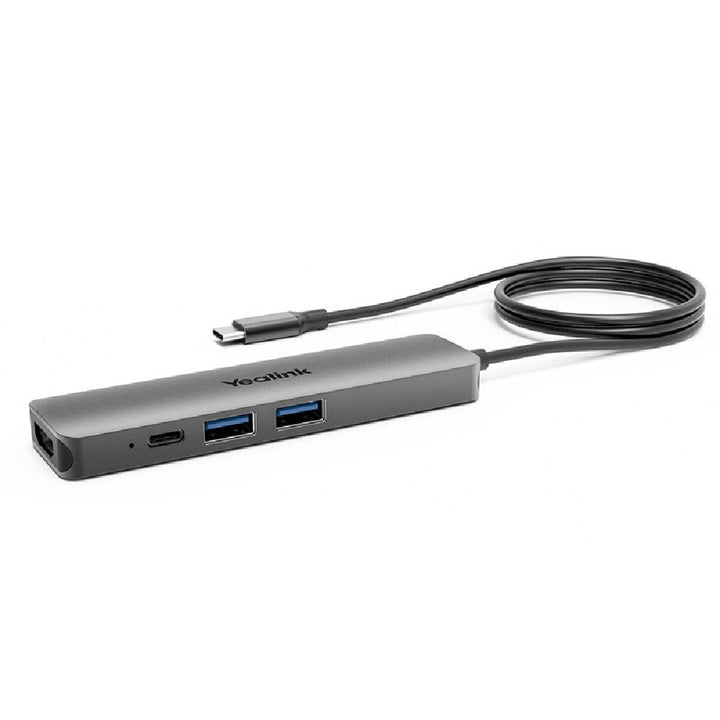


Yealink BYOD-BOX
PRODUCT DESCRIPTION
Yealink BYOD-BOX (1300004) - 2 Years Local Warranty
Yealink BYOD-Box — One-Cable BYOD Hub for Meeting Rooms
The Yealink BYOD-Box turns a meeting room into a bring-your-own-device space: plug one USB-C cable into your laptop and instantly use the room's USB camera, speakerphone and display with any video conferencing software you choose. No software installation, no fumbling with cables — walk in, plug in, meet.
Works with Every Major Meeting Platform
Because your laptop runs the meeting, the BYOD-Box works with most video platforms — Microsoft Teams and Skype for Business, Zoom Rooms and Zoom client, Google Meet, Cisco Webex, BlueJeans and more — on Windows, Mac and Chromebook laptops. Perfect for Singapore offices hosting guests on mixed platforms.
Connects and Charges Your Laptop
The USB-C connection to your laptop supports charging via USB-C while you present, with two USB 3.0 Type-A ports for the room's USB camera and audio devices and an HDMI output for the room display.
Compact and Discreet
At just 113 x 30 x 10 mm, the BYOD-Box tucks neatly onto the meeting table or fixes under it with the included Velcro — a tidy upgrade for huddle rooms and small meeting rooms using Yealink UVC cameras and speakerphones.
Yealink BYOD-Box Datasheet — Technical Specifications
General
| Model | Yealink BYOD-Box |
| Part Number | 1300004 |
| Function | BYOD connectivity hub — links a laptop to in-room USB camera/audio devices and display over one cable |
| Warranty | 2 Years Local Warranty (Singapore) |
Ports & Connectivity
| USB-A | 2 x USB 3.0 Type-A ports (room camera / audio devices) |
| HDMI | 1 x HDMI output (room display) |
| Laptop Connection | USB Type-C cable to laptop, supports charging via USB-C |
| Power | 1 x Type-C port for PD power adapter |
Physical & Environment
| Dimensions | 113 x 30 x 10 mm |
| Net Weight (carton) | 0.33 kg |
| Operating Temperature | 0 to 40°C |
| Operating Humidity | 10-95% non-condensing |
Compatibility & Software Support
The BYOD-Box is plug-and-play with no software installation, applicable to most video conferencing platforms including Microsoft Teams, Skype for Business, Zoom, Google Meet, Cisco Webex and BlueJeans, on Windows, Mac and Chromebook laptops. In Yealink's line-up it appears in the UVC40-BYOD Meeting Kit (with the UVC40 video bar) and the UVC30-CP900-BYOD Meeting Kit (UVC30 camera + CP900 speakerphone). For adding BYOD mode to Yealink MVC/ZVC room systems, the separate MVC-BYOD-Extender is the officially documented option — also available at SourceIT.
Package Contents & BYOD Ordering Information
In the box: Yealink BYOD-Box, PD power adapter, USB Type-C cable, Type-C to Type-A adapter, 2 x Velcro.
Yealink BYOD & Content Sharing at SourceIT
| Yealink BYOD-Box — laptop-to-room USB/HDMI hub | 1300004 (this model) |
| Yealink MVC-BYOD-Extender — BYOD mode for MVC/ZVC rooms | 1303113 |
| Yealink UVC40-BYOD Kit — small room BYOD kit | UVC40-BYOD |
| Yealink VCH51 Pro Content Sharing & BYOD Hub | 1303106 |
| Yealink WPP30 4K Wireless Presentation Pod | 1303112 |
Datasheet & Downloads
Frequently Asked Questions — Yealink BYOD-Box
Q: What does the Yealink BYOD-Box actually do?
It consolidates the meeting room's USB camera, USB audio device and HDMI display into a single USB-C cable to your laptop, so you can run any meeting platform from your own device — plug and play, no software to install.
Q: Which platforms work with the BYOD-Box?
Most major platforms, including Microsoft Teams, Skype for Business, Zoom, Google Meet, Cisco Webex and BlueJeans — because the meeting runs on your laptop, not the box.
Q: Does it charge my laptop?
Yes — with the included PD power adapter connected, the USB-C link to your laptop supports charging while you meet.
Q: How is the BYOD-Box different from the MVC-BYOD-Extender?
The BYOD-Box is a standalone hub for rooms built on USB devices (for example Yealink UVC cameras with a CP900 speakerphone). The MVC-BYOD-Extender is the officially documented add-on for switching Yealink MVC/ZVC room systems into BYOD mode.
Q: What devices can I plug into it?
Two USB 3.0 Type-A ports accept the room's USB camera and speakerphone/microphone, and the HDMI output drives the room display.
Q: Does the Yealink BYOD-Box come with warranty in Singapore?
Yes. Every BYOD-Box sold by SourceIT comes with 2 years local Singapore warranty and a GST invoice.


