
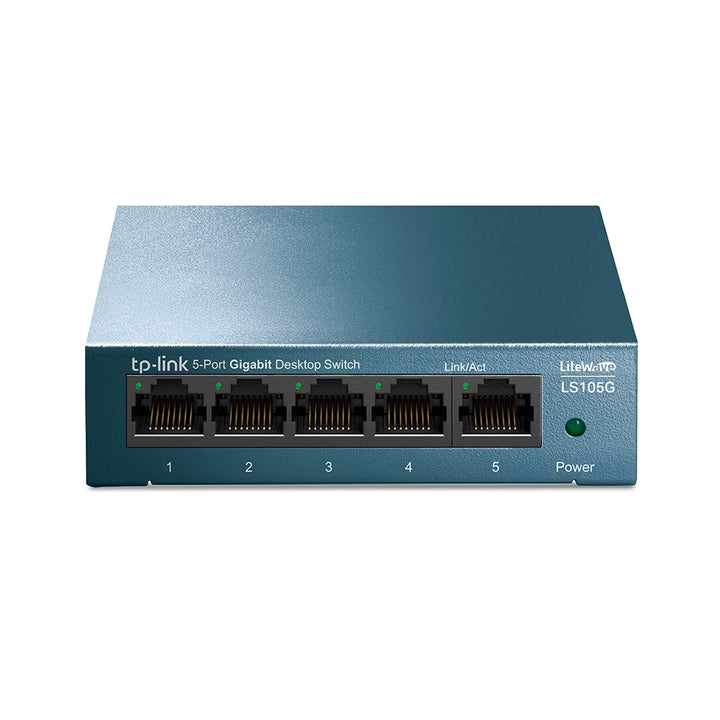


TP-Link LiteWave LS105G 5-Port 10/100/1000Mbps Desktop Network Switch
PRODUCT DESCRIPTION
TP-Link 5-Port 10/100/1000Mbps Desktop Network Switch (LS105G) - 5 Years Local Warranty
The LS105G is a five-port Gigabit desktop switch from TP-Link's LiteWave Series. It is fanless, runs from a small 5 V adapter and needs no setup at all - plug it in, connect up to five wired devices and every port negotiates its own speed and duplex. For a Singapore home office, a shop counter or a meeting room that has run out of wall points, it is the cheapest honest way to turn one Ethernet socket into five.
Five Gigabit Ports, Auto-Negotiation and Auto-MDI/MDIX
All five RJ45 ports run at 10, 100 or 1000 Mbps and negotiate speed and duplex automatically, so a legacy printer at 100 Mbps and a NAS at Gigabit can share the same switch without any setting being changed. Auto-MDI/MDIX means straight-through and crossover cables both work, which removes the most common cause of a dead link when someone re-patches a desk. Supported standards are IEEE 802.3i, 802.3u, 802.3ab and 802.3x, plus IEEE 802.1p for priority tagging.
Fanless, Cool and Silent on the Desk
The LS105G has no fan. Maximum power consumption is 2.776 W measured at 220 V / 50 Hz and maximum heat dissipation is 9.466 BTU/h, so the unit stays cool enough to sit on a desk, behind a monitor or inside a shallow AV cabinet without ventilation. It measures 99.8 x 98 x 25 mm (3.9 x 3.9 x 1.0 in) and runs from an external 5 V DC / 0.6 A adapter supplied in the box. Front LEDs show system power and Link/Act per port, which is usually enough to diagnose a bad patch lead at a glance.
7.4 Mpps Forwarding, 2K MAC Table and 16 KB Jumbo Frames
Packet forwarding runs at 7.4 Mpps with a 2K MAC address table and 1 Mb of packet buffer memory, which is sized for a small wired cluster rather than a floor of endpoints. Jumbo frame support to 16 KB helps when the switch sits between a workstation and a NAS doing large sequential transfers. Transmission is store-and-forward, so each frame is validated before it is passed on and corrupted frames are dropped rather than propagated across the segment.
802.3x Flow Control, 802.1p/DSCP QoS and Green Technology
IEEE 802.3x flow control lets a congested port ask the sender to pause instead of silently discarding frames, which protects throughput when a Gigabit source feeds a slower device. 802.1p/DSCP QoS lets the switch honour priority markings already set by a VoIP phone or a router, so voice and video are not queued behind a bulk file copy. TP-Link's Green Technology trims power on ports with no link. None of this needs configuring - the switch is unmanaged and all three behaviours are always on.
Unmanaged by Design
There is no web interface, no console port and no VLAN, SNMP or port-mirroring support on the LS105G, and it cannot be adopted into an Omada controller. That is deliberate: there is no firmware to maintain and no configuration to lose. Where a site needs VLAN segmentation, PoE for cameras or access points, or central management, SourceIT can quote the equivalent Omada smart or managed switch instead.
Ideal For
Singapore homes, home offices, retail counters and meeting rooms that need to fan one Ethernet point out to a handful of wired devices - desktop PC, NAS, printer, console, set-top box or a wired access point. Supplied by SourceIT with local Singapore warranty, GST invoice and volume pricing on request.
LS105G Datasheet — Technical Specifications
General
| Model | LS105G |
| Official Product Name | 5-Port 10/100/1000Mbps Desktop Network Switch |
| Series | TP-Link LiteWave Series Unmanaged Switches |
| Brand | TP-Link |
| Warranty | 5 Years Local Warranty (Singapore) |
Hardware Features
| Standards and Protocols | IEEE 802.3i/802.3u/802.3ab/802.3x, IEEE 802.1p |
| Interface | 5 10/100/1000Mbps, Auto-Negotiation, Auto-MDI/MDIX Ports |
| Fan Quantity | Fanless |
| External Power Supply | External Power Adapter (Output: 5VDC / 0.6A) |
| LED | System Power, Link/Act indicators per port |
| Dimensions (W x D x H) | 3.9 x 3.9 x 1.0 in. (99.8 x 98 x 25 mm) |
| Max. Power Consumption | 2.776 W (220V/50Hz) |
| Max. Heat Dissipation | 9.466 BTU/h |
Performance
| Packet Forwarding Rate | 7.4 Mpps |
| MAC Address Table | 2K |
| Packet Buffer Memory | 1 Mb |
| Jumbo Frame | 16 KB |
| Transmission Method | Store and Forward |
| Advanced Features | Green Technology, 802.3X Flow Control, 802.1P/DSCP QoS |
Environment & Compliance
| Certification | CE, FCC, RoHS |
| Operating Temperature | 0 °C to 40 °C |
| Storage Temperature | -40 °C to 70 °C |
| Operating Humidity | 10% to 90% non-condensing |
| Storage Humidity | 5% to 90% non-condensing |
TP-Link does not publish a switching capacity figure or a product weight for the LS105G, so neither is stated here.
Compatibility & Software Support
The LS105G is an unmanaged switch. There is nothing to install, nothing to log into and no controller to adopt it with - it forwards traffic between any IEEE 802.3-compliant devices connected to it.
| Management | Unmanaged — no web GUI, CLI, SNMP or console port |
| Omada SDN Controller | Not supported — this model cannot be adopted or centrally managed |
| Configuration Required | None — plug and play |
| Device Compatibility | Any 10BASE-T, 100BASE-TX or 1000BASE-T device, at any mix of speeds |
| PoE | Not supported — powered devices need a PoE injector or PoE switch |
Package Contents & Ordering Information
Package Contents
| In the Box | 5-Port 10/100/1000Mbps Desktop Switch, Power Adapter, Installation Guide |
Ordering Information
| Model | LS105G |
| Warranty | 5 Years Local Warranty (Singapore) |
| Recommended Retail Price (incl. GST) | S$23.90 |
Datasheet & Downloads
Frequently Asked Questions — LS105G
Does the LS105G need any setup?
No. It is unmanaged and plug-and-play. Connect the power adapter, patch your devices in and every port negotiates its own speed and duplex automatically.
What is the difference between the LS105G and the LS1005G?
Both are five-port Gigabit LiteWave switches, but they are different products. The LS105G is the larger 99.8 x 98 x 25 mm unit and adds 802.1p/DSCP QoS; the LS1005G is the smaller 90 x 72 x 23 mm unit and publishes Back Pressure instead of QoS. Ask SourceIT if you need the two compared for a specific site.
Can it power an IP camera or access point?
No. The LS105G has no PoE ports. A powered device needs either a PoE injector or a PoE switch, both of which SourceIT can quote.
Can it be managed, or added to an Omada controller?
No. There is no management interface and it cannot be adopted by Omada. Where VLANs, PoE or central management are needed, SourceIT can specify an Omada smart or managed switch with the same port count.
What warranty does SourceIT provide?
Five years local Singapore warranty. Every LS105G sold by SourceIT comes with a GST invoice and local warranty support.
We Also Recommend


