
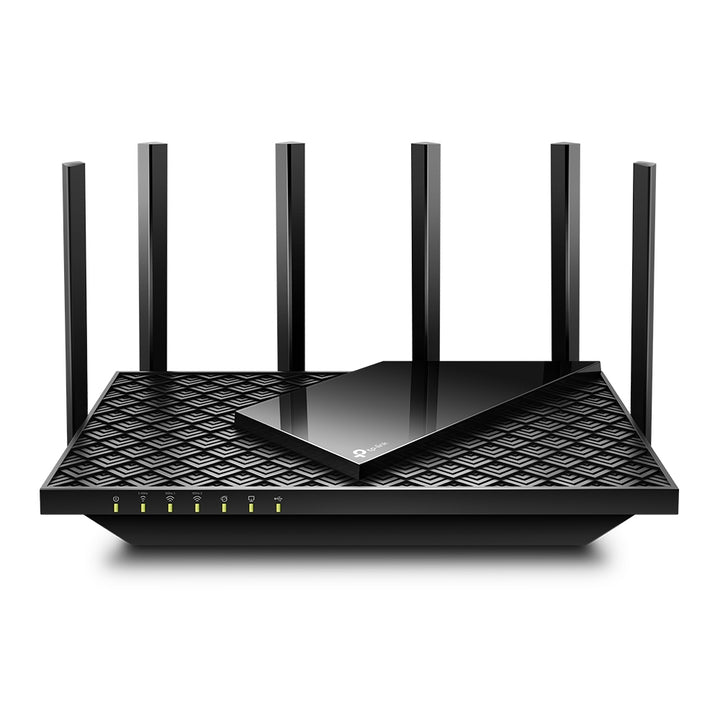


TP-Link Archer AX75 AX5400 Tri-Band Wi-Fi 6 Router
Email sales@sourceit.com.sg or use Request for Quotation below and our team will confirm the latest price, availability and lead time.
PRODUCT DESCRIPTION
TP-Link AX5400 Tri-Band Wi-Fi 6 Router (Archer AX75) - 3 Years Local Warranty
The Archer AX75 splits the same AX5400 budget across three radios instead of two: two independent 5 GHz bands at 2402 Mbps each plus 574 Mbps on 2.4 GHz, driven by a 1.7 GHz quad-core processor. Where a dual-band AX5400 gives one very fast 5 GHz lane, the AX75 gives two, which is what relieves congestion in a device-heavy home.
Two Separate 5 GHz Bands, Not One Faster One
The AX75 publishes 2402 Mbps on each of two 5 GHz radios and 574 Mbps on 2.4 GHz, for six streams in total. The point is separation: streaming boxes and laptops can be split across the two 5 GHz bands so a large download on one does not sit in the same queue as a video call on the other. TP-Link rates the router's capacity as very high on that basis, with OFDMA, Airtime Fairness and DFS behind it.
A 1.7 GHz Quad-Core Processor
Three radios, a VPN server and HomeShield running at once need processing headroom, and the AX75 carries a 1.7 GHz quad-core CPU — a clear step up from the dual-core and triple-core parts in the dual-band AX5400 models. That matters most when NAT, QoS by device and an OpenVPN tunnel are all active at the same time, which is exactly the load a work-from-home setup puts on a router.
Three Guest Networks and Full VPN Both Ways
Because there are three radios, TP-Link publishes three separate guest networks: one on 5 GHz-1, one on 5 GHz-2 and one on 2.4 GHz. That allows a genuinely isolated guest or IoT segment on its own band. OpenVPN, PPTP and L2TP are all published as both server and client, so the AX75 can terminate a tunnel for remote access or route the household out through a VPN provider.
Six Antennas, Gigabit Ports and USB 3.0 Sharing
Six fixed high-performance antennas, Beamforming and a high-power front-end module deliver TP-Link's rated three-bedroom coverage. Wired networking is one Gigabit WAN port and four Gigabit LAN ports. A USB 3.0 port reads NTFS, exFAT, HFS+ and FAT32 volumes and serves them over FTP, a media server or Samba, with Apple Time Machine support. The router is OneMesh-supported and runs in Router or Access Point mode.
Certification and Encryption — Read Before You Order
Encryption covers WPA3, WPA2, WPA and WPA/WPA2-Enterprise with 802.1x, and HomeShield adds IoT protection, malicious site blocking, intrusion prevention, DDoS prevention and a network scanner. One point to note: the certification row on TP-Link's Singapore page for this model reads "FCC, RoHS" with no CE mark, and the transmission-power figures on the same page are quoted for FCC only. Ask us if a CE declaration is a requirement for your deployment.
Ideal For
Singapore households and home offices with many simultaneous 5 GHz devices that want band separation and VPN headroom rather than a single faster lane. Supplied by SourceIT with local Singapore warranty and GST invoice.
Archer AX75 Datasheet — Technical Specifications
General
| Model | Archer AX75 |
| Official Product Name | AX5400 Tri-Band Wi-Fi 6 Router |
| Brand | TP-Link |
| Warranty | 3 Years Local Warranty (Singapore) |
Wireless
| Standards and Protocols | Wi-Fi 6; IEEE 802.11ax/ac/n/a 5 GHz; IEEE 802.11ax/n/b/g 2.4 GHz |
| Wi-Fi Speeds | AX5400 — 5 GHz: 2402 Mbps (802.11ax); 5 GHz: 2402 Mbps (802.11ax); 2.4 GHz: 574 Mbps (802.11ax) |
| Wi-Fi Range | 3 Bedroom Houses — 6× Fixed High-Performance Antennas, Beamforming, High-Power FEM |
| Wi-Fi Capacity | Very High — Tri-Band, OFDMA, Airtime Fairness, DFS, 6 Streams |
| Working Modes | Router Mode, Access Point Mode |
Hardware
| Processor | 1.7 GHz Quad-Core CPU |
| Ethernet Ports | 1× Gigabit WAN Port, 4× Gigabit LAN Ports |
| USB Support | 1× USB 3.0 Port — NTFS, exFAT, HFS+, FAT32; Apple Time Machine, FTP Server, Media Server, Samba Server |
| Buttons | Wi-Fi On/Off Button, Power On/Off Button, LED On/Off Button, WPS Button, Reset Button |
| Power | 12 V DC, 2.5 A |
| Dimensions (W × D × H) | 10.7 × 5.8 × 1.9 in (272.5 × 147.2 × 49.2 mm) |
Security
| Network Security | SPI Firewall, Access Control, IP & MAC Binding, Application Layer Gateway, HomeShield Security (Real-Time IoT Protection, Malicious Site Blocker, Intrusion Prevention System, DDoS Attack Prevention, Home Network Scanner) |
| Guest Network | 1× 5 GHz-1 Guest Network, 1× 5 GHz-2 Guest Network, 1× 2.4 GHz Guest Network |
| VPN Server | OpenVPN Server, PPTP VPN Server, L2TP VPN Server |
| VPN Client | OpenVPN Client, PPTP VPN Client, L2TP VPN Client |
| Wi-Fi Encryption | WPA, WPA2, WPA3, WPA/WPA2-Enterprise (802.1x) |
Software
| Protocols | IPv4, IPv6 |
| Service Kits | HomeShield (free basic plan; Pro plan chargeable by TP-Link) |
| Mesh | OneMesh Supported |
| Parental Controls | HomeShield Parental Controls — Custom Profiles, Professional Content Filter Library, Family Time, Bedtime, Off Time, Time Rewards, Family Online Time Ranking, Pause the Internet, Weekly and Monthly Reports |
| WAN Types | Dynamic IP, Static IP, PPPoE, PPTP, L2TP |
| Quality of Service | QoS by Device |
| Cloud Service | Auto Firmware Upgrade, TP-Link ID, DDNS |
| NAT Forwarding | Port Forwarding, Port Triggering, DMZ, UPnP, Virtual Server |
| IPTV | IGMP Proxy, IGMP Snooping, Bridge, Tag VLAN |
| DHCP | Address Reservation, DHCP Client List, Server |
| DDNS | TP-Link, NO-IP, DynDNS |
| Management | Tether App, Webpage |
Environment and Certification
| Certifications (as published) | FCC, RoHS — TP-Link's Singapore page lists no CE mark for this model, and quotes transmission power for FCC only. |
| Transmit Power (as published) | FCC: <24 dBm (5.25–5.35 GHz and 5.47–5.725 GHz), <28 dBm (5.15–5.25 GHz and 5.725–5.825 GHz), <29 dBm (2.4 GHz) |
| Operating Temperature | 0°C to 40°C (32°F to 104°F) |
| Operating Humidity | 10% to 90% non-condensing |
TP-Link notes this router may not support all the mandatory features as ratified in the IEEE 802.11ax specification, and that further software upgrades for feature availability may be required. TP-Link publishes no net weight, no MU-MIMO row and no storage temperature or humidity figure for the Archer AX75. Those are left out rather than taken from another model.
Compatibility & Software Support
| Management App | TP-Link Tether (iOS and Android) |
| Web Management | Supported via browser |
| TP-Link Cloud | TP-Link ID, auto firmware upgrade, DDNS |
| Mesh Ecosystem | OneMesh — pairs with TP-Link OneMesh extenders for one seamless network |
| Client Requirements | Internet Explorer 11+, Firefox 12.0+, Chrome 20.0+, Safari 4.0+, or another JavaScript-enabled browser |
| Internet Requirements | Cable or DSL modem if required by your plan, plus a subscription with an internet service provider |
| USB Storage Formats | NTFS, exFAT, HFS+, FAT32 |
Wi-Fi 6 features including OFDMA, 1024-QAM and HE160 require clients that support them, and 160 MHz may be unavailable on 5 GHz in some regions due to regulatory restrictions.
Package Contents & Ordering Information
Package Contents
| In the Box | Wi-Fi Router Archer AX75, Power Adapter, RJ45 Ethernet Cable, Quick Installation Guide |
Ordering Information
| Model | Archer AX75 |
| SKU | Archer AX75 |
| Warranty | 3 Years Local Warranty (Singapore) |
Datasheet & Downloads
Specifications on this page are taken from TP-Link's official Archer AX75 product page for Singapore (www.tp-link.com/sg/home-networking/wifi-router/archer-ax75/).
Official TP-Link Archer AX75 product page (Singapore)
Archer AX75 downloads — firmware, quick installation guide, setup videos
Frequently Asked Questions — Archer AX75
Is the AX75 faster than a dual-band AX5400?
Not on a single client. The AX75 splits AX5400 across two 5 GHz radios at 2402 Mbps each, where a dual-band AX5400 puts 4804 Mbps on one. The AX75 wins on separation and congestion, not peak single-device speed.
How many guest networks can it run?
Three — one on each radio: 5 GHz-1, 5 GHz-2 and 2.4 GHz.
Why does the certification row not list CE?
TP-Link's Singapore page publishes "FCC, RoHS" for this model. We do not add a mark TP-Link does not list. Ask us if a CE declaration is needed for your project.
What warranty does SourceIT provide?
Three years local Singapore warranty, under TP-Link's published replacement warranty terms, with a GST invoice.
Can SourceIT quote this for an office or a project?
Yes. Send us the quantity and we will quote with local warranty, delivery and support.


