
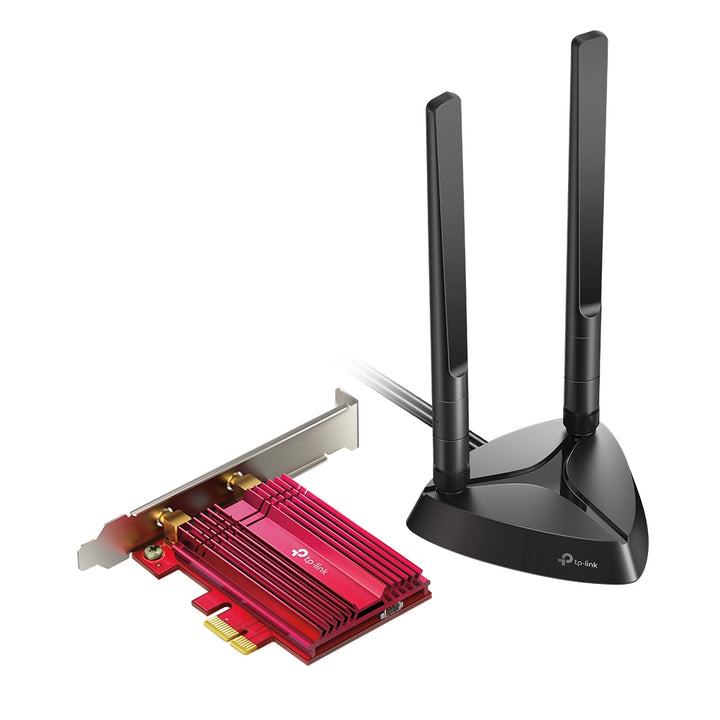


TP-Link Archer TX3000E AX3000 Wi-Fi 6 Bluetooth 5.0 PCIe Adapter
PRODUCT DESCRIPTION
TP-Link AX3000 Wi-Fi 6 Bluetooth 5.0 PCIe Adapter (Archer TX3000E) - 3 Years Local Warranty
The Archer TX3000E is TP-Link's Intel-based Wi-Fi 6 desktop card: 2402 Mbps on 5 GHz, 574 Mbps on 2.4 GHz, and Bluetooth 5.0 on the same board. Two high-gain antennas sit on a magnetised base with a 1 m RF cable, so they can be lifted clear of the desk instead of being trapped behind the case. TP-Link publishes Windows 10 64-bit as the only supported operating system.
AX3000 Dual-Band Wi-Fi 6 for a Desktop PC
On 5 GHz the card reaches 2402 Mbps under 802.11ax, falling back to 1733 Mbps on 802.11ac, 300 Mbps on 802.11n and 54 Mbps on 802.11a. On 2.4 GHz it reaches 574 Mbps under 802.11ax, 300 Mbps on 802.11n, 54 Mbps on 802.11g and 11 Mbps on 802.11b. Those are the physical link rates TP-Link publishes; real throughput depends on the router at the other end and on how busy the band is. A Wi-Fi 6 router is needed to see the 11ax figures.
Bluetooth 5.0 on the Same Card
The TX3000E carries Bluetooth 5.0 alongside the Wi-Fi radio, with backward support for Bluetooth 4.2 and 4.0, so a headset, keyboard, mouse or controller pairs without a separate USB dongle occupying a port. TP-Link states that the Bluetooth profiles are the native ones implemented in Windows 10 - the card exposes the radio and Windows supplies the profile stack. A Bluetooth header cable is supplied in the box to connect the card to the motherboard's internal USB header.
Two High-Gain Antennas on a Magnetised Base
Rather than screwing the antennas straight onto the bracket, TP-Link ships a magnetised antenna base with a 1 m RF cable. The base can be stood on the desk, clipped to a metal case panel or placed on a shelf, which matters because a desktop tower usually sits on the floor under a desk - the worst possible place for a radio. Both antennas are dual-band and high-gain. A low-profile bracket is included for small-form-factor cases.
Wireless Security Through WPA3 and 802.1x
The card supports WPA3 as well as WPA and WPA2, WPA-PSK and WPA2-PSK, the legacy 64/128-bit WEP modes, and 802.1x for enterprise networks that authenticate each client against a RADIUS server. That 802.1x support is what makes the TX3000E usable on a corporate or campus SSID rather than only on a home network. Modulation runs from DBPSK and CCK up to 1024-QAM, which is where the Wi-Fi 6 rate gains come from.
What TP-Link Publishes, and What It Does Not
TP-Link's Singapore specification lists Windows 10 (64-bit) only as the system requirement for this model - no Windows 11 entry is published, and none is claimed here. The specification also publishes no bus-interface row and no chipset detail beyond "Intel Wi-Fi 6 Chipset". Certification is CE, FCC and RoHS. Where a figure is not published for this exact model, it is left out of this listing rather than taken from a sibling adapter.
Ideal For
Singapore desktop users adding Wi-Fi 6 and Bluetooth to a tower that has neither - gamers and streamers on a Wi-Fi 6 router, and office or campus machines that need 802.1x on the corporate SSID. Supplied by SourceIT with local Singapore warranty, GST invoice and volume pricing on request.
Archer TX3000E Datasheet — Technical Specifications
General
| Model | Archer TX3000E |
| Official Product Name | AX3000 Wi-Fi 6 Bluetooth 5.0 PCIe Adapter |
| Brand | TP-Link |
| Warranty | 3 Years Local Warranty (Singapore) |
Hardware
| Dimensions (W x D x H) | 3.7 x 4.8 x 0.8 in (95.2 x 120.8 x 21.5 mm) |
| Antenna | Two High-Gain Dual Band Antennas; Magnetized Antenna Base |
| Chipset | Intel Wi-Fi 6 Chipset |
Wireless
| Wireless Standards | IEEE 802.11ax/ac/n/a 5 GHz; IEEE 802.11ax/n/g/b 2.4 GHz; Bluetooth 5.0/4.2/4.0 |
| WLAN Signal Rate | 5 GHz: 11ax up to 2402 Mbps, 11ac up to 1733 Mbps, 11n up to 300 Mbps, 11a up to 54 Mbps. 2.4 GHz: 11ax up to 574 Mbps, 11n up to 300 Mbps, 11g up to 54 Mbps, 11b up to 11 Mbps |
| WLAN Transmit Power | 5 GHz: 27 dBm (FCC) / 23 dBm (CE); 2.4 GHz: 26 dBm (FCC) / 20 dBm (CE) |
| WLAN Modes | Infrastructure mode |
| Wireless Security | Support 64/128 bit WEP, WPA/WPA2/WPA3, WPA-PSK/WPA2-PSK, 802.1x |
| Modulation Technology | DBPSK, DQPSK, CCK, OFDM, 16-QAM, 64-QAM, 256-QAM, 1024QAM |
| Bluetooth Standards | Bluetooth 5.0/4.2/4.0 |
| Bluetooth Profiles | Native BT profiles implemented in Windows 10 |
Others
| System Requirements | Windows 10 (64-bit) only |
| Certification | CE, FCC, RoHS |
| Operating Temperature | 0°C to 40°C |
| Storage Temperature | -40°C to 70°C |
| Operating Humidity | 10% to 90% non-condensing |
| Storage Humidity | 5% to 90% non-condensing |
TP-Link publishes no bus-interface row and no Bluetooth-interface row for this model. Detailed WLAN reception-sensitivity figures are published on the TP-Link specification page linked below.
Compatibility & Software Support
| Operating System | Windows 10 (64-bit) only, as published by TP-Link for this model |
| Bluetooth Stack | Native Bluetooth profiles implemented in Windows 10 |
| Router Requirement | A Wi-Fi 6 (802.11ax) router or access point is required to reach the 11ax rates; the card falls back to 802.11ac/n/a/g/b on older networks |
| Enterprise Networks | 802.1x supported for RADIUS-authenticated SSIDs |
| Motherboard | An internal USB header is required for the supplied Bluetooth header cable |
TP-Link does not publish a Windows 11, macOS or Linux entry for the Archer TX3000E. No such support is claimed here.
Package Contents & Ordering Information
Package Contents
| In the box | Archer TX3000E; Magnetized Antenna Base with 1m RF Cable; Two High Gain Antennas; Low-Profile Bracket; Bluetooth Header Cable; Quick Installation Guide; Resource CD |
Ordering Information
| Model | Archer TX3000E |
| SKU | Archer TX3000E |
| Warranty | 3 Years Local Warranty (Singapore) |
| Requires | A free PCI Express slot and an internal USB header for Bluetooth |
Datasheet & Downloads
Frequently Asked Questions — Archer TX3000E
Will it work on Windows 11?
TP-Link publishes Windows 10 (64-bit) as the only system requirement for this model, so we do not claim Windows 11 support. Check the driver list on the TP-Link support page linked above before buying for a Windows 11 machine, and talk to us first if that is the deciding factor.
Do I need a Wi-Fi 6 router to use it?
No, but you need one to reach the headline speeds. On an older router the card connects at 802.11ac, n, a, g or b rates instead. The Bluetooth 5.0 radio works regardless of the router.
Why is there a cable on the antennas?
The two antennas mount on a magnetised base with a 1 m RF cable rather than directly on the card bracket, so you can place them on the desk or on top of the case instead of behind the tower. This usually makes a noticeable difference when the PC sits on the floor.
What warranty does SourceIT provide?
Three years local Singapore warranty. Every Archer TX3000E sold by SourceIT comes with a GST invoice.
Can SourceIT quote this in volume?
Yes. Send us the quantity and we will quote, including for mixed builds where the desktops, switching and access points come from us as one order.


