
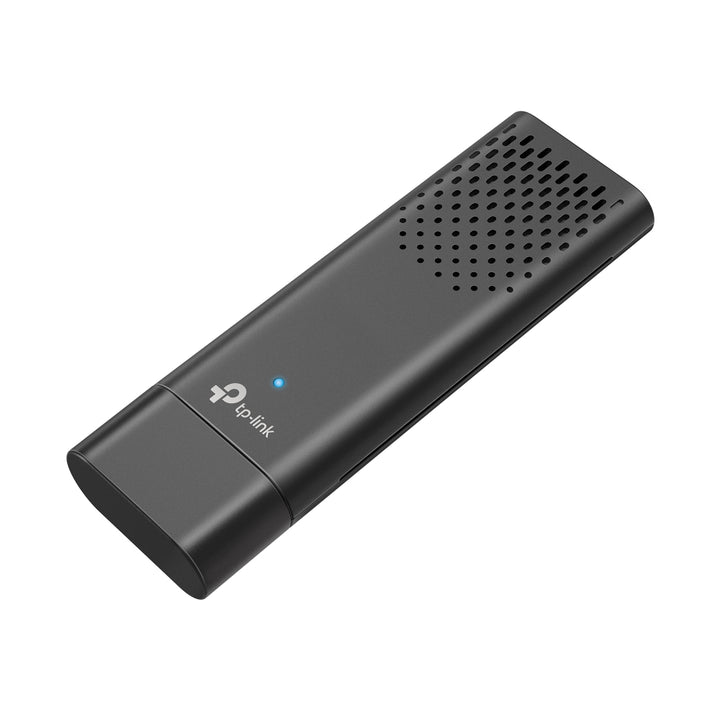


TP-Link Archer TX20U AX1800 Dual Band Wi-Fi 6 Wireless USB Adapter
Email sales@sourceit.com.sg or use Request for Quotation below and our team will confirm the latest price, availability and lead time.
PRODUCT DESCRIPTION
TP-Link AX1800 Dual Band Wi-Fi 6 Wireless USB Adapter (Archer TX20U) - 3 Years Local Warranty
The Archer TX20U brings 802.11ax to a machine that has no Wi-Fi 6 card, with two dual-band antennas in a 90.2 x 29.2 x 12.9 mm body. TP-Link publishes 1201 Mbps on 5 GHz and 574 Mbps on 2.4 GHz, plus WPA3 support — the practical entry point to Wi-Fi 6 for an existing Windows desktop or notebook.
Wi-Fi 6 on an Existing Machine
802.11ax brings OFDMA and improved efficiency in dense environments, which is where it matters most in Singapore: shared office floors and HDB blocks where dozens of access points overlap. TP-Link's own footnote is the honest qualifier — use of Wi-Fi 6 and other features, including OFDMA and MU-MIMO, requires your APs to also support the corresponding features. On a Wi-Fi 5 router the adapter still connects, at 802.11ac rates.
Published Rates and Transmission Power
TP-Link publishes up to 1201 Mbps at 5 GHz under 802.11ax, 867 Mbps under 802.11ac, 300 Mbps under 802.11n and 54 Mbps under 802.11a; on 2.4 GHz, 574 Mbps under 802.11ax and 400 Mbps under 802.11n. Transmission power is published per band and per regulatory domain: 19 dBm (FCC) / 21.5 dBm (CE) (EIRP) at 5 GHz, and 19 dBm (FCC) / 18.5 dBm (CE) (EIRP) at 2.4 GHz. Published rates are physical-layer maximums, not measured throughput.
Two Dual-Band Antennas and a Status LED
Two dual-band antennas are fitted, with a status LED on the body. The 90.2 mm length means it is best used where it will not be knocked — a rear desktop port or a fixed docking position rather than a laptop carried in a bag. TP-Link publishes a security row of WEP, WPA/WPA2/WPA3 and WPA-PSK/WPA2-PSK, so WPA3 networks are supported, and certification is published as FCC, CE, RoHS.
Windows Only, and the Question of USB Generation
Published system requirements are Windows 10 and 11 — no macOS version and no earlier Windows release is published. Drivers are published for Windows 10 and Windows 11 in both 64-bit and 32-bit builds, and the hardware version is V1. TP-Link's own footnote reads "Numbers are based on testing conducted by the USB-IF and your computers are required to also support USB 3.0.", reproduced here as published.
Ideal For
Singapore desktop users and small offices that have upgraded to a Wi-Fi 6 router and want existing Windows machines to benefit without replacing internal cards. Also a sensible fix for a desktop with no wireless at all. Supplied by SourceIT with local Singapore warranty, GST invoice and volume pricing on request.
Archer TX20U Datasheet — Technical Specifications
Source note: the specifications here are reproduced from TP-Link's official Singapore product page for the Archer TX20U, with driver and hardware-version details from TP-Link Singapore's download centre. No figure has been carried across from any other model.
Hardware
| LED | Status |
| Antenna | 2x Dual-Band Antennas |
| Dimensions (W x D x H) | 90.2 x 29.2 x 12.9 mm (3.55 x 1.15 x 0.51 in) |
Wireless
| Wireless Standards | IEEE 802.11a/b/g/n/ac/ax |
| Signal Rate (5 GHz) | 11ax: Up to 1201 Mbps(dynamic); 11ac: Up to 867 Mbps(dynamic); 11n: Up to 300 Mbps(dynamic); 11a: Up to 54 Mbps(dynamic) |
| Signal Rate (2.4 GHz) | 11ax: Up to 574 Mbps(dynamic); 11n: Up to 400 Mbps(dynamic); 11g: Up to 54 Mbps(dynamic); 11b: Up to 11 Mbps(dynamic) |
| Wireless Modes | Infrastructure mode |
| Wireless Security | WEP, WPA/WPA2/WPA3, WPA-PSK/WPA2-PSK |
| Transmission Power (5 GHz) | 19dBm(FCC) / 21.5dBm(CE) (EIRP) |
| Transmission Power (2.4 GHz) | 19dBm(FCC) / 18.5dBm(CE) (EIRP) |
Environment and Compliance
| Certification | FCC, CE, RoHS |
| Operating Temperature | 0°C~40°C (32°F~104°F) |
| Operating Humidity | 10%~90% non-condensing |
| Storage Humidity | 5%~90% non-condensing |
| Local Warranty (Singapore) | 3 Years Local Warranty (Singapore) |
TP-Link publishes no Interface row, no reception-sensitivity table and no net weight for this model, so none is stated here.
TP-Link's page carries the footnote "Models' appearances and specifications are not determined and will be updated accordingly", reproduced here as published.
The same page also carries a general networking footnote reading "Actual network speed may be limited by the rate of the product's Ethernet WAN or LAN port, the rate supported by the network cable, Internet service provider factors and other environmental conditions", although no Ethernet port is listed anywhere in this model's published specifications. Both are reproduced exactly as TP-Link prints them.
Compatibility & Software Support
| System Requirements | Supported operating systems include Windows 10, 11 |
| Wi-Fi 6 Features | TP-Link states that use of Wi-Fi 6 and other features, including OFDMA and MU-MIMO, requires your APs to also support the corresponding features |
| Network Compatibility | Works with any 2.4 GHz or 5 GHz Wi-Fi router or access point; no TP-Link router required |
| Hardware Versions | V1 |
| Driver | Windows 10 and Windows 11, 64-bit and 32-bit, from TP-Link Singapore |
No macOS version is published for this model.
Package Contents & Ordering Information
Package Contents
| Adapter | AX1800 Dual Band Wi-Fi 6 Wireless USB Adapter |
| Documentation | Quick Installation Guide |
Ordering Information
| Model | Archer TX20U |
| SKU | Archer TX20U |
| Warranty | 3 Years Local Warranty (Singapore) |
TP-Link lists no USB extension cable and no cradle in this model's package contents.
Datasheet & Downloads
Frequently Asked Questions — Archer TX20U
Do I need a Wi-Fi 6 router to use it?
No. It falls back to 802.11ac, n, g, b and a. But TP-Link notes that Wi-Fi 6 features such as OFDMA and MU-MIMO only work when the access point supports them, so the 1201 Mbps figure requires a Wi-Fi 6 router.
Does it work on a Mac?
TP-Link publishes Windows 10 and 11 only for this model. No macOS version is published for this model.
Does it support WPA3?
Yes. The published security row lists WEP, WPA/WPA2/WPA3 and WPA-PSK/WPA2-PSK.
Is it USB 3.0?
TP-Link publishes no Interface row for this model, so no USB generation is stated for the adapter itself. TP-Link's own footnote reads "Numbers are based on testing conducted by the USB-IF and your computers are required to also support USB 3.0". If the host interface is critical to your deployment, ask us before ordering and we will confirm with TP-Link.
Why are two transmission-power figures listed for each band?
TP-Link publishes a separate FCC and CE figure per band: 19dBm(FCC) / 21.5dBm(CE) (EIRP) at 5 GHz and 19dBm(FCC) / 18.5dBm(CE) (EIRP) at 2.4 GHz. These are ratings for the same hardware under two regulatory regimes.
What warranty applies in Singapore?
3 Years Local Warranty (Singapore). TP-Link Singapore's replacement-warranty policy states a three-year default and does not list USB wireless adapters among its exception categories.
Can SourceIT quote quantity?
Yes. Send the quantity and we will quote with local warranty, GST invoice and delivery in Singapore.


