
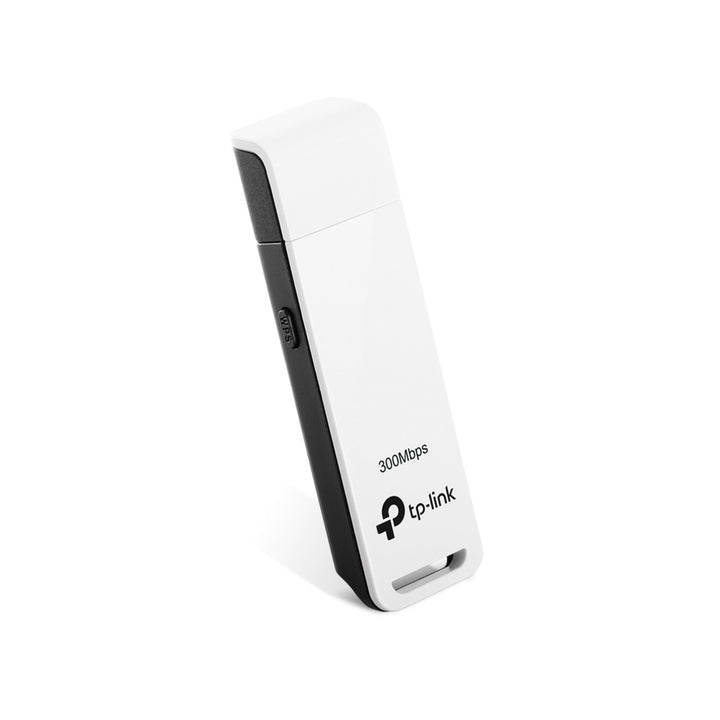


TP-Link TL-WN821N 300Mbps Wireless N USB Adapter
Email sales@sourceit.com.sg or use Request for Quotation below and our team will confirm the latest price, availability and lead time.
PRODUCT DESCRIPTION
TP-Link 300Mbps Wireless N USB Adapter (TL-WN821N) - 3 Years Local Warranty
The TL-WN821N adds 300 Mbps 2.4 GHz Wi-Fi to a desktop or laptop through a USB 2.0 port. It is a 69 x 21 x 9.5 mm stick with an on-board antenna and a WPS push button, supplied with a USB extension cable so it can be positioned away from a cramped rear panel where reception is usually worse.
N300 Wi-Fi for a Machine Without It
TP-Link publishes IEEE 802.11n, 802.11g and 802.11b support on 2.400-2.4835 GHz, with signal rates of up to 300 Mbps on 11n, 54 Mbps on 11g and 11 Mbps on 11b. For a desktop that has never had wireless, or a laptop whose internal card has failed, a USB adapter is the fastest fix available — no case to open, no card to seat, and the same stick moves between machines as needed.
WPS Push Button for One-Press Joining
A WPS push button on the adapter pairs it with a WPS-capable router without anyone typing a passphrase. That is useful in a small office where a technician sets up several machines in succession, and at home where the router's password is a long string printed on a label underneath it. Security itself covers 64/128-bit WEP and WPA-PSK/WPA2-PSK.
USB Extension Cable Included, Which Matters More Than It Sounds
TP-Link includes a USB extension cable in the box. On a desktop, the USB ports are usually at the back of a metal case pushed against a wall or sitting under a desk — about the worst place in the room for a 2.4 GHz radio. Running the adapter up onto the desk on the extension cable frequently makes a larger difference to throughput than any setting change.
Ad-Hoc and Infrastructure Modes
Published wireless modes are Ad-Hoc and Infrastructure. Infrastructure is the normal case — the adapter joins a router or access point. Ad-Hoc allows two machines to talk directly without a router, which still has occasional uses for file transfer between laptops on a site where no network exists. Published modulation covers DBPSK, DQPSK, CCK, OFDM, 16-QAM and 64-QAM, with transmission power under 20 dBm EIRP.
Check the Operating System Before You Order
This is the point worth reading twice. TP-Link's published system requirements for this model are Windows 8.1/8, 7, Vista and XP (32/64-bit), Mac OS X 10.7 to 10.10, and Linux. Windows 10 and Windows 11 are not on the published list, and neither are current macOS releases. Driver availability for newer operating systems changes over time — check TP-Link's download page, linked below, or ask us before ordering for a modern machine.
Ideal For
Older desktops and laptops in Singapore homes, workshops and small offices that need wireless added cheaply, and IT teams keeping a few spare adapters on hand for machines with failed wireless cards. Supplied by SourceIT with local Singapore warranty and a GST invoice.
TL-WN821N Datasheet — Technical Specifications
General
| Model | TL-WN821N |
| Official Product Name | 300Mbps Wireless N USB Adapter |
| Brand | TP-Link |
| Warranty | 3 Years Local Warranty (Singapore) |
Hardware
| Interface | USB 2.0 |
| Button | WPS Push Button |
| Dimensions | 69 x 21 x 9.5 mm (2.7 x 0.8 x 0.4 in) |
| Antenna | On-Board |
Wireless
| Standards | IEEE 802.11n, IEEE 802.11g, IEEE 802.11b |
| Frequency | 2.400 - 2.4835 GHz |
| Signal Rate | 300 Mbps (11n), 54 Mbps (11g), 11 Mbps (11b) |
| Wireless Modes | Ad-Hoc / Infrastructure |
| Wireless Security | 64/128-bit WEP, WPA-PSK/WPA2-PSK |
| Modulation | DBPSK, DQPSK, CCK, OFDM, 16-QAM, 64-QAM |
| Transmission Power | <20 dBm (EIRP) |
Environment & Certification
| Certification | CE, FCC, RoHS |
| Operating Temperature | 0°C ~ 40°C (32°F ~ 104°F) |
| Storage Temperature | -40°C ~ 70°C |
| Operating Humidity | 10% ~ 90% non-condensing |
| Storage Humidity | 5% ~ 90% non-condensing |
TP-Link's footnote on this page reads: "All above information apply to TL-WN821N version 4.0 ONLY." The product images TP-Link publishes on the same page are named for version 5.0. Both are reproduced here as published, without harmonising them — check the hardware version printed on your unit before downloading drivers.
TP-Link publishes no antenna gain, net weight or LED row for this model, so none is claimed here.
Compatibility & Software Support
| Windows | Windows 8.1/8 (32/64-bit), Windows 7 (32/64-bit), Windows Vista (32/64-bit), Windows XP (32/64-bit) — as published by TP-Link |
| macOS | Mac OS X 10.7 ~ 10.10 — as published by TP-Link |
| Linux | Supported |
| Host Port | USB 2.0 (works in a USB 3.0 port at USB 2.0 speeds) |
| Bands Supported | 2.4 GHz only — this adapter has no 5 GHz radio |
| Driver Source | Bundled Resource CD, or the TP-Link download page for your hardware version |
Windows 10, Windows 11 and current macOS releases are not on TP-Link's published system-requirements list for this model. Driver availability changes over time — check TP-Link's download page for your hardware version, or ask us, before ordering for a modern machine.
Package Contents & Ordering Information
What's in the Box
| Package Contents | Wireless Adapter, USB extension cable, Resource CD, Quick Installation Guide |
TP-Link still lists a Resource CD in the published package contents. Current cartons may ship without one; the same drivers are available from the TP-Link download page linked below.
Ordering Information
| Model | TL-WN821N |
| SKU | TL-WN821N |
| Warranty | 3 Years Local Warranty (Singapore) |
Datasheet & Downloads
Frequently Asked Questions — TL-WN821N
Will it work on Windows 11?
TP-Link's published system requirements for this model stop at Windows 8.1. Windows 10 and 11 are not listed. Check the download page for your hardware version, or ask us before ordering for a current machine.
Does it support 5 GHz Wi-Fi?
No. This is a 2.4 GHz-only N300 adapter. Ask us about a dual-band model if you need 5 GHz.
Is the antenna external?
No. TP-Link publishes an on-board antenna for this model, with no gain figure. A USB extension cable is included so the adapter can be moved away from the back of a desktop case.
What warranty does SourceIT provide?
Three years local Singapore warranty, in line with TP-Link's published replacement-warranty policy. Every unit sold by SourceIT comes with a GST invoice.
Can SourceIT quote this in volume?
Yes. Send us the quantity and we will quote, with local warranty and support. Ask for the current lead time before committing to a rollout date.


