
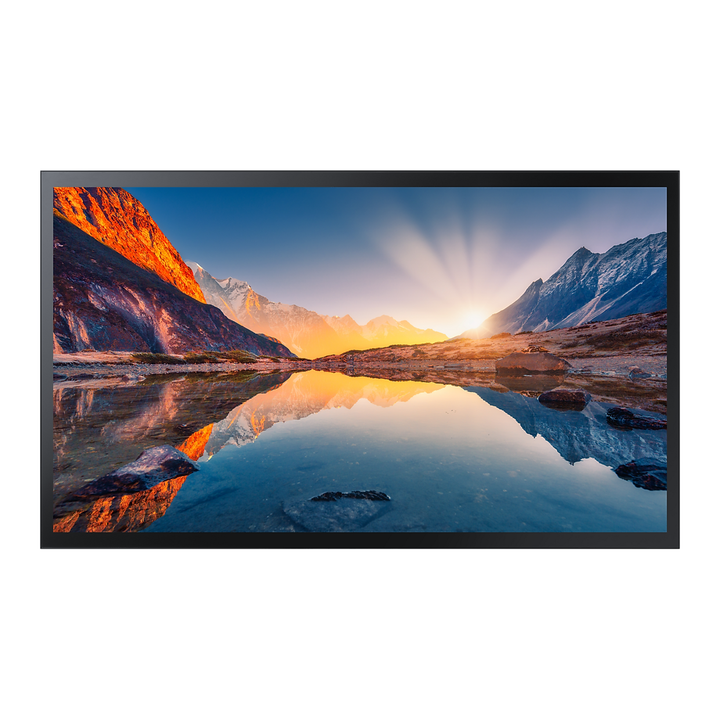


Samsung QM55B-T 55" 4K UHD Touch Interactive Display
Currently out of stock. Request a quote and
our team will confirm the latest price, availability and lead time.
PRODUCT DESCRIPTION
Samsung QM55B-T 55" 4K UHD Touch Interactive Display - 3 Years Local Warranty
All-in-One Touch Signage
The Samsung QM55B-T combines a 55" 4K UHD (3,840 x 2,160) VA panel with capacitive touch, so wayfinding kiosks, product finders and self-service screens run without a separate touch overlay.
Readable in Bright Spaces
Non-glare glass with a 25% haze coating improves visibility in sunlight and gives a smoother touch feel, at 400 nit typical brightness with the glass (500 nit without), 4000:1 contrast and 92% DCI-P3 colour.
Built for 24/7 Public Use
Rated for 24/7 operation, with IP5X dust protection and conformal coating for reliability in retail, lobbies and transport hubs.
Easy to Deploy and Manage
Tizen 6.5 with 16 GB storage, Tizen Zero Config set-up, Custom Home to lock meeting-room settings, Smart Calibration via mobile app and MagicINFO content and device management (licence sold separately).
Samsung QM55B-T Datasheet — Technical Specifications
General
| Model | QM55B-T |
| Part Number | LH55QMBTBGCXXY |
| Series | Samsung QMB-T Interactive Display |
| Colour | Black |
| Local Warranty (Singapore) | 3 years local warranty |
Display
| Diagonal Size | 55" |
| Panel Type | VA |
| Resolution | 3,840 x 2,160 (4K UHD) |
| Pixel Pitch (H x V) | 0.315 x 0.315 mm |
| Brightness (Typ.) | 500 nit without glass; 400 nit with glass |
| Contrast Ratio | 4000:1 (without glass); dynamic contrast Mega |
| Viewing Angle (H/V) | 178/178 |
| Response Time | 8 ms |
| Colour Gamut | 92% (DCI-P3, CIE 1976) |
| Glass Haze | 25% |
| H-Scanning Frequency | 30–81 kHz |
| Max. Pixel Frequency | 594 MHz |
| Operation Time | 24/7 |
Touch & Smart Platform
| Touch | Yes |
| Touch Technology | Capacitive |
| OS | Tizen 6.5 |
| Flash Memory | 16 GB |
| Dust Protection | IP5X |
Connectivity
| HDMI In | 3 (HDMI 2.0, HDCP 2.2) |
| DisplayPort In | 1 (DP 1.2) |
| USB | 2 |
| IR In | Yes |
| Audio In | No |
| Audio Out | Stereo mini jack |
| RS232 In / Out | Yes / Yes |
| RJ45 In | Yes |
| Wi-Fi | Yes |
| Bluetooth | Yes |
Power
| Power Supply | AC 100–240 V, 50/60 Hz |
| Power Consumption (On Mode) | 143 W |
| Power Consumption (Sleep Mode) | 0.5 W |
Physical & Environmental
| Set Dimensions (W x H x D) | 1253.8 x 734.6 x 56.7 mm |
| Package Dimensions (W x H x D) | 1421 x 884 x 165 mm |
| Set Weight | 26.9 kg |
| Package Weight | 32.5 kg |
| VESA Mount | 200 x 200 mm |
| Frame | Non-glossy |
| Operating Temperature | 0–40 °C |
| Operating Humidity | 10–80%, non-condensing |
| EMC | Class B |
| Safety | 60950-1, 62368-1 |
Compatibility & Installation
Mounting
VESA 200 x 200 mm. Samsung lists wall mount WMN4070SG and stand STN-L4355G as optional items, and Auto Level helps with flexible installation designs.
Content Management
MagicINFO integrated content and device management (licence sold separately); Upgradable Web-engine supports the latest web-based content.
Sources
Three HDMI 2.0 inputs and one DisplayPort 1.2 input for media players or PCs; RS232 and RJ45 for control.
Typical Use
Retail product finders, self-service and wayfinding kiosks, lobbies, showrooms and meeting rooms that need a 24/7-rated touch screen.
Package Contents & Samsung QMB-T Ordering Information
In the Box
Refer to Samsung's packing list in the Quick Setup Guide (see Datasheet & Downloads). SourceIT supplies the QM55B-T bundled with Samsung LFD power cord CLBUKC71M5.
Optional Accessories
| Wall mount | WMN4070SG |
| Stand | STN-L4355G |
Samsung Touch Display Range
| Model | Key feature |
| QB13C-T | 13" FHD touch small signage |
| QB24C-T | 24" FHD touch small signage |
| QM32C-T | 32" FHD touch commercial display |
| QM43B-T | 43" 4K UHD capacitive touch, Tizen 6.5 |
| QM55B-T (this listing) | 55" 4K UHD capacitive touch, Tizen 6.5 |
Datasheet & Downloads
| Samsung product page | QM55B-T on samsung.com Singapore |
| Quick Setup Guide | QMB-T Quick Setup Guide (PDF) |
| User Manual | QMB / QMB-N / QMB-T User Manual (ZIP) |
| Samsung Support | LH55QMBTBGCXXY support page |
Frequently Asked Questions — Samsung QM55B-T
Is it rated for 24/7 operation?
Yes. Samsung rates the QMB-T for 24/7 operation.
Do I need a separate media player?
No. Tizen 6.5 with 16 GB storage runs content and web apps on board; MagicINFO (licence sold separately) adds scheduling and remote management. External players can connect over HDMI or DisplayPort.
What touch technology does it use?
Capacitive touch behind non-glare glass with a 25% haze coating.
How bright is it?
400 nit typical with the touch glass (500 nit without glass).
Which mount or stand fits?
VESA 200 x 200 mm; Samsung lists wall mount WMN4070SG and stand STN-L4355G as optional items.
What warranty do I get?
3 years local warranty; supplied by SourceIT with a GST invoice.
Product Video
We Also Recommend


Samsung QM55C 55" 4K UHD Smart Signage Display


Samsung BE50F-H 50" 4K UHD Business TV


Samsung QB50C 50" 4K UHD Crystal Smart Signage Display


Samsung QM65C 65" 4K UHD Smart Signage Display

Samsung Flat 27" Height Adjustable (IPS, USB-C)