
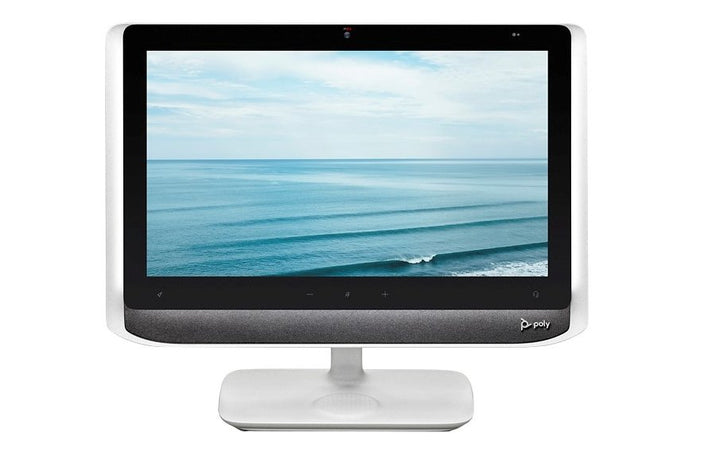


Poly Studio P21 Personal Meeting Display
Email sales@sourceit.com.sg or use Request for Quotation below and our team will confirm the latest price, availability and lead time.
PRODUCT DESCRIPTION
Poly Studio P21 Personal Meeting Display (2200-87100-102) - Local Warranty
Availability note: HP no longer publishes a product page for the Poly Studio P21, and it does not appear in HP’s current Singapore Poly personal video range (now the Studio V12, V52, V72 and R30). HP has not published a formal end-of-life notice or a named successor. SourceIT supplies remaining stock with local Singapore warranty — please confirm availability with our sales team before ordering in volume.
Poly Studio P21 — A 21.5-Inch Display Built Only for Meetings
The Poly Studio P21 is not a monitor with a webcam bolted on. It is a 21.5-inch 1080p meeting display with its own camera, dual 10 W stereo speakers, a MEMS microphone, vanity lighting with an ambient light sensor, and wireless phone charging in the base — all reaching the computer over a single USB-C cable. The idea is simple: your calls live on the P21, and your work monitor stays free for work.
21.5-Inch Full HD Panel with an Integrated Camera
The panel is a 21.5-inch LCD with a 476.1 x 267.7 mm active area, fixed 1920 x 1080 16:9 resolution, 250 cd/m² typical brightness and 1000:1 typical contrast. The integrated camera supports 1080p and 720p with a maximum 80° diagonal field of view, electronic zoom to 4x with manual pan and tilt, low-light handling and true colour, plus a manual privacy shutter.
Vanity Lighting, Stereo Audio and NoiseBlockAI
Built-in vanity lighting at CRI 80 and 3000 K colour temperature is driven by an ambient light sensor and a capacitive touch control, so you are lit properly whatever the room is doing. Dual stereo speakers rated 10 W per channel cover 80 Hz to 20 kHz — substantially more than a laptop — and a unidirectional MEMS microphone with Poly NoiseBlockAI handles your voice, alongside a mute button, volume controls and a programmable button.
One USB-C Cable, Plus Ports and Wireless Charging
A single USB 3.0 Type-C cable connects the P21 to a Windows or macOS host. The display then acts as a small dock: two USB 3.0 Type-A ports at 5 W / 1 A each, a 3.5 mm four-pole headset jack and wireless mobile phone charging built into the stand base. It is certified for Zoom and listed by HP as compatible with Microsoft Teams. A Kensington lock slot is fitted.
Ideal For
Executives, client-facing professionals and senior home-office users in Singapore who spend a large part of the day on video and want a dedicated, well-lit, good-sounding meeting screen that keeps the working monitor clear.
Poly Studio P21 Datasheet — Technical Specifications
General
| Model | Poly Studio P21 |
| Part Number | 2200-87100-102 |
| Type | Personal meeting display (all-in-one) |
| Certifications | Zoom certified; Microsoft Teams compatible (HP’s wording is “compatible”, not certified) |
| Management | Poly Lens cloud service and Poly Lens Desktop App |
| Colour | White |
| Manufacturer | Poly (HP) |
| Warranty | Local Warranty (Singapore) |
Display
| Panel | 21.5-inch LCD |
| Active area | 476.1 x 267.7 mm |
| Resolution | Fixed 1080p Full HD (1920 x 1080), 16:9 |
| Brightness | 250 cd/m² (typical) |
| Contrast ratio | 1000:1 (typical) |
| Pixel pitch | 0.25 x 0.25 mm |
Camera & Lighting
| Camera resolutions | 1080p Full HD; 720p HD |
| Field of view | Maximum 80° DFOV |
| Zoom | Electronic zoom up to 4x / EPTZ; manual pan and tilt |
| Image processing | Low-light quality; true-colour images |
| Privacy | Integrated manual privacy shutter |
| Vanity lighting | CRI 80, CCT 3000 K, with ambient light sensor for automatic brightness and capacitive touch control |
Audio
| Speakers | Dual stereo speakers, 10 W per channel |
| Speaker frequency response | 80 Hz – 20 kHz |
| Microphone | Single unidirectional MEMS microphone |
| Microphone specification | −26 dB sensitivity; 65 dB FS signal-to-noise ratio; 50 Hz – 20 kHz |
| Audio processing | Poly NoiseBlockAI |
| Controls | Mute button; volume controls; programmable button |
Connectivity
| Host connection | 1 x USB 3.0 Type-C — single-cable connection to the computer |
| USB peripheral ports | 2 x USB 3.0 Type-A, 5 W / 1 A per port |
| Headset | 3.5 mm four-pole headset jack (North America / AHJ / CTIA) |
| Wireless charging | Mobile phone charging in the stand base (not available in South Korea) |
| Security | Kensington security lock slot |
| HDMI / Ethernet | Not listed by HP for this model |
Design & Power
| Dimensions (set up) | 575 mm W x 188 mm D x 478 mm H |
| Weight | 6.8 kg |
| Shipping | 690 x 510 x 228 mm; 10.81 kg |
| Power supply | External DC supply, 120 / 240 V, 80 W |
| Power consumption | 20 W without vanity light or wireless charging; 35 W normal; 50 W maximum |
Compatibility & Software Support
The Poly Studio P21 connects to a Windows or macOS computer over a single USB-C cable and presents its display, camera, speakers and microphone to the host.
| Zoom | Certified |
| Microsoft Teams | Compatible (HP’s published wording is “compatible”, not certified) |
| Google Meet | HP does not publish a Google Meet certification for this model |
| Windows (datasheet) | Windows 8.1 and 10 |
| Windows (user guide) | Windows 11 also supported |
| macOS | macOS 10.15 or higher |
| Host connection | Single USB 3.0 Type-C cable carries display, camera, speakers and microphone |
Poly Lens Support
| Poly Lens Desktop App | Yes — camera settings, framing and firmware from the connected computer |
| Poly Lens cloud service | Yes |
Poly Studio P Series at SourceIT
| Model | Part Number | Type |
| Poly Studio P5 Professional 1080p Full HD Webcam | 2200-87070-001 / 76U43AA | USB webcam |
| Poly Studio P5 USB-A Webcam (TAA) | 76U43AA | USB webcam |
| Poly Studio P15 Video Bar | 2200-69370-102 / 842D1AA | Personal video bar |
| Poly Studio P21 Personal Meeting Display (this listing) | 2200-87100-102 | All-in-one meeting display |
Package Contents & Poly Studio P Series Ordering Information
What’s in the Box
Poly Studio P21 display; USB-C to USB-A / USB-C adapter cable (1 m); 80 W power supply with country-specific power cord; desktop stand; mounting and setup sheets; Poly Lens coaster; safety insert; warranty information.
Poly Studio P Series Ordering Information
| Model | Part Number | Type |
| Poly Studio P5 Professional 1080p Full HD Webcam | 2200-87070-001 / 76U43AA | USB webcam |
| Poly Studio P5 USB-A Webcam (TAA) | 76U43AA | USB webcam |
| Poly Studio P15 Video Bar | 2200-69370-102 / 842D1AA | Personal video bar |
| Poly Studio P21 Personal Meeting Display (this listing) | 2200-87100-102 | All-in-one meeting display |
Datasheet & Downloads
Frequently Asked Questions — Poly Studio P21
What exactly is the Poly Studio P21?
It is a 21.5-inch Full HD display dedicated to video calls, with a built-in 1080p camera, dual 10 W stereo speakers, a MEMS microphone, vanity lighting and wireless phone charging in the base. It connects to your computer over a single USB-C cable and sits alongside your working monitor rather than replacing it.
Is the Studio P21 certified for Microsoft Teams?
HP publishes the P21 as Zoom certified and describes it as Microsoft Teams compatible. SourceIT does not claim Teams certification for this model because HP does not.
Will the Studio P21 charge my laptop over USB-C?
HP does not publish a USB-C power-delivery figure for the P21, so we cannot promise laptop charging. What is specified is the 80 W external supply for the display itself and 5 W / 1 A per USB Type-A port, plus wireless charging for a phone in the stand base (not available in South Korea).
How does the P21 compare with the Studio P15 and the P5?
The Studio P5 is a 1080p webcam. The Studio P15 is a 4K personal video bar with a speaker and a three-microphone array that clamps to your existing monitor. The P21 is the only one of the three that brings its own screen, its own lighting and 10 W-per-channel stereo audio — and the only one that needs desk space of its own.
Do I need any licence or room system with the Studio P21?
No. The P21 is a personal device with no built-in compute and no room licence — the meeting application runs on the Windows or macOS computer it is plugged into.
Is the camera zoom optical?
No. The P21 uses electronic zoom up to 4x (EPTZ) with manual pan and tilt. HP does not specify any optical zoom for this model.
Is the Poly Studio P21 still being made?
HP no longer publishes a product page for the P21 and it is absent from HP’s current Singapore Poly personal-video range. HP has issued no formal end-of-life notice and named no successor. SourceIT supplies remaining stock with local Singapore warranty — please confirm availability with our sales team before ordering in volume.
Does the Poly Studio P21 come with warranty in Singapore?
Yes. Every Poly Studio P21 sold by SourceIT comes with local Singapore warranty and a GST invoice.


