
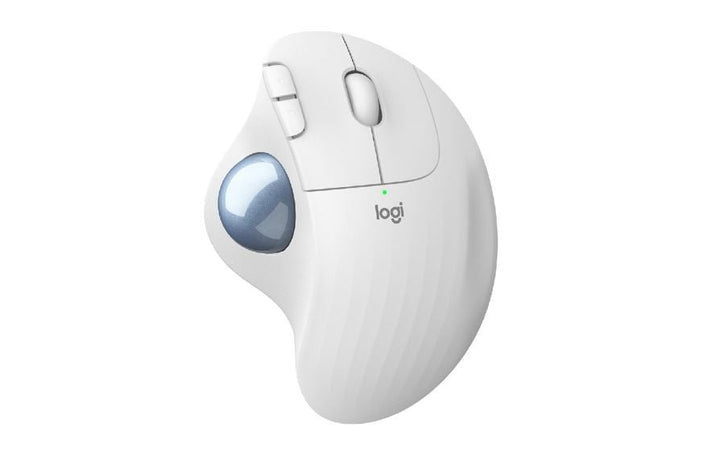

Logitech Ergo M575 Wireless Trackball Mouse For Business Off-White
Currently out of stock. Request a quote and
our team will confirm the latest price, availability and lead time.
PRODUCT DESCRIPTION
Logitech ERGO M575 for Business Wireless Trackball (Off-White) — 910-006439 - 2 Years Local Warranty
Ergonomic Thumb-Operated Trackball — Move Less, Work More
The Logitech ERGO M575 is a sculpted, right-handed trackball that shifts cursor movement into your thumb, letting your hand and wrist stay still all day. The 20° tilt and full-palm support keep the wrist in a relaxed neutral posture — ideal for Singapore office desks, hot-desks and compact home-office setups where mouse-swing space is limited.
Precision Optical Tracking with a Configurable 380–2000 DPI Range
An advanced optical sensor reads the trackball with smooth, low-friction bearings for consistent tracking across CAD, design, spreadsheet and everyday productivity work. DPI is adjustable through Logi Options+ so you can trade precision for speed to suit multi-monitor or 4K displays.
Dual Wireless — Logi Bolt USB Receiver and Bluetooth
Pair the included Logi Bolt receiver to a PC and Bluetooth to a laptop or iPad, then switch instantly. Logi Bolt uses secure, low-latency 2.4 GHz enterprise-grade wireless — recommended for corporate deployments where security matters.
Up to 24 Months on a Single AA Battery
One user-replaceable AA cell delivers up to 24 months of daily use over Logi Bolt (or 20 months via Bluetooth), so trackball maintenance is measured in years, not weeks. A low-battery indicator warns you before power drops.
Built for IT — Logi Bolt Security & Fleet Management
The for Business variant ships with a Logi Bolt receiver enforcing Security Mode 1 / Level 4 (AES-128), pairs up to 6 Logi Bolt peripherals per receiver, and is manageable through Logi Options+ policies — a clean fit for enterprise standard operating environments.
Logitech ERGO M575 Datasheet — Technical Specifications
General
| Product Type | Wireless trackball mouse (thumb-operated) |
| Form Factor | Right-handed ergonomic sculpted shape |
| Dimensions (H x W x D) | 134 mm x 100 mm x 48 mm |
| Weight | 145 g (with 1x AA battery) |
| Tracking Technology | Advanced optical tracking with smooth-glide bearings |
| DPI Range | Nominal 380 – 2000 DPI (adjustable via Logi Options / Options+) |
| Buttons | 5 buttons total — Left / Right click, Back, Forward, Scroll wheel with middle click |
| Programmable Buttons | 3 customisable buttons (via Logi Options / Options+) |
| Scroll Wheel | Precision mechanical encoder |
| Warranty | 2 Years Local Warranty (Singapore) |
| Part Number | 910-006439 |
| Colour | Off-White |
Connectivity
| Wireless Connectivity | Logi Bolt USB receiver and Bluetooth Low Energy (dual) |
| Wireless Range | Up to 10 metres |
| Receiver Included | Yes — Logi Bolt USB-A receiver |
| Encryption | Logi Bolt Security Mode 1, Level 4 (AES-128, FIPS-compliant transport) |
Battery
| Battery Type | 1 x AA (included, user replaceable) |
| Battery Life via Logi Bolt | Up to 24 months* |
| Battery Life via Bluetooth | Up to 20 months* |
| Low-Battery Indicator | Yes |
| *Note | Battery life varies with usage and computing conditions. |
Sustainability & Durability
| Certified Post-Consumer Recycled Plastic | 50% (Graphite) / 21% (Off-White) |
| Packaging | FSC-certified paper |
| Service Life | 10 million clicks tested |
| MTTF | > 150,000 hours |
Compatibility & Software Support
The ERGO M575 works out of the box on all modern operating systems via Logi Bolt or Bluetooth. Advanced features (button remapping, DPI adjustment, Logi Flow multi-computer control) require Logi Options+ on Windows or macOS.
| Windows (Logi Bolt) | Windows 10 or later |
| macOS (Logi Bolt) | macOS 10.14 or later |
| Windows (Bluetooth) | Windows 10 or later |
| macOS (Bluetooth) | macOS 10.15 or later |
| iPadOS (Bluetooth) | iPadOS 13.4 or later |
| Linux | Basic mouse function without drivers |
| Chrome OS | Basic mouse function without drivers |
| Software | Logi Options+ (Windows / macOS) for button remapping, DPI tuning, Flow (Flow supports 3 buttons on ERGO M575) |
Package Contents & ERGO M575 Family Ordering Information
In the box: Logitech ERGO M575 Trackball, Logi Bolt USB-A receiver, 1 x AA battery (pre-installed), user documentation, 2-year local warranty card.
ERGO M575 / M575S Ordering Information (SourceIT Singapore)
| Model / Colour | Part Number |
| Ergo M575 for Business — Graphite | 910-006222 |
| Ergo M575 for Business — Off-White (this listing) | 910-006439 |
| Ergo M575S — Consumer (Graphite) | 910-007031 |
Datasheet & Downloads
Frequently Asked Questions — Logitech ERGO M575
Q: What is the difference between the ERGO M575, ERGO M575 for Business and ERGO M575S?
A: The trackball hardware — sensor, shape, buttons, wireless range and battery life — is identical across all three. The for Business SKUs (910-006222 / 910-006439) ship in enterprise packaging with a Logi Bolt receiver and are Logi Options+ device-management compatible. The M575S (910-007031) is the current-generation consumer SKU that also ships with a Logi Bolt receiver.
Q: Is the ERGO M575 right-handed only?
A: Yes. The M575 is a sculpted right-handed trackball. Left-handed users looking for a Logitech trackball should consider the MX Ergo S (ambidextrous stand).
Q: Do I need to install any software?
A: No — it works as a plug-and-play mouse over Logi Bolt or Bluetooth. Install Logi Options+ on Windows or macOS to remap buttons, adjust DPI, and use Logi Flow across two computers.
Q: Can I connect the ERGO M575 to an iPad?
A: Yes, over Bluetooth. iPadOS 13.4 or later is required. The Logi Bolt receiver is not supported on iPad.
Q: How does the ERGO M575 compare to the Logitech MX Ergo S?
A: The MX Ergo S is Logitech's premium trackball — rechargeable Li-Po battery, 20° adjustable tilt plate, Precision Mode button, and Logi Flow across three computers. The ERGO M575 is a lighter-duty AA-powered trackball at a lower price point with the same fixed 20° tilt. For extended daily use, consider the MX Ergo S.
Q: What accessories or spares are available?
A: The M575 uses a standard 1x AA battery — no proprietary spares. Replacement Logi Bolt receivers are available from Logitech support if lost.
Q: Does SourceIT provide local Singapore warranty and a GST invoice?
A: Yes. Every ERGO M575 sold by SourceIT comes with 2 years local Singapore warranty and a GST invoice.
We Also Recommend


Logitech MX Master 4 For Business Graphite


Logitech M240 Wireless Mouse For Business Graphite


Logitech Signature M650 M Size Wireless Mouse for Business Off-White


Logitech Lift Vertical Ergonomic Mouse Rose